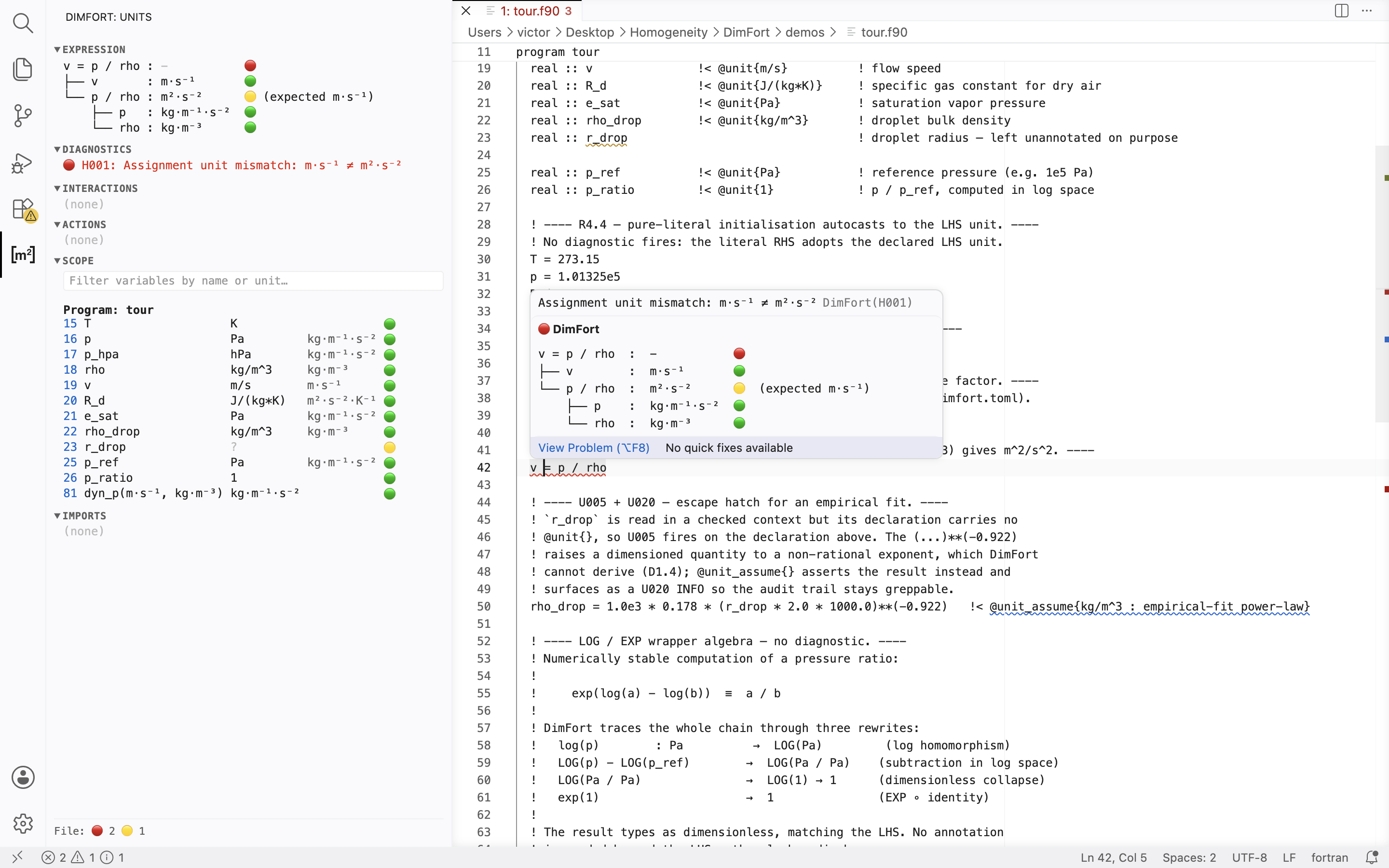
VSCode client for DimFort —
the dimensional-homogeneity checker for Fortran. Thin Language Server
Protocol client: spawns dimfort lsp and forwards your Fortran
sources to it; the server publishes diagnostics back, and VSCode
renders them as squiggles and entries in the Problems panel.
Want a hands-on look first? See the DimFort tour —
a short, self-contained Fortran file that exercises the most common
diagnostics, with a line-by-line walkthrough.
Install
1. Install DimFort itself
The extension needs the dimfort binary on PATH. Install with
pipx (recommended on Homebrew Python /
modern Linux distros where PEP 668 blocks pip install):
pipx install 'dimfort[lsp]'
dimfort --version
2. Install the extension
VSCode — from the Extensions panel, search "DimFort" and click
Install. Or from the command palette (Cmd/Ctrl+P):
ext install arrialvictor.dimfort-vscode
VSCodium / Cursor / Theia / code-server — from the Open VSX
gallery. Most of these clients have Open VSX as the default gallery;
search "DimFort" in the Extensions panel:
ext install dimfort.dimfort-vscode
From .vsix (any client) — for offline / air-gapped installs or
when a marketplace isn't reachable:
Open any .f90 file — DimFort lights up. Settings → search
dimfort to see toggle commands.
Features beyond plain diagnostics
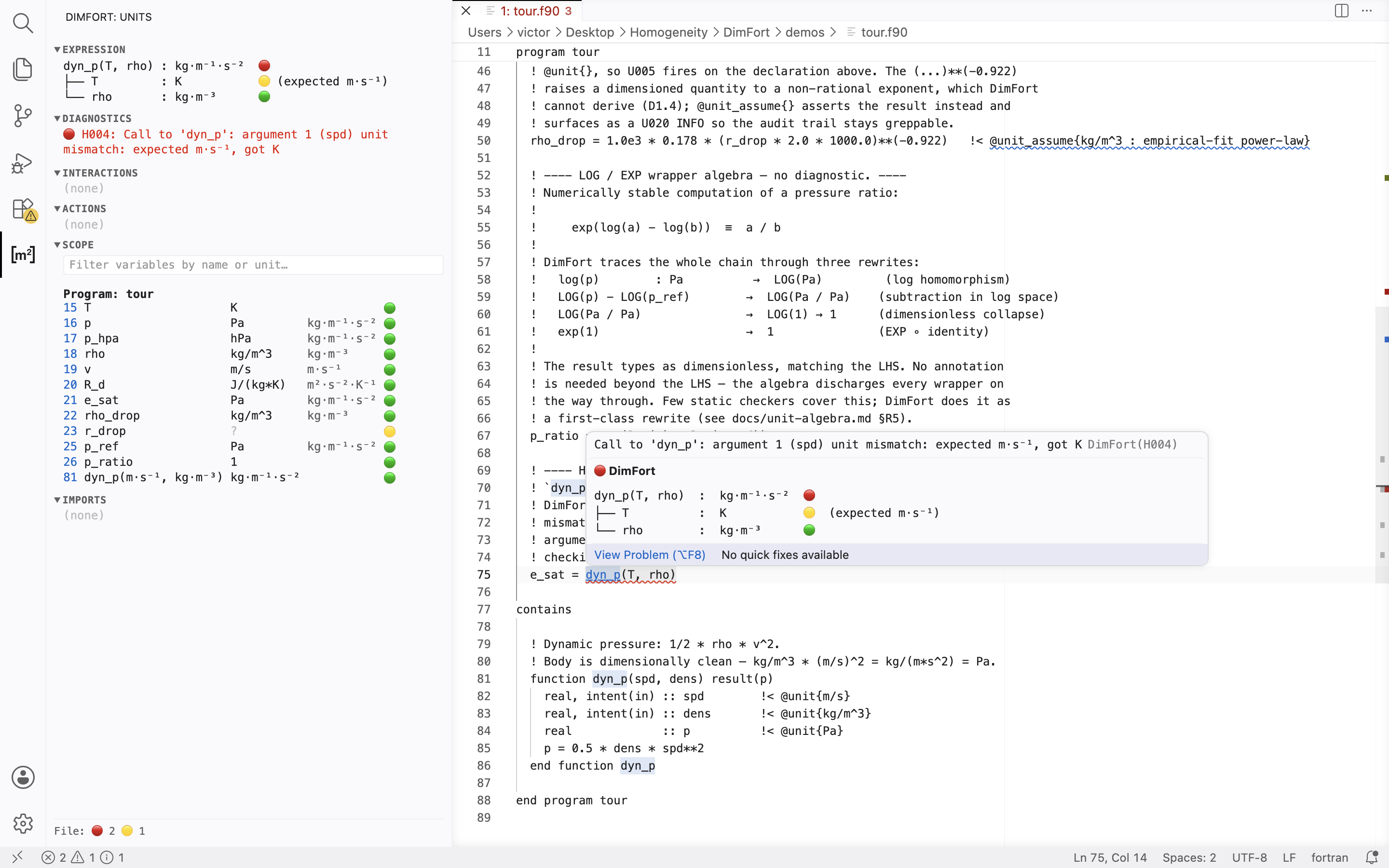
Hover — one setting, DimFort: Hover (dimfort.hover),
picks the level of detail and applies to every hover surface:
disabled (no hover — the side panel is the unit surface),
short, or detailed.
On a call (function or subroutine) — same tree layout as the
side panel: root row name(args) : ret with the overall verdict
marker, and one child row per actual argument labelled by the
source expression, with (expected <formal>) on a mismatch.
Subroutines have no return unit so the root reads name(args) : ?
and paints 🟡. Detailed adds a sub-tree under any computed
actual showing how its unit was derived.
On an expression — Short is a one-line homogeneity check on
assignments and relational expressions, a bare name : unit
hover on identifiers, and the resolved unit on computed
sub-expressions. Detailed is the full unit-algebra tree (every
node tagged with its resolved unit and a per-row 🟢/🟡/🔴 marker
that pinpoints where a violation fires or a leaf is unannotated).
The header marker aggregates the worst row: 🔴 mismatch, 🟡 partial,
🟢 clean. Cycle the level with DimFort: Cycle Hover Verbosity;
the side panel is unaffected (always detailed). The full layout
spec lives in DimFort's hover-ui.md.
Extract literal to a named PARAMETER quick-fix on H010
D1.5 warnings (the 1. + speed regularisation pattern). Press
Cmd+. on the yellow squiggle, type a name in the input box,
and the refactor inserts a typed PARAMETER declaration and
rewrites the literal use site.
Add @unit{} quick-fix on undeclared symbols.
Inlay hints show ghost-text units inline next to each
variable reference (toggle with DimFort: Toggle Inlay Hints).
Go-to-definition on variables and procedure calls.
Completion inside @unit{} annotations, sourced from the
active unit table.
Coverage visualisation — per-line status in one of two visual
encodings (mutually exclusive). Off by default; toggle with
DimFort: Cycle Coverage Visualisation (Disabled → Gutter →
Background):
Gutter — one dot per line in the left margin, in four
tiers: green (verified), yellow (needs attention), red (hard
fire), blue (unparsed). Lines with no unit semantics (control
flow, blank lines, string assignments) carry no dot.
Background — low-alpha background tint behind each in-scope
line, in the same four tiers. Heavier visual weight; reads at
a glance without scanning the gutter column.
Configuration
Settings (under DimFort in the Settings UI):
dimfort.executable — path to the dimfort binary. Default is
just dimfort (must be on $PATH). Override if the binary lives
in a virtualenv: /path/to/.venv/bin/dimfort.
dimfort.trace.server — set to verbose to see every LSP message
in Output → DimFort. Useful for debugging.
dimfort.inlayHints.enabled, dimfort.completion.enabled,
dimfort.codeActions.enabled, dimfort.gotoDefinition.enabled —
per-feature toggles. The palette also exposes them as
DimFort: Toggle … commands.
dimfort.hover — hover verbosity: disabled / short / detailed
(default short). Cycle with DimFort: Cycle Hover Verbosity. The
side panel is unaffected — it is always detailed. The server reloads
automatically when any dimfort.* setting changes.
dimfort.maxWorksetSize — cap on the number of files in a single
check pipeline (default 40). Restart the language server after
changing.
dimfort.externalModules — extra module names treated as
external (no U007 diagnostic when they're missing from the
workspace). Extends the built-in allowlist.
dimfort.cache.mode — content-hash cache for the workspace
check: read-write (default), read-only, or off. With
read-write, warm re-runs replay cached diagnostics for files
whose source, includes, and dependencies haven't changed
(a benchmark workspace measured ~33 s cold → ~20 s warm). Palette command
DimFort: Cycle Content-Hash Cache (Off / Read-only / Read-write)
cycles all three modes. Invalidation triggers and the design are
documented in
DimFort/docs/usage.md#content-hash-cache.
dimfort.cache.dir — optional override for the cache
directory. Empty (default) means .dimfort-cache/ under the
first workspace folder.
dimfort.scale.mode — opt-in scale/magnitude checking (S001
multiplicative, S002 affine-offset): auto (default — defer to
the project dimfort.toml[scale] enabled), on, or off.
on/off override the toml for the editor session. Cycle with
DimFort: Cycle Scale Checking.
dimfort.panel.enabled — reveal the side panel on activation
(default true — set this false to keep it closed and open it
yourself from the DimFort activity-bar icon).
dimfort.panel.debounceMs tunes its cursor-follow refresh.
Default stance: the side panel is on and hover defaults to
short — both cursor-following unit surfaces. Inlay hints default
off (redundant beside the panel/hover) and the cache defaults to
read-write. Adjust any of these in Settings.
Side panel
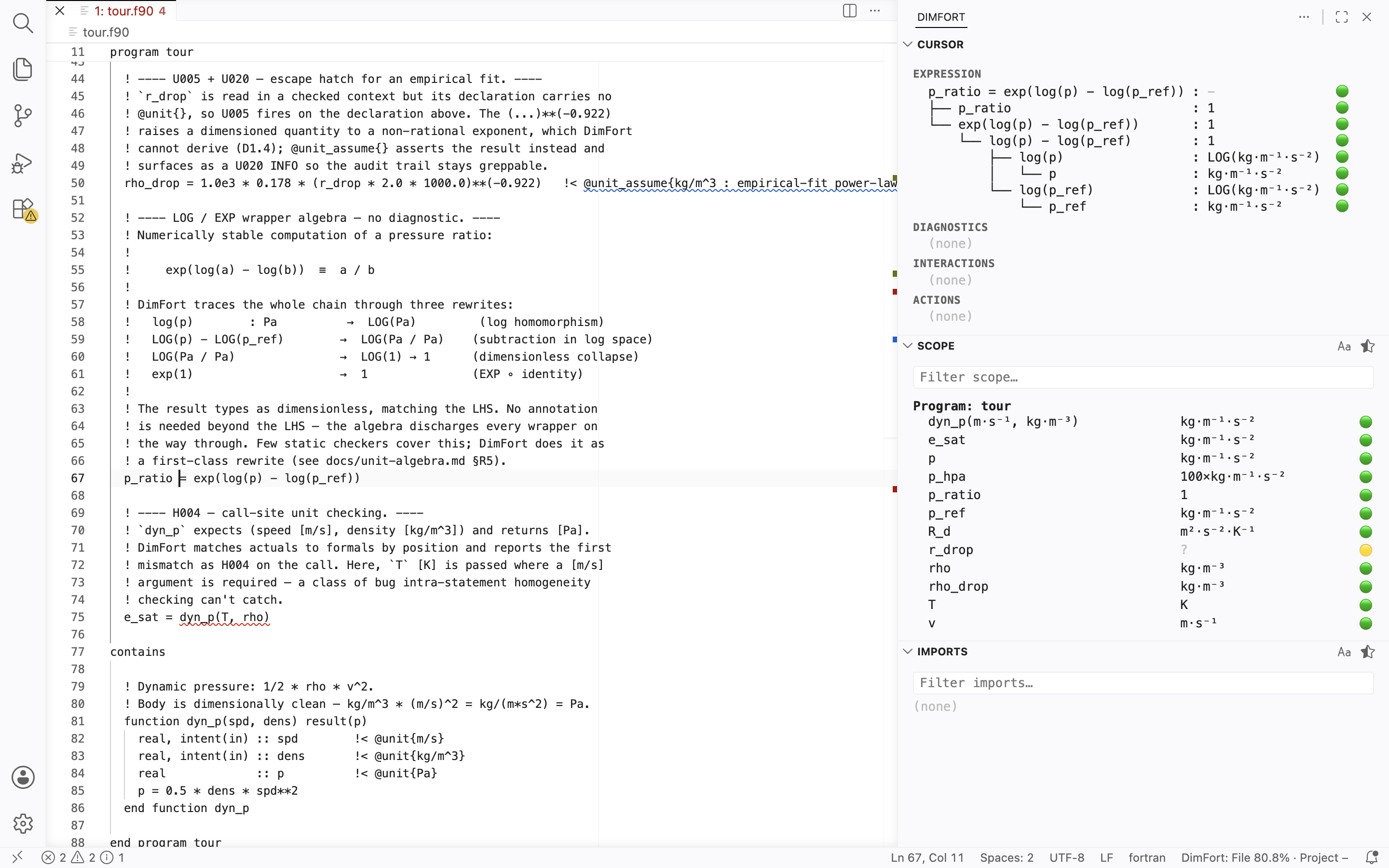
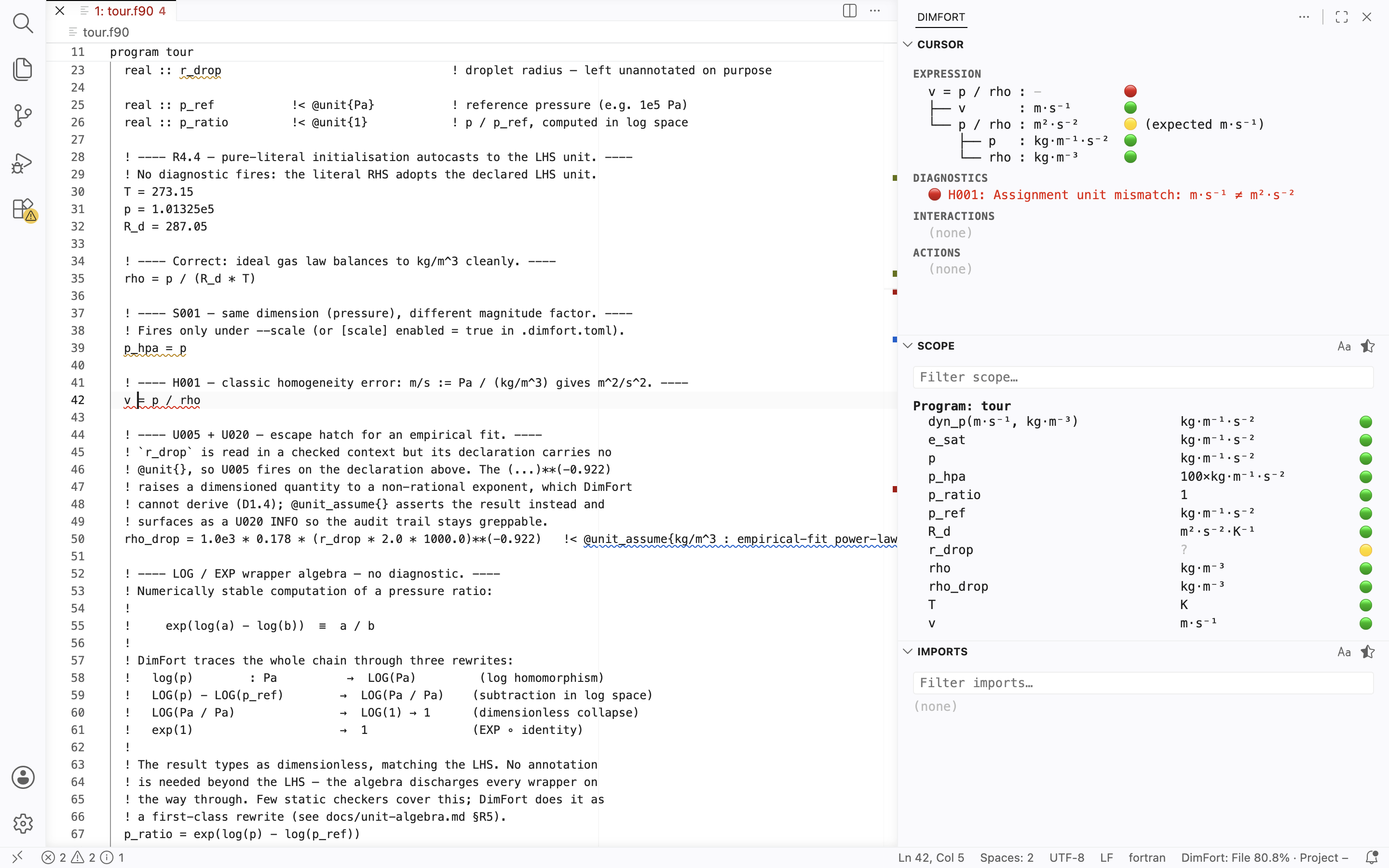
A cursor-following side panel rendering the six DimFort sections —
Expression, Diagnostics, Interactions, Actions, Scope, Imports.
The full description of what each section shows is the canonical
side-panel reference;
the controls below are the VSCode-specific bits.
Toggle: open by default. The DimFort activity-bar icon
toggles the panel; the palette command DimFort: Show Side Panel
does the same.
Settings:
dimfort.panel.enabled — set to false to keep the panel
closed on attach.
Filters: the Scope and Imports sections each carry an inline
filter box (name / unit / module).
Restoring panel layout: each view (Cursor / Scope / Imports) can
be independently dragged to the bottom panel or secondary sidebar,
collapsed, or hidden via right-click on its title bar. If you drag a
view out and can't get it back via right-click menus, run the
command palette View: Reset View Locations — it restores all
DimFort views (and every other extension's views) to their default
positions. The "+ Add View" affordance only re-adds hidden views,
not views moved to another location, so dragged-out views need
either a manual drag back or the reset command.
Commands
All commands are available from the Command Palette (Cmd/Ctrl+Shift+P) under the DimFort: category. Settings live under the dimfort.* namespace.
Command
Effect
DimFort: Restart Language Server
Restart the LSP server (dimfort.restartLanguageServer).
DimFort: Status
Append a timestamped snapshot of the current DimFort settings + LSP client state to the DimFort Output channel, then reveal that channel (dimfort.status).
DimFort: Open Config…
Quick-pick between the project configuration file (dimfort.toml) and the project units file (units.toml). Each opens if it exists, or creates a stub via a sub-pick (Empty file vs Reference template). Auto-wires [units].file = "units.toml" into dimfort.toml so the server picks up the new units file immediately (dimfort.openConfig).
DimFort: Check Workspace
Run the workspace-wide unit check; refreshes the status-bar Coverage: segment (dimfort.checkWorkspace).
DimFort: Toggle Inlay Hints
Toggle inlay hints; restarts the server (dimfort.toggleInlayHints).