Skip to content
| Marketplace
Sign in
Visual Studio Code>Debuggers>IndizivoNew to Visual Studio Code? Get it now.
Indizivo

Indizivo

Preview

ArmoTuSitio

|
1 install
| (0) | Free
Evidence-first development environment diagnostics. Find the cause. Fix with confidence.
Installation
Launch VS Code Quick Open (Ctrl+P), paste the following command, and press enter.
Copied to clipboard
More Info

Indizivo — full-color radar logo

Indizivo

Developer Environment Diagnostics for Visual Studio Code
Find the cause. Fix with confidence.

License: MIT Status: Preview VS Code 1.99 or newer


Understand your development environment

A project that refuses to start does not always have a code problem. An incompatible runtime, an unavailable local service, a missing environment variable or a port already in use may be enough to interrupt your work.

Indizivo brings these signals together in one Visual Studio Code control center. Run diagnostics, inspect the supporting evidence and decide what to investigate next — without switching between unrelated utilities.

Indizivo prioritizes observed facts over guesses. When it cannot establish a cause, it says so. It does not silently change your files or terminate processes.

Screenshots

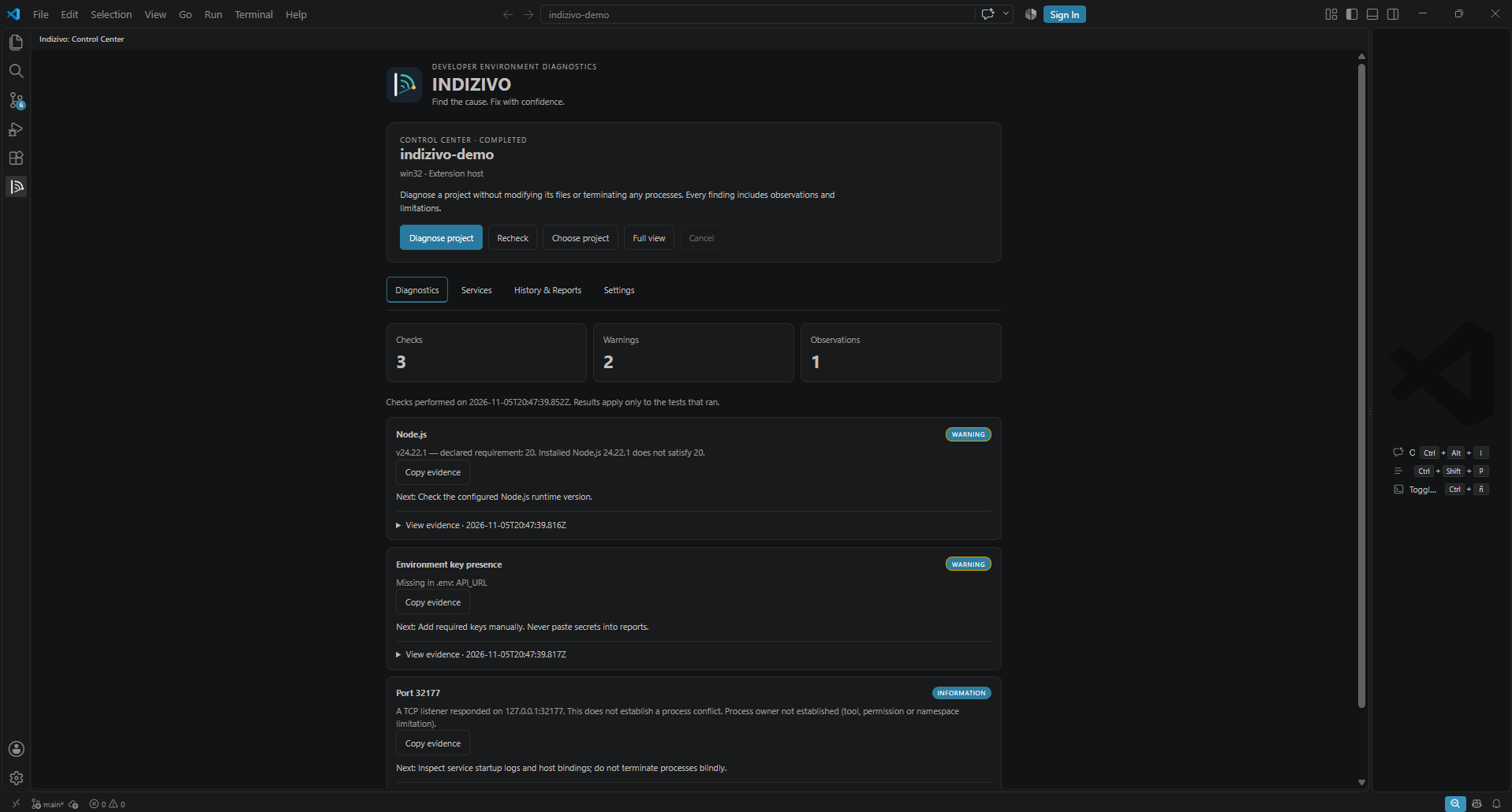
Diagnostics — findings and supporting evidence

Indizivo Diagnostics: completed project scan with Node.js warning, missing environment key and port observation

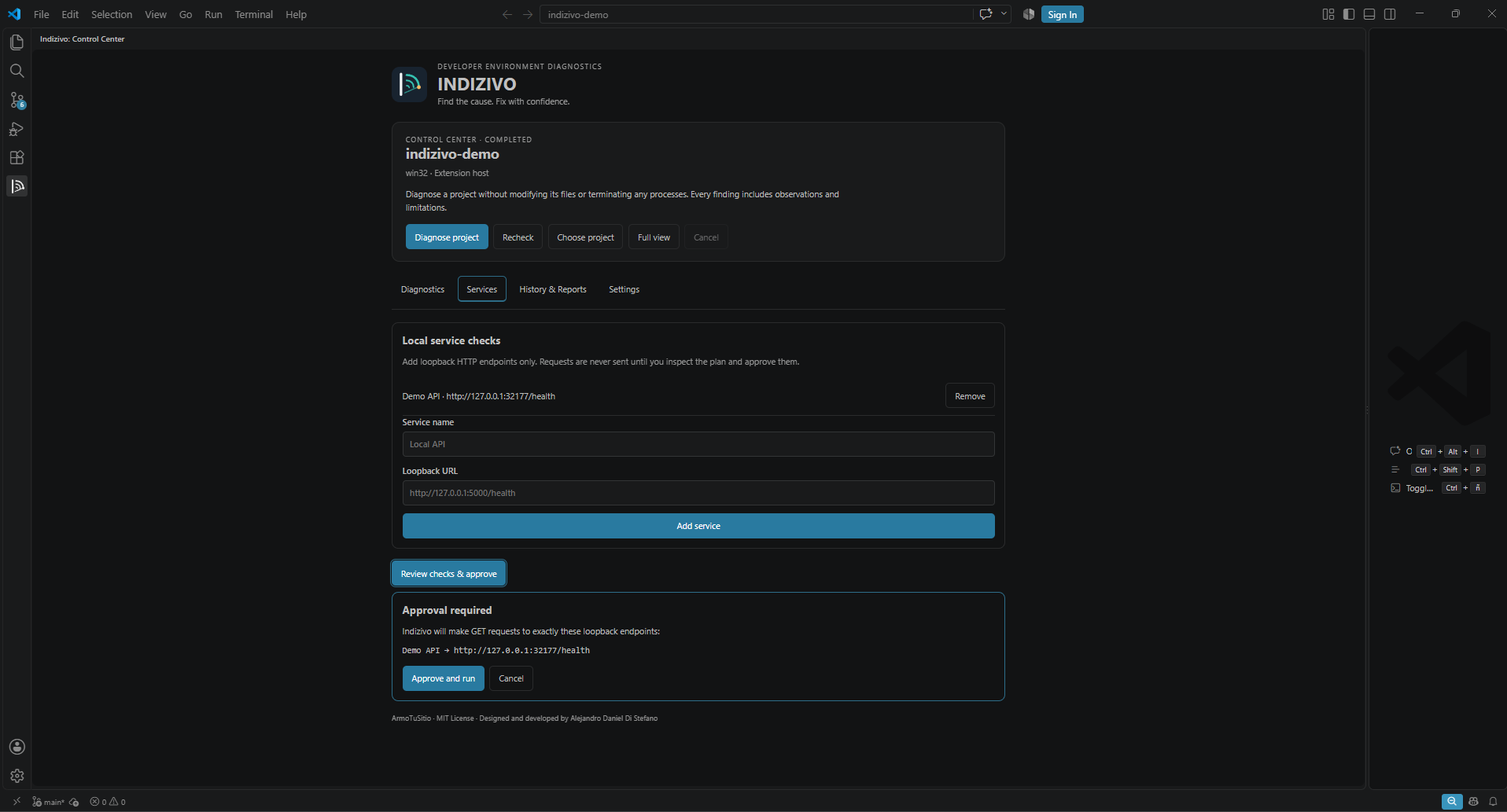
Services — review and approve local checks

Indizivo Services: localhost endpoint configuration and explicit approval plan

Features

Capability What Indizivo does
Project diagnostics Detects Node.js and Go projects and checks their locally available runtimes.
Runtime compatibility Evaluates common Node.js requirements and Go module minimums, reporting unsupported version expressions as inconclusive.
Port investigation Checks declared local TCP ports and attempts read-only process identification where operating-system tools permit.
Environment configuration Compares variable names only between .env.example and .env without retaining secret values.
Local service health Tests user-configured localhost HTTP endpoints only after explicit approval.
Evidence-backed findings Shows observations, timestamps, limitations and suggested next steps.
Recheck and compare Compares check results across completed sessions without claiming that changed observations prove a fix.
Reports and history Exports Markdown or JSON, copies evidence and manages locally stored session history.

One interface, full control

The Indizivo Control Center lives in the VS Code Activity Bar. Its four sections cover the supported workflow:

  • Diagnostics: choose a project, run or cancel checks, inspect findings and copy evidence.
  • Services: add or remove localhost HTTP targets, review the exact plan and approve probes.
  • History & Reports: compare completed checks, export reports or delete local history.
  • Settings: configure diagnostic timeouts through the UI.

No terminal is required for normal usage after installation.

Getting started

Version 0.1.0 is a preview. Supported scenarios have been tested on Windows; other desktop hosts are not yet fully qualified.

Requirements: desktop Visual Studio Code 1.99 or newer, a trusted local workspace and the relevant tools installed for each supported diagnostic. No account, AI key, container or hosted service is required.

  1. Open your project folder in Visual Studio Code.
  2. Open Indizivo from the Activity Bar.
  3. Select Diagnose project.
  4. Inspect the observations, their evidence and suggested next steps.
  5. Optionally configure a localhost endpoint in Services, review the plan and approve the request.
  6. Rerun diagnostics or export a report after investigating an issue.

Multi-root workspaces allow you to choose the project to inspect. Remote development environments have not yet been fully qualified.

Install the preview VSIX

In VS Code, choose Extensions → … → Install from VSIX…, then select indizivo-0.1.0.vsix provided by the publisher. Verify the package origin before installing.

Maintainers with authorized repository access can reproduce the release candidate with:

npm ci
npm run release:check

The automated Windows checks include a fresh, isolated installation of the packaged VSIX. Final user-facing checks remain part of the release sign-off.

Privacy and security

  • Local-first: no account, mandatory AI provider, cloud backend or telemetry.
  • Read-only by default: checks do not edit source code, install packages or terminate processes.
  • Explicit consent: localhost HTTP requests require approval of their exact targets.
  • Secrets stay private: environment variable names can be checked, but .env values are not retained in findings.
  • Bounded operations: supported reads and probes enforce limits, timeouts and cancellation.
  • Transparent outcomes: a listening port does not prove a conflict, and a passing check is not a complete project-health guarantee.

Indizivo is not an operating-system sandbox. Runtime and process checks execute with the permissions of the VS Code extension host.

The detailed PRIVACY.md and SECURITY.md policies are included inside the installed VSIX; no access to the private source repository is required.

Current scope

The first preview focuses on local Node.js and Go development environments. The interface is available in English and Spanish, selectable in Settings. Automatic remediation, remote network scanning, Docker-specific diagnostics and comprehensive WSL, SSH or container support are not part of this release.

Future capabilities are described in the ROADMAP.md file bundled with the extension.

Development

npm install
npm run check
npm test
npm run test:e2e
npm run package

The E2E suite launches an official VS Code Extension Host. It requires a graphical desktop environment. For reproducible issues, please include the extension version, operating system, relevant status and steps to reproduce.

Feedback and support

Found an incorrect diagnosis, an incomplete check or a missing development environment? Open a support request and mention Indizivo 0.1.0.

Never upload secrets, private environment values or confidential project logs.

Public support · Changelog and security/privacy policies are bundled with the extension.


Designed and developed by Alejandro Daniel Di Stefano
© 2026 ArmoTuSitio. Copyright holder.
Released under the MIT License (included with the extension).

  • Contact us
  • Jobs
  • Privacy
  • Manage cookies
  • Terms of use
  • Trademarks
  • Your Privacy Choices
  • Consumer Health Privacy
© 2026 Microsoft