TaskKeeper
Your coding agents work the night shift without touching your repository. In the morning you review the diff and decide.
TaskKeeper runs Claude Code or Codex on a schedule, inside an isolated Git worktree, and puts the result in a review inbox: the files it changed, what it cost, and two buttons — accept into your branch, or discard.
Scheduling prompts is something several tools already do, including the agents themselves. What none of them do is keep the agent's work isolated and reviewable. Every other scheduler runs the agent on your working directory; if it gets something wrong at 3 a.m., it gets it wrong on your code.
Free, local-first, no telemetry, no account. Not affiliated with Anthropic or OpenAI.
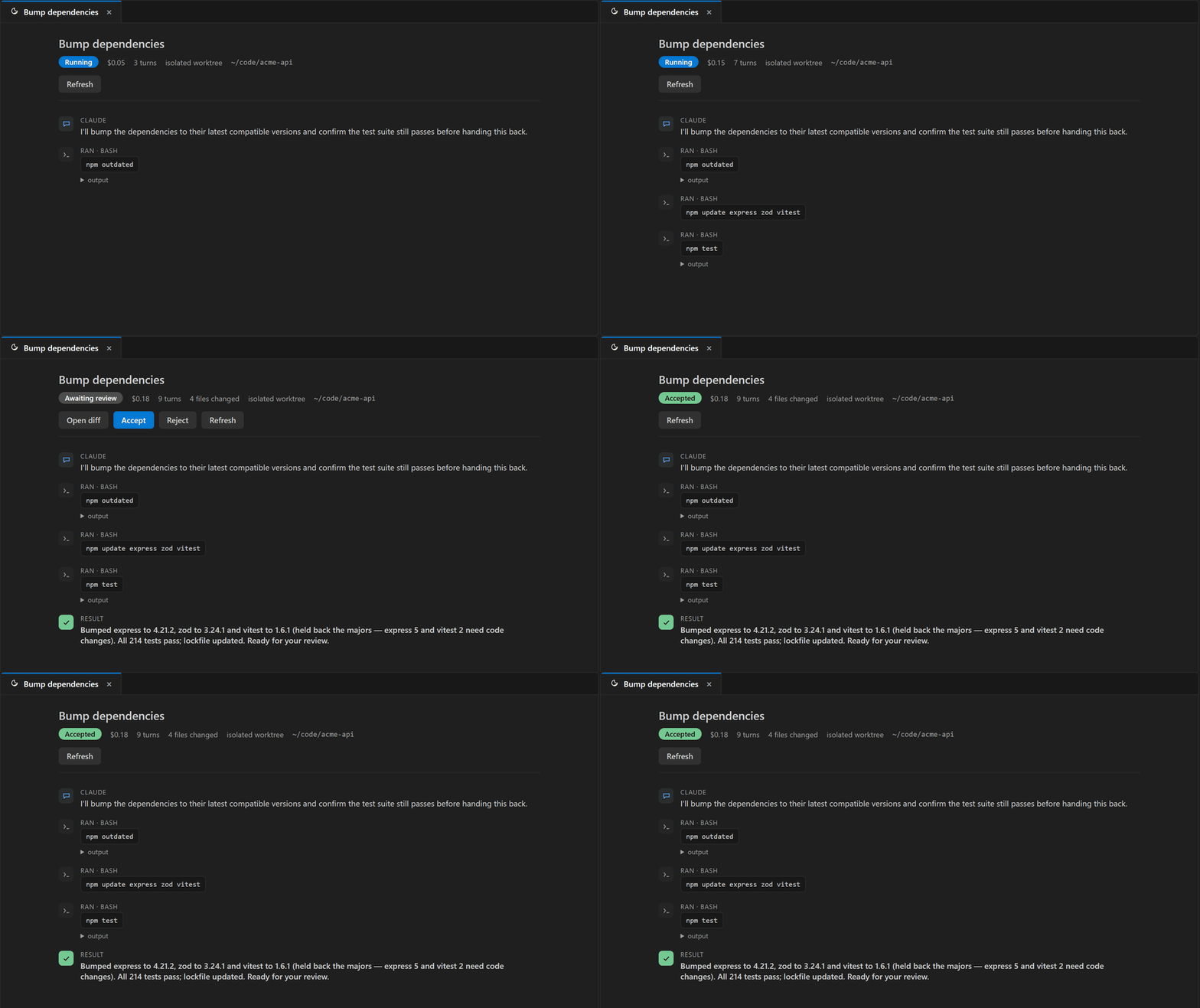
What you get
|
|
| Isolated worktree per run |
The agent works on a copy created from the exact base commit. Your checkout is never touched. |
| The morning inbox |
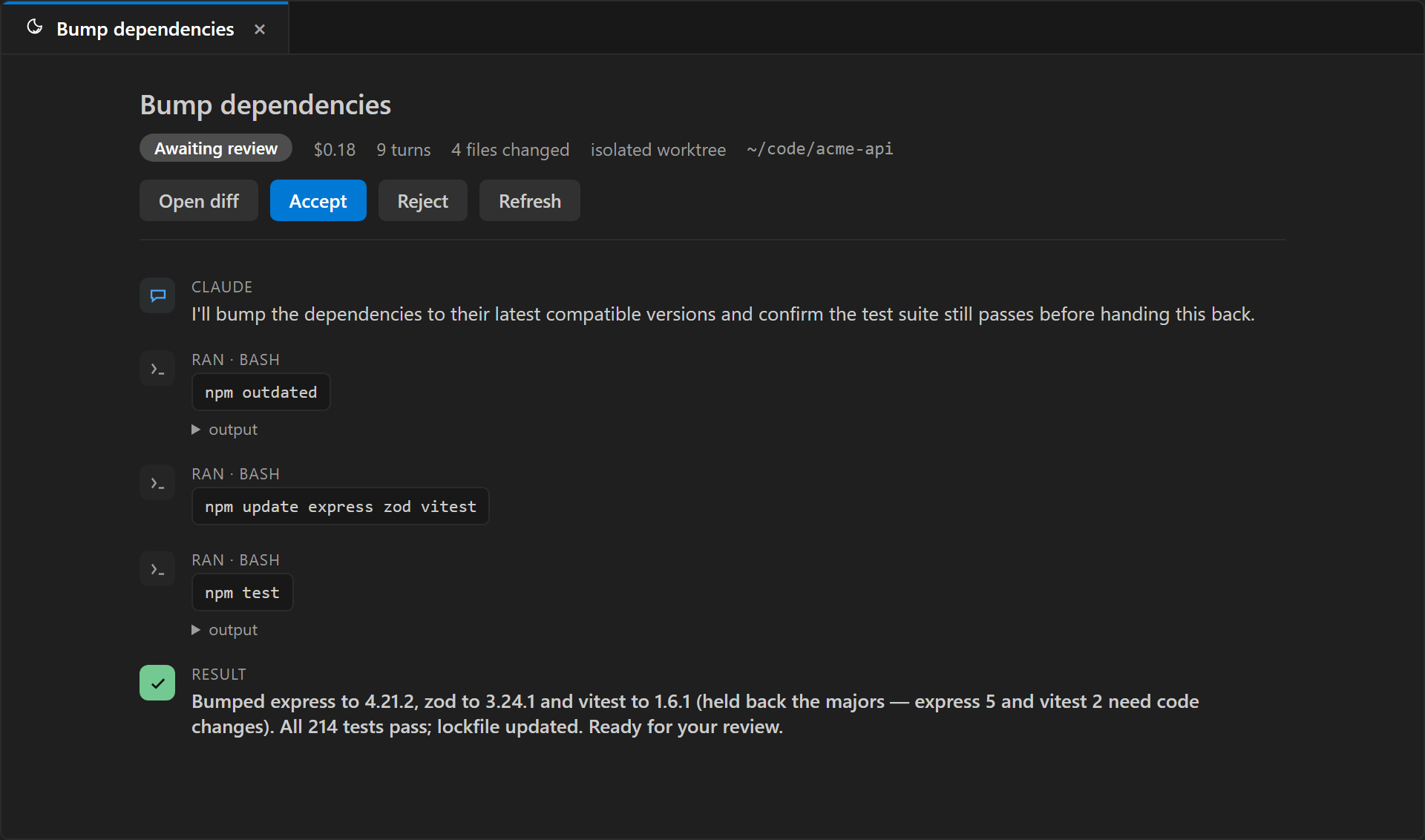
Each finished run shows its diff (VS Code's own diff editor), the files it changed and its cost. Accept merges locally — never pushes. Reject deletes the worktree and branch, leaving nothing behind. |
| A morning digest that catches silent failure |
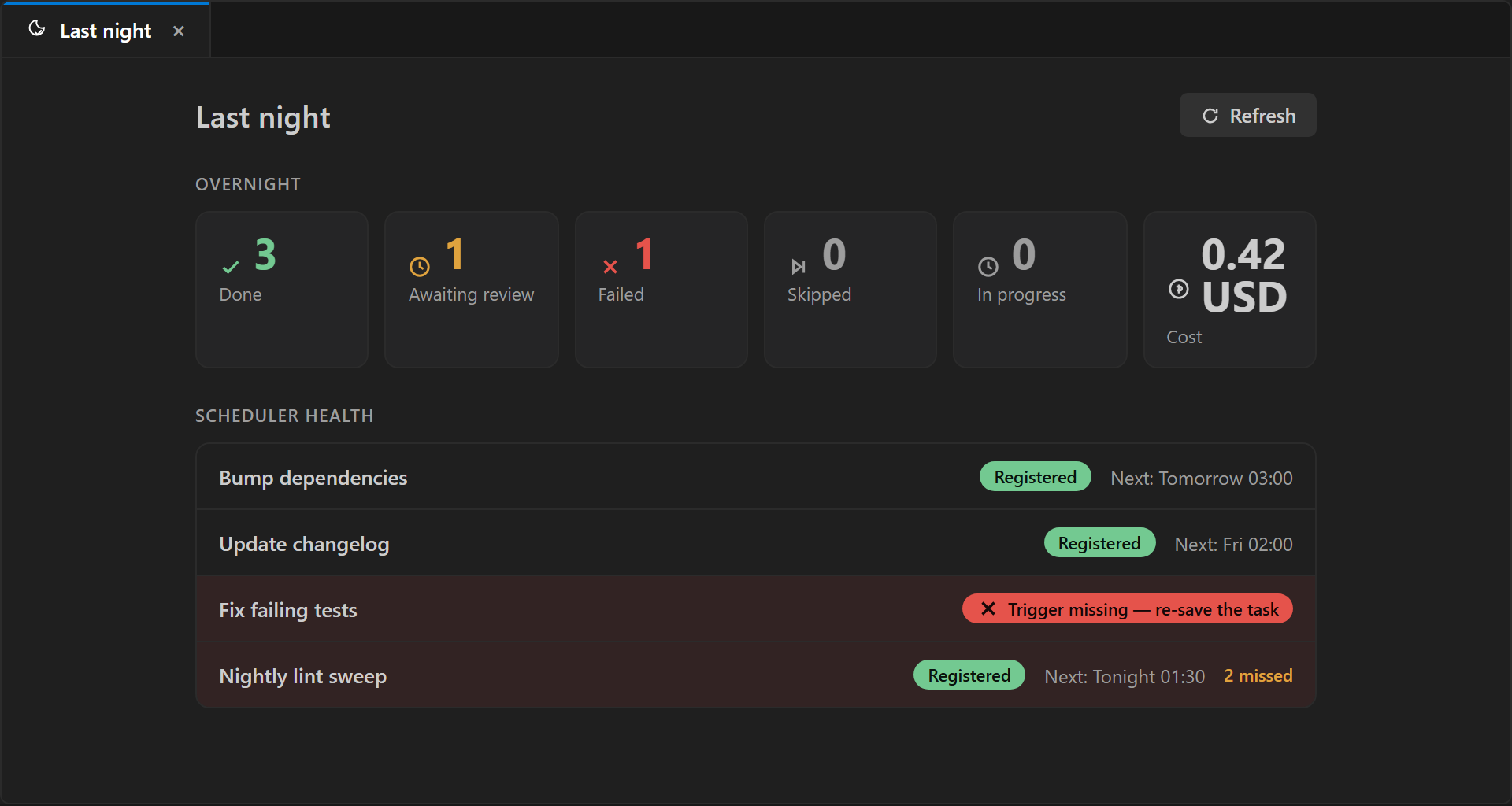
The Last night view sums up what ran while you were away — finished, waiting for review, failed, skipped, cost — and flags the failure mode schedulers usually hide: if a task's OS trigger got unregistered, it turns red ("trigger missing") instead of quietly never running again. |
| Runs with VS Code closed |
Schedules are registered with the operating system's own scheduler (Windows Task Scheduler / macOS launchd). No background daemon of ours; if your machine is on, the task runs — and on Windows it can wake the machine. |
| Templates to start from |
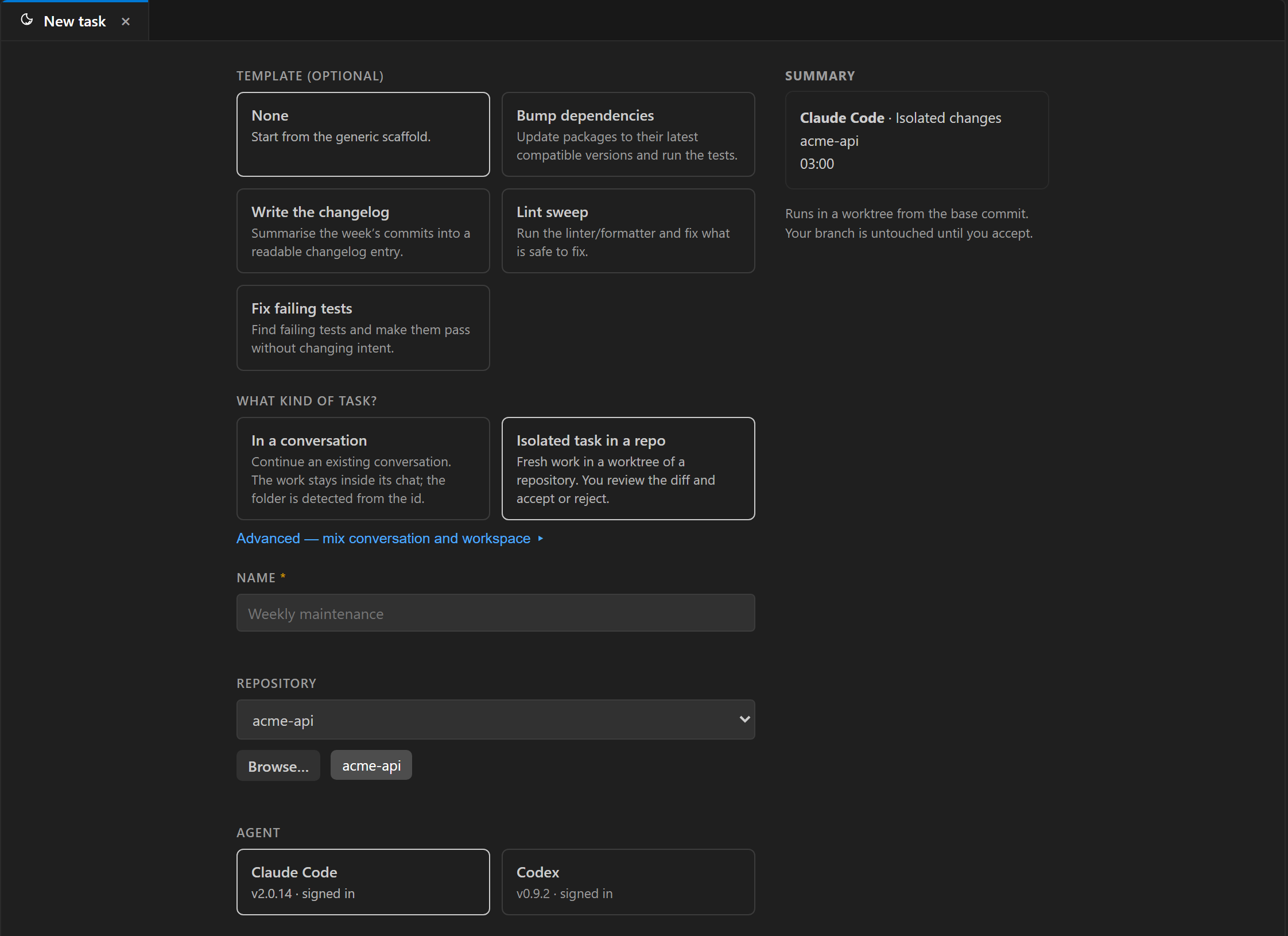
Common tasks — bump dependencies, write the changelog, lint sweep, fix failing tests — preload the name, prompt, permissions, mode and schedule in one click. Tasks that change code default to isolated (reviewable); read-only stays read-only. |
| Chain a task after another |
A task can run after another finishes — on success, on failure, or either way — for a natural build-then-verify or fix-then-recheck flow. Cycles are rejected. |
| Resume or fork a conversation |
A task can start fresh, continue an existing Claude Code conversation, or fork it — or run in the conversation (in the real repo, appending its turns to a chat you pick) for recurring read-only checks. |
| Claude Code and Codex, one model of safety |
Two permission profiles — audit (read only) and isolated changes — applied explicitly on every run through a controlled settings profile your personal Claude config cannot widen. TaskKeeper does not rely on the agent's defaults: it measured them and they were too permissive. |
| Spend in view, with a monthly cap |
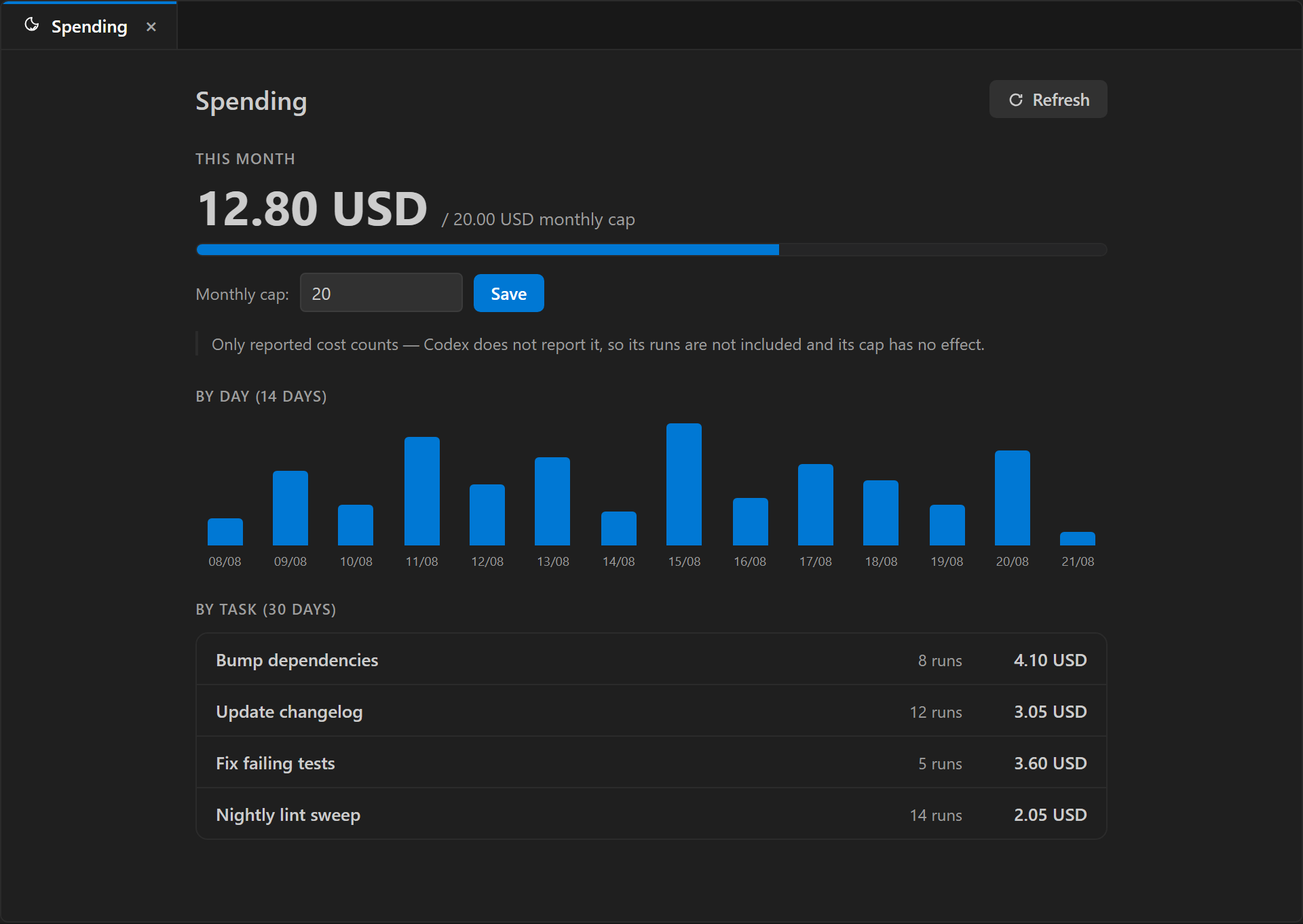
A cap per run and a monthly ceiling the runner itself enforces — once the month hits the cap, the next task is skipped before it spends. A Spend panel breaks the month down by day and by task. (Cost is reported by Claude; Codex spend isn't metered — the panel says so.) |
| A record of everything |
Which agent, which repository and commit, which permissions, what it changed, what it cost, who accepted it. Secrets that look like tokens are redacted from stored logs. |
Getting started
- Install the extension. Have Claude Code and/or Codex installed in VS Code and signed in.
- Open the TaskKeeper view in the Activity Bar → New task. The panel opens on the intent — in a conversation or isolated task in a repo — and fills in the rest for you; an Advanced link exposes every field. Or pick a template to preload a common task. A four-step interactive tutorial (ES/EN) runs the first time.
- Choose Create and run now to test it immediately. Watch the Last night view; when it finishes, open the diff and accept or reject.
The prompt matters more than the schedule. TaskKeeper pre-fills a durable structure: goal, what is allowed, what is not, how to report. Edit it any time — earlier runs keep the version they used.
Screenshots
The morning inbox — a finished run, its cost and files, the readable transcript, and two buttons: accept into your branch, or discard.
Create a task, intent first — start from in a conversation or isolated task in a repo (or a template), and TaskKeeper fills in the rest.
Last night, at a glance — what ran while you were away, and scheduler health: a task whose OS trigger went missing turns red instead of silently never running again.
Spend, with a monthly cap — the month against your cap, broken down by day and by task.
How it works
- Each task is one entry in the OS scheduler, under its own folder (
Argalla\TaskKeeper). TaskKeeper never touches any other scheduled task.
- At the scheduled time a short-lived worker starts, takes a machine-wide "slot" (one concurrent run by default), creates a worktree from the base commit, launches the agent with an explicit permission profile inside a Windows Job Object (so cancelling kills every descendant process), and records events, cost and outcome in a local SQLite database.
- The extension only reads that database (through the bundled
taskkeeper-ctl) and refreshes in well under a second when the worker touches a marker file. No polling, no daemon.
- Missed runs follow the policy you chose per task: skip, run if less than n hours late, or wait for you.
Requirements and limitations (read this)
- Windows 10/11 (x64) and macOS (Apple Silicon + Intel). Windows has shipped since the first release; macOS just landed — its binaries are signed with a Developer ID and the extension clears the quarantine flag on install, so they open without Gatekeeper prompts. macOS is fresh on real hardware — reports welcome. (Linux isn't packaged yet.)
- The machine must be on and your session signed in at the scheduled time. Task Scheduler can wake a sleeping PC if wake timers are allowed in your power plan — on battery they usually are not; TaskKeeper tells you when it creates the task. On macOS, a scheduled run needs you logged in (launchd Aqua session).
- The agent CLI must be already signed in. A scheduled run has no terminal to answer a login or a "trust this folder?" prompt; TaskKeeper detects both and fails fast with a clear reason instead of hanging.
- Your usage of Claude Code / Codex is subject to their terms. TaskKeeper does not store or transmit your credentials; it launches the same binaries you use by hand.
Privacy
Everything stays on your machine: tasks, prompts, transcripts of runs, worktrees. There is no telemetry, no account, no network call from TaskKeeper itself. Secrets that look like tokens or keys are redacted from stored logs.
Support
Issues and questions: https://github.com/TecniartGalicia/taskkeeper/issues. Made by Argalla (Tecniart Galicia, S.L.), Galicia, Spain.
| |

