Skip to content
| Marketplace
Sign in
Visual Studio Code>Linters>ArchDriftNew to Visual Studio Code? Get it now.
ArchDrift

ArchDrift

ArchDrift

|
1 install
| (0) | Free
Architectural drift monitoring for VS Code (God Class, N+1, layers)
Installation
Launch VS Code Quick Open (Ctrl+P), paste the following command, and press enter.
Copied to clipboard
More Info

ArchDrift

Architectural smoke detector for TypeScript codebases. Detects structural erosion while you're coding, not months later in refactors.

Demo

What You'll See After Installing

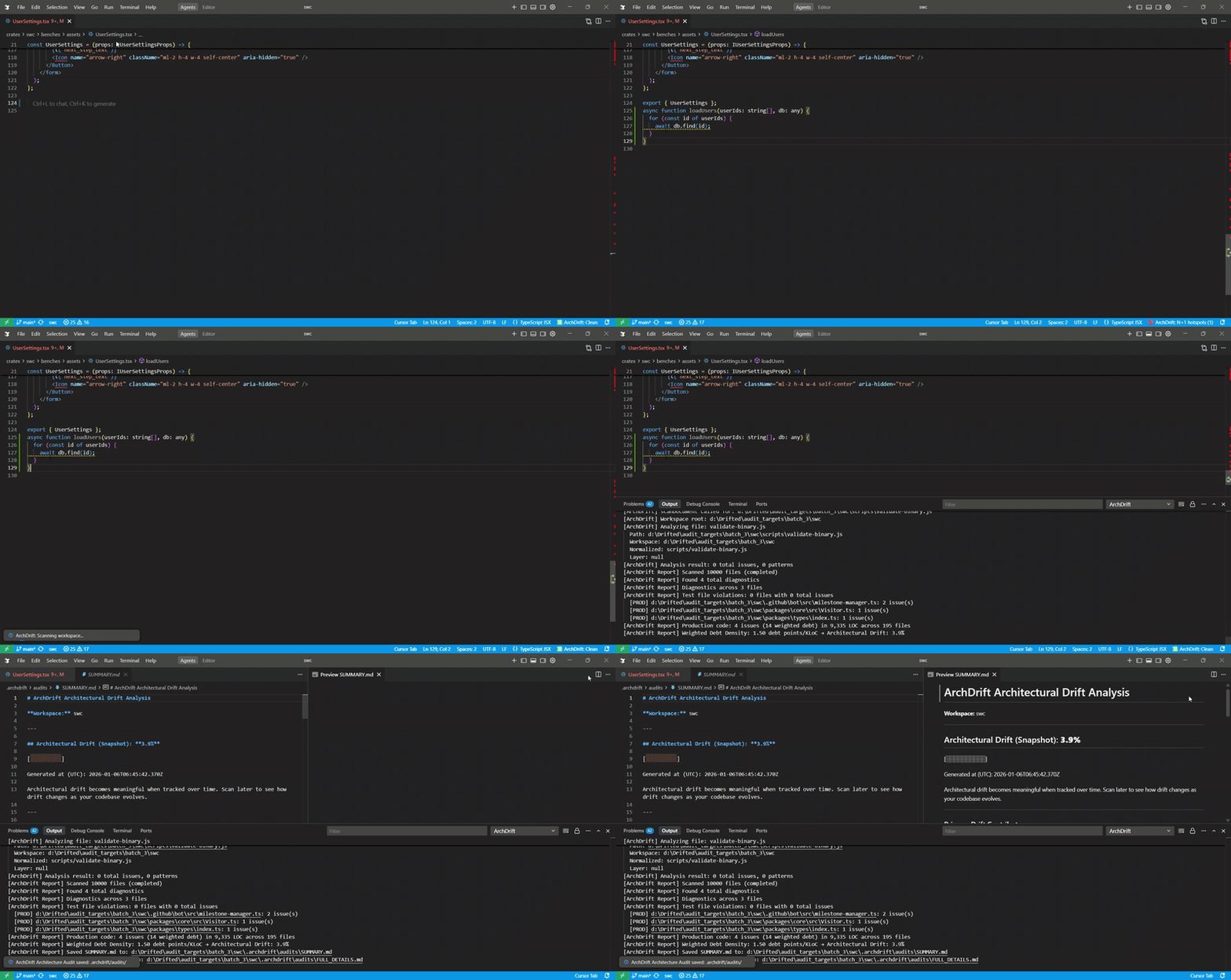
  • Open a TypeScript or JavaScript file
  • Architectural risk signals appear inline as diagnostics
  • Hover to see why a pattern is risky
  • Generate a workspace report to see:
    • Drift snapshot
    • Top offending files
    • Pattern breakdown
    • Line-by-line findings with file and location references

What It Detects

Layer Violations

Forbidden dependencies between architectural layers. Flags when domain logic imports from API layers, or infrastructure depends on domain code.

N+1 Queries

Database or API calls executed inside loops, indicating potential performance bottlenecks.

God Classes

Files exceeding 800 lines of code. Large Class: 801-1,500 lines. Monolith: 1,501+ lines (2,500+ for type definitions).

Calibration

Detection thresholds are calibrated against an audit of 43 high-velocity TypeScript repositories, including React, Prisma, Supabase, Storybook, and Angular. This ensures signals are grounded in real-world patterns rather than arbitrary rules.

Domain Awareness

ArchDrift applies domain-aware heuristics to adjust analysis sensitivity based on project characteristics:

  • Framework: Stricter layer enforcement
  • Database Tool: Higher N+1 query sensitivity
  • Utility Library: More tolerant of large files
  • Application: Balanced enforcement across all patterns

This prevents false positives in utility libraries (where large files are expected) while maintaining strict standards for frameworks.

Installation

VS Code Extension

  1. Install from VSIX file via Extensions view → "Install from VSIX..."
  2. Open any TypeScript/JavaScript workspace
  3. ArchDrift analyzes files automatically on open and save

Development

npm install
npm run compile

Press F5 in VS Code to launch Extension Development Host.

Usage

ArchDrift runs automatically. Diagnostics appear in the Problems panel with severity levels:

  • Error: Layer violations (architectural breakdown)
  • Warning: God Classes and N+1 Queries (maintainability and performance risks)

Use Command Palette → "ArchDrift: Generate Workspace Report" for a comprehensive drift analysis.

How It Works

Static analysis of import statements, loop constructs, and file structure. Production code is identified by excluding test files, build artifacts, and files ignored by .gitignore. Test files are scanned but excluded from drift calculations.

Structural Integrity Index

ArchDrift summarizes detected signals into a drift snapshot designed to be compared across scans and repositories analyzed with the same methodology.

Real-World Results

Selected examples from an audit of 43 TypeScript repositories:

  • Storybook — 0.2% drift
    Large UI system with near-zero architectural drift; risk is isolated to a small number of oversized data and story files.

  • VS Code — 5.1% drift
    Extremely large, long-lived codebase where drift is driven by accumulated complexity rather than structural violations.

  • create-t3-app — 2.6% drift
    Lean modern full-stack starter; drift signals come exclusively from data-access patterns, not architecture.

  • Cal.com — 3.5% drift
    Product-driven SaaS with drift concentrated in performance-sensitive paths due to repeated data access inside loops.

  • Prisma — 19.3% drift
    Structurally disciplined core with elevated drift from performance-heavy client generation logic.

  • Directus — 46.3% drift
    Backend platform where architectural drift is dominated by internal service coupling to API layers, indicating structural erosion rather than isolated code smells.

Most production codebases tend toward one of these profiles over time. ArchDrift shows which direction yours is moving - and whether that movement is accelerating.

License

MIT

  • Contact us
  • Jobs
  • Privacy
  • Manage cookies
  • Terms of use
  • Trademarks
© 2026 Microsoft