🕵️ Agent Snitch - See What Your AI Agents Are Really Doing
Finally understand what's happening under the hood when AI agents write your code.
Stop wondering what Claude Code or Codex are doing behind the scenes. Agent Snitch transforms cryptic CLI agent sessions into beautiful, interactive visual graphs that show you exactly what tools are being called, when, and why.
🎯 Why You Need This
The Problem
You're using powerful AI coding agents, but you have no visibility into:
- What files they're reading or modifying
- Which commands they're executing
- How they're making decisions
- When they get stuck or error out
- How they chain tool calls together
The Solution
Agent Snitch gives you real-time X-ray vision into your AI agents with:
- 📂 Explorer Integration - See sessions in your sidebar, always visible
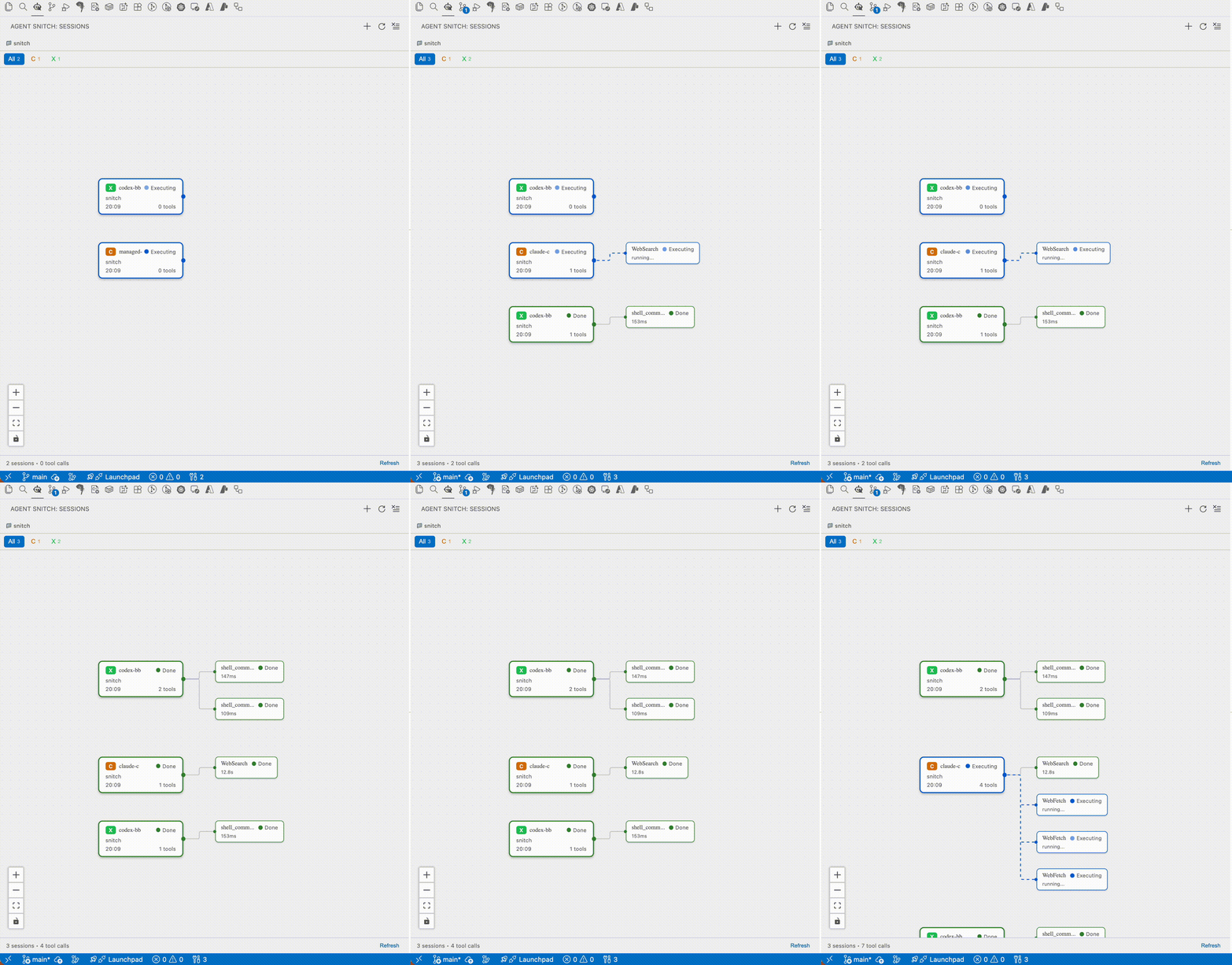
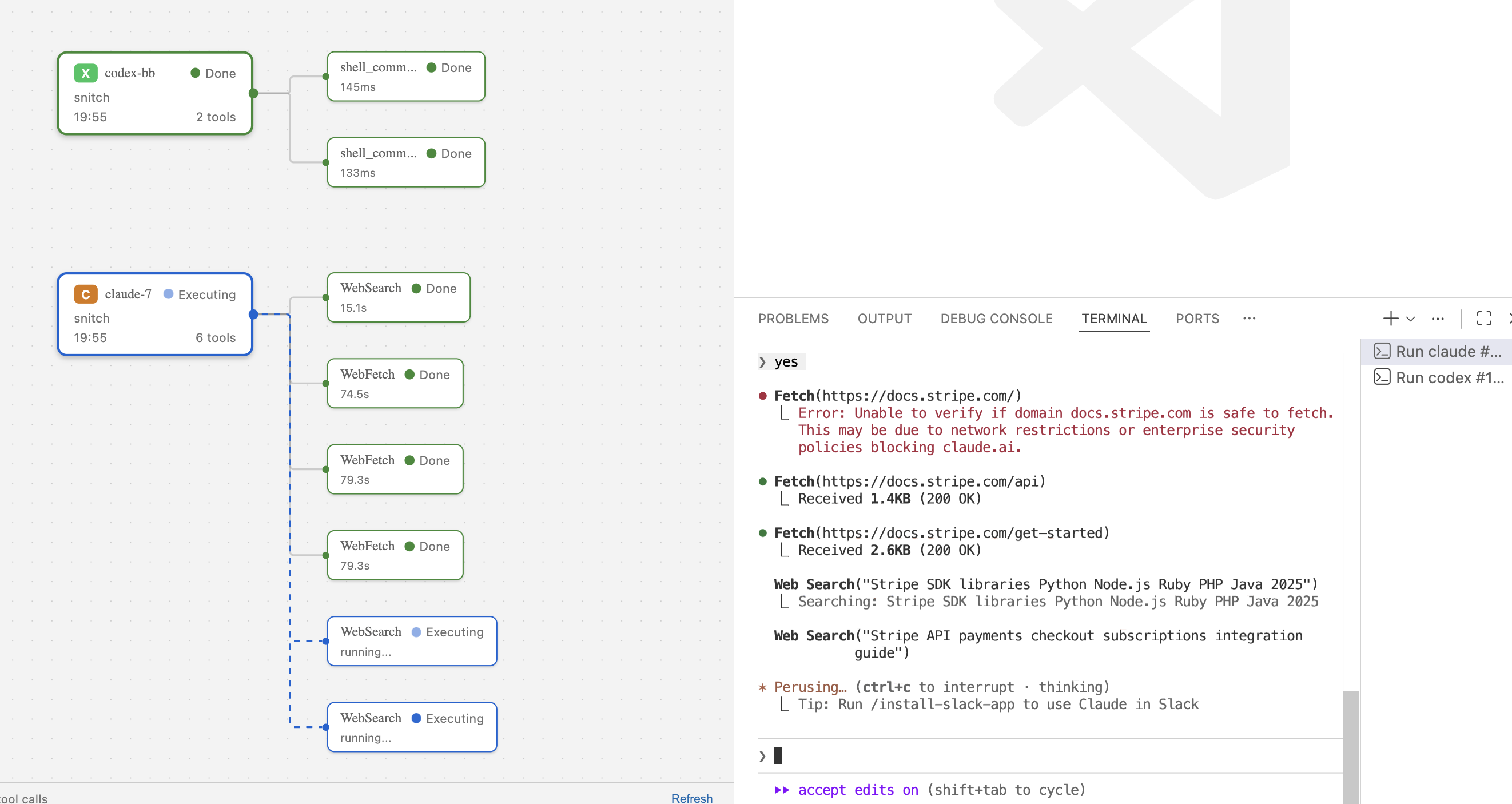
- 📊 Interactive Flow Graphs - See sessions and tool calls as connected nodes
- 🔴 Live Status Updates - Watch agents work in real-time with color-coded states
- 🎯 Multi-Agent Support - Track Claude Code and Codex in one place
- 🔍 Deep Inspection - Click any node to see full arguments, results, and errors
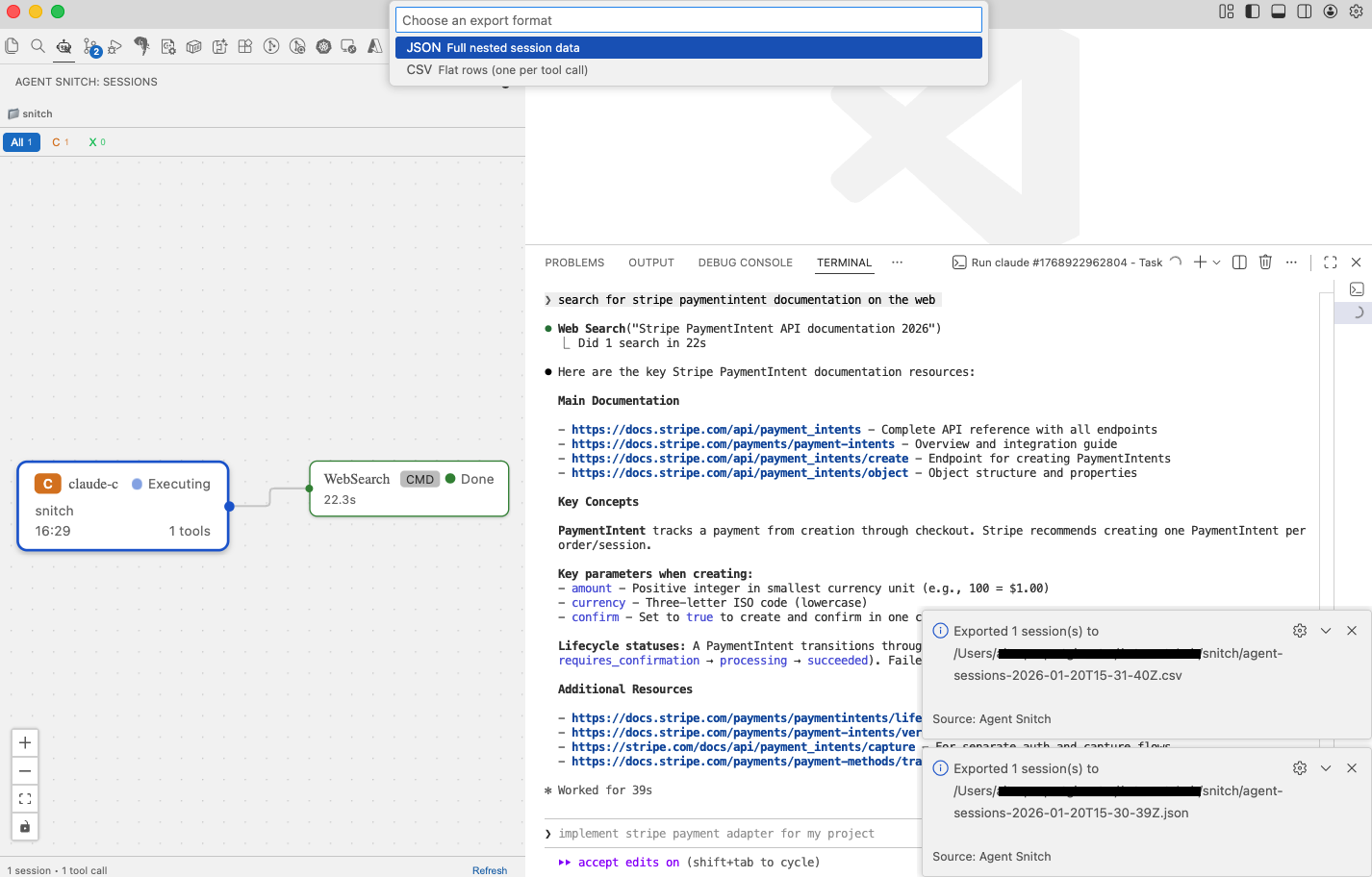
- 📤 Session Exports - Save filtered sessions as JSON or CSV for offline analysis
- 🔍 Command Inspection - See the exact commands agents execute, including cwd and timing
- ⚡ Performance Metrics - Track session duration, throughput, P50/P95 latencies, and identify slow tool calls
- 🎨 Clean Interface - Beautiful sidebar that doesn't get in your way
✨ Key Features
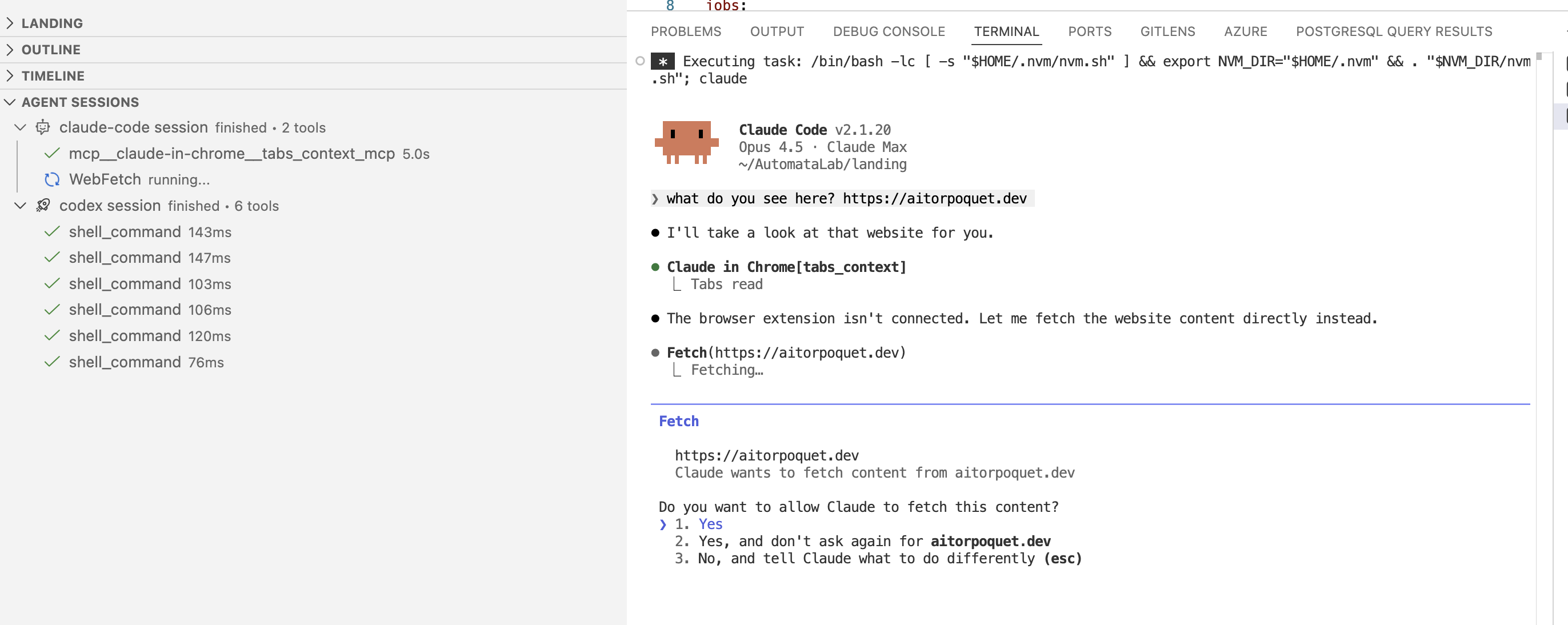
📂 Agent Sessions in Explorer
Browse sessions directly from the Explorer sidebar without opening the main panel. Each session can be expanded to reveal its tool calls, with color-coded status indicators so you can spot issues at a glance.
🚀 Launch & Track Sessions
Start new agent sessions directly from VS Code with one click. Agent Snitch tracks all sessions launched through the extension interface.
📈 Visual Session Graph
Every agent interaction becomes a node in an interactive graph:
- Session Nodes - See which agent is running, from where, and current status
- Tool Call Nodes - Every file read, command execution, or edit appears as a connected node
- Status Colors - Instantly spot executing (blue), completed (green), errors (red), or waiting states (yellow)
🎛️ Smart Filtering
Filter by agent type to focus on what matters:
- View all agents at once
- Focus on Claude Code sessions only
- Monitor just Codex
- Keep an eye on Copilot
📋 Complete Session History
Never lose track of what happened:
- Full chronological history of all sessions
- Expandable tool call details with arguments and results
- Export sessions as JSON or CSV for deeper analysis
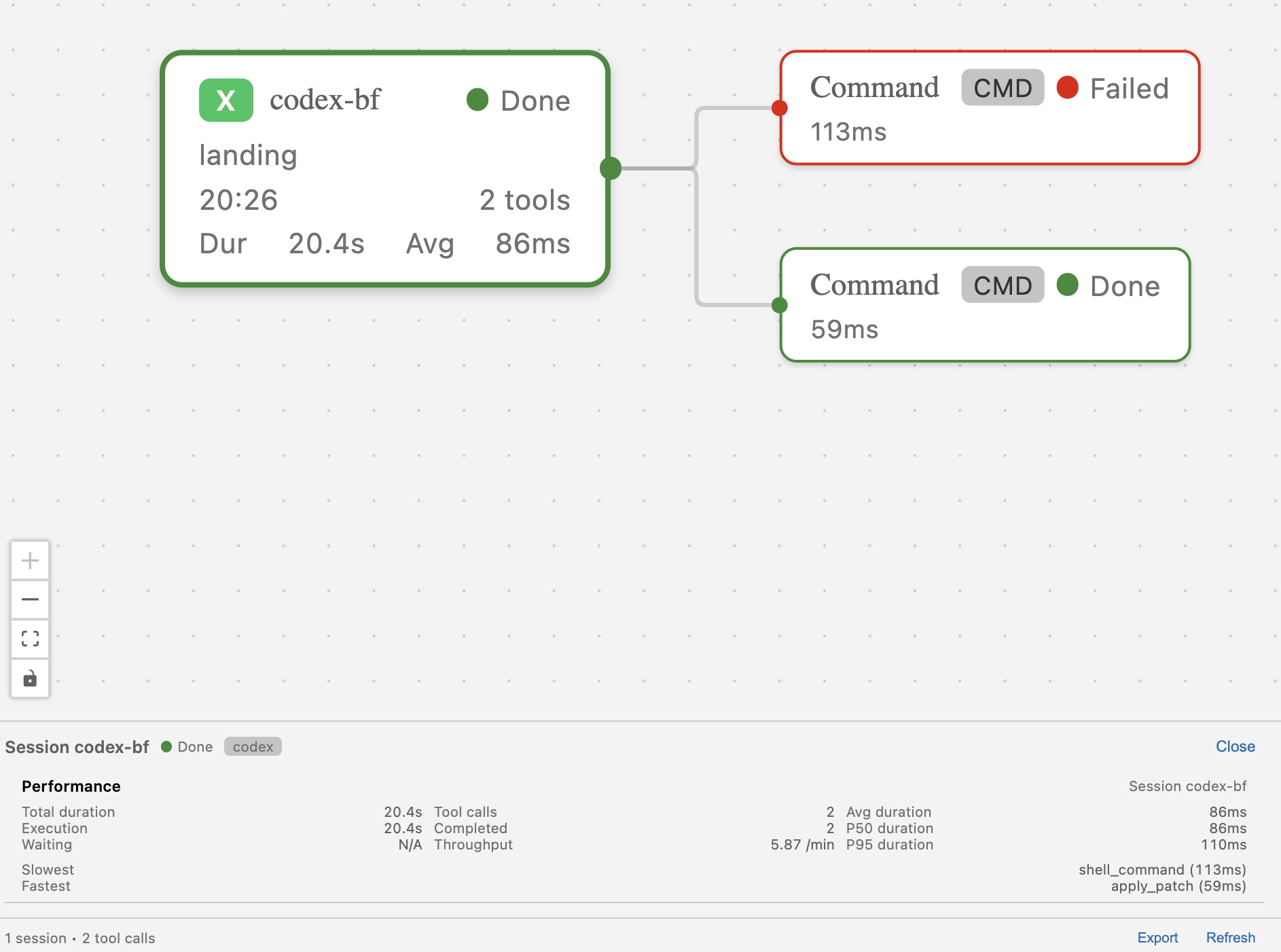
Click any session node to see detailed performance insights:
- Duration & Throughput - Total session time and tool calls per minute
- Latency Percentiles - P50 and P95 tool call durations
- Extremes - Identify your slowest and fastest tool calls
- Execution vs Waiting - See time spent executing vs waiting for approval
🔄 Real-Time Updates
No manual refreshing needed. See tool calls appear as agents invoke them.
🎬 Quick Start
- Install Agent Snitch from the marketplace
- Click the 🕵️ icon in the Activity Bar
- Launch a CLI agent session using the + button (Claude, Codex, or Copilot)
- Watch the magic happen as your session graph builds in real-time
💡 Use Cases
🐛 Debug Agent Behavior
See exactly which tool call failed and why. No more guessing.
📚 Learn Agent Patterns
Understand how professional AI agents solve problems by watching their decision flow.
⚡ Optimize Workflows
Identify bottlenecks and unnecessary tool calls that slow down your agents.
🎓 Training & Demos
Perfect for teaching others how AI coding agents work under the hood.
🔬 Research & Development
Track agent behavior for analysis, benchmarking, or improving your own agent implementations.
🛠️ Supported Agents
- ✅ Claude Code - Full support for Anthropic's CLI agent
- ✅ Codex - Complete Codex agent visibility
- ✅ GitHub Copilot CLI - Full support with log watching and managed runner
- 🔜 OpenCode comming soon
- 🔜 More agents on the roadmap
📸 Screenshots
Export Sessions to JSON/CSV
🚀 Installation
From VS Code Marketplace
- Open VS Code
- Go to Extensions (Ctrl/Cmd + Shift + X)
- Search for "Agent Snitch"
- Click Install
Requirements
- VS Code 1.85.0 or higher
- At least one CLI agent installed (Claude Code, Codex, or GitHub Copilot CLI)
📊 Commands
Access these from the Command Palette (Ctrl/Cmd + Shift + P):
Agent Snitch: Launch CLI Agent - Start a new agent sessionAgent Snitch: Start Claude CLI Session - Launch Claude CodeAgent Snitch: Start Codex CLI Session - Launch CodexAgent Snitch: Start Copilot CLI Session - Launch Copilot CLI in a VS Code taskAgent Snitch: Refresh Agent Sessions - Manually refresh the session listAgent Snitch: Clear Agent Sessions - Clear all tracked historyAgent Snitch: Export Agent Sessions - Save filtered sessions as JSON or CSVAgent Snitch: Reveal Agent Session - Focus the sidebar on a session (used by Timeline items)
🎯 Coming Soon
- 💰 Token Usage Tracking - Monitor per-session tokens and estimated API cost in real time
- ⏮️ Session Replay - Replay past sessions step-by-step
- 🎨 Custom Themes - Match your VS Code theme
- 🔔 Smart Notifications - Get alerts when agents need attention
💬 Support & Feedback
Found a bug? Have a feature request? We'd love to hear from you!
🏆 Why Developers Love Agent Snitch
"I finally understand what Claude Code is doing. This should be built into every AI agent." - Jose Z., Senior Developer
"Seeing the complete trace of what my agents do has been invaluable. Total game changer." - Carlos J., Tech Lead
"The visual graph makes complex agent workflows crystal clear." - Dario P., AI Researcher
Built with ❤️ by Aitor Poquet
Make your AI agents transparent. Install Agent Snitch today.

