Skip to content
| Marketplace
Sign in
Visual Studio Code>Other>Grep Log ViewerNew to Visual Studio Code? Get it now.
Grep Log Viewer

Grep Log Viewer

any-tool

|
3 installs
| (0) | Free
Regex-based text file viewer with color highlighting and auto-folding
Installation
Launch VS Code Quick Open (Ctrl+P), paste the following command, and press enter.
Copied to clipboard
More Info

🎨 GrepLogViewer

Regex-based log viewer — color highlighting, auto-folding, and keyword timeline

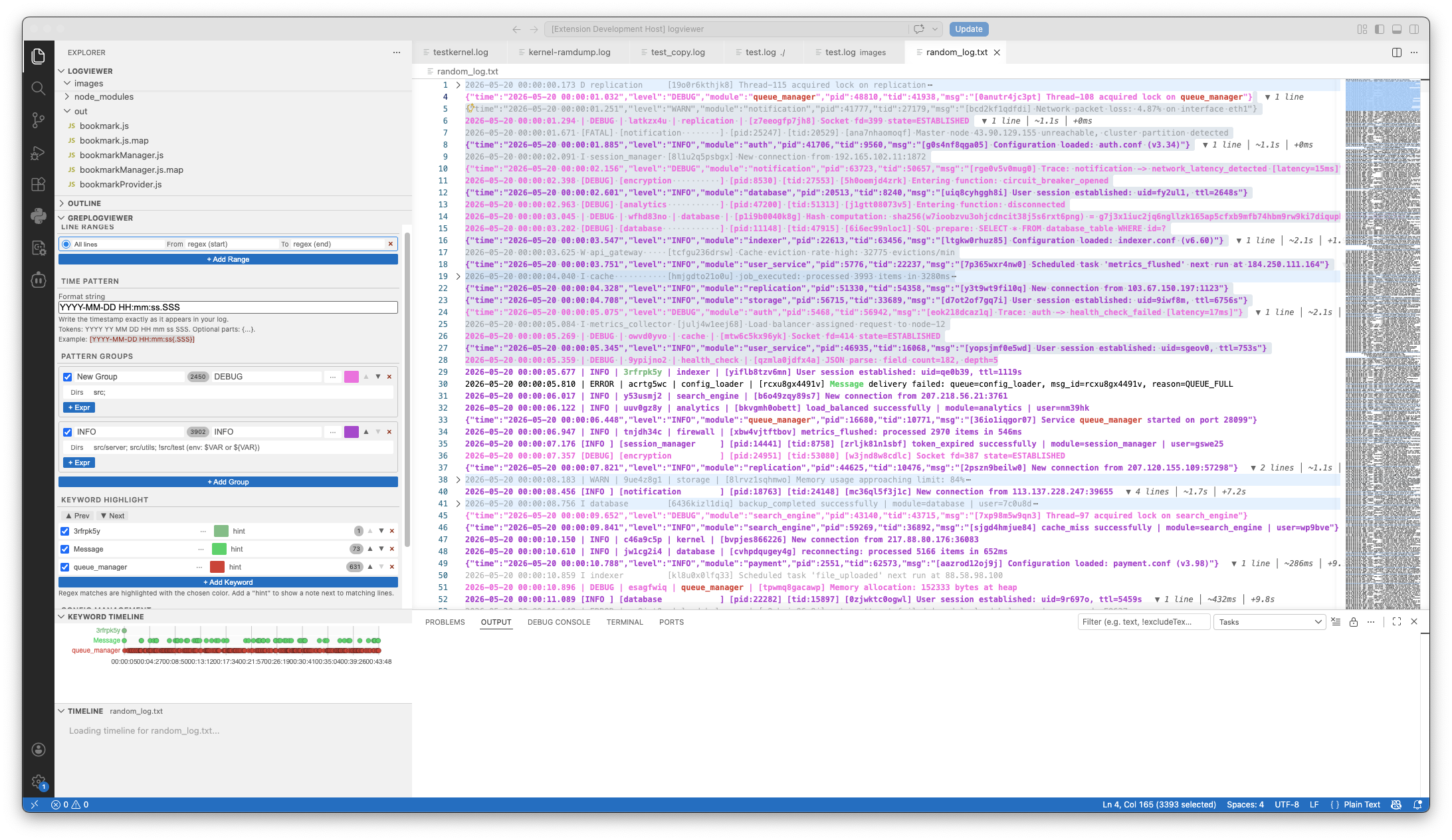
screenshot


📖 Usage

Open log file -> set/import/apply rules -> Click Go


✨ Features

🎨 Regex Group Coloring & Auto-Folding

Assign colors to regex groups. Matched lines get full-line highlights. Unmatched lines are auto-folded — only relevant content stays visible.

🔍 Keyword Substring Highlighting

Substring-level coloring that never clashes with group colors (range subtraction).

⏱️ Fold Time Annotations

With a time pattern configured, each folded region displays hidden line count + time span.

🕐 Keyword Timeline

Bottom-panel time axis chart showing keyword hit distribution over time.

🖱️ Right-Click Grep

Select text → right-click → Grep Keyword / Grep Function → searches associated code directories, output to terminal.

Supports ;-separated dirs, ! exclusion, ${VAR} environment variables.

📦 Config Sharing

Save named configs (User or Workspace scope), export as JSON, share with your team.

🎯 Use Cases

  • Log debugging: color-code by module (e.g., kernel module → green, HAL → yellow), auto-fold everything else. 30,000 lines → 500 at a glance
  • Trace analysis: correlate timestamps across keyword occurrences with the timeline
  • Code auditing: grep keywords or function definitions across code directories from any file

📄 License

MIT

  • Contact us
  • Jobs
  • Privacy
  • Manage cookies
  • Terms of use
  • Trademarks
© 2026 Microsoft