Repository ·
Issues ·
Changelog ·
Security
Why AuroraLens
Aurora clusters live in private subnets. Reaching them from a laptop usually means a VPN, a bastion host or an SSH tunnel, plus a database password saved in a local file.
AuroraLens connects through the RDS Data API, an AWS-managed HTTPS endpoint protected by IAM. You sign in with the AWS SSO identity you already have. The database password never leaves AWS Secrets Manager, and every statement runs read-only unless you choose otherwise.
Features
| Feature |
What you get |
| Connection manager |
All your clusters in one sidebar, colour-coded by environment, with a guided form to add or edit them. |
| Test Connection |
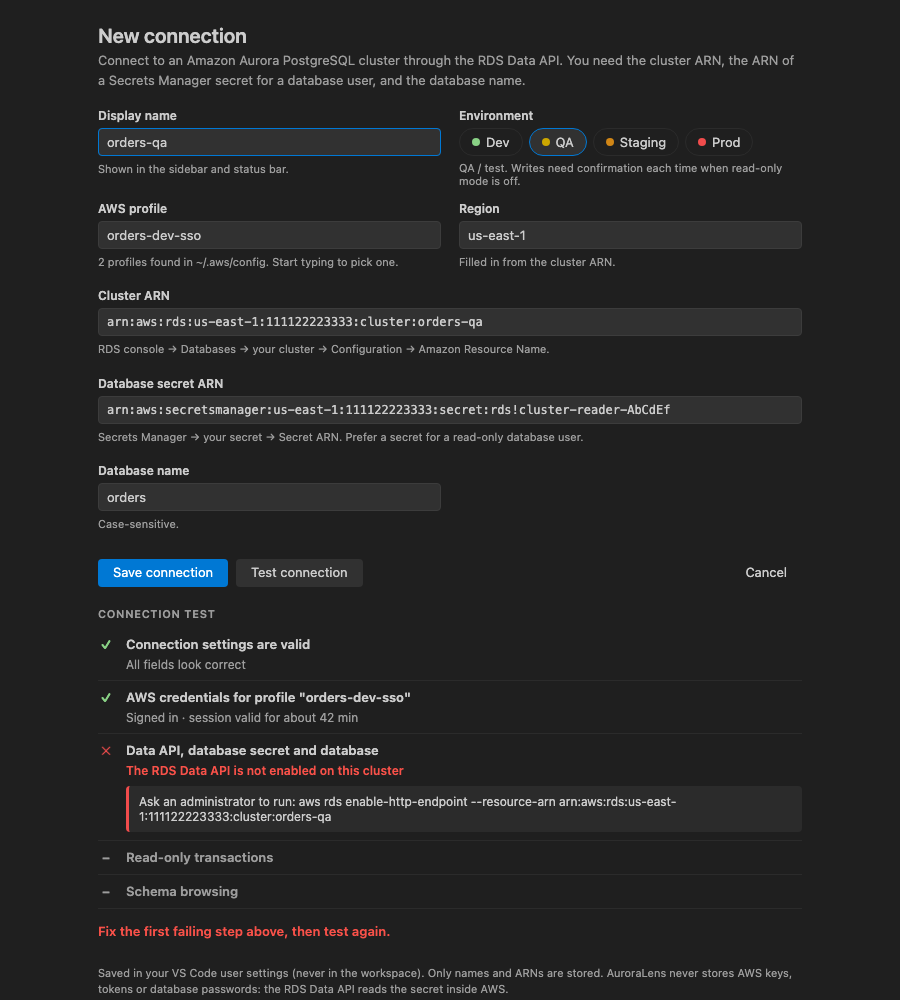
Checks sign-in, the Data API, the secret, the database and read-only mode in turn, and tells you the exact fix if one fails. |
| Schema explorer |
Schemas, tables, views and columns, with key markers, types and estimated row counts. Partitions are grouped under their parent table. |
| Table actions |
Select Top 1000, Count Rows, Script as SELECT / INSERT / UPDATE / DELETE and View DDL, one right-click away. |
| Results grid |
Smooth with thousands of rows. Type-aware sorting, filtering, resizable columns, four densities, a JSON inspector, and copy as CSV, JSON or Markdown. |
| Query history |
Reopen or re-run anything you ran. Only the SQL text is kept, never results. |
| Cluster monitor |
Cluster health, CloudWatch metrics, running queries, sessions and the largest tables. |
| Safe by default |
Database-enforced read-only transactions. Production connections can never write. |
Works with Amazon Aurora PostgreSQL and Aurora MySQL (preview). The engine is detected automatically.
Results you can work with

Connection problems explained, not just reported
Your cluster at a glance

Requirements
- VS Code 1.85 or later on macOS, Windows or Linux.
- AWS CLI v2 for the SSO sign-in step.
- An Aurora PostgreSQL or Aurora MySQL cluster with the Data API enabled, plus the IAM permissions listed under For administrators.
Getting started
- Click the AuroraLens icon in the Activity Bar.
- Click Sign in with AWS SSO. The first time, enter your AWS access portal URL, its Region and your permission set.
- Click Add Connection. Paste the cluster ARN and the database secret ARN, enter the database name, then click Test connection.
- Open a new query, write SQL and press Ctrl+Enter (macOS: Cmd+Enter).
Security and privacy
- No credentials are stored. AuroraLens never saves AWS keys, tokens or database passwords. AWS sign-in uses the standard AWS SDK credential chain, and the Data API reads the database secret inside AWS.
- Read-only is enforced by the database. Each statement runs in a
READ ONLY transaction with a timeout, and the transaction is always rolled back. A dialect-aware SQL tokenizer also blocks side effects that a read-only transaction can't stop:
- PostgreSQL:
pg_terminate_backend, dblink and aws_lambda.*
- MySQL:
SELECT … INTO OUTFILE S3, mysql.lambda_async and /*! … */ executable comments
- Workspaces can't change your settings. All settings are user-level, so a repository's
.vscode/settings.json cannot alter connections, sign-in or read-only mode.
- No silent file changes. AuroraLens shows you the exact lines before adding anything to
~/.aws/config.
- No telemetry. Nothing is sent anywhere except the AWS endpoints in your own account.
- Hardened webviews: strict Content Security Policy, no remote content, and formula-safe CSV export.
To report a vulnerability, see SECURITY.md.
For administrators
Enable the Data API on the cluster:
aws rds enable-http-endpoint --resource-arn arn:aws:rds:<region>:<account>:cluster:<cluster>
Recommended: a read-only database user. AuroraLens already enforces read-only mode. A read-only user adds a second, independent layer.
-- PostgreSQL 14+
CREATE ROLE auroralens_reader LOGIN PASSWORD '<generated>';
GRANT pg_read_all_data TO auroralens_reader;

-- MySQL
CREATE USER 'auroralens_reader'@'%' IDENTIFIED BY '<generated>';
GRANT SELECT, SHOW VIEW ON *.* TO 'auroralens_reader'@'%';
Store the user's credentials in Secrets Manager as {"username": "...", "password": "..."} and use that secret's ARN in the connection.
IAM permissions. The first two statements are required. The third is optional and only powers the AWS sections of the cluster monitor.
{
  "Version": "2012-10-17",
  "Statement": [
    {
      "Effect": "Allow",
      "Action": ["rds-data:ExecuteStatement", "rds-data:BeginTransaction", "rds-data:RollbackTransaction"],
      "Resource": "arn:aws:rds:<region>:<account>:cluster:<cluster>"
    },
    {
      "Effect": "Allow",
      "Action": "secretsmanager:GetSecretValue",
      "Resource": "arn:aws:secretsmanager:<region>:<account>:secret:<reader-secret>-*"
    },
    {
      "Effect": "Allow",
      "Action": ["rds:DescribeDBClusters", "rds:DescribeDBInstances", "cloudwatch:GetMetricData"],
      "Resource": "*"
    }
  ]
}
Keyboard shortcuts
| Action |
Windows / Linux |
macOS |
| Run the statement under the cursor (or the selection) |
Ctrl+Enter |
Cmd+Enter |
| Move between result cells |
Arrow keys, PageUp, PageDown |
Same |
| Inspect a value |
Enter or double-click |
Same |
| Copy a value |
Ctrl+C |
Cmd+C |
Settings
All settings are user-level.
| Setting |
Default |
Description |
auroralens.readOnly |
true |
Database-enforced read-only mode. Always on for prod. |
auroralens.maxRows |
500 |
LIMIT added to SELECT statements that don't have one. |
auroralens.statementTimeoutSeconds |
30 |
Server-side timeout for read-only statements. |
auroralens.history.enabled |
true |
Keep a local history of executed SQL text. |
auroralens.connections |
[] |
Connections. Managed through Add Connection. |
auroralens.ssoSession |
null |
IAM Identity Center session. Set it up through Sign in. |
Troubleshooting
Run Test Connection (right-click a connection) first. It pinpoints the failing step. The most common issues:
| Problem |
Fix |
| The RDS Data API is not enabled |
An administrator runs aws rds enable-http-endpoint (see For administrators). |
| Your AWS session has expired |
Click Sign in in the AuroraLens sidebar. |
| Missing IAM permission |
Add the rds-data and secretsmanager permissions above to your permission set. |
| The cluster is resuming |
Aurora Serverless is waking from auto-pause. Wait 15 to 30 seconds and try again. |
| Result is larger than the Data API allows |
Select fewer rows or columns. The Data API returns at most about 1 MB per call, and each call is limited to 45 seconds. |
Roadmap
- Native IAM Identity Center sign-in, with no AWS CLI needed
- Cluster discovery across accounts and Regions
- Amazon RDS instances through AWS Systems Manager port forwarding
- Performance Insights top SQL, result tabs and ER diagrams
Ideas and bug reports are welcome on GitHub Issues.
Trademarks
AuroraLens is an independent open-source project by Anuj Shrigiriwar. It is not affiliated with, endorsed by or sponsored by Amazon Web Services. Amazon Aurora, Amazon RDS, AWS and related marks are trademarks of Amazon.com, Inc. or its affiliates.
License
MIT

