Skip to content
| Marketplace
Sign in
Visual Studio Code>Programming Languages>Symbols ConnectorNew to Visual Studio Code? Get it now.
Symbols Connector

Symbols Connector

antenna-tec

|
4 installs
| (0) | Free
Draw connecting lines from the symbol under the cursor to its definition and every reference.
Installation
Launch VS Code Quick Open (Ctrl+P), paste the following command, and press enter.
Copied to clipboard
More Info

English | 简体中文

Symbols Connector

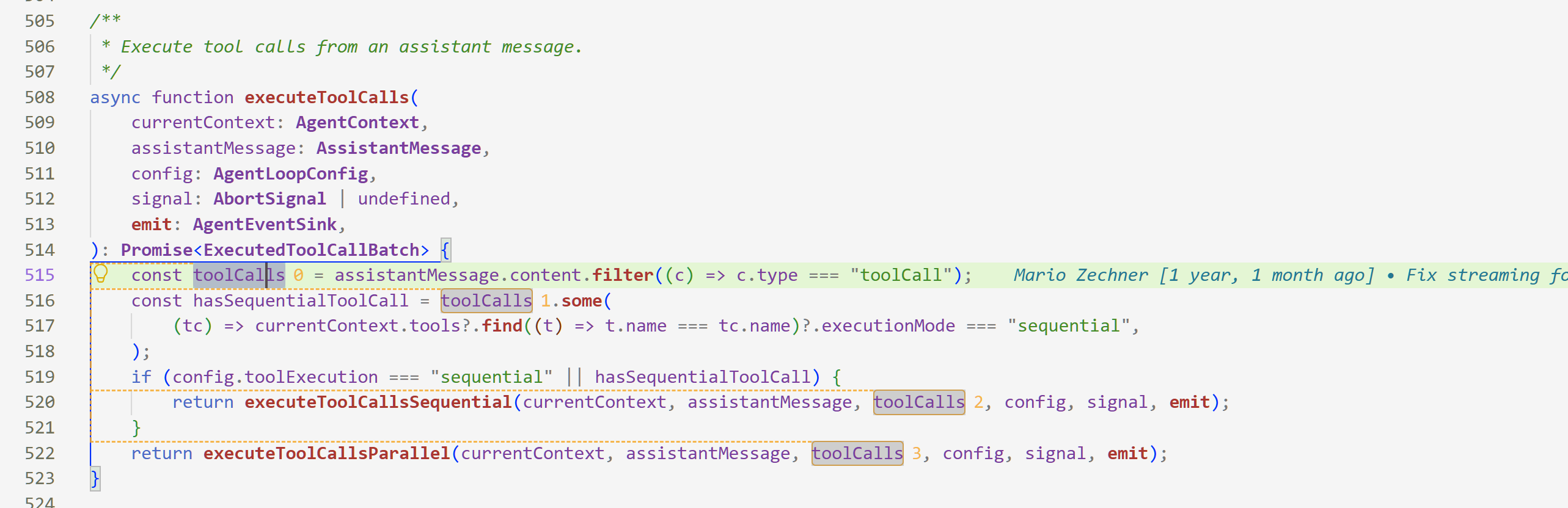
Show every reference and the definition of a symbol in the current file as connecting lines.

Symbols Connector

Features

  • In-editor connectors — Put the cursor on an identifier (variable, function or class) and every occurrence in the current file is linked up, each labelled with an index: 0 marks the definition/declaration, the rest are numbered top to bottom.
  • Reference graph — Press Ctrl+Alt+G for a side panel that draws every reference as a curve. Cross-file, and clicking a node jumps to it.

Usage

Works out of the box — move the cursor onto any identifier. Nothing to trigger.

Also available from the Command Palette (Ctrl+Shift+P) and the editor context menu:

Command Keybinding
Open reference graph Ctrl+Alt+G / Cmd+Alt+G
Toggle connectors —
Re-resolve current symbol —
Copy reference list to clipboard —

Settings

The defaults are 1.5px orange dashed lines. To change the look, adjust these:

{
  "symbolsConnector.lineWidth": 1.5,        // 1-8px
  "symbolsConnector.lineStyle": "dashed",   // solid / dashed / dotted / double
  "symbolsConnector.palette": ["#F5A623CC"] // supports #RRGGBBAA
}

Give each reference its own colour by turning palette into a multi-colour array (colours cycle by index).

Common switches:

Setting Default Description
symbolsConnector.autoTrigger true Resolve as the cursor moves. Turn off to resolve on demand only.
symbolsConnector.autoOpenGraph false Open the reference graph automatically.
symbolsConnector.maxRelated 60 Maximum number of references rendered at once.

Search symbolsConnector in Settings for the rest (rail alignment, index labels, cross-file previews, ...).

  • Contact us
  • Jobs
  • Privacy
  • Manage cookies
  • Terms of use
  • Trademarks
  • Your Privacy Choices
  • Consumer Health Privacy
© 2026 Microsoft