Protobuf Inspector
Deserialize and serialize Protobuf messages directly inside VS Code — no external tools, no command line. Just open a .proto file, click a lens, and inspect your binary data.
Features
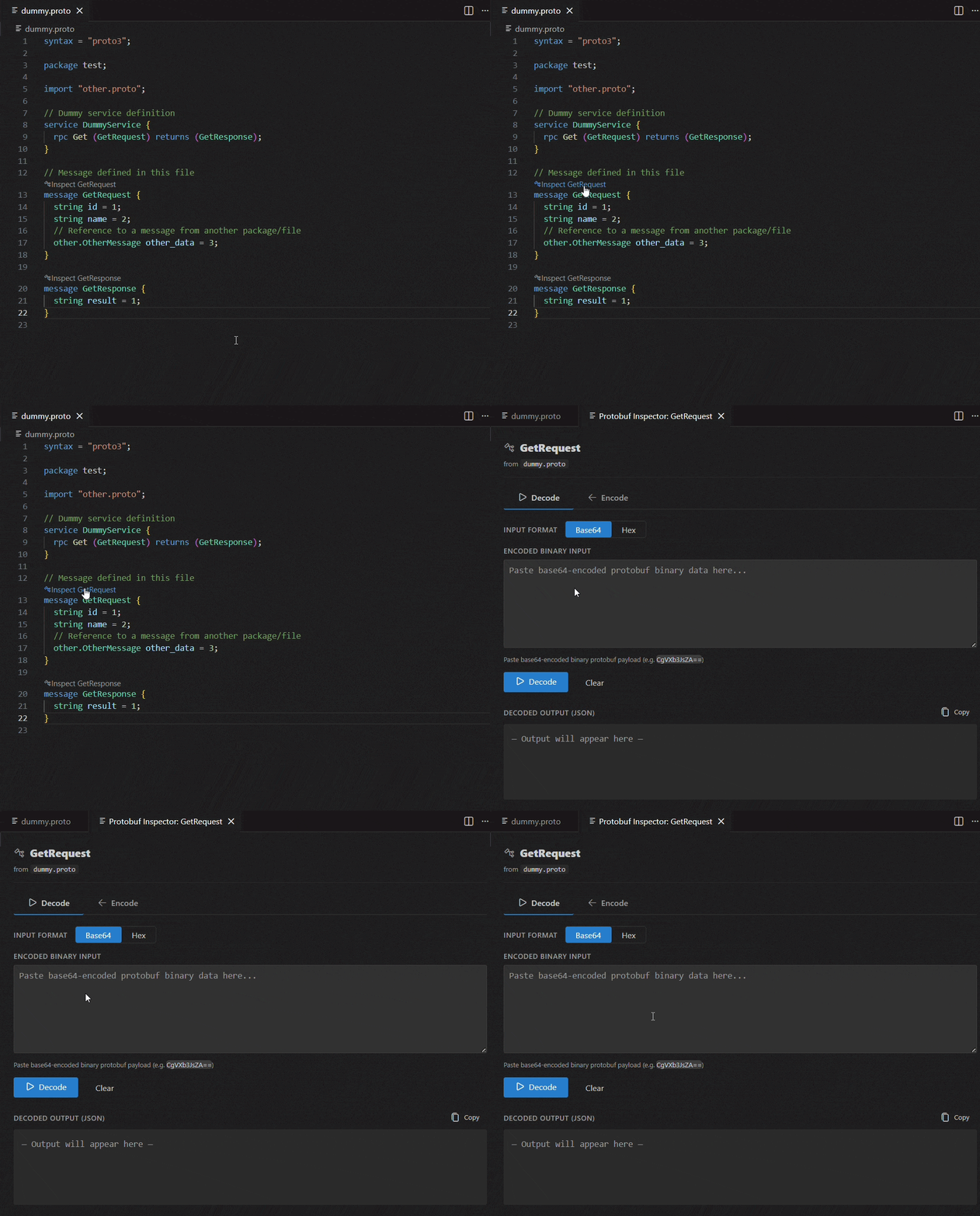
One-click Inspect from your .proto file
A CodeLens action appears above every message definition. Click Inspect <MessageName> to instantly open the decode/encode panel for that message — no configuration needed.
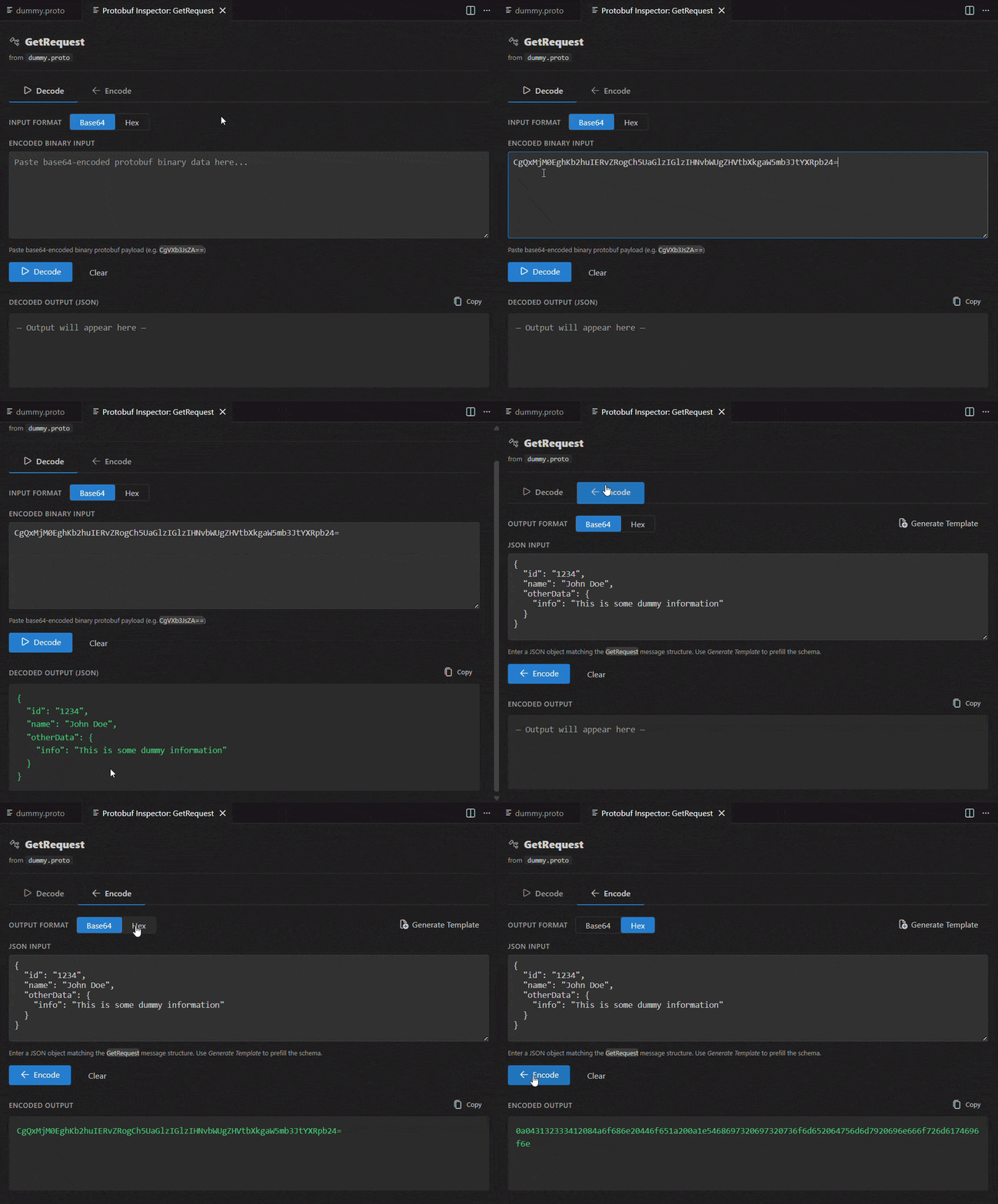
Decode and Encode Protobuf messages
Easily convert between binary Protobuf (Base64/Hex) and JSON using the Decode (deserialization) and Encode (serialization) tabs. Paste your payload or JSON, click the respective button, and see the result instantly. The panel validates your input and displays the output with full field names and values from your schema.
Command Palette support
Run Protobuf Inspector: Open Decode/Encode Panel from the Command Palette (Ctrl+Shift+P):
- If a
.proto file is active in the editor — the extension uses it automatically and shows a message picker listing all message definitions found in that file.
- If no
.proto file is open — a file dialog opens so you can browse to any .proto file on disk, then the message picker appears.
Auto-generate a JSON template
Not sure what fields a message has? Use the Generate Template button to auto-fill the editor with a skeleton JSON object containing all fields of the message, including nested messages, repeated fields, and enums — with sensible placeholder values.
Live schema reload
When you save your .proto file, the panel automatically reloads the schema — no need to close and reopen anything. If your file has unsaved changes, the CodeLens shows a Save to inspect prompt instead.
Usage
- Open a
.proto file in VS Code.
- Click the Inspect <MessageName> CodeLens above any
message definition.
- In the Decode tab (deserialization): paste your Base64 or Hex payload and click Decode.
- In the Encode tab (serialization): paste or generate a JSON template and click Encode.
Tip: Use the Generate Template button on the Encode tab to scaffold a valid JSON structure from your message definition.
Extension Settings
| Setting |
Default |
Description |
protobuf-inspector.panelMode |
reuseTab |
reuseTab — reuse a single shared panel; newTab — open a separate panel per message |
protobuf-inspector.enableCodeLens |
true |
Show or hide the Inspect CodeLens above message definitions in .proto files |
Requirements
No external dependencies or CLI tools required. Everything runs inside VS Code.
Release Notes
1.0.0
Initial release:
- Deserialize (decode) Protobuf binary (Base64 / Hex) to JSON
- Serialize (encode) JSON to Protobuf binary (Base64 / Hex)
- Auto-generate JSON templates from message definitions
- CodeLens integration for
.proto files
- Live schema reload on file save
- Command Palette command to open any
.proto file
License
This extension is licensed under the MIT License.
Third-Party Notices
This extension uses the following open-source packages:
- protobufjs — BSD 3-Clause License. Copyright © 2016, Daniel Wirtz.
- @vscode/codicons — Icon font licensed under CC BY 4.0; code licensed under MIT. Copyright © Microsoft Corporation.

