Figma Mobile Layout Codegen
Layout and screen codegen from Figma for native mobile — separate outputs per platform. Currently supports:
- Android: Java with XML, Kotlin with XML, Kotlin with Jetpack Compose
- iOS: Swift with SwiftUI, Swift with UIKit
- Flutter: Flutter with Dart
- React Native: TypeScript / JSX
Prompt Composer lets you tag exact UI targets on the canvas, then submit structured prompts with numbered SoM references so an AI editor can apply product behavior without guessing.
GitHub
https://github.com/rdforandroid-bot/figma-mobile-layout-codegen
Videos
Full walkthroughs on YouTube:
- Figma ZIP file into a live app demo
- Canvas Selection + SoM Prompt Composer
- JSON & Image ZIP Export Figma Plugin
- SoM + Prompt Composer(Cursor / VS Code)
- Create RecyclerView Demo
- Create BottomNavigationBar Demo
- Create Tab Bar Demo
Usage
- Open a supported mobile project root as your VS Code or Cursor workspace:
- Android: a Gradle root containing
settings.gradle
- iOS: a folder containing an
.xcodeproj or .xcworkspace
- Flutter: the project root containing
pubspec.yaml and lib/; do not select lib/ itself
- React Native: the project root containing
package.json with react-native (or App.tsx / index.js); do not select a subdirectory
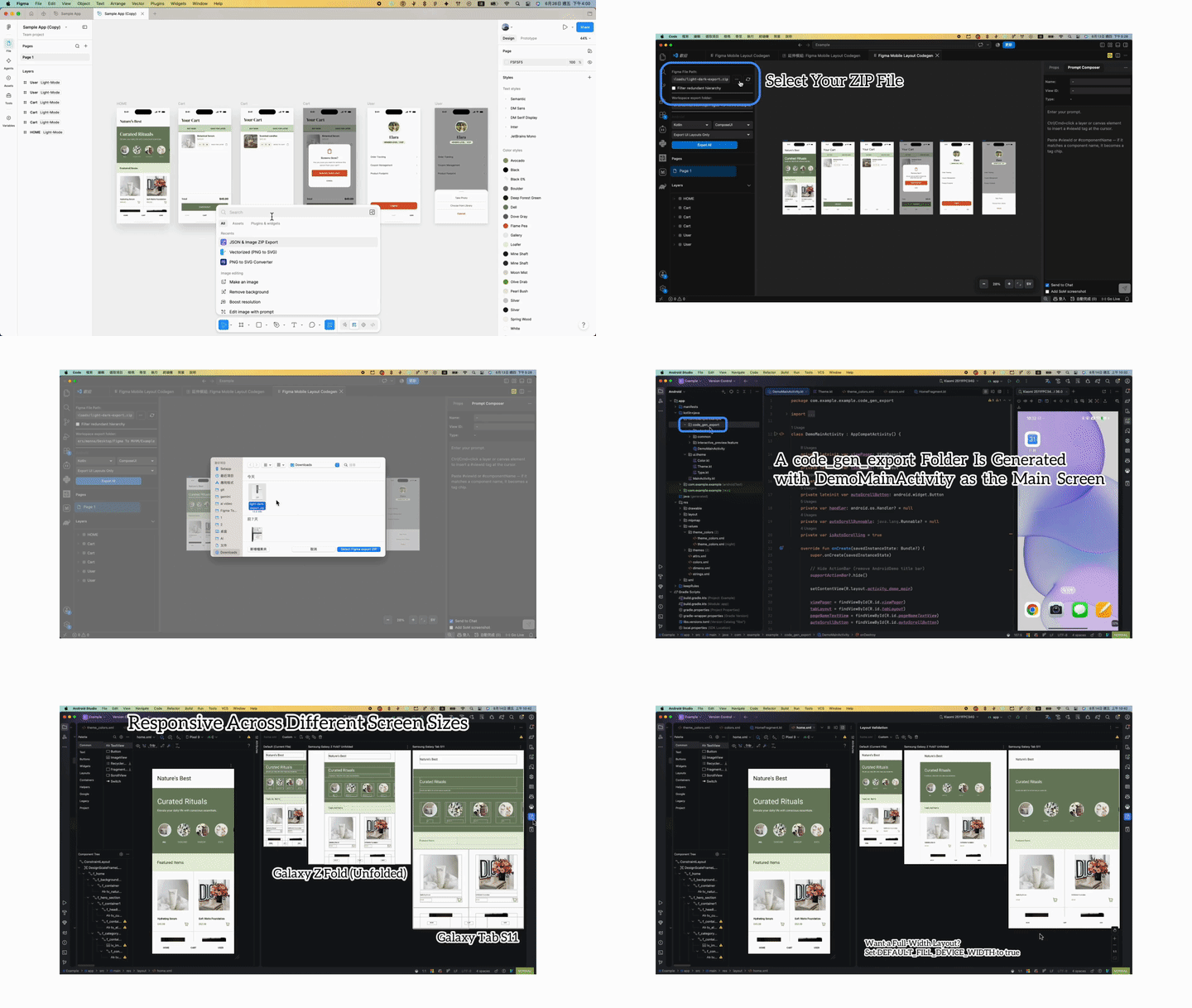
- Install the JSON & Image ZIP Export Figma plugin and export your design as a ZIP from Figma.
- Open the Command Palette and run Figma Mobile Layout Codegen: Open Editor.
- Import the Figma export ZIP.
- Use the default Interactive Preview mode and run Export All.
- Run the exported Android, iOS, Flutter, or React Native project to see the generated preview.
After the preview is working, you can use Prompt Composer to tag elements and submit structured prompts to your AI assistant.
Demos
Figma export → mobile codegen
Export a ZIP from Figma, open it in the extension, then export native mobile layouts to your project.
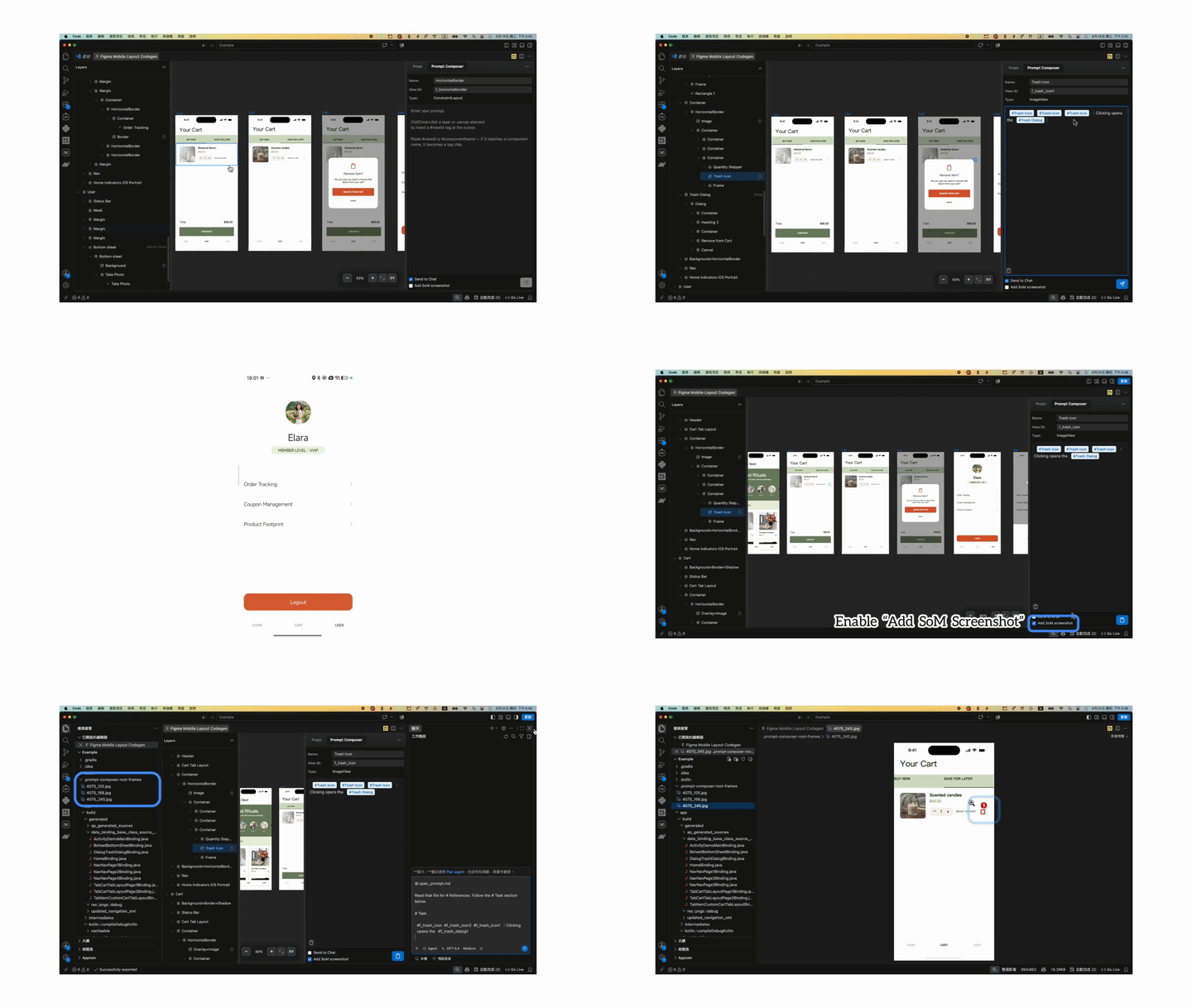
Prompt Composer + SoM
Tag elements on the canvas, submit in Prompt Composer, and get SoM JPEG screenshots with numbered markers plus .spec_prompt.md.
Includes a Figma-driven layout editor, platform-aware export, and context menus for native UI patterns (lists, navigation, sheets, dialogs, and more).
All export modes are token-free (rule-based codegen, not LLM generation).
Image assets stay on your machine and are not uploaded to the server; only Figma JSON is sent when server-side processing is needed.
Export modes
- Export UI Layouts Only — UI files only, no ViewModel
- Export MVVM Template — Optional MVVM scaffold (View + ViewModel); layouts and structure, not full app or business logic
- Export Interactive Preview — Runnable preview with sample data (default)
- SoM + Prompt Composer — On Prompt Composer Submit, generates SoM JPG screenshots with numbered markers and a
.spec_prompt.md file; does not export plugin-generated code in this mode
Prompt Composer
Open the Prompt Composer tab in the right panel.
- Select exact elements — Tag UI on the canvas or in Layers (Ctrl/Cmd+click); the prompt binds to the exact target.
- Assign product behavior — e.g. “this button signs the user in”, “this field validates email”.
- AI edits without guessing — Structured references (file paths, locators, IDs) instead of vague “the button on the home screen”.
- SoM numbered visual references — Optionally adds Set-of-Mark (SoM) JPEG screenshots with numbered markers for tagged components, so the AI can locate each target visually.
- Ready for your AI editor — Writes
.spec_prompt.md with # Context and # References; clipboard includes # Task for Chat.
UI icons (licensing)
Icons in the webview UI (Layers panel, context menus, toolbar, page tree, visibility toggles, expand chevrons, and related controls) are inline SVG assets defined in this project (webview/app.js). They are simple stroke icons created for this extension.
- They are not taken from third-party icon fonts or packs (e.g. Font Awesome, Material Icons, Lucide).
- No separate attribution is required for those UI icons when you ship or use this extension commercially.
- npm dependencies remain subject to their own licenses (see
package.json / node_modules).
Tech stack
- Webview UI: HTML, CSS, JavaScript (
webview/)
- Extension: TypeScript, VS Code Extension API (
src/ → out/)
- Layout: Flexbox-based responsive panels
- Theme: Light/dark styling aligned with the editor UI

