Skip to content
| Marketplace
Sign in
Visual Studio Code>Other>AnalectNew to Visual Studio Code? Get it now.
Analect

Analect

Analect Technologies

|
5 installs
| (2) | Free
AI semantic navigation for code
Installation
Launch VS Code Quick Open (Ctrl+P), paste the following command, and press enter.
Copied to clipboard
More Info

Analect

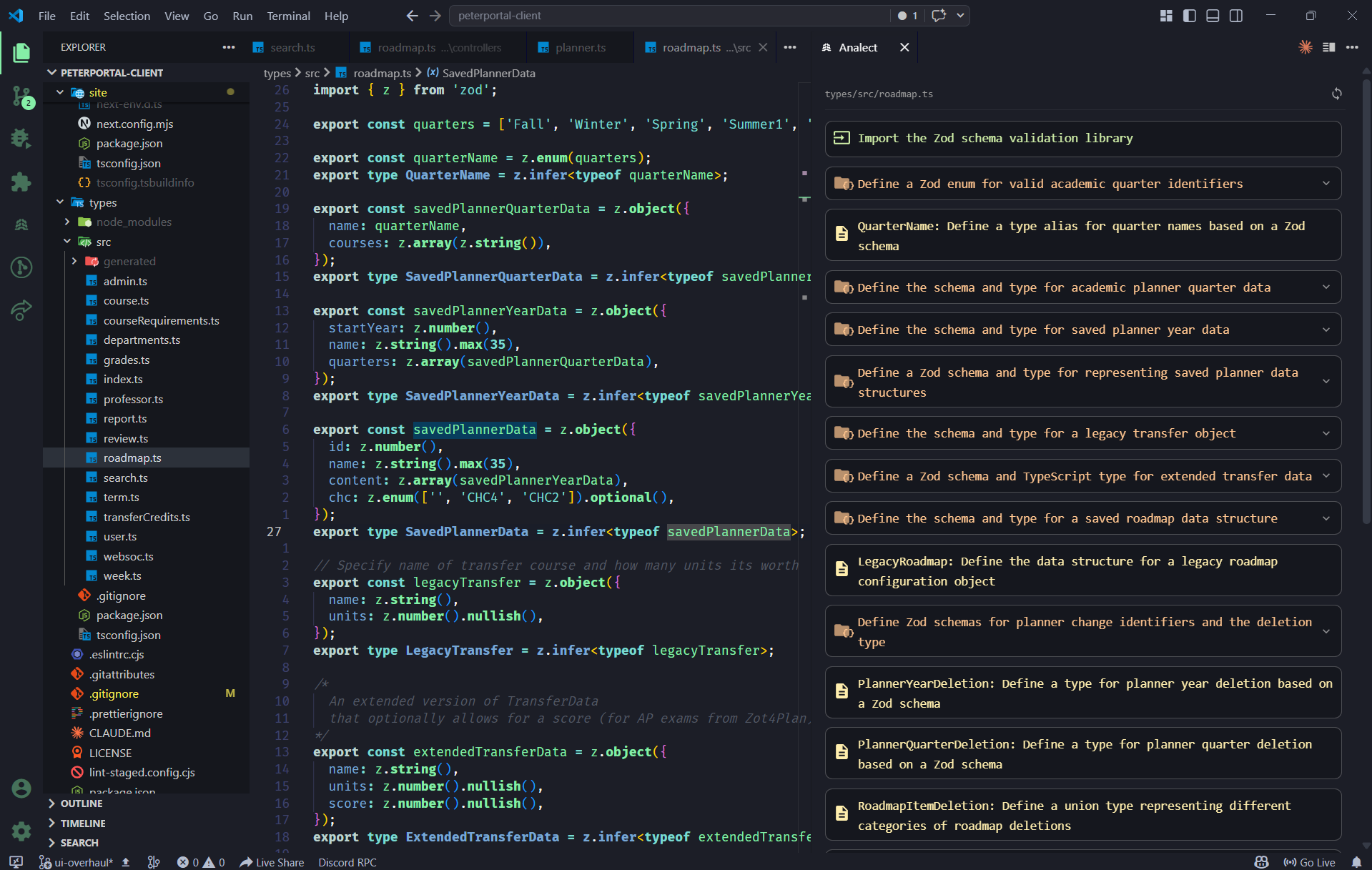
Understand any codebase at a glance. Analect adds an AI-powered sidebar to VS Code that generates hierarchical, natural-language summaries of your source code — so you can navigate and understand complex files without reading every line.

Analect sidebar showing a tree of code summaries

Features

  • Hierarchical summaries — Your code is broken into logical blocks with plain-English descriptions, organized as a collapsible tree
  • Click-to-navigate — Click any summary to jump directly to that section of code in the editor
  • Automatic updates — Summaries refresh whenever you switch files or save changes
  • Caching — Results are cached by content hash so repeated opens are instant

Supported Languages

JavaScript, TypeScript, TSX, Python, Rust, C++, C#

Getting Started

  1. Install the extension from the VS Code Marketplace
  2. Open a supported source file — the Analect panel will appear in the sidebar
  3. Summaries are generated automatically for the active file

How It Works

Analect sends your file to the backend, which:

  1. Parses it into an AST using Tree-sitter
  2. Uses an LLM to group semantically related blocks
  3. Generates a natural-language summary for each block
  4. Returns a hierarchical SummaryTree rendered in the sidebar

Summaries are nested up to 4 levels deep for large functions, giving you a layered view that lets you drill into detail only where you need it.

License

MIT

  • Contact us
  • Jobs
  • Privacy
  • Manage cookies
  • Terms of use
  • Trademarks
© 2026 Microsoft