Skip to content
| Marketplace
Sign in
Visual Studio Code>Programming Languages>Ansible LensNew to Visual Studio Code? Get it now.
Ansible Lens

Ansible Lens

Amr IO

|
3 installs
| (0) | Free
Fast Ansible language server, IntelliSense, and <20ms linter for YAML & Jinja2. Zero Python, WSL, or Docker.
Installation
Launch VS Code Quick Open (Ctrl+P), paste the following command, and press enter.
Copied to clipboard
More Info

Ansible Lens

OpenSSF Scorecard License: MIT

Fast Ansible language server, IntelliSense, and <20ms linter for YAML & Jinja2 — zero Python, WSL, or Docker required.

Why Ansible Lens?

Ansible Lens is a pure TypeScript, zero-dependency Ansible Language Server & linter powered by static collection metadata packs. It runs natively on Windows, macOS, and Linux with zero Python, zero WSL, and zero Docker.

See It in Action

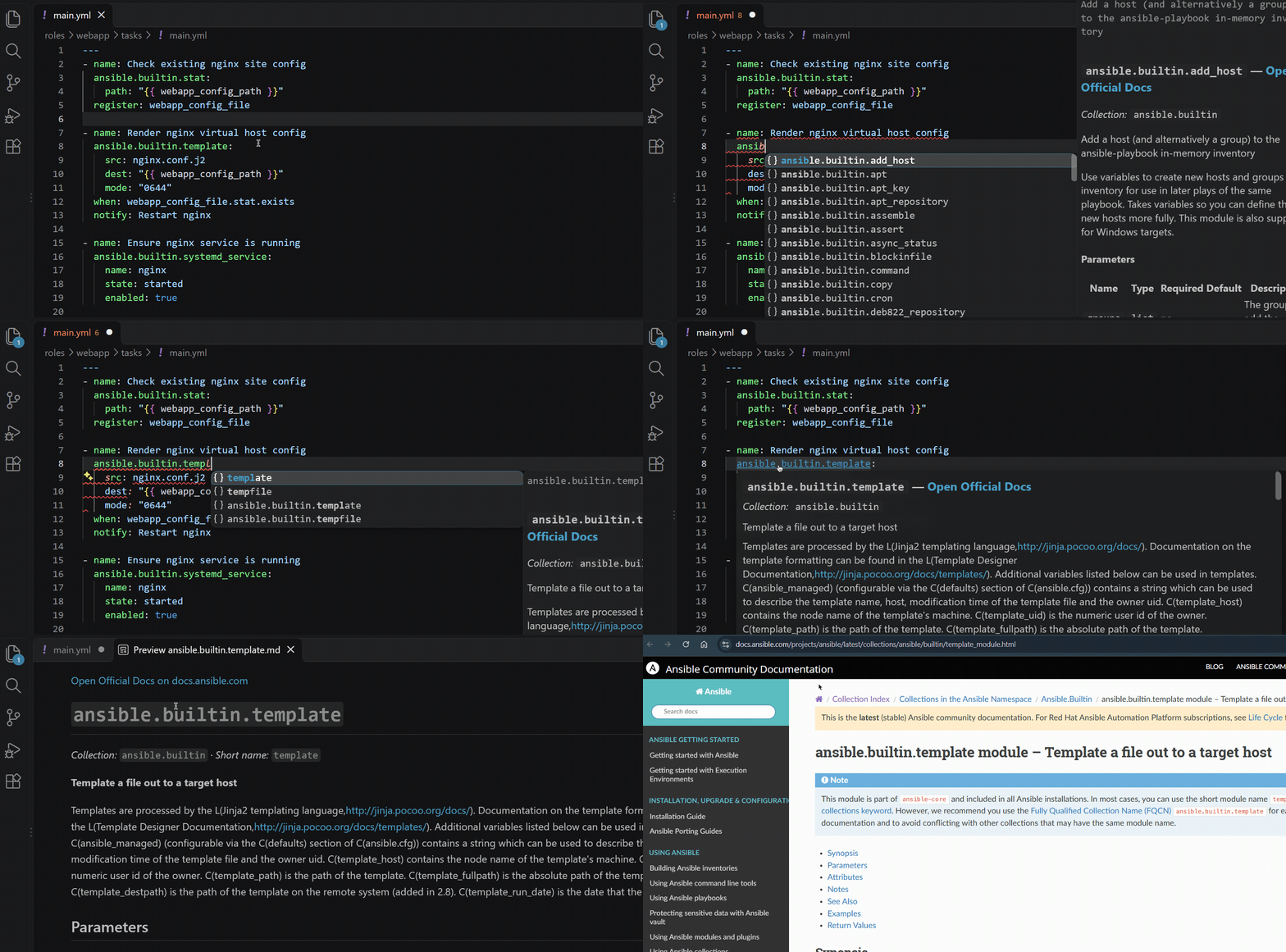
Pylance-Style Hover & Ctrl+Click Module Docs

Hover and Ctrl+Click Module Docs

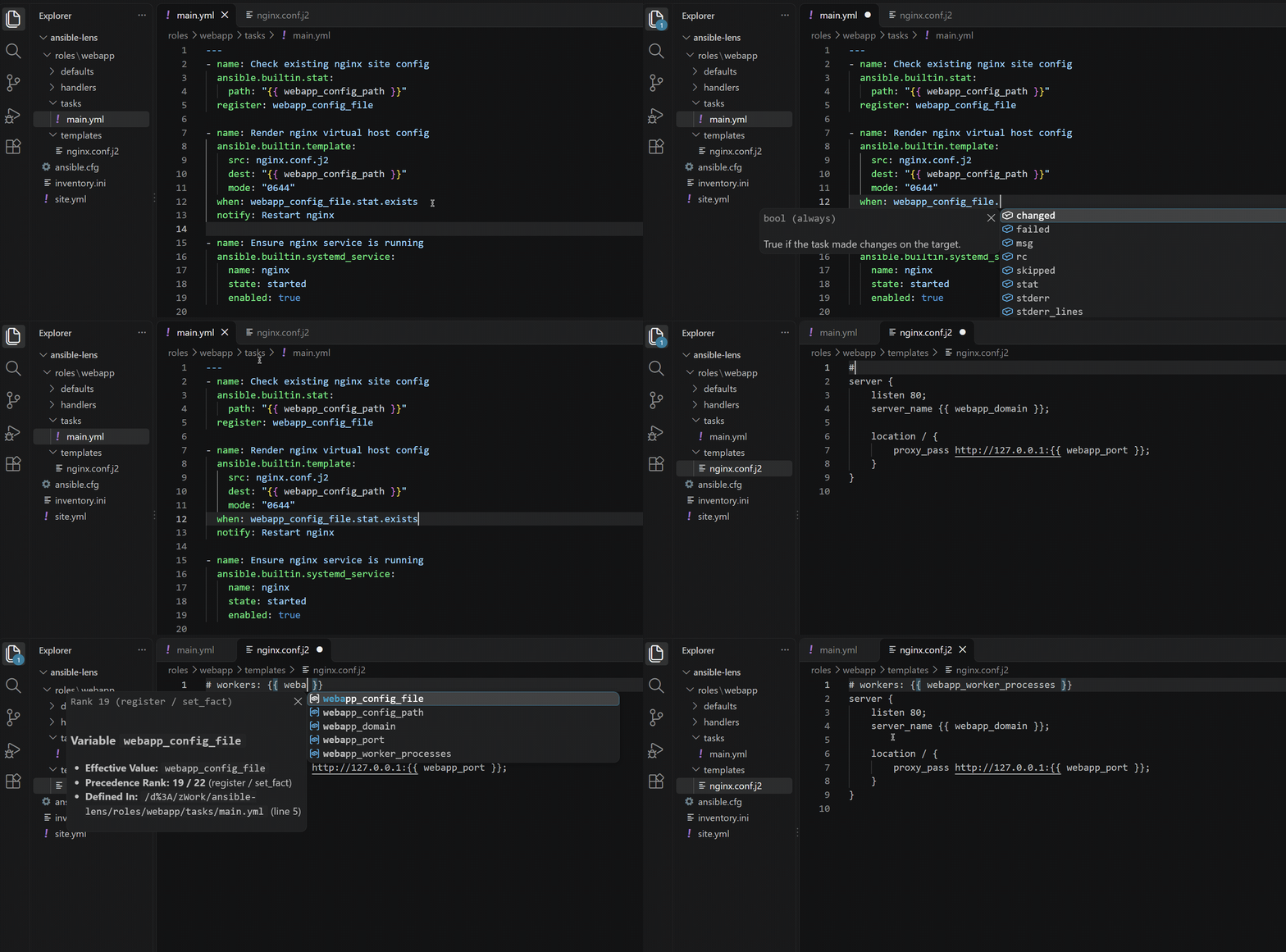
register: Return-Value & .j2 Template Autocomplete

register Return-Value and Jinja2 Template Autocomplete

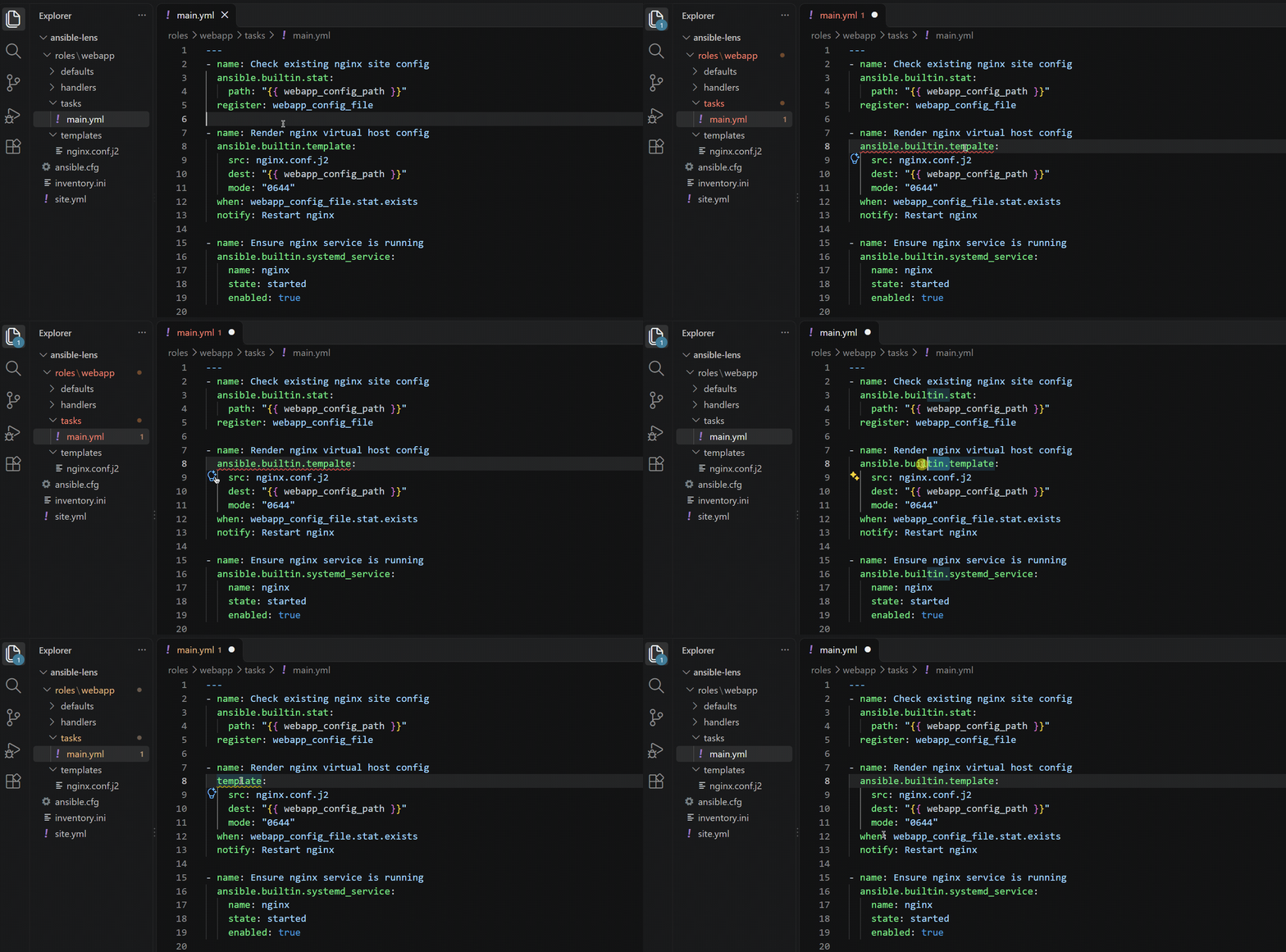
Instant (<20ms) Linting & 1-Click Quick-Fixes

Instant Linting and Quick-Fixes

Key Features

  • Sub-20ms Fault-Tolerant Linting: 24 clean-room MIT-licensed rules with 1-click Quick-Fixes (Convert File to FQCN, Levenshtein "Did you mean?", var-naming[no-role-prefix]) and debounced incremental revalidation.
  • Pylance-Style Hover & Ctrl+Click Docs: Rich Markdown hover cards with parameter tables, defaults, choices, and return schemas, plus configurable Ctrl+Click (renderedPreview, openInBrowser, disabled) with zero permanent underlines.
  • register: Return-Value Inference (loop:-Aware): Autocompletes registered fields (.stat.*, .rc, .stdout, .results[].*) across tasks, multi-line when: lists, and .j2 templates.
  • 22-Level Cross-File Variable Intelligence & .j2 Templates: Tracks defaults/, vars/, group_vars/, host_vars/, relative vars_files: (with missing-vars-file validation & cache eviction), include_vars:, inventory, set_fact:, and register:, with scoped completion ranking and smart {{ | }} auto-spacing.
  • Smart Hybrid Activation: Coexists cleanly with redhat.vscode-yaml while ignoring Kubernetes, Docker Compose, and GitHub Actions YAML.
  • Bundled ansible.builtin + 90+ Silent Auto-Downloaded Collections: Works offline out of the box and lazily fetches 90+ collection packs with SHA-256 verification.

Comparison vs. redhat.ansible

Feature Ansible Lens Red Hat Ansible
Native Windows (no WSL/Docker) Yes Requires WSL or EE container
Python / ansible-lint required Zero Required
Lint latency (300-line playbook) ~10.7 ms ~2,622 ms
register: return-value autocomplete Yes (loop:-aware) Limited
22-level variable precedence hover Yes No
License MIT GPL-3.0

Verified Benchmarks

Measured on GitHub Actions ubuntu-latest (4 vCPU AMD EPYC 9V45, Node.js v22.23.5, ansible-lint 26.11.0) over 5 runs on the same 302-line playbook (benchmark workflow):

Tool Runtime Median
Ansible Lens (in-process LSP) Pure TypeScript / Node.js 10.73 ms
ansible-lint (CLI) Python 2,622.4 ms

Documentation

  • Lint & Project Integrity Rules
  • Configuration Reference
  • Troubleshooting Guide

Privacy

Zero Telemetry: Ansible Lens collects zero analytics or crash reports and makes no outbound requests other than optional SHA-256-verified collection metadata pack downloads.

License

MIT License. See LICENSE.


Ansible Lens is an independent, community-built extension and is not affiliated with or endorsed by Red Hat, Inc. Ansible® is a registered trademark of Red Hat, Inc.

  • Contact us
  • Jobs
  • Privacy
  • Manage cookies
  • Terms of use
  • Trademarks
  • Your Privacy Choices
  • Consumer Health Privacy
© 2026 Microsoft