pykrete for VS Code
Static type checking for dataframe schemas — in your editor.

pykrete is a strict superset of Python that adds a type layer for dataframes. This extension brings its schema checks into VS Code (and Cursor, VSCodium, code-server, Theia): live diagnostics, hover, completion, go-to-definition, and quick-fixes on .pyk files. New to pykrete? Start with the documentation.
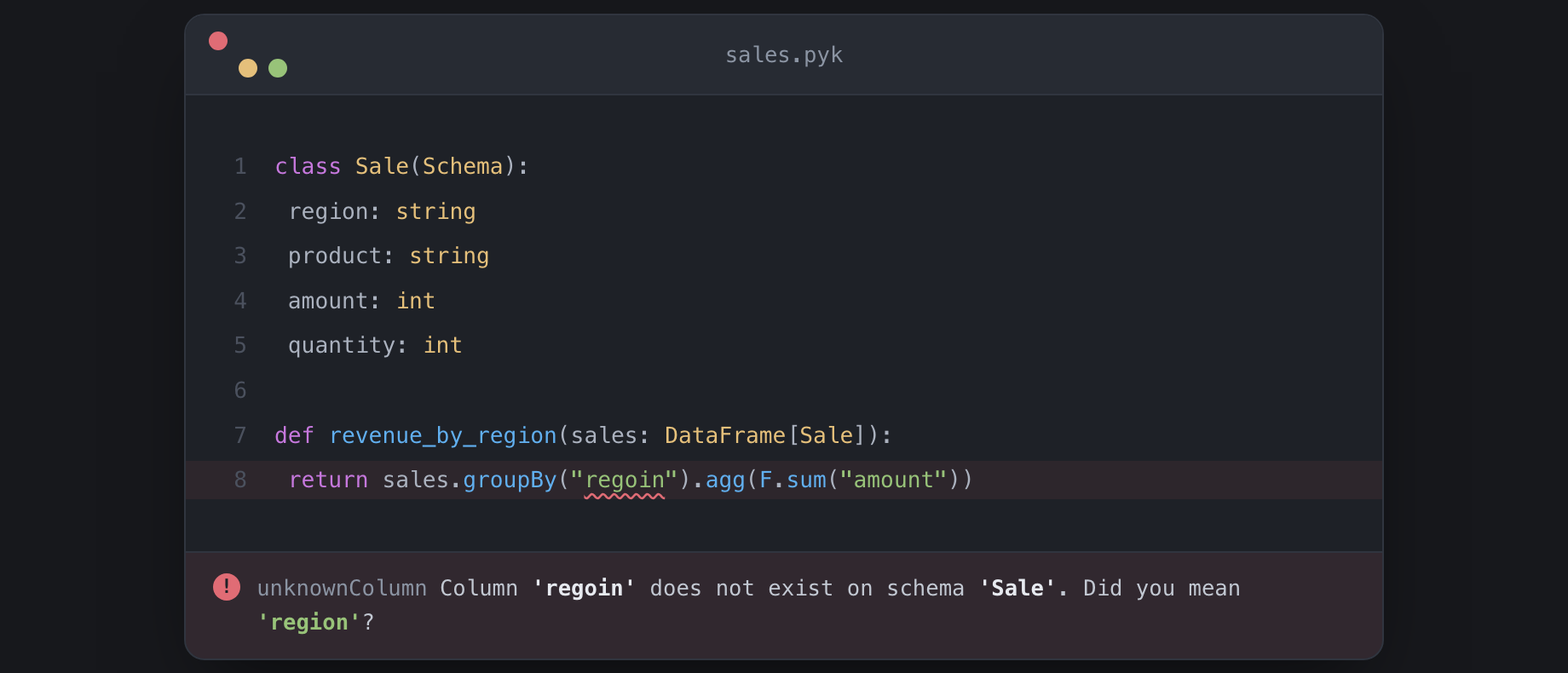
A column typo, caught at edit time.
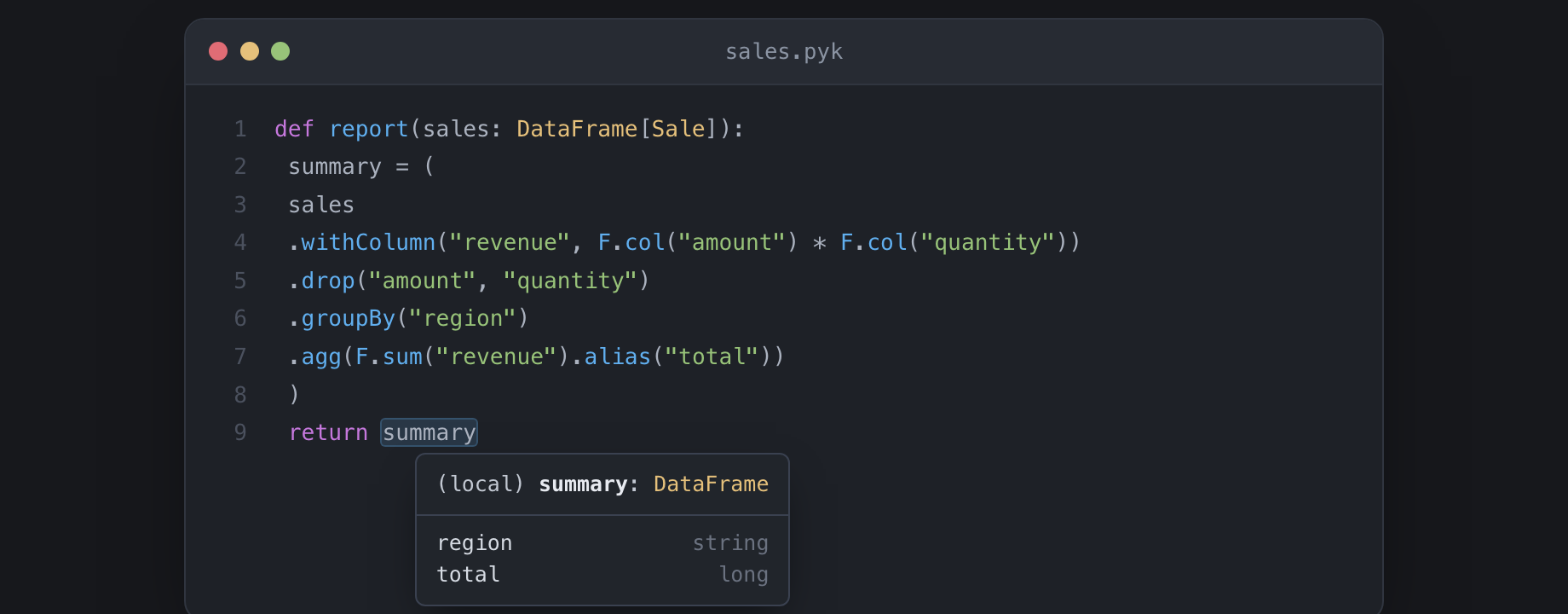
The schema flows through every transform — hover the result to see the derived shape.
What it gives you
Column typos, caught as you type. Every column reference — col("x"), df.x, df["x"], dotted paths into nested structs, string arguments to functions like F.sum("x") — is checked against the schema in scope. A misspelling gets a red underline and a did you mean.
Checks that follow the data. pykrete tracks the schema through select, filter, withColumn, drop, join, groupBy + agg, pivot, union, and the rest. Reference a column three transforms after it was dropped, and the squiggle lands exactly where you used it.
Hover to see a schema. Hover a SparkFrame[…] or PandasFrame[…] parameter and see its columns without leaving the file. Go-to-definition jumps to the schema declaration. (DataFrame[…] is a deprecated alias for SparkFrame[…] and renders the same hover.)
Cross-dialect handoff (v1.5). df.toPandas() re-tags SparkFrame[X] to PandasFrame[X], so a downstream pdf["typo"] still gets the squiggle. spark.createDataFrame(pdf) re-tags back when a schema= keyword or a typed call-arg resolves to a known schema. Pandas .head(10).merge(...) keeps tracking (dialect-gated terminals), and pdf.loc[:, "col"] literal-form lands too.
pykrete migrate + D0090 strict-mode escalation (new in v1.6). pykrete migrate src/ rewrites the deprecated DataFrame[X] alias to SparkFrame[X] or PandasFrame[X] based on call-graph dialect adjudication — each binding's downstream usage is inspected for Spark-only versus pandas-only methods, and mixed-dialect bindings get a # pykrete: ambiguous marker for hand review. Paired atomically with D0090 escalating from warning to error under "typeCheckingMode": "strict" — strict-mode projects get the fix-button in the same release as the breaking-change signal. Pandas pivot_table(index=, columns=, values=, aggfunc=) literal-form column checking ships too. v1.6 also closes the .take() dialect-gate (pdf.take([0, 2]).merge(...) keeps tracking) and the pdf.loc[mask, "col"] nested-arg false positive.
Migrator --check default + pandas melt + Spark-D1 closure (new in v1.7). v1.6 shipped pykrete migrate src/ as an in-place rewrite default; v1.7 flips that to --check (preview verdicts on stdout; exit 1 if any site needs attention). --apply is the new opt-in for the in-place rewrite. A first-run on v1.7 with no flag emits a one-line stderr warning so the change is hard to miss. Pandas df.melt(id_vars=, value_vars=, var_name=, value_name=) literal-form column checking ships as the v1.7 reshape downpayment — typo in any string-literal argument fires D0030 with a did you mean. The v1.6 architecture-audit Important #3 closes with a shared dialect_signals module + a CI-guard test; 14 Spark-only methods (selectExpr, freqItems, approxQuantile, crosstab, colRegex, summary, mapInPandas, mapInArrow, writeTo, writeStream, unpivot, rdd, isStreaming, sparkSession) get added to the discriminator list — corr / cov deliberately excluded for pandas collision risk. pykrete migrate parse-error skips now surface on stderr; CRLF marker normalization lands for Windows source files.
v2.0 deprecation runway + spark-D2 D0091 (new in v1.8). pykrete check --deprecation-report is the JSON envelope inventorying every D0090-firing site with its adjudicated dialect and suggested rewrite — drop it into CI to gate v2.0 readiness without re-parsing diagnostic text. The D0090 message text is amended in lockstep: drops the date-committal "and will be removed in pykrete v2.0" for "slated for removal in a future pykrete v2.0" and names the new --deprecation-report flag inline. The D0091 crossDialectMethodMismatch warning fires when a pandas-only method is called on a Spark receiver (pdf.withColumn(...), pdf.selectExpr(...)) or a Spark-only method on a pandas receiver (sdf.assign(...), sdf.merge(...)), with a use .x(...) instead suggestion for the high-traffic pairs.
v2.0 migration plannability + D0091 maturity (new in v1.9). pykrete check --deprecation-report bumps to envelope "2" with per-site migrationStatus (pending / acknowledged) driven by a # pykrete: ack-deprecation comment marker, plus a --ack=<pending|acknowledged> filter for site-by-site CI gating: pykrete check --deprecation-report --ack=pending src/ exits non-zero with the unacked-site inventory; --ack=acknowledged runs the inverse for regression checks. The envelope deliberately ships without targetVersion / removalVersion / shipDate — pykrete tracks per-site progress; you pick the v2.0 ship date. D0091 matures: strict-mode escalation lands ("typeCheckingMode": "strict" → error, mirroring the v1.6 D0090 precedent), a suggestion drift guard pins the cross-dialect suggestion table at build time, a shape_changes hint appends "— note arg shape differs" to asymmetric mappings (withColumnRenamed → rename, assign → withColumn), and a NEW bare-attribute inference arm catches pdf.rdd, sdf.loc, pdf.iloc, sdf.toPandas (bare, no call) — new property tables SPARK_DISCRIMINATOR_PROPERTIES + PANDAS_INHERITED_PROPERTIES drive the gate. The v1.8 build.rs-generated inventory tripwire is now backed by CI-running tests via an extracted build_helpers.rs module.
v2.0 migration archivability + D0091 surface completion + pandas stack (new in v1.10). pykrete check --deprecation-report --snapshot=<path> writes the v2 envelope to disk via atomic tempfile-plus-rename so CI can persist a prior-report cache and diff between releases. --fail-on-nonempty exits non-zero when sites is non-empty — drop pykrete check --deprecation-report --fail-on-nonempty src/ into CI to fail on any unacked site without the jq | test boilerplate. D0091 surface completes: SPARK_DISCRIMINATOR_PROPERTIES adds na, write, writeStream, storageLevel (closes v1.9 spark-I1); PANDAS_INHERITED_PROPERTIES adds index, values, shape, T (closes v1.9 spark-I2) — both via the v1.9 bare-attribute path. Pandas df.stack(level=, dropna=) literal-form lands as the v1.10 reshape arm (continuing the one-per-cycle cadence from v1.6 pivot_table and v1.7 melt); receiver-dialect-gated to fire only on PandasFrame[X] receivers because Spark's stack is a column-free-function.
Pandas unstack + v1.10 D0091 cross-codebase carve-out closes + audit-tooling block (new in v1.11). Pandas df.unstack(level=, fill_value=) literal-form lands as the v1.11 reshape arm — mirror of v1.10 stack, continuing the one-arm-per-cycle cadence. Receiver-dialect-gated to PandasFrame[X]; literal level= resolves against the receiver schema and fires D0030 on a typo. The v1.10 PR-D1 carve-out closes: cross-codebase property probes for the 8 v1.10 D0091 properties (na, write, writeStream, storageLevel, index, values, shape, T) ship in pykrete-tests PR-P1 #39. The audit-tooling block lands (scripts/trust-claim-sweep-checklist.sh + scripts/changelog-cite-check.sh + .github/workflows/auto-label-release-pr.yml) — devs run the sweep checklist locally before opening PR-F; CI-side release-gate label-trigger wiring tracked for v1.12.
D0080 cross-codebase trust + GITHUB_TOKEN calendared promise closure + pivot_table(aggfunc=) allowlist (new in v1.12). v1.12 closes the v1.11 calendared GITHUB_TOKEN promise: the auto-label workflow now dispatches release-gate.yml via the actions.createWorkflowDispatch API, bypassing GitHub's GITHUB_TOKEN cross-workflow no-trigger rule so the release-gate fires non-skipped on labeled PR events end-to-end. D0080 returnTypeMismatch cross-codebase trust coverage lands (pykrete-tests PR-P1 #42) — the longest-standing trust gap since v1.6 closed (dialect-on-return is a checker carve-out deferred to v1.13). Pandas pivot_table(aggfunc=) literal-form recognition lands against an 11-string allowlist (sum / mean / count / min / max / median / std / var / first / last / nunique); recognition is informational (no diagnostic; result schema unchanged) and primes v1.13+ aggfunc-driven inference. Multi-line ack-marker rationale block per spec §6.1.4: # pykrete: ack-deprecation (shape b) now extends acknowledgement to the entire contiguous comment block above the anchor — a behavioral change versus v1.10's strict-single-line semantic; adopters with ack-deprecation tooling should update.
D0080 dialect-on-return + pivot_table aggfunc schema inference (new in v1.13). A function annotated -> SparkFrame[X] returning a .toPandas() chain now fires D0080 with a dedicated dialect-mismatch message at error severity — the longest-standing 7-cycle correctness gap closes. Pandas pivot_table(aggfunc=) result schema is no longer Unknown when aggfunc= is a recognized string and values= carries literal columns — it synthesizes a Derived envelope with the named columns at the aggregate-driven dtype (count / nunique → int64; mean / std / var / median → float64; sum / min / max / first / last preserve the receiver column's type). Adopters that accidentally accessed non-values= columns post-pivot_table will see new D0030 fires — use .reset_index() first to access index= / columns= arg values as columns.
D0080 constructor carve-out closed + groupby.agg Derived synthesis + --compare-to diff (new in v1.14). D0080's last carve-out closes: -> SparkFrame[X] returning pd.DataFrame({...}), or -> PandasFrame[X] returning spark.read.parquet(path), now fires D0080 — and spark.createDataFrame(rows, schema=<Schema>) fires when the dialect disagrees with the annotation. Adopters with cross-dialect constructor returns at function boundaries will see new D0080 fires. When both dialect and column-type mismatches land on the same return, the message is multi-clause (one fire, two clauses) — CI greps for "two D0080 fires at the same range" need to adjust. Pandas df.groupby(...).agg("sum") synthesizes a Derived envelope mirroring pivot_table(aggfunc=): group keys plus the non-key columns at the aggregate-driven dtype (count / nunique → int64; mean / std / var / median → float64; sum / min / max / first / last preserve). v1.14 ships the single-string form; the dict and callable forms land in v1.16. The new pykrete check --deprecation-report --compare-to=<prior.json> flag emits a SIMPLE three-bucket diff (added / removed / unchanged) with exit-nonzero on added; mutually exclusive with --ack / --snapshot / --fail-on-nonempty. The envelope round-trips a v2 provenance pair (pykreteSourceCommit + generatedAt) so CI artifacts carry author-pinpointing metadata.
Pandas chain-depth extension + synthesis-arm cross-codebase coverage closure + resolve_override_ty primitive (new in v1.15). The v1.14 groupby.agg Derived envelope now survives one more transform: pdf.groupby("k").agg("sum").reset_index(drop=True) keeps the synthesized envelope alive, and pdf.set_index([literal-keys]) removes the named literal-key columns from the accessible schema. Adopters who incorrectly accessed non-aggregate columns after groupby.agg().reset_index(drop=True), or who accessed literal keys after set_index([keys]), will see new D0030 fires — align downstream code with the synthesized schema or access keys via .index (not modeled; reset_index(drop=False) index-as-column promotion is a v1.17 deferral). The v1.14 synthesis-arm cross-codebase coverage gaps close in pykrete-tests PR-P1 #50. The dtype-override family (shared between pivot_table(aggfunc=) and groupby.agg) consolidates behind the new resolve_override_ty primitive in preparation for the window-aggregation arms (the Windowed lattice variant was evaluated and rejected in v1.16 in favor of direct-chain recognition; deferred to v1.17).
Time/window aggregation + dict & callable groupby.agg (new in v1.16). df.resample("<rule>").agg("<fn>") now synthesizes a Derived schema instead of falling through — columns follow the aggregate-to-dtype table (count / nunique → Long; mean / std / var / median → Double; sum / min / max / first / last preserve the receiver column's dtype). df.rolling(<n>).agg("<fn>") aggregates numeric columns to Double, with aggfuncs restricted to count / sum / mean / std / var / median / min / max. groupby.agg gains its dict form ({col: fn}, which keeps only the named columns plus group keys) and its callable form (np.mean, len, which on an all-numeric frame keeps keys plus every non-key column at Unknown dtype). Only the single-expression .agg("<str>") spelling is recognized on the window chains — direct-method df.resample("M").sum(), held-intermediate chains, and non-string aggfuncs still fall through silently.
v1.16 also makes the checker quieter where pandas itself raises. Named-aggregation df.groupby(k).agg(out=(col, fn)) was a false positive through v1.15 — it synthesized a keys-only schema and fired a bogus returnColumnsMismatch on correct code — and now declines to Unknown (precise modeling lands in v1.17). Numeric-restricting aggregation (mean / std / var / median, a rolling aggregation, or an opaque callable) over a frame with a non-numeric column also declines: pandas 2.x raises TypeError / DataError there rather than silently dropping the column the way pre-2.0 pandas did, so pykrete does not synthesize a schema for code that errors at runtime. And reset_index(inplace=True) / set_index(inplace=True) now resolve to None, matching pandas — adopters who chained off an inplace=True result were relying on a schema pandas never returns; drop inplace=True and rebind. Adopters who accessed columns dropped by a dict-form groupby.agg will see new D0030 fires.
Autocomplete for column names. Type a column name in a string argument and pykrete completes the ones that actually exist on the dataframe in scope.
Quick-fixes. When pykrete flags an unknown column with a did you mean suggestion, the lightbulb action swaps in the closest matching name.
Full Python support, included. The extension bundles a Python language server, so you also get ordinary Python hover, completion, go-to-definition, find-references, and type diagnostics — for free, in the same extension. Nothing else to install, no files.associations, no configuration.
Requirements
The extension needs the pykrete-lsp binary on your PATH. Install it via any of:
- Homebrew (macOS / Linux):
brew install amirnaderi93/pykrete/pykrete
- Windows: download the MSI from the latest release
- From source (Rust ≥ 1.95):
cargo install --git https://github.com/amirnaderi93/pykrete pykrete pykrete-lsp
Each installs both pykrete and pykrete-lsp. Homebrew and the MSI put the binary on your PATH automatically. Full options in the install guide.
The bundled Python language server runs on Node.js. If node isn't on your PATH, pykrete's schema features still work fully — only the general Python features are unavailable.
Install the extension
- VS Code — search pykrete in the Extensions panel, or run
code --install-extension amirnaderi.pykrete.
- Cursor / VSCodium / code-server / Theia — search pykrete in the Extensions panel (served from the Open VSX Registry).
- Offline / locked-down environments — every pykrete release attaches a
.vsix; install it with Extensions panel → ⋯ → Install from VSIX…
Open a .pyk file and the checks start immediately. Have existing PySpark .py files? Rename one to .pyk — it's a strict superset of Python, so the file still runs unchanged. The quickstart walks through it in five minutes.
Settings
| Setting |
Purpose |
pykrete.serverPath |
Path to the pykrete-lsp binary. Defaults to discovering it on PATH (and the workspace target/ directory, for contributors). |
pykrete.pythonServer.path |
Path to a basedpyright-langserver / pyright-langserver binary, to use instead of the bundled Python engine. |
Project behavior — type-checking strictness, excluded paths, per-rule severity — is configured with a pykrete.json file; see Configuration.
Links
Development
To build the extension from source:
npm install        # also fetches the bundled Python engine (~40 MB)
npm run compile    # one-shot; `npm run watch` rebuilds on save
npx vsce package   # produces a .vsix
During development the extension finds pykrete-lsp in the workspace's target/release/ directory — run cargo build --release -p pykrete-lsp from the repo root first.
MIT licensed.

