Pogo for VS Code
Runtime-aware completion, hover, diagnostics, signatures, and navigation for the Django ORM.
What Pogo Adds
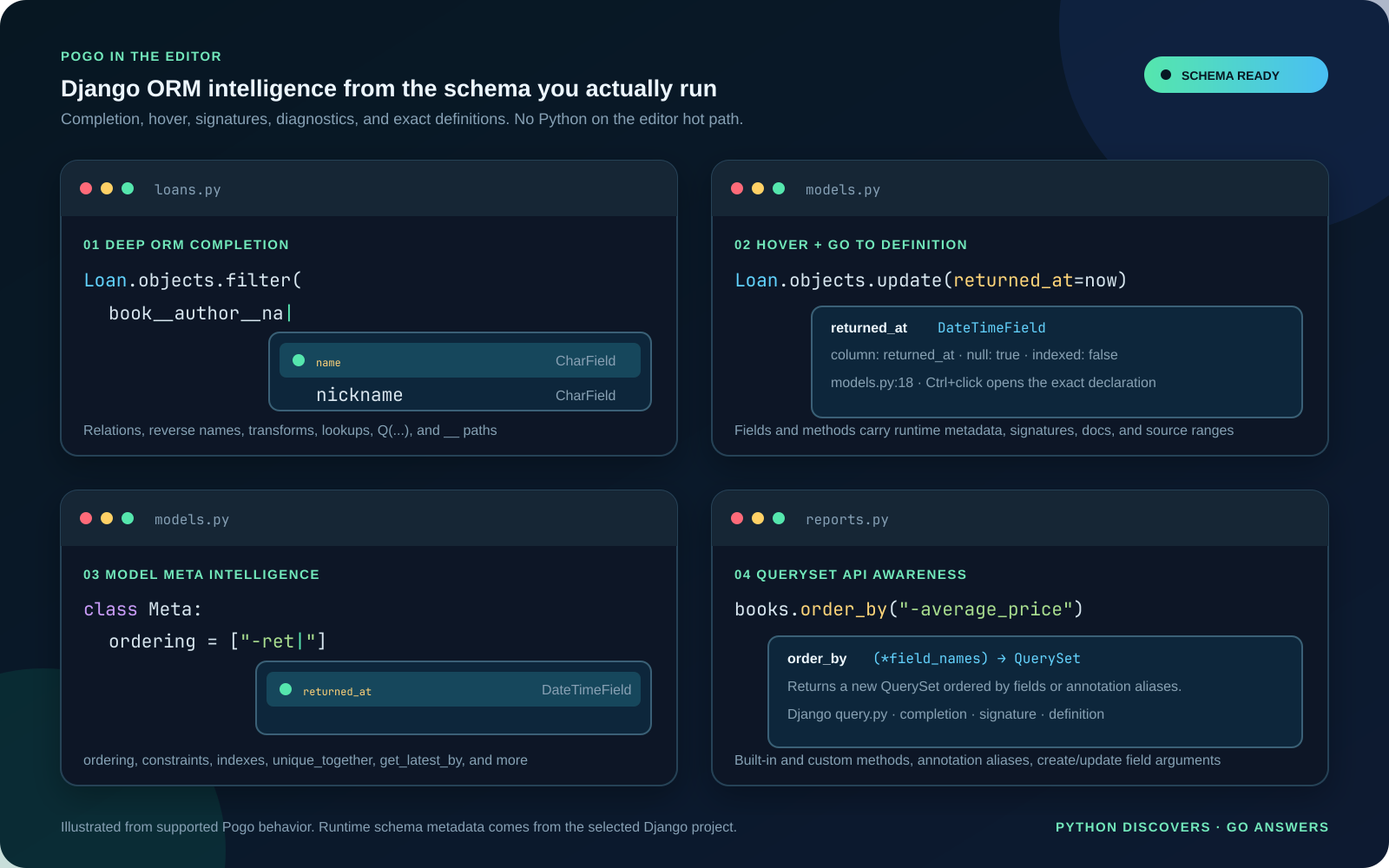
Pogo adds Django ORM completion, model Meta field completion, hover
information, signature help, diagnostics and exact definitions to Python files.
It completes runtime model fields in Meta options such as ordering,
unique_together, get_latest_by, UniqueConstraint(fields=[...]), and
Index(fields=[...]), plus Django built-in and custom QuerySet methods.
Field intelligence also covers filter, exclude, get, get_or_create,
update_or_create, create, update, Q(...), order_by, values,
values_list, earliest, latest, dates, and datetimes. The extension
automatically retriggers suggestions after __ inside single-line Python
strings.
- Follow relation, reverse-accessor, transform, and lookup paths through
__.
- Complete and navigate field names in
Q(...), create/update calls, ordering,
constraints, indexes, projections, and related loading.
- Explore built-in and custom QuerySet APIs with cached signatures and docs.
- Catch invalid ORM paths before they reach a request or background task.
- Complete, hover, and navigate static DRF
ModelSerializer field lists,
configuration keys, and dotted model-backed source strings. See the
serializer support and scope.
Get Started
Install the extension, select the project's Python environment in VS Code, and
open a trusted Django workspace. The extension includes Pogo for supported
Linux, macOS, and Windows extension hosts; no separate server installation is
needed. For a local source build, Pogo: Executable Path can override the
bundled server.
Configuration
| Setting |
Behavior |
| Pogo: Project Root |
Overrides the Django project root for settings discovery, imports, and the worker's working directory. Relative paths resolve from the workspace folder; empty uses that folder. Interpreter and environment-file paths remain workspace-relative. |
| Pogo: Executable Path |
Optional source-build or custom-server override. When empty, the extension uses its bundled server. |
| Pogo: Python Path |
Overrides the Django worker interpreter. When empty, Pogo uses VS Code's active Python environment, then the workspace .venv. |
| Pogo: Settings Module |
Overrides settings discovery. Otherwise Pogo checks an explicitly configured worker DJANGO_SETTINGS_MODULE, the literal manage.py setting, then one unambiguous immediate */settings.py. Ambient editor settings are not used. |
| Pogo: Env File |
Names an explicit worker environment file. Relative paths resolve from the workspace; no .env file is discovered automatically. |
| Pogo: Environment |
Supplies nonsecret worker literals. Strings replace file values and null removes file values. |
The Django worker starts with an empty application-variable baseline except for
the coordinator's snapshotted PATH, which lets normal imported tools locate
executables such as Git without Pogo-specific settings. Pogo
loads Pogo: Env File, applies Pogo: Environment, and finally adds its
private runtime values. It does not invent a SECRET_KEY, database URL,
settings module, or fallback database. Explicit worker PATH configuration
replaces the inherited default when a project needs tighter control.
Use an ignored, permission-restricted .env.pogo for secrets and commit a
value-free .env.pogo.example listing required keys. Pogo warns if the selected
file is group- or world-readable on POSIX. The server snapshots the file once;
restart Pogo or reload the window after editing it. Literal environment values
cross LSP initialization and can appear in LSP traces, so they are not
appropriate for secrets.
The Go coordinator naturally inherits the extension host environment. Only its
snapshotted PATH, not its other application variables, is forwarded to Django.
Worker isolation is not a sandbox:
trusted project imports still run with the user's filesystem and network
permissions.
Pogo starts Django to load the runtime model schema. Only use it with projects
you trust. Full binary installation and troubleshooting instructions are in
the Pogo product manual.

