AELM — Agent-native Electronic Layout Markup
Design circuits with code, not clicks. Edit a .aelm file and the schematic renders live, side-by-side, in VS Code.

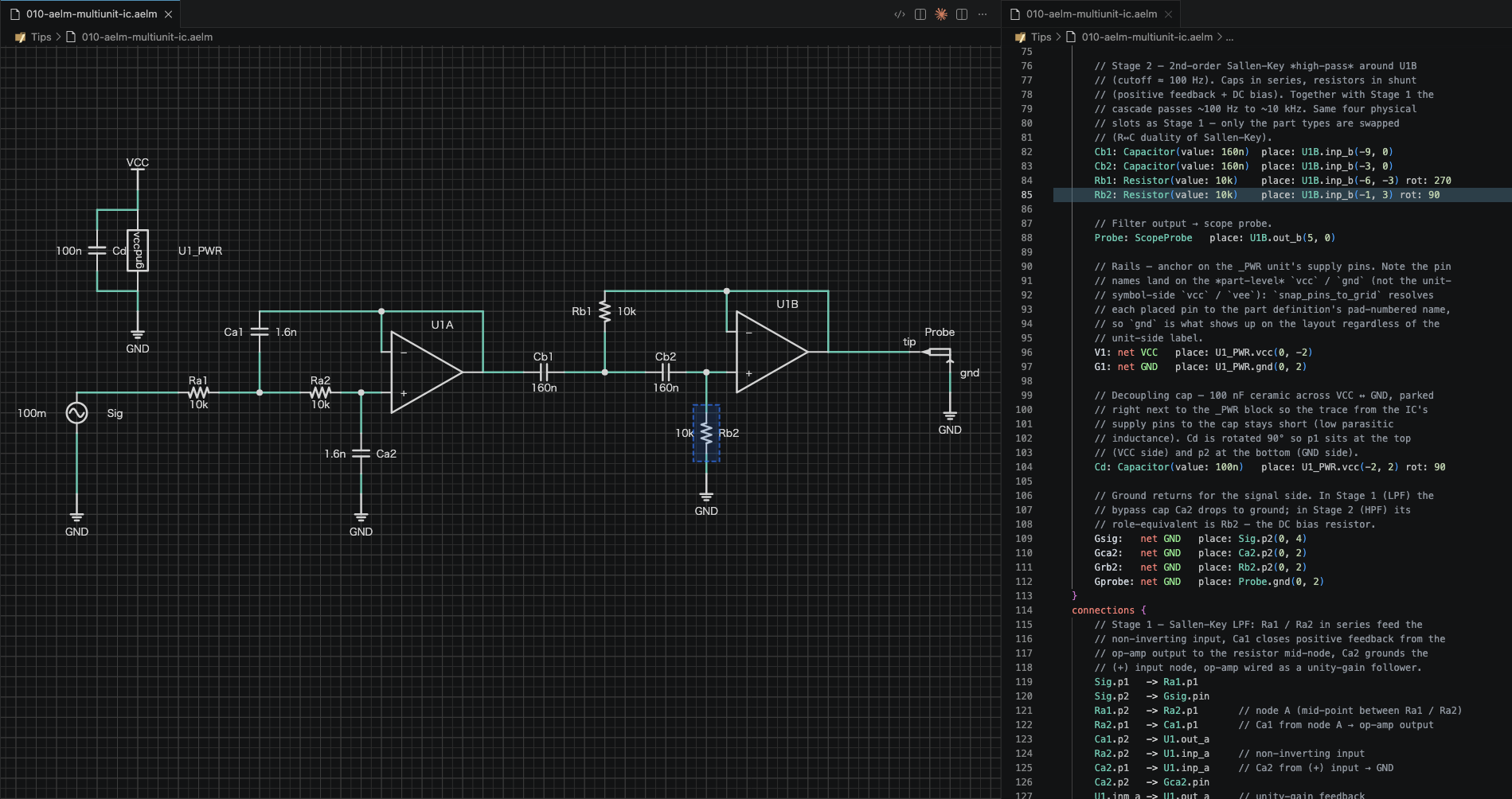
What you get
- A compact DSL for schematics — parts, pins, connections, and placement hints.
- A live schematic preview that updates on every keystroke.
- Git-friendly source files — every change is a text diff.
- A format that LLMs and AI agents can read, edit, and generate reliably.
- SVG / PNG export for docs, slides, and reports.
- Built-in LSP: diagnostics, hover docs, completion for parts, pins, and nets.
- A standard parts library (resistors, capacitors, transistors, power symbols, connectors, op-amps, logic gates, flow / block diagram symbols) with 35+ built-in schematic symbols.
Who it's for
- Hardware designers who want schematics to live next to firmware in the same repo, with diffable history.
- Docs and tutorials where a textual circuit source is easier to maintain than a binary schematic file.
- Agentic workflows where a language model needs to read a design, propose a change, and write back a correct edit.
- Anyone who prefers code-review-able circuits over clicking through a GUI.
Quick start
- Install the extension.
- Create a file ending in
.aelm.
- The schematic opens in the circuit editor next to your code. Type, watch it render.
Example: a minimal circuit
part Resistor {
    pins {
        a: passive @1
        b: passive @2
    }
    symbol: resistor
}

module Divider {
    instances {
        R1: Resistor(value: 10k) place: (0, 0)
        R2: Resistor(value: 10k) place: R1.b(0, -10)
    }
    connections {
        R1.b -> R2.a
    }
}
More examples live at https://github.com/alphaelements/aelm/tree/main/examples.
File types
| Extension |
Purpose |
.aelm |
Schematic / circuit source |
.alib |
Parts library (reusable part definitions) |
.astyle |
Visual styling (colors, widths, grid) |
.aproj |
Project config (library paths, defaults) |
Commands
Open the command palette and type AELM: to see them all.
| Command |
What it does |
AELM: Show Side by Side |
Code + diagram in parallel |
AELM: Show Diagram Only |
Full-screen schematic |
AELM: Show Code Only |
Back to text editor |
AELM: Export as SVG |
Save the diagram as SVG |
AELM: Export as PNG |
Save the diagram as PNG |
AELM: Zoom to Fit |
Fit the schematic to the viewport |
Context-menu actions (right-click a component in the diagram): rotate, mirror, lock, delete, drill into sub-modules.
Documentation
AI integration (MCP)
The aelm-mcp server exposes
Aelm's parsing, validation, rendering, and analysis as
Model Context Protocol tools — so AI
assistants (Claude Code, Claude Desktop, Cursor, ...) can design, review,
and debug circuits conversationally.
Setup
1. Install the Aelm CLI — download from
GitHub Releases
(Linux, macOS, Windows) and place it on your PATH:
# Linux x86_64
curl -LO https://github.com/alphaelements/aelm/releases/latest/download/aelm-v0.5.1-x86_64-linux.tar.gz
tar xzf aelm-v0.5.1-x86_64-linux.tar.gz
sudo cp aelm-v0.5.1-x86_64-linux/aelm /usr/local/bin/

# macOS (Apple Silicon)
curl -LO https://github.com/alphaelements/aelm/releases/latest/download/aelm-v0.5.1-aarch64-macos.tar.gz
tar xzf aelm-v0.5.1-aarch64-macos.tar.gz
sudo cp aelm-v0.5.1-aarch64-macos/aelm /usr/local/bin/

# Windows — download aelm-v0.5.1-x86_64-windows.zip from the release page
# and add the extracted directory to your PATH.
2. Install the MCP server:
cargo install --git https://github.com/alphaelements/aelm-mcp
3. Configure your AI client:
# Claude Code
claude mcp add aelm -- aelm-mcp --working-dir /path/to/your/project
See the aelm-mcp README for
Claude Desktop, Cursor, and other client configurations.
Status
Preview release. The language and editor are usable for real circuits today; the format is stabilising. Breaking DSL changes will be noted in the changelog.
Requirements
Links

