
Claude Code Usage Time MarkerTime marker for Claude Code session and weekly usage. Shows whether you are over or under an even pace. Installation Launch VS Code Quick Open ( Ctrl+P), paste the following command, and press enter.Copied to clipboard |

Claude Code Usage Time MarkerSee how much of your Claude Code limits you have used, and whether you are spending them faster or slower than an even pace. This is an unofficial extension. It is not affiliated with or endorsed by Anthropic. 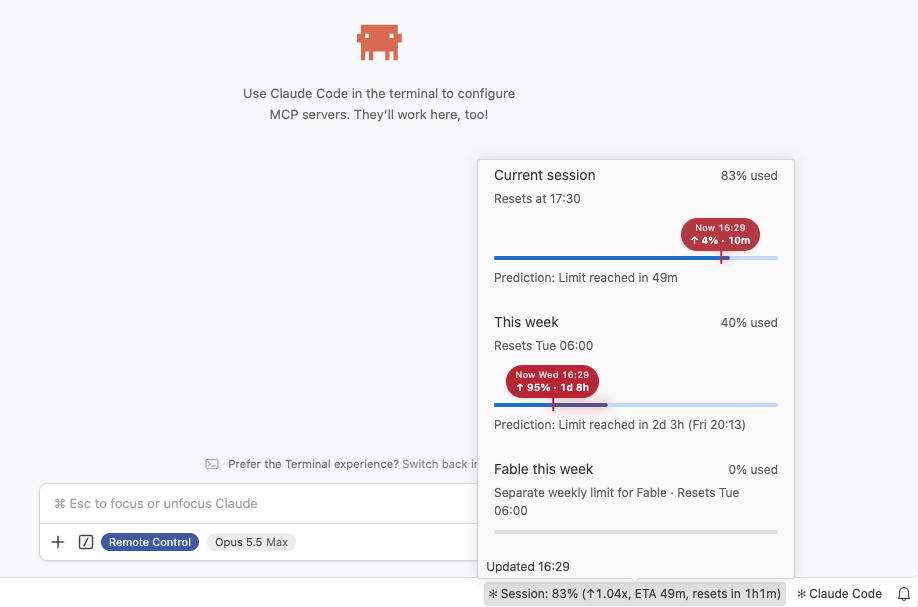
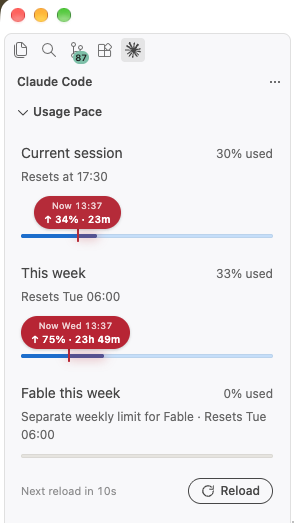
Where to find itThe view lives inside the sidebar of the official Claude Code extension. It adds no icon of its own.
You do not have to open the sidebar. Hover over the status bar entry of this extension and the same bars appear in a popover. If the section is missing, run Claude Code Usage Time Marker: Show from the Command Palette or click the status bar entry of this extension. You can drag the section to another sidebar or to the panel. What it showsView "Usage Pace". One bar per limit: the current session, the week, and model-specific weekly limits if your plan has them. It is laid out like the usage page on claude.ai. Under each bar stands a prediction. It assumes you go on at the average rate of this window so far. Over pace, it says when the limit is reached, for a week with the day and the time. Under pace, the reset comes first, and it says how much is used by then: Status bar. One entry with the session and the week: After the share you have used, the parentheses hold:
In the settings you can leave out the session or the week, and put together what stands in parentheses. Each part has its own setting:
Two more settings change how it is written: a dot instead of the comma, and a space after the arrow and inside a time. A few of the entries you can get: Hover over the entry to see the same bars as in the view. Click to open the view. The gear at the top right of the popover opens the settings of this extension. At its bottom the popover says how long ago the numbers were reloaded ( How to read the markerEach bar has a marker. It stands where your usage would be right now if you spent the limit evenly over its window. The label above it tells you how far you are from that point. Example: you have used 31% of the session, but only 16% of the five hours have passed. The label reads
A bar with nothing used has no marker. Requirements
Tested on macOS. Windows and Linux are untested. Where the numbers come fromThe extension asks the Claude Code program that ships inside the official extension. It sends the same request that feeds the "Account & Usage" panel there.
The numbers refresh every 60 seconds, also while VS Code is in the background. Claude Code keeps an answer for one minute, so a shorter interval would only repeat the same numbers. With several windows open, only one of them asks and the others reuse its answer. This request is undocumented, and Anthropic marks it as experimental. A Claude Code update can change it. If that happens, the view shows a message instead of the bars until this extension is updated. Claude Code itself is not affected: the extension only reads. SettingsThe gear in the popover of the status bar entry takes you there, and so does Claude Code Usage Time Marker: Settings in the Command Palette.
LicenseMIT |