Overview Version History Q & A Rating & Review
Deepseek Commit Message
使用 DeepSeek 根据当前工作区暂存区 (staged)的 git 变更自动生成符合
Conventional Commits 规范的 commit message,
摆脱对 Copilot 内置 commit 功能不稳定、经常失效的依赖。
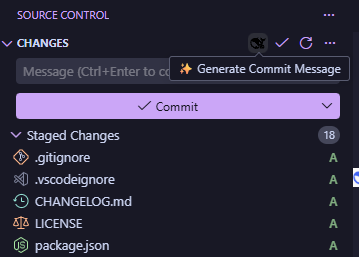
预览
功能特性
🎯 一键生成:在 SCM(源代码管理)面板点击 ✨ Generate Commit Message 按钮,
自动读取暂存区 变更并调用 DeepSeek 生成 commit message,填充到输入框。
(如需包含未暂存修改与未跟踪文件,可将 deepseekCommitMessage.changeScope 设为 all。)
📐 超大变更自动采样:变更内容超过预算上限时不简单截断,而是按文件比例采样
(每个文件至少保留一段、diff hunk 保持完整),并附全量文件统计,兼顾细节与全貌。
⚙️ 可视化配置:模型、提示词模板均可在 VSCode 设置面板中配置。
🔐 安全存储:API Key 通过命令保存到系统凭据库(SecretStorage),不落盘到 settings.json。
🧩 预设模板:内置英文 / 中文两套 Conventional Commits 提示词,也支持自定义。
🧠 动态模型:通过 DeepSeek GET /models 接口拉取可用模型列表,接口不可用时回退到内置默认(deepseek-v4-pro / deepseek-v4-flash),也支持手动输入任意模型 ID。
📊 用量统计:累计记录每次成功生成的 token 用量(prompt / completion / reasoning),状态栏常驻显示,命令可查看明细。
快速开始
设置 API Key:Ctrl+Shift+P → DeepSeek Commit Message: Set API Key。
(API Key 可在 https://platform.deepseek.com 申请)
API Key 安全保存在系统凭据库(SecretStorage)中,不写入 settings.json。
(可选)选择模型:DeepSeek Commit Message: Select Model。
打开任意 git 仓库,先 git add 暂存要提交的变更 ,然后点击 SCM 面板的 ✨ Generate Commit Message 按钮,
或执行 DeepSeek Commit Message: Generate Commit Message。
命令
命令
说明
DeepSeek Commit Message: Set API Key设置 DeepSeek API Key
DeepSeek Commit Message: Clear API Key清除已保存的 API Key
DeepSeek Commit Message: Select Model从接口动态选择或手动输入模型 ID
DeepSeek Commit Message: Set Prompt选择/自定义提示词模板
DeepSeek Commit Message: Generate Commit Message生成 commit message 并填充到 SCM 输入框
DeepSeek Commit Message: Show Token Usage查看累计 token 用量(状态栏也可点击查看)
DeepSeek Commit Message: Reset Token Usage重置当前 API Key 的累计 token 用量(需确认)
配置项
配置键
类型
默认值
说明
deepseekCommitMessage.modelstring
deepseek-v4-flash任何 DeepSeek 支持的模型 ID
deepseekCommitMessage.promptTemplateenum
conventionalconventional / conventional-zh / custom
deepseekCommitMessage.promptstring
""自定义提示词(custom 模板时生效)
deepseekCommitMessage.requestTimeoutnumber
120000请求超时(毫秒)
deepseekCommitMessage.maxRetriesnumber
2瞬时错误重试次数(0–5)
deepseekCommitMessage.maxDiffCharsnumber
40000发送给模型的变更内容上限(字符),超出后按比例采样
deepseekCommitMessage.changeScopeenum
stagedstaged(仅暂存区,默认)/ all(含未暂存与未跟踪)
API Key 不通过配置面板暴露,而是通过 Set API Key 命令安全存储于系统凭据库(SecretStorage)。
常见问题
生成的 message 会自动提交吗? 不会。结果只填充到 SCM 输入框,可手动修改后再提交。只基于暂存区吗?未暂存的修改会包含吗? 默认**只基于暂存区(staged)**变更生成。
如需同时包含未暂存修改与未跟踪文件,将 deepseekCommitMessage.changeScope 设为 all。变更特别大时怎么办? 超过 deepseekCommitMessage.maxDiffChars(默认 40000 字符)时,
扩展不会截断内容,而是按文件比例采样:每个变更文件至少保留一小段、diff hunk 完整,
并附加全量文件统计,保证既不超模型上下文、又不丢失尾部变更。仍建议大改动分批提交。API Key 存在哪里? 通过 Set API Key 命令保存在系统凭据库(SecretStorage),不写入 settings.json。如何更换或清除 API Key? 执行 DeepSeek Commit Message: Clear API Key 清除后再重新设置。选了中文模板仍是英文? 请通过 Select Model 切到 deepseek-v4-pro(推理更强、约束遵循更稳),或重新点击生成一次。