
zhao: dbt Companion
A companion VS Code extension for zhao-cli: a
depth-scoped, diff-aware dbt lineage view, a live data preview, and a compiled-code viewer,
all docked right in your editor.
Free and open source (Apache 2.0). No dbt Cloud connection required, no network calls of any
kind -- it runs zhao-cli locally and reads the JSON it writes, the same way you'd run it from
a terminal.
What it does
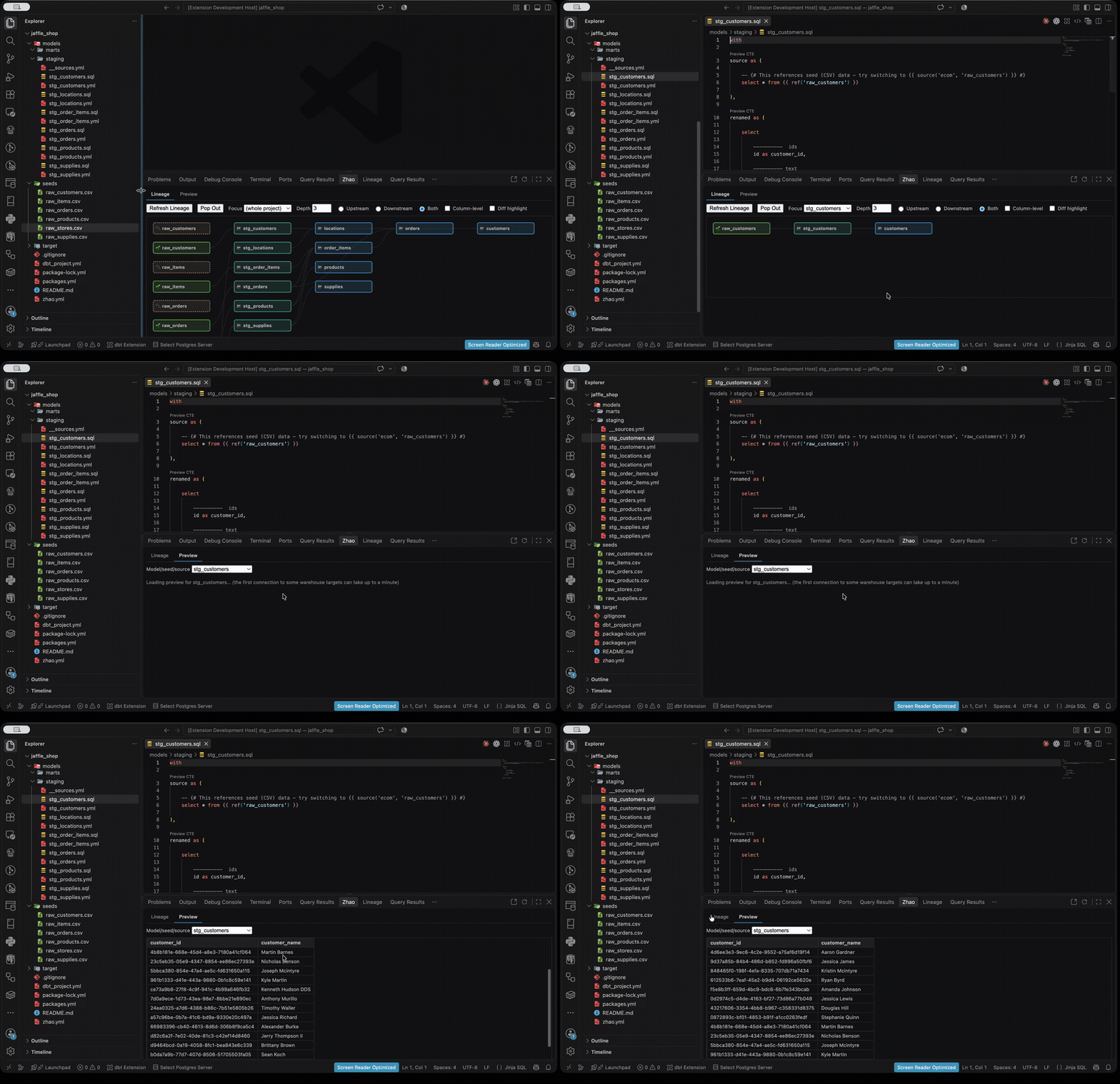
Lineage panel, docked alongside your Terminal/Output/Debug Console tabs (poppable into a
full editor tab for a denser graph). Auto-detects which model the file you have open belongs
to, and shows a depth-and-direction-scoped view of its upstream/downstream lineage -- adjust
either directly in the panel, no re-running a command by hand.
Column-level lineage, toggled on top of the model-level graph, for tracing a specific
column's provenance.
Preview tab: right-click any model, seed, or source in the graph and choose "Preview Data"
to see a live, row-capped preview of its query results, right next to the lineage view -- works
on both classic dbt-core and dbt Fusion projects, and respects your project's own dbt
wrapper/--vars/--target configuration the same way the lineage compile does. The default
row cap is configurable via zhao-cli's zhao.yml.
Open Model File, also from the right-click menu, jumps straight to a node's .sql/.csv
source.
View Compiled Code, also from the right-click menu, opens a model's compiled SQL as a
read-only tab -- compiling first if nothing's been compiled yet this session. Locates the file
via the compiled manifest itself, not a hardcoded folder guess, so it works the same way on
classic dbt-core and dbt Fusion projects. Flags a possibly-stale result if the source has
changed since the last compile.
Node icons and color-coding: each node shows an icon for its kind (model/source/seed) and a
color for its materialization (table/view/incremental/ephemeral), so a large graph is scannable
at a glance instead of a wall of identical boxes.
Diff highlighting: see which models were actually changed on your current branch, and
which downstream models are genuinely reached by that change -- the same data zhao check/
zhao diff already compute in CI, now visible before you even open a PR.
Recommended command: with diff highlighting on and zhao.yml's
recommended-command.subcommand
set, a ready-to-run command rebuilding exactly the impacted models appears in the panel --
Copy it, or Run in Terminal to have it typed into your integrated terminal (using your
real shell, aliases and all) without being executed for you. zhao-cli computes the command;
the extension never does, and nothing runs without you pressing Enter yourself.
Settings sidebar: which dbt project is active (auto-detected in a monorepo, always
overridable via a searchable picker -- built for monorepos with many dbt projects, not just
one or two) and which profile target zhao compiles against, remembered per workspace.
Switching projects defaults the target to that project's own first available one, from its own
profiles.yml, rather than leaving a stale target picked for a different project.
Isolated compiles: every compile this extension triggers writes to a temp directory, never
your project's real target/ -- it can't collide with a dbt run you triggered yourself.
Refreshing is an explicit action by default; auto-refresh-on-save is available as an opt-in
setting.
zhao.yml setup wizard, run via a "Set Up zhao.yml" banner in the settings sidebar when
none is found: asks for dbt-command (the one setting that's actually required), auto-detects
your repo's default branch for against, and writes every other option as a commented,
self-documenting example rather than guessing values for you. Choose whether it's written at
the repo root (an org-wide default) or your current project's directory (an override layered
on top of the root, per zhao-cli's own config-resolution rules).
Environment variables for dbt: many dbt projects need environment variables just to run --
env_var('SF_ACCOUNT') in profiles.yml, one project reused across many clients. Define them
in .vscode/zhao.json (see below) and the extension passes them to every zhao/dbt process it
runs. The zhao sidebar lets you add, edit and delete them, group them into named sets (one per
client or environment) and switch the active set with a dropdown. Secrets are masked (with an
eye toggle to reveal), and a warning tells you if a secrets file isn't git-ignored. Changing the
environment marks the lineage stale ("Environment variables changed") rather than recompiling on
its own.
Environment variables
Two files under the workspace folder's .vscode/, sharing one schema (with validation and
autocomplete built in):
zhao.json: safe to commit.zhao-secret.json: same shape, layered on top, meant to be git-ignored. Ticking Secret in
the sidebar writes a variable here instead of zhao.json.
{
  "envFile": ".env",                       // optional; a path or an array of paths
  "env": { "DBT_THREADS": "4" },           // applies always
  "sets": {                                // named sets; pick the active one in the sidebar
    "client-a-prod": {
      "envFile": ".env.client-a",          // optional, per set
      "env": {
        "SF_ACCOUNT": "acme",
        "SF_PASSWORD": "${env:CLIENT_A_SF_PASSWORD}"  // passthrough: commit the name, not the value
      }
    }
  }
}
${env:NAME} reads VS Code's own environment (a VS Code launched from the macOS Dock does not
see variables exported in your shell profile; one started with code . does). ${OTHER} reads
another variable in the same configuration. Anything unresolved is flagged, not silently empty.- Precedence, highest first: the active set's
.env files, base .env files, zhao-secret.json
active set, zhao.json active set, zhao-secret.json base, zhao.json base, then VS Code's own
environment. .env files win over JSON on purpose; a warning names any variable where they
disagree. .env files are shown read-only in the sidebar.
- The sidebar also scans your project for
env_var() calls and tells you which required
variables are missing from the active environment (a name with a default is optional).
- The environment applies only to processes the extension starts, never your integrated terminals.
Requirements
zhao-cli on your PATH (or pointed at via the
zhao.executablePath setting), and a dbt project with a working dbt install. The extension
shows a warning banner with a download link if zhao isn't found.
Settings
| Setting |
Default |
Description |
zhao.depth |
3 |
Default number of upstream/downstream hops shown. |
zhao.direction |
"both" |
Default direction: upstream, downstream, or both. |
zhao.autoRefreshOnSave |
false |
Re-compile and refresh automatically on save. |
zhao.executablePath |
"zhao" |
Path to the zhao-cli executable. |
Development
npm run typecheck / npm test / npm run build -- the usual trio; npm test runs the pure
lineage-graph-engine/plumbing unit tests, plus (when a zhao-cli checkout with a release build
is available as a sibling repo, or $ZHAO_BIN is set) a real end-to-end test against the actual
zhao binary.npm run smoke -- loads the real, esbuild-bundled dist/extension.cjs (exactly what VS Code's
extension host require()s) against a fake vscode module and asserts activate() runs
without throwing and registers every command/view package.json declares. Not a substitute for
running inside a real VS Code Extension Development Host (F5 from this repo) -- that's still
the way to verify the webview UI itself.
How this compares to the official dbt extension
The official dbt VS Code extension's lineage view requires a paid dbt Cloud connection and shows
only the currently-open model with no depth control. This extension is offline, free, lets you
scope how many hops are shown, and layers diff-highlighting on top -- useful on its own or
alongside the official extension.
License
Apache 2.0 -- see LICENSE.
| |

