DayNight Theme Scheduler
A Visual Studio Code extension that automates theme switching depending on the time of day.
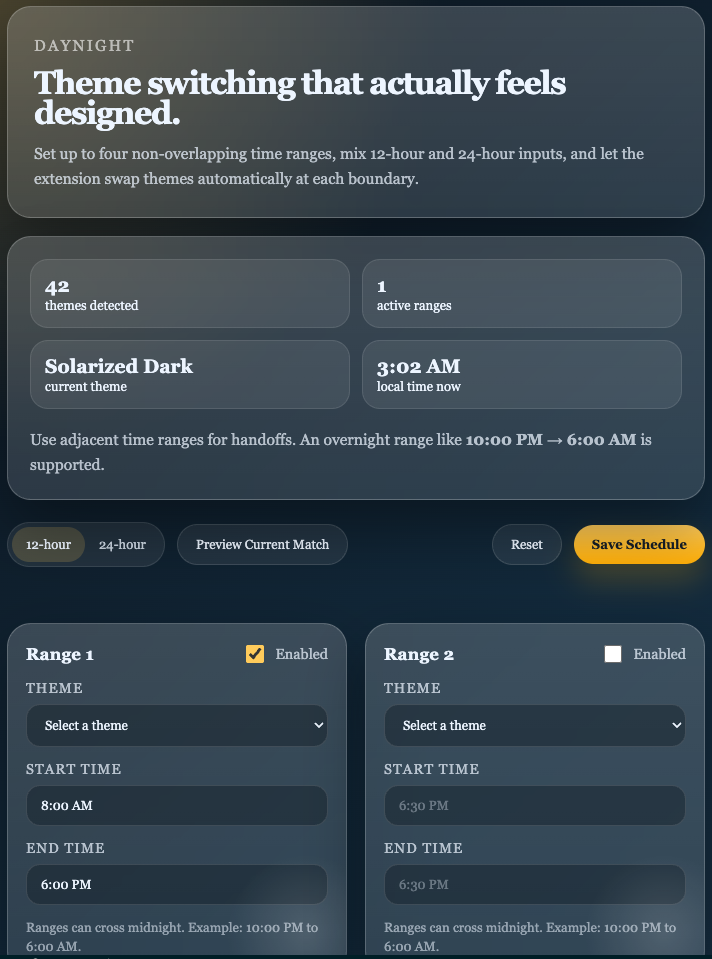
Features
- Configure up to four non-overlapping time ranges.
- Assign a VS Code theme to each range.
- Accept both
12-hour inputs like 6:30 PM and 24-hour inputs like 18:30.
- Support overnight ranges such as
10:00 PM to 6:00 AM.
- Search installed themes from each range card before selecting one.
- Edit schedules in a glassmorphism-style UI from the command palette or the status bar.
How it works
- Open
DayNight: Open Theme Scheduler from the command palette.
- Enable up to four ranges and select a theme for each one.
- Enter start and end times in either format.
- Save the schedule. The extension applies the matching theme immediately and again at each boundary.
Development
Files
package.json: extension manifest and contribution pointssrc/extension.js: activation, persistence, theme switching, webview wiringsrc/scheduler.js: time parsing, validation, overlap detection, active-range logicsrc/webview.js: scheduler UI markup, styling, and client-side behaviorsrc/test/scheduler.test.js: scheduler unit tests
Run tests
npm test
Install dependencies
Use npm install for this project. The checked-in lockfile is package-lock.json.
Package locally
Install dependencies, then package with your preferred VS Code extension workflow, for example vsce package.
Notes
- When two ranges overlap, saving is blocked to keep the active theme deterministic.
- A range with the same start and end time is treated as all day.
| |

