Pkg Guard
Vulnerability warnings and update suggestions right inside package.json, including transitive dependencies, with one-click fixes.
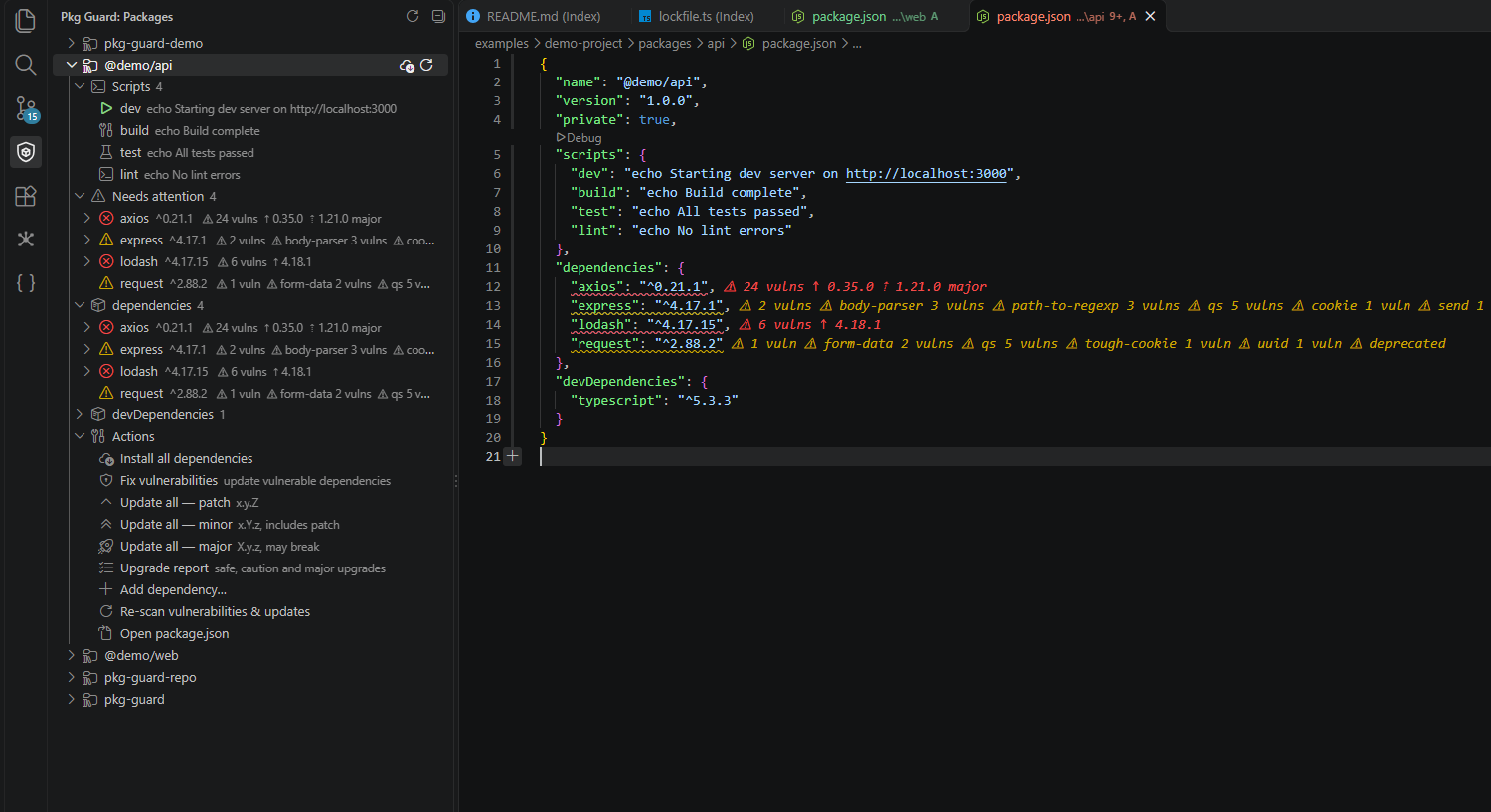
Features
- Inline hints at the end of each dependency line:
⚠ 3 vulns → 4.18.1, ↑ 11.2.8, ⇡ 12.2.0 major. Hover for advisory details and fixes.
- Squiggles in the Problems panel: red for high/critical, yellow for moderate, blue for info.
- Quick fixes (lightbulb or
Ctrl+.): update to the fixed version, pin a transitive package via resolutions (yarn) or overrides (npm), ignore an advisory, stop suggesting updates for a package.
- Transitive vulnerabilities from
yarn.lock (v1) or package-lock.json (v2/3), shown on the direct dependency that pulls them in, with the path (@nestjs/platform-express › express › body-parser).
- Status bar summary; click to re-scan.
Open Pkg Guard in the activity bar.

Every package.json in the workspace (monorepos included) appears as a project:
- Scripts: ▶ runs
npm|yarn|pnpm|bun run <script> in a terminal.
- Needs attention: only the vulnerable or outdated dependencies.
- dependencies / devDependencies / optionalDependencies with installed version and fix hints.
- Project actions: install all, update all within the current major, add dependency, re-scan.
- Upgrade report: one Markdown report per project that groups available upgrades into safe (no breaking changes expected), needs caution (0.x minors, peer or Node-engine conflicts) and major, flags security fixes and deprecated packages, and includes a ready-to-run install command per group. Save or copy it from the notification.
- Per dependency (inline buttons and right-click): update to latest or a chosen version, open the npm page or repository, show the changelog, check compatibility, remove.
Compatibility check
Before a version change, the target version is compared with your project:
- its
peerDependencies against what is installed,
engines.node against your project's engines.node,- added or removed dependencies,
- installed packages whose own peer range would reject the new version. The newest release of each that accepts it is offered as a companion update.
Dependents are checked among your direct dependencies, using their installed node_modules manifests.
Settings
| Setting |
Default |
|
pkgGuard.enableVulnerabilities |
true |
|
pkgGuard.checkTransitive |
true |
needs a supported lockfile |
pkgGuard.enableOutdated |
true |
|
pkgGuard.showMajorUpdates |
true |
|
pkgGuard.minSeverity |
low |
low / moderate / high / critical |
pkgGuard.auditFallback |
true |
|
pkgGuard.registry |
https://registry.npmjs.org |
|
pkgGuard.ignoredAdvisories |
[] |
|
pkgGuard.ignoredPackages |
[] |
|
Notes
- Advisories come from OSV.dev (falls back to
yarn audit / npm audit when offline). Versions come from the npm registry.
- Fixes only edit
package.json. Run your package manager afterwards to update the lockfile.
- Not supported yet: yarn berry / pnpm lockfiles (direct dependencies are still checked using
node_modules or the declared range), single-line dependency sections, workspaces catalog: ranges.
Building from source
See the repository README. To install a local build into VS Code, run yarn cli vscode install from the repository root.
| |

