Alan IF IDE
Editor tooling for the Alan interactive-fiction language:
syntax highlighting, navigation, real compiler diagnostics, formatting and one-click
Play. It is built on a language server using Xtext.
Alan IF, for the interactive-fiction Alan. It is not the
M-industries Alan application platform, same name,
different language.
Features
You can see, and run, all Alan IF IDE commands from the Command Palette. Press
Ctrl+Shift+P and type "alan if".
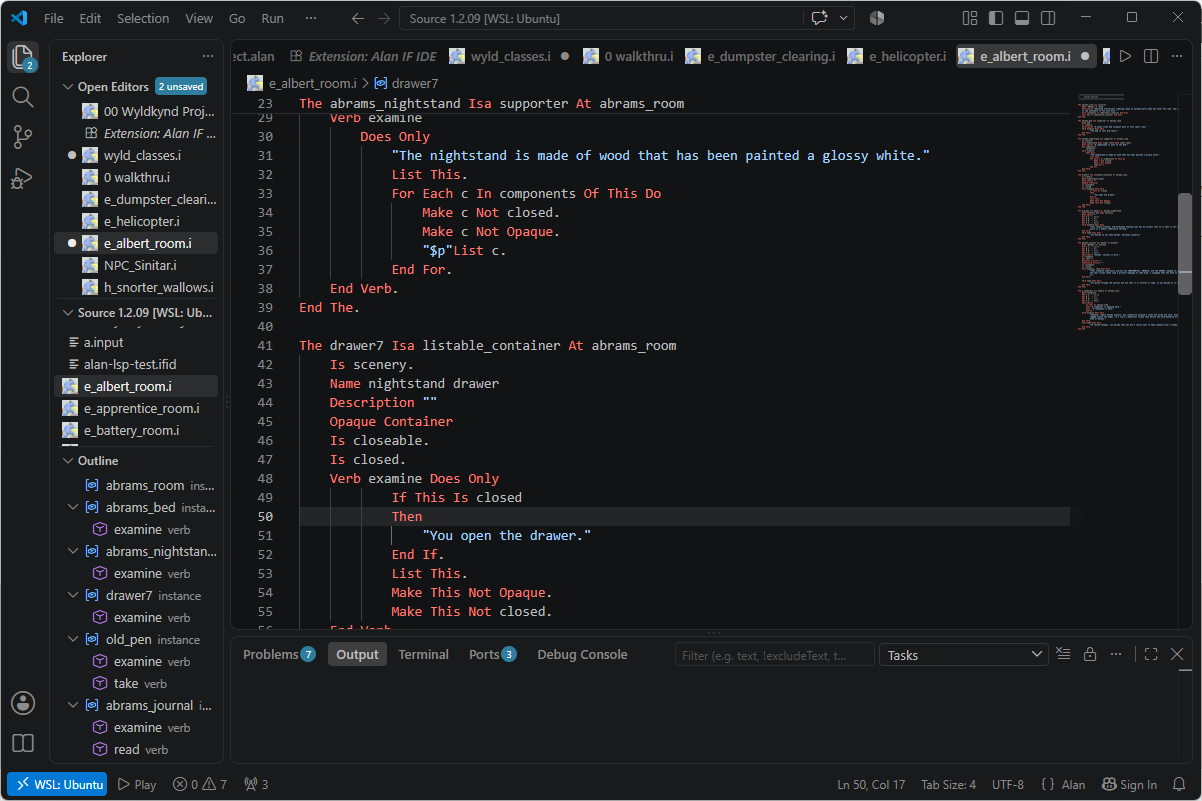
Syntax highlighting for .alan and .i files.
Document outline with classes, instances, additions, events, imports, verbs,
syntax, scripts and synonyms, nested and with distinct icons.
Go to Definition (F12) works across files, and knows what a name means. A loop
variable resolves to its for each, and this resolves to the class or instance you
are inside. Everything else resolves by name across the project, and works from
wherever you refer to it: isa, locate, describe, exits and the rest.
On a verb, Go to Definition shows what decides its behaviour: the syntax that says
how the player phrases it, then each class down the hierarchy that overrides it,
ending where you are.
Find All References (Shift+F12) is scoped the same way, so it agrees with Go to
Definition. Inside a loop you get that loop's uses, outside it the global's. On a verb
it lists every implementation.
Occurrences of the name under the cursor are highlighted, with the declaration
marked slightly different from the uses.
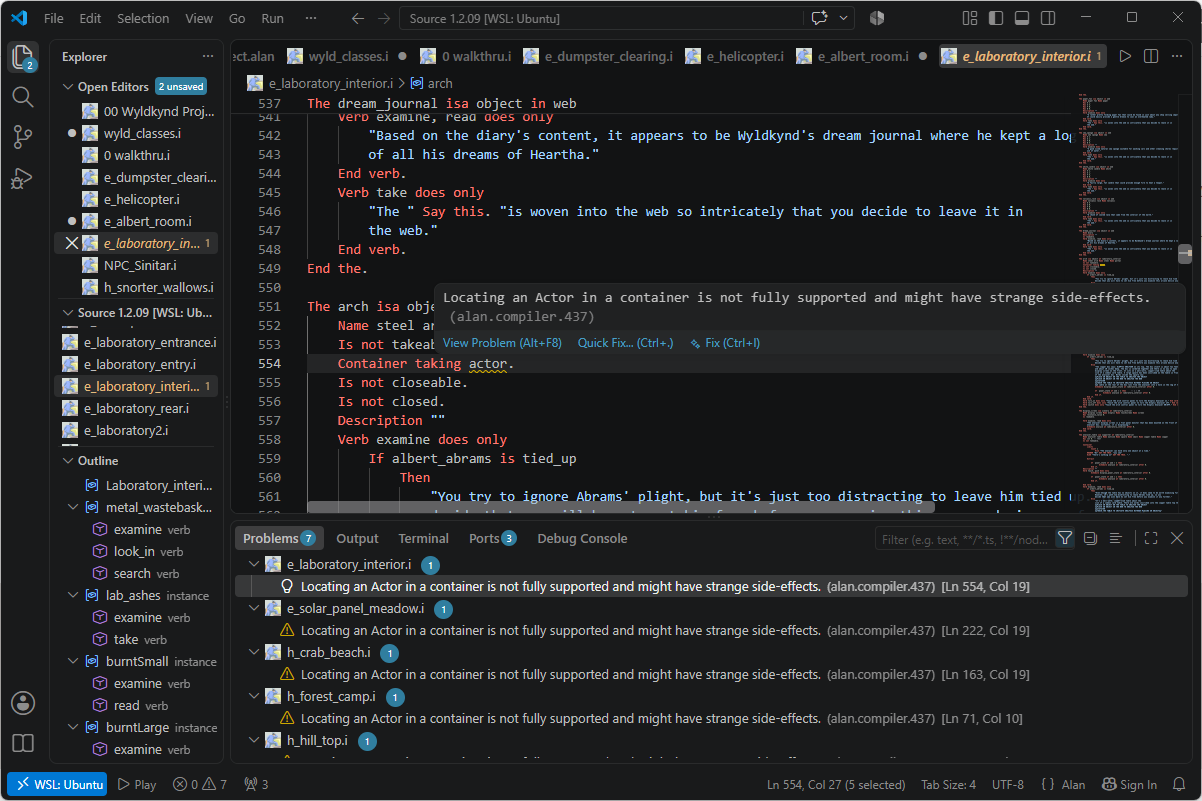
Compiler diagnostics are the real Alan compiler's errors, shown in the editor for
a whole multi-file adventure. It compiles the main file and shows each error in
the file it came from, so errors turn up in your .i imports too.
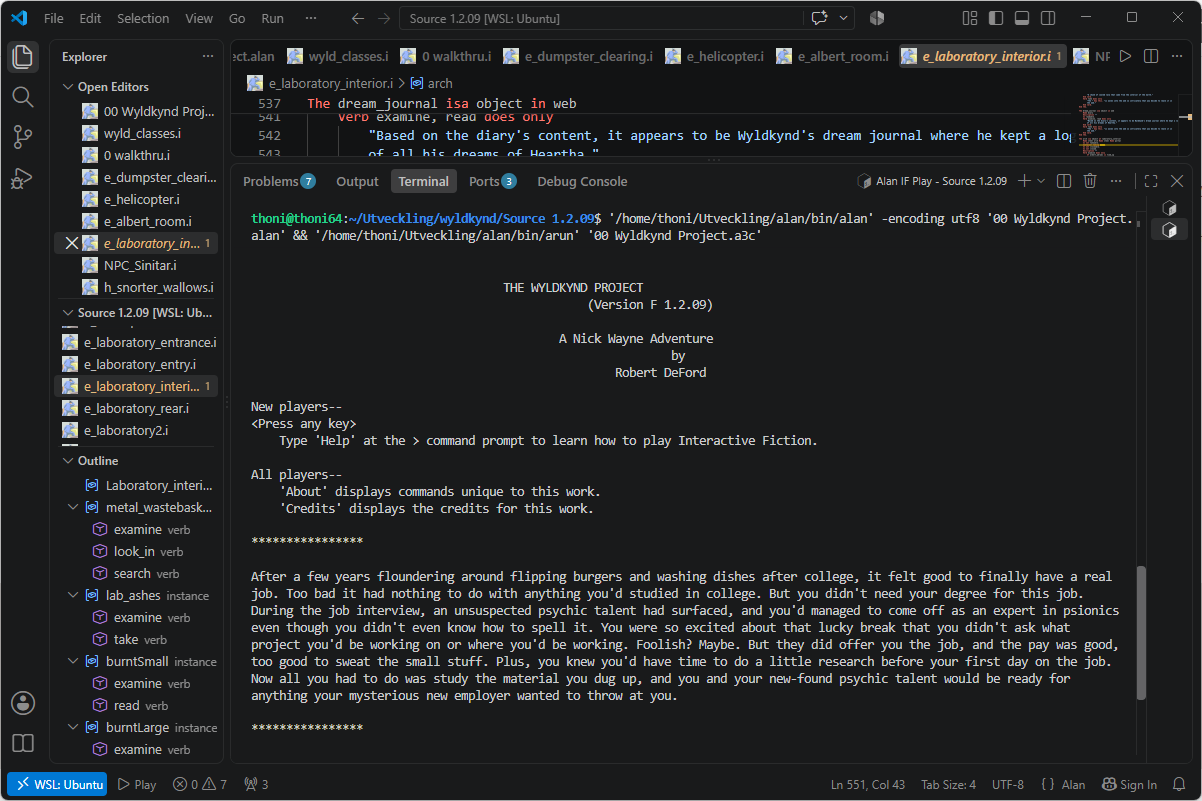
Play (▶) compiles the adventure and launches it in an integrated terminal. It is
in the editor title bar, in the status bar and in the context menu.
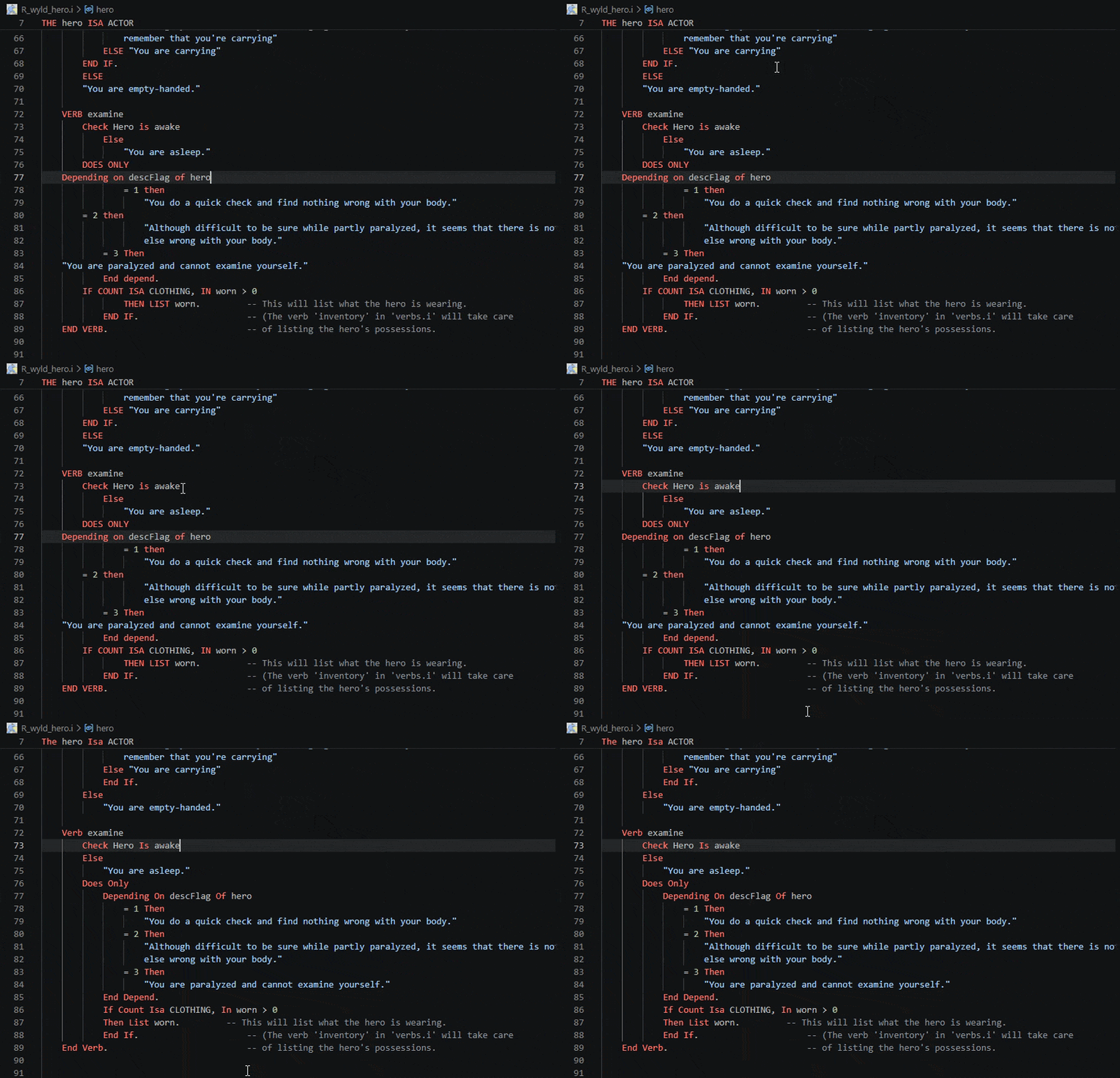
Format Document indents from the real block nesting, and will normalise keyword
case if you ask it to. Multi-line strings move as rigid blocks and are never reflowed
inside.
Re-wrap String (Alt+Q, or right-click) reflows the string your cursor is in, or
every string a selection touches, to alanif.format.stringWidth. $p and $n are
laid out as the paragraph and line break they print as, so the source starts to look
like what the player reads. Use it freely. The interpreter collapses whitespace inside
a string and wraps to the player's terminal, so how you lay a string out cannot change
what the game prints.
If Alt+Q does nothing, the
Rewrap extension
binds the same key for every language, so it may be bound to that rather than to the
Alan IF IDE. Bind Alt+Q to Re-wrap String writes a user keybinding, which beats
any extension's, and you are offered it the first time you re-wrap. The command is
always available from the right-click menu and the Command Palette.
Toggle Block Comment (Shift+Alt+A, or right-click) comments the selected lines
out, and takes the comment away again. Alan's //// delimiters are whole lines. The
opening one has to stand in the first column, and the comment ends only at a line that
is slashes and nothing else, not even a trailing space. VS Code's built-in command
puts its delimiters inline, at the two ends of the selection, so it cannot write
either of them. Alan files get this command instead, on the same key.
Convert Sources to UTF-8. Sources written in the older ISO-8859-1 show their
accented text wrongly in the editor, and the Alan compiler cannot read them at all, so
a whole project can go quiet with no error to point at. The extension notices, and
offers to repair it. It is lossless, the game it builds is identical.
Set Up Spell Checking. An author writes thousands of words of player-facing prose,
and the Alan compiler does not care about a single typo in any of it. This command
configures
Code Spell Checker
for the way an Alan source is written, in your own project folder. Only string
literals are checked, $p and $n no longer glue themselves to the following word,
and fragments built with $$ are left alone.
It also collects your game's own vocabulary, i.e. class and instance names, Name
clauses, synonyms, verbs and exits, into a generated word list, so Aerrowan and
wyldkynd are not underlined on every page. On the 83-file Wyldkynd Project that
takes the checker from 178 unknown words down to 57, and what is left is real:
satifsy, sidways, and Arrowan where the character is Aerrowan.
Pick your prose's language from the list. English comes with the checker, the others
install a dictionary. After that it keeps itself current. Every time you save an Alan
file the names it declares are collected again, so a character you rename is spelled
right from the moment you save, and the name you renamed away from stops being
accepted. Run the command again only when something changed outside the editor, like a
git pull. Misspellings are reported as Information, since the game runs fine and
you may just want to know.
Two files appear in your project. The brief is cspell.json, which tells the
checker where your prose is and which lists to trust. The concordance is
alan-concordance.txt, your game's own names, rebuilt every time you save, so nothing
you write in it survives.
The glossary is the third list, and it is the one you add to. A word that is
genuinely yours, a surname in the credits or a dialect spelling, goes in with Add to
dictionary. Choose the option naming your project's cspell.json. Your glossary
lives inside the brief, travels with the game, and is never rebuilt over. The other
options put your game's private vocabulary into your editor's settings, where user
settings would make it correct in every project you have.
If nothing is underlined but the Spell Checker panel lists misspellings, click the
open eye in that panel's title bar.
Requirements
Java is included. Part of the extension runs on Java, but the build for your
platform ships with its own, so you do not need to install Java yourself. If you would
rather use your own, point alanif.java.home at it. (The platform-neutral build carries
no runtime and falls back to JAVA_HOME or java on your PATH.)
For diagnostics and Play you also need the Alan toolchain:
|
|
|
alan |
the compiler (3.0beta8), for diagnostics and Play |
Set alanif.compiler.path, or have it on your PATH. |
arun |
the interpreter, for Play |
Found next to the compiler, or on PATH. |
Without them the editing features still work, diagnostics are simply skipped.
Settings
| Setting |
Purpose |
alanif.compiler.path |
Path to the Alan compiler (else found automatically). |
alanif.arun.path |
Path to arun (else next to the compiler, or on PATH). |
alanif.mainFile |
The .alan file to compile and Play (else auto-detected). |
alanif.format.keywordCase |
off (default) / lower / upper / capitalize. |
alanif.format.stringWidth |
Column Re-wrap String wraps before (default 80). |
alanif.java.home |
JDK/JRE 21+ home (else the bundled runtime). |
You should not need to set the paths. Leave them empty and the tools are found
automatically. Clearing one always returns to that automatic search.
Knowing whether it works
While an Alan file is open, the language status bubble (the {} beside the language
mode in the status bar) lists what the extension found:
Compiler 3.0beta8       ~/alan/bin/alan — PATH
Interpreter 3.0beta8    ~/alan/bin/arun — next to the compiler
Java 21                 from the bundled runtime
Spell checking          962 names, in Source 1.2.09
If something is missing, a warning appears in the status bar instead. Click it, or run
Alan IF: Check Setup, to see everything at once and fix any of it.
Spell checking is set up per project, not per machine, so it is easy to have it in one
game and not in another. Both the bubble and Check Setup name the folder they are
talking about, and say how many of your game's names have been collected there.
There is also Alan IF: Locate Alan Compiler… to browse for the compiler, and
Alan IF: Locate Alan Interpreter… for the interpreter.
A note on .i files
Alan uses .i for imported source. That extension is contested, C toolchains claim it
too, so this extension sets a workspace default associating *.i with Alan. If you also
edit C .i files, override files.associations for that workspace.
Source and issues
Source, build instructions and issue tracker:
github.com/thoni56/alan-if-ide.
It is the successor to the older Eclipse-RCP AlanIDE.
License
MIT © Thomas Nilefalk.
| |

