Kudosflow2
https://github.com/akudo7/kudosflow
A VSCode extension that integrates React Flow for visual workflow editing. Build node-based workflows with a drag-and-drop canvas interface, right inside VSCode.
Current Version: v1.0.0
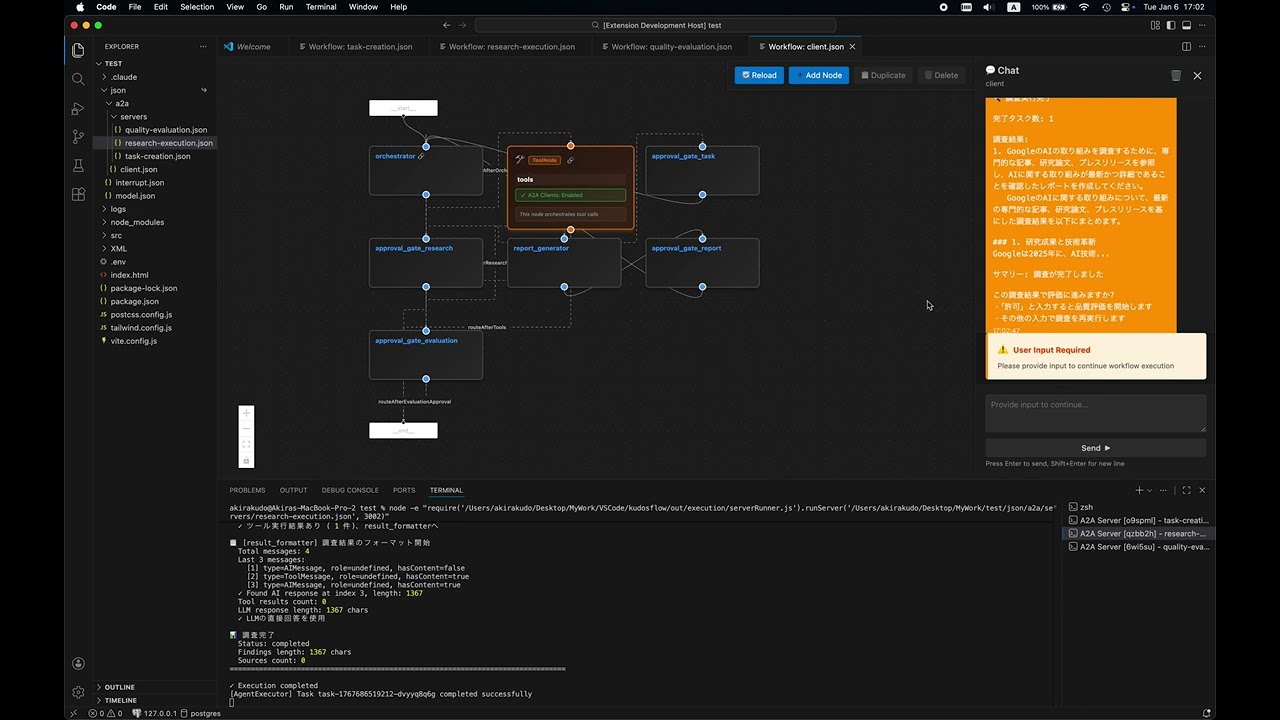
Click to watch the demo video
Features
- 🎨 Visual Workflow Editor: Drag-and-drop interface powered by React Flow
- 🔌 Node-Based Architecture: Connect nodes to build complex workflows
- 💾 JSON Storage: Workflows are stored as JSON files in your workspace
- 🔄 A2A Integration: Support for Agent-to-Agent communication workflows
- 🔄 MCP Integration: Support for MCP communication workflows
- 🎯 Context Menu Integration: Right-click JSON files to open in workflow editor
- 🚀 Live Preview: Real-time workflow execution and testing
Getting Started
Installation
# Install from marketplace
code --install-extension kudosflow2-2.0.0.vsix
Or install from the VSCode marketplace (coming soon) or build from source.
Requirements:
Setup:
Create a .env file in your project root with required API keys:
# OpenAI API Configuration
OPENAI_API_KEY=your_openai_api_key_here

# Anthropic API Configuration
ANTHROPIC_API_KEY=your_anthropic_api_key_here

# Ollama Configuration
OLLAMA_BASE_URL=http://127.0.0.1:11434
Sample workflow files are automatically installed to ~/.vscode/extensions/akirakudo911.kudosflow2-1.0.0/json/
Sample Workflows
The extension includes several example workflows to help you get started:
Basic Workflows:
interrupt.json - Interactive workflow demonstrating user interrupts and state managementmodel.json - Career counselor workflow showing OpenAI model integration
A2A (Agent-to-Agent) Workflows:
a2a/client.json - A2A client workflow for agent-to-agent communicationa2a/servers/task-creation.json - Task creation server workflowa2a/servers/research-execution.json - Research execution server workflowa2a/servers/quality-evaluation.json - Quality evaluation server workflow
These samples demonstrate key features including:
- User interaction with interrupt nodes
- AI model integration (OpenAI)
- State management and persistence
- Agent-to-agent communication patterns
- Multi-step workflow orchestration
Usage
Opening Workflow Editor
- From Explorer: Right-click any
.json file → "Open Workflow Editor"
- Command Palette:
Ctrl+Shift+P → "Kudosflow: Open Workflow Editor"
- Create New: Right-click a folder → "Create New Workflow Here"
Building Workflows
- Use the + button to add nodes to the canvas
- Drag nodes to position them
- Connect nodes by dragging from output anchors to input anchors
- Configure node parameters in the node panel
- Save your workflow using the save button in the toolbar
Development
Prerequisites
- Node.js 20.x or higher
- Yarn package manager
- VSCode 1.96.0 or higher
Setup
# Install all dependencies (extension + webview)
yarn install:all

# Copy environment example
cp .env.example .env
# Edit .env with your API keys
Build Commands
# Compile TypeScript for extension
yarn compile

# Watch mode for extension development
yarn watch

# Start webview development server with hot reload
yarn start:webview

# Build webview for production
yarn build:webview

# Package extension
yarn package
Testing
# Run linter
yarn lint

# Run tests
yarn pretest
Press F5 in VSCode to launch the Extension Development Host for testing.
Architecture
The extension consists of two separate build systems:
Extension Side (Node.js context):
- Entry: src/extension.ts
- Build: TypeScript →
out/ directory
- Manages VSCode extension lifecycle and webview panel
Webview Side (Browser context):
State Management and Thread Persistence
The A2A server supports stateful conversations using thread IDs:
- thread_id: Optional parameter for maintaining conversation state across requests
- State Persistence: Same thread_id retrieves previous conversation context
- Fresh Start: Omit thread_id to start new conversation with clean state
Example Usage
# Start new conversation (no thread_id)
curl -X POST http://localhost:3000/message/send \
  -H "Content-Type: application/json" \
  -d '{
    "message": {"parts": [{"type": "text", "text": "Please research the AI market"}]}
  }'
# Response includes thread_id: "thread-1234567890-abc123"

# Continue conversation (with thread_id)
curl -X POST http://localhost:3000/message/send \
  -H "Content-Type: application/json" \
  -d '{
    "message": {"parts": [{"type": "text", "text": "Approved"}]},
    "thread_id": "thread-1234567890-abc123"
  }'
# Response uses same thread_id, state is preserved
Documentation
Samples:
Task Creation → Approval → Research Execution → Approval
  → Report Generation → Report Approval → Quality Evaluation → Complete
Contributing
Contributions are welcome! Please feel free to submit a Pull Request.
License
MIT License - see LICENSE for details.
Author
Hand-crafted by Akira Kudo in Tokyo, Japan
Copyright © 2023-present Akira Kudo

