MinSpec
Just enough Spec. Never too much.





Preview. MinSpec is published as a preview. One developer builds it and uses it every day, on Linux, and its automated tests run on Linux only, so Windows and macOS are less proven. Known Windows problems are tracked as issues titled "windows:". Please report what breaks.
Why This Exists
Every specification-driven development tool applies the same ceremony to every change. A one-line bug fix gets the same multi-page spec treatment as a full architecture rewrite. Developers try SDD, hit the overhead on small changes, and abandon it.
MinSpec fixes this. It classifies each change by its mechanical scope -- the blast radius of files, lines, and boundaries it touches -- and applies proportional ceremony: a small, contained change needs one sentence of spec, while a far-reaching architectural change gets a full design document. The tier reflects how far a change reaches, not how hard it is to think through, and it acts as a floor you can always raise. You get the discipline of specification-driven development without the bureaucracy.
More info: minspec.dev — full methodology, FAQ, stack diagram, and the case for adaptive ceremony.
Methodology Stack
MinSpec is mostly SDD (Spec-Driven Development, ~70%) with a thin CDD layer (Contract-Driven Development, ~15%) and a few borrowed best practices: architecture decision records (ADR), Weighted Shortest Job First scoring (WSJF), and session discipline in the style of Getting Things Done (GTD). Bug fixes follow RCDD (Root-Cause-Driven Debugging) — a separate lifecycle, because bug-fix work doesn't fit a feature-shaped process.
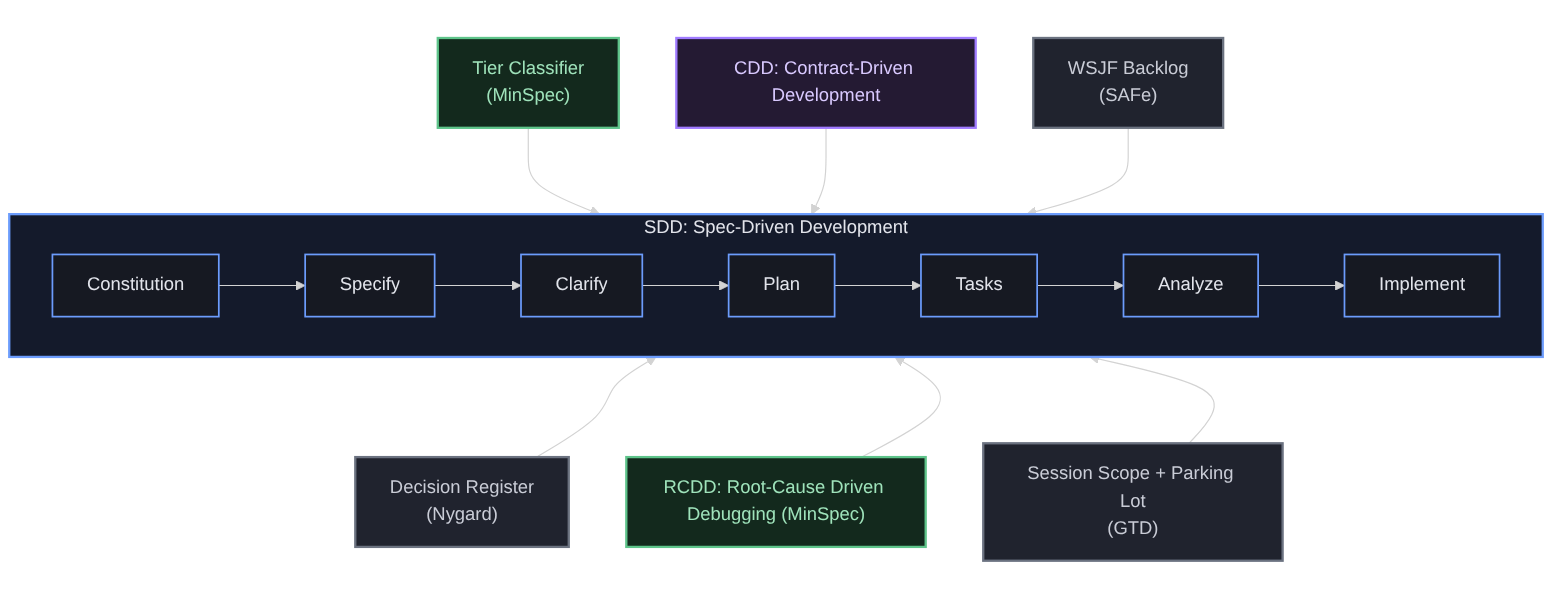 Full explanation, attribution to source methodologies, and FAQ at minspec.dev/#methodology.
What MinSpec Does on Your Network
The MinSpec extension opens no network connection of its own. It has no telemetry, no analytics, no account and no backend, and nothing is sent to the people who make it. Your specs, decisions and approvals are files in your project directory.
Some features run command-line tools you already have installed: the GitHub CLI (gh), git and claude. Those tools contact the network under your own sign-in. This is every case, read from the code.
Runs without asking first
Two read-only checks. Both run only after you run MinSpec: Initialize SDD Structure or MinSpec: Refresh Harness Files, from the Command Palette or by accepting MinSpec's toast, and only in a git repository:
- Whether
gh is installed and signed in: gh --version, then gh auth status.
- If it is, this repository's own settings on GitHub: its branch rulesets, and the names (never the values) of its Actions secrets. MinSpec uses them to decide whether to offer you a branch ruleset.
These checks write nothing to GitHub.
Runs only when you ask
| You do this |
MinSpec runs |
| MinSpec: Refresh Backlog (contacts GitHub through your gh CLI), from the Command Palette, from the Backlog pane's title bar, or by selecting the pane's "Backlog not loaded" row |
gh issue list. The pane loads nothing when it is drawn and never refreshes on its own: not when the window regains focus, and not when the pane becomes visible. A loaded list shows the time it was loaded |
| MinSpec: Park Topic or MinSpec: Park Topic (force), or Park as Issue on a drift warning |
gh auth status, then gh issue list to look for an open issue with the same title (the force command skips this), then gh issue create. gh issue comment instead, if you choose to comment on the issue it found |
| MinSpec: Score Issue (WSJF) |
gh auth status and gh issue list. After you choose Apply: gh issue view, gh issue edit and gh issue comment |
| MinSpec: Quick Triage Inbox Issue |
gh auth status, gh issue list, then gh issue edit |
| MinSpec: Push docs via lane, after you confirm the dialog that names the push |
gh auth status, git fetch, git push, then gh pr create |
| MinSpec: Backfill Epics (AI-assisted), when you choose the AI pass, or accept MinSpec's offer to backfill (its text says it is AI-enhanced if Claude Code is installed, and what the AI pass sends) |
claude -p, which sends the ids and titles of your specs, decisions and epics, and the first paragraph of each spec or decision that has no epic yet, to the model provider your claude command is set up with. The heuristic pass is offline |
| Create ruleset or Add checks, on the offer that can follow the two checks above |
gh api, to create or update a branch ruleset on this repository |
Runs when a setting allows it
| Setting |
MinSpec runs |
When |
minspec.pushOnApprove |
git push of the approval commit. When you approve on a protected branch the push goes to a new branch, and can be preceded by a git fetch of the default branch |
prompt (the default) asks after each approval and pushes only if you choose Push. Choosing Always push from now on pushes too, and records that choice for this project in .minspec/preferences.json, so later approvals here push without asking. always pushes without asking. never sends nothing |
minspec.approvalPr |
gh pr list and gh pr create, and gh label create when the repository has no docs-lane label |
Only after an approval has been pushed to a side branch. auto (the default) opens the pull request. manual shows a link instead |
minspec.autoBackfillUseAi |
claude -p, as described above |
false (the default) asks each time. true uses the AI pass whenever you run Backfill Epics. Choosing Always on that question records the same choice for this project in .minspec/preferences.json |
If gh is not installed or not signed in, Park Topic saves to .minspec/parking-lot.md instead in an initialized project; in a folder that has not been initialized it saves nothing in the folder and says so. The other gh features say that they could not run. They do not report an empty result.
Quick Start
- Install MinSpec from the VS Code Marketplace.
- Open your project in VS Code.
- MinSpec auto-detects your project state and offers setup actions as toasts -- "Initialize", "Refresh", or "Classify". Before you accept "Initialize", read What Initialization Produces: it adds git hooks and GitHub workflows to the repository, not only Markdown files.
- Write your spec -- MinSpec tells you how much (or how little) you need.
The same three actions, and every other command, are in the Command Palette under "MinSpec:".
What Initialization Produces
Read this before you accept Initialize. Besides Markdown files it adds git hooks, changes one git setting, and adds GitHub Actions workflows. Everything it writes is inside the project folder, and nothing is committed unless you accept the commit offer that follows.
This is what Initialize wrote into a new git repository that held only a README, with version 0.1.27:
| Path |
What it is |
.minspec/config.json |
Project settings: spec and decision folders, which phases each tier needs, the minimum test coverage |
.minspec/constitution.md |
The project's invariants, principles, constraints and goals, seeded with a draft for you to edit |
.minspec/labels.md |
A suggested issue-label vocabulary. Documentation only: MinSpec does not create these labels |
.minspec/hooks/pre-commit, .minspec/hooks/commit-msg, .minspec/hooks/validate.py |
Git hooks (see below) |
docs/epics/INDEX.md |
An empty index of epics, which group specs and decisions |
CLAUDE.md, AGENTS.md, .cursorrules |
Project instructions, in the files that Claude Code, generic coding agents and Cursor already read |
.claude/commands/minspec-*.md (8 files), .cursor/rules/spec-kit-commands.mdc |
Slash commands for those tools: /minspec-specify, /minspec-clarify, /minspec-plan, /minspec-tasks, /minspec-analyze, /minspec-implement, /minspec-checklist, /minspec-constitution |
.claude/hooks/session-title.sh, .claude/hooks/session-title.py, .claude/settings.json |
A Claude Code hook that sets the session title, and its registration |
.github/workflows/minspec-validate.yml |
A CI check named "MinSpec SDD validation", run on every push and pull request |
.github/workflows/secret-scan.yml |
A CI secret scan (gitleaks) |
.github/workflows/ai-review.yml, .github/workflows/ai-review-retry.yml |
An optional AI review of pull requests. It is skipped, with a notice, until you add the repository secrets that ai-review.yml names. ai-review-retry.yml runs on a schedule |
.github/workflows/ready-to-merge.yml |
Posts a ready-to-merge status on each pull request. It reports failure until a verified AI review has passed, so expect it to be red while no reviewer is configured. It blocks nothing unless you make it a required check |
.github/workflows/docs-lane.yml |
Merges a documentation-only pull request that carries the docs-lane label once its checks pass |
.github/scripts/ai-review-guard.js, .github/scripts/ai-review-guard.test.js, scripts/review-branch.sh, scripts/review-decide.sh, scripts/lib/agent-context.sh, scripts/approval-provenance.py, scripts/hooks/canonical.py, scripts/roles/*.md (4 files) |
The scripts and reviewer prompts those workflows run |
.gitignore |
A block of entries for MinSpec's machine-local files |
.gitattributes |
A block that pins the git hooks, the Claude Code hook, the shell and Python scripts under scripts/, and the workflows to LF line endings. Without it, git converts them to CRLF on checkout wherever core.autocrlf is true, which is usual on Windows, and a shell cannot run a CRLF hook |
.minspec/generated-hashes.json, .minspec/template-baseline.json |
Bookkeeping that Refresh uses to tell your edits from template changes. Machine-local, ignored by git |
The files for Claude Code and Cursor are written whether or not you use those tools. Delete the ones you do not want.
After writing the files, Initialize asks for a minimum test-coverage figure, may suggest the GitHub Pull Requests extension, offers to commit what it generated, and may offer to create a GitHub branch ruleset that requires the generated checks. Each of these is a prompt you can decline.
Files that already exist. Initialize does not overwrite an existing file. It does add to four: the ignore block in .gitignore, the line-ending block in .gitattributes, a slash-command section in AGENTS.md, and one hook entry in .claude/settings.json (that file is re-serialised, so its formatting changes).
Git hooks. Initialize sets this repository's core.hooksPath to .minspec/hooks, so the hooks run on every commit, from any tool. If the repository already used another hooks folder (Husky's, for example), that setting is replaced and those hooks stop running until you chain them yourself. The hooks are shell scripts; validate.py runs only where a working Python 3 is found (the hook tries python3, python and py -3 in turn), and without one pre-commit falls back to shell checks of its own.
pre-commit refuses a commit made directly on the default branch when the repository has a remote (allow it with git config minspec.allowCommitOnDefaultBranch true), scans staged changes with gitleaks if it is installed, and checks staged specs and decision records.commit-msg requires a Root cause: line in the body of a fix: commit, and a Follow-ups: line when the message says work was deferred.MINSPEC_GATE_OFF=1 git commit ... skips both for one commit.
Files written later, as you use MinSpec.
| Path |
What it holds |
Ignored by git? |
specs/SPEC-NNN-*.md |
Your specs (plain Markdown, Spec Kit-compatible) |
No |
docs/decisions/DR-NNN.md, docs/decisions/INDEX.md |
Decision records and their generated index |
No |
docs/epics/EPIC-NNN*.md |
Epics |
No |
.minspec/approvals/ |
One record per approved spec: who approved it, when, and a hash of the approved text |
No |
.minspec/traceability.json |
Code-to-requirement mappings for CodeLens |
No |
.minspec/parking-lot.md |
Parked topics, when the gh CLI is not available |
No |
.minspec/session.json |
The session scope you declared |
Yes |
.minspec/calibration.json |
A log of your tier overrides, so raising a tier is never silent |
Yes |
.minspec/preferences.json |
Your answers to MinSpec's setup prompts |
Yes |
.minspec/sessions/, .minspec/queue/ |
A small heartbeat file per open window, and queued phase-advance requests |
Yes |
Accepting the "Refresh" toast later merges template updates with your edits via section-level hashing. Sections you modified are preserved. Unmodified sections get the latest template content. New template sections are appended. No AI tool is required — your specs are plain markdown files that any tool (or no tool) can read.
Features
Scope Classifier
MinSpec analyzes your git diff and classifies each change into one of four tiers by its mechanical scope -- the blast radius of the change. The classifier examines file count, line count, new exports, schema changes, dependency additions, cross-directory spread, and more, then recommends the right level of specification ceremony.
A tier measures how far a change reaches, not how hard it is to think through -- a subtle one-line fix and a trivial one-line fix look identical to a structural analyzer, so the predicted tier is applied as an upward-only floor (it only ever ratchets ceremony up, never down) rather than a difficulty verdict. The result is advice about your current diff; nothing is saved. When MinSpec predicts T1 and the change is harder than its size suggests, one click raises the tier. Detecting cognitive difficulty would require reading your issue text with an AI model; that is deliberately out of the zero-AI core and deferred to an opt-in feature.
Adaptive Phase Lifecycle
Each spec moves through a lifecycle of phases: Specify, Clarify, Plan, Tasks, Implement. MinSpec skips phases that do not add value for the current tier. A T1 change needs only a one-line spec. A T4 change goes through every phase.
 Solid arrows are the full T3/T4 path. Dashed arrows show how T1 collapses Specify directly to a single auto-generated Tasks step, and how T2 makes Clarify optional and reduces Plan to a single sentence.
All specs in your project appear in the Explorer sidebar, in lanes by status (Specifying, Planning, Implementing, Done, Archived, Superseded) or grouped by epic. Each row shows the spec's tier (T1-T4), progress, current phase and whether it is approved. Click a spec to open it. Right-click to reclassify it, approve it or revoke its approval, see what changed since it was approved, or open its design and task files. Two more panes list the project's decisions and its issue backlog.
Active Spec Panel
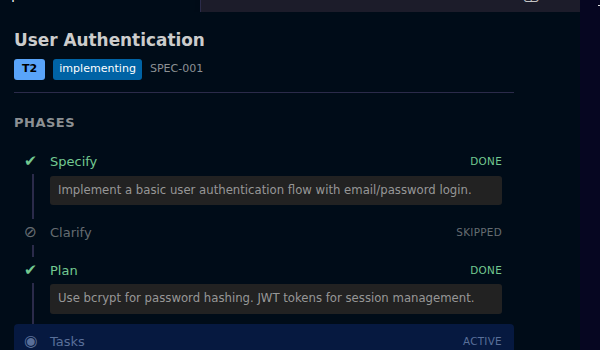
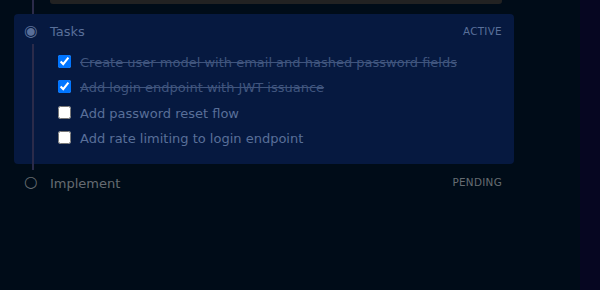
A webview panel displays the current spec as a vertical stepper. Completed phases collapse. The active phase expands with its content. Tasks appear as an interactive checklist you can toggle directly.
CodeLens Traceability
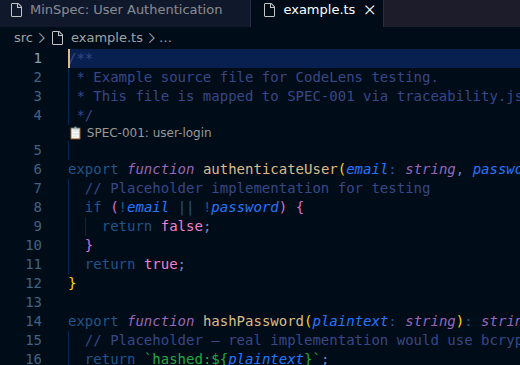
Inline CodeLens annotations appear above code that is mapped to a spec requirement, showing which requirement it implements. Click an annotation to jump to the spec; MinSpec: Go to Code Location goes the other way. Create a mapping with MinSpec: Link Code to Spec Requirement. Mappings are stored in .minspec/traceability.json.
Architecture Decision Records
MinSpec manages Architecture Decision Records (ADRs) as docs/decisions/DR-NNN.md ("DR" for decision record) and keeps an index of them. A new record starts as proposed. Accept it, or set another status, from the Decisions pane in the sidebar, or with Alt+A while it is open.
Approvals
Approval is the human sign-off between writing a spec and building from it. Approving a spec (Alt+A, or the tick in the Specs pane) first checks it for completeness, then records who approved it and a hash of the approved text under .minspec/approvals/. If the text changes afterwards the approval shows as stale, and MinSpec: Show Changes Since Approval opens the difference. By default the approval is committed in its own commit (minspec.commitOnApprove) and MinSpec then asks whether to push it (minspec.pushOnApprove). An approval is refused when the approver's identity belongs to an agent or bot.
Next Task Signpost
A status bar item names the one thing waiting on you, for example a spec to approve or a decision to accept, or says "MinSpec: clear". Click it, or press Alt+N, to open that item.
Session Discipline
Declare your session scope before starting work. MinSpec monitors file saves and warns you when you drift outside scope. Drifted work can be parked as a GitHub Issue (via gh CLI) or saved to a local parking lot file for later triage.
A MinSpec "session" is distinct from your Claude / Cursor / Copilot chat session -- it's a unit of intent ("today I'm fixing the rate limiter"), not a chat window. Run MinSpec: Declare Session Scope from the Command Palette to set it; the scope persists to .minspec/session.json and survives chat restarts, editor reloads, and machine reboots.
This is a MinSpec-specific discipline -- inspired by SDD and SAFe but not literally either -- and is opt-in. You can ignore it entirely and MinSpec still works.
Status Bar
The Next Task signpost is always shown. Two more items appear only when there is something to do: one when files MinSpec generated are waiting to be committed, and one when the checkout holds changed files that are identical to the default branch and can be tidied away. MinSpec: Show SDD Status reports the active spec's tier, phase and progress, and which build you are running.
Tier System
MinSpec classifies every change into one of four scope tiers. A tier is a measure of mechanical blast radius (files, lines, boundaries crossed), not a measure of how hard the change is to reason about:
| Tier |
Label |
Ceremony |
Typical trigger (the highest signal sets the tier) |
| T1 |
Contained |
One-sentence spec |
1-2 files and at most 20 changed lines, in one folder, no new files |
| T2 |
Standard |
Spec + plan |
3-5 files, or 21-100 lines, or two folders, or a new file, class or export |
| T3 |
Wide |
Full spec cycle |
6-15 files, or 101-500 lines, or three or more folders; a schema change, a removed export, new dependencies |
| T4 |
Architectural |
Complete ceremony |
16 or more files, or more than 500 lines, or a destructive schema operation |
The predicted tier is applied as an upward-only floor: MinSpec never auto-lowers ceremony below what it predicts (the prediction is a near-perfect lower bound), and it never claims a change is easy. Because a subtle one-line fix is size-identical to a trivial one, the classifier cannot see difficulty. When it predicts T1 and the change is harder than its footprint suggests, one click raises the tier. A spec's own tier is the tier: field in its frontmatter, which is yours to set.
Phase Lifecycle
Each spec follows a lifecycle adapted to its tier. The diagram above is the general shape; this table is what the shipped defaults ask for:
| Phase |
T1 |
T2 |
T3 |
T4 |
| Specify |
Required |
Required |
Required |
Required |
| Clarify |
- |
Optional |
Optional |
Required |
| Plan |
- |
Required |
Required |
Required |
| Tasks |
- |
- |
Required |
Required |
| Implement |
- |
- |
Required |
Required |
A dash means that tier skips the phase by default: the work still happens, MinSpec just does not ask for a document or a sign-off for it. The mapping lives in .minspec/config.json under phaseMappings, so a project can change it.
Skipped phases appear greyed out in the spec panel, labelled "skipped". The phase map is plain YAML in the spec's frontmatter, so you can bring a skipped phase back by editing it.
Configuration
All settings are under the minspec.* namespace in VS Code Settings.
| Setting |
Type |
Default |
Description |
minspec.specsDir |
string |
"specs" |
Directory for spec files, relative to workspace root |
minspec.decisionsDir |
string |
"docs/decisions" |
Directory for Architecture Decision Records, relative to workspace root |
minspec.specsLayout |
"flat" or "spec-kit" |
"flat" |
One file per spec, or one folder per spec with separate spec.md, plan.md and tasks.md (strict Spec Kit layout) |
minspec.codelens.enabled |
boolean |
true |
Enable/disable CodeLens annotations showing spec requirement mappings |
minspec.autoBootstrap.enabled |
boolean |
true |
Offer Initialize, Refresh and Classify as toasts when MinSpec detects they apply |
minspec.autoClassifyOnCommit |
boolean |
false |
Classify automatically after each git commit |
minspec.manualCreate.enabled |
boolean |
false |
Show the manual "Create Decision" and "Create Epic" buttons in the Decisions pane |
minspec.commitOnApprove |
boolean |
true |
Commit an approved document and its approval record together, in one commit of their own. Never pushes |
minspec.pushOnApprove |
"never", "prompt" or "always" |
"prompt" |
Whether an approval commit is pushed. On a protected branch the push goes to a new branch at the same commit |
minspec.approvalPr |
"auto" or "manual" |
"auto" |
After an approval has been pushed to a side branch: open the pull request through your gh, or show a link for you to open it |
minspec.protectedBranches |
string[] |
["main", "master", "trunk"] |
Branches that reject a direct push. Read from settings, so no network call is needed to decide |
minspec.approverEmail |
string |
"" |
The human identity recorded on approvals. Blank falls back to git config user.email. An agent or bot identity is refused |
minspec.advancePhaseOnApprove |
boolean |
false |
Queue a phase-advance request on every spec approval without asking each time |
minspec.autoBackfillUseAi |
boolean |
false |
Always use the AI pass when backfilling epics, without asking each time. Runs your local claude command |
minspec.ruleset.requiredChecks |
string[] |
[] |
Extra status checks for the branch ruleset that Initialize offers to create, on top of the ones MinSpec works out |
minspec.coverage.minimumPercentage |
number |
80 |
The value pre-selected in Initialize's coverage prompt. The enforced figure lives in .minspec/config.json |
Commands
Open the Command Palette (Ctrl+Shift+P / Cmd+Shift+P) and type "MinSpec" to see all commands.
Keyboard shortcuts
| Shortcut |
Command |
Alt+A |
MinSpec: Approve/Accept Active |
Alt+N |
MinSpec: Go to Next Review Task |
Ctrl+K Ctrl+P (Cmd+K Cmd+P on macOS) |
MinSpec: Push docs via lane |
Setup and generated files
| Command |
Description |
| MinSpec: Initialize SDD Structure |
Create .minspec/ and the files listed under What Initialization Produces |
| MinSpec: Refresh Harness Files |
Merge the installed version's templates into the generated files, keeping your edits |
| MinSpec: Commit Harness Refresh |
Offer again to commit generated files that are still uncommitted |
| MinSpec: Tidy Checkout (discard redundant copies) |
List changed files that are identical to the default branch, and discard them after you confirm |
| MinSpec: Migrate Spec Layout (Flat ↔ Spec Kit) |
Convert specs between one file per spec and one folder per spec |
| MinSpec: Generate Example Spec |
Create a sample spec file for demo and learning purposes |
| MinSpec: Propose Constitution (draft) |
Write a draft of invariants, principles and constraints into the constitution, offline |
| MinSpec: Show Constitution Generation Prompt |
Open a prepared prompt for drafting the constitution in your own AI assistant |
| MinSpec: Compact Constitution |
Strip the draft markers from the constitution, after you confirm |
Specs and approvals
| Command |
Description |
| MinSpec: Classify Task Complexity |
Classify the current git changes into a tier |
| MinSpec: Show Active Spec Panel |
Open the webview panel displaying the current spec's phase stepper and task checklist |
| MinSpec: Show SDD Status |
Report the active spec's tier, phase and progress, and the running build |
| MinSpec: Go to Next Review Task |
Open the one thing waiting on your review |
| MinSpec: Check Spec Completeness |
Report what a spec is missing. Changes nothing |
| MinSpec: Approve Spec for Implementation |
Approve a spec, after a completeness check |
| MinSpec: Approve/Accept Active |
Approve or accept whichever spec, decision or epic is open |
| MinSpec: Revoke Spec Approval |
Withdraw a spec's approval |
| MinSpec: Show Changes Since Approval |
Open the difference between the approved text and the current text. In the palette only while a Markdown file is open |
| MinSpec: Refresh Spec Tree |
Manually refresh the sidebar spec tree view |
| MinSpec: View Design, MinSpec: View Tasks |
Open a spec's design or task file. In the Specs pane's context menu only |
Decisions and epics
| Command |
Description |
| MinSpec: Create Architecture Decision Record |
Create a new DR-NNN.md file from the ADR template with sequential numbering |
| MinSpec: Accept Decision |
Set a proposed decision to accepted |
| MinSpec: Set Decision Status… |
Choose any status for a decision |
| MinSpec: Regenerate Decision Register INDEX |
Rebuild docs/decisions/INDEX.md, keeping anything you wrote outside its generated block |
| MinSpec: Create Epic |
Create a new epic document |
| MinSpec: Accept Epic |
Set a proposed epic to active. In the tree's context menu only |
| MinSpec: Regenerate Epic INDEX |
Rebuild the epic index |
| MinSpec: Backfill Epics (AI-assisted) |
Propose epics for existing specs and decisions. A heuristic pass runs offline; an optional AI pass runs your local claude command if you agree. Nothing is written until you apply the proposal |
| MinSpec: Toggle Group by Epic (Specs), MinSpec: Toggle Group by Epic (Decisions), MinSpec: Toggle Group by Epic (Backlog) |
Switch a pane between its normal grouping and grouping by epic |
Session, parking and backlog
| Command |
Description |
| MinSpec: Declare Session Scope |
Set the scope for your current work session (enables drift detection) |
| MinSpec: Park Topic |
Create a GitHub Issue (or local note) for an out-of-scope topic |
| MinSpec: Park Topic (force) |
The same, without the check for an existing matching issue |
| MinSpec: Score Issue (WSJF) |
Calculate a Weighted Shortest Job First score for backlog prioritization |
| MinSpec: Quick Triage Inbox Issue |
Triage an inbox-labelled GitHub Issue with priority and labels |
| MinSpec: Refresh Backlog (contacts GitHub through your gh CLI) |
Load, or reload, the Backlog pane from this repository's GitHub issues. The pane loads nothing until you run this |
AI tool context, traceability and publishing docs
| Command |
Description |
| MinSpec: Inject Active Spec Context |
Write the active spec's context into detected AI tool config files |
| MinSpec: Remove Active Spec Context |
Remove injected spec context from AI tool config files |
| MinSpec: Go to Spec Requirement |
Navigate from code to the linked spec requirement |
| MinSpec: Go to Code Location |
Navigate from a spec requirement to its implementing code |
| MinSpec: Link Code to Spec Requirement |
Create a traceability mapping between a code location and a spec requirement |
| MinSpec: Push docs via lane |
Gather changed documentation files, ask you to confirm, and open a pull request for them through your gh |
Specs are plain markdown with YAML frontmatter. They are compatible with Spec Kit -- you can use both tools on the same project.
---
id: SPEC-001
title: Add rate limiting to /api/health
tier: T2
status: implementing
created: 2026-05-26
phases:
  specify: done
  clarify: skipped
  plan: done
  tasks: done
  implement: in-progress
---

## Specify

Health endpoint needs rate limiting at 100 req/min per IP.

## Tasks

- [x] Add express-rate-limit middleware to health route
- [ ] Add 429 response test
MinSpec extends the Spec Kit format with optional frontmatter fields (tier, status, phases). Spec Kit ignores these fields, so interoperability is maintained in both directions.
FAQ
No. MinSpec has zero AI dependencies. It works with any AI coding tool (Claude Code, Cursor, Copilot, Cline, Aider, Windsurf) but does not require any of them. Your specs are plain markdown files.
Does MinSpec make network calls or require an account?
No account. The extension opens no network connection of its own: no telemetry, no analytics, no backend. Some features run your own gh, git or claude command-line tools, and those do contact the network, under your sign-in. Two read-only checks run without asking, after Initialize or Refresh Harness Files. Everything else runs only when you ask for it or switch it on. The full list is in What MinSpec Does on Your Network.
Can I use MinSpec with Spec Kit?
Yes. MinSpec reads and writes Spec Kit's markdown format. Files created by either tool work in both. MinSpec adds optional frontmatter fields that Spec Kit safely ignores.
What happens if I uninstall MinSpec?
You keep everything. Specs are plain markdown. Harness files (CLAUDE.md, AGENTS.md, etc.) are standard files in your repo. The .minspec/ directory contains JSON config you can read or delete. There is no lock-in.
Uninstalling the extension removes nothing from the repository. The workflows, scripts and hooks that Initialize added are ordinary files: delete the ones you no longer want. The repository's core.hooksPath setting still points at .minspec/hooks, so if you delete that folder also run git config --unset core.hooksPath, or hooks in the default .git/hooks folder stay switched off.
How does the classifier work?
The classifier is a deterministic, multi-signal heuristic engine -- not ML. It analyzes your git diff for file count, line count, new exports, schema changes, dependency additions, cross-directory changes, and more. Every one of those signals measures mechanical scope -- the blast radius of the change -- so the tier reflects how far a change reaches, not how hard it is to think through. The highest-scope signal sets the tier, which is then applied as an upward-only floor: MinSpec never auto-lowers ceremony below its prediction. A T1 prediction can be raised with a single click (the raise is logged, so a bump is never silent). Detecting cognitive difficulty would mean reading your issue text with an AI model -- deliberately kept out of the zero-AI core and deferred to an opt-in feature.
Contributing
Contributions are welcome. See the GitHub repository for issues and pull requests.
Privacy
MinSpec collects zero data: no telemetry, no analytics, no account, no backend, and the extension opens no network connection of its own. Your work leaves your machine only through your own gh, git and claude command-line tools, in the cases listed under What MinSpec Does on Your Network. Privacy Policy
License
MIT, including the bundled @aiclarity/shared package. There is no second licence to reason about. See the repository LICENSE.

