Git AI Review PackPreview and export Git changes into a secure, structured ZIP for AI-assisted code review. Installation Launch VS Code Quick Open ( Ctrl+P), paste the following command, and press enter.Copied to clipboard |

Git AI Review PackYour Git changes. One review-ready ZIP. Turn your local Git changes into a structured package for AI-assisted code review or collaboration — without automatically uploading your source code.
English · العربية What It DoesA local export tool for the changes you're working on. It gathers staged, unstaged and non-ignored untracked files relative to Use the resulting ZIP with a review tool of your choice, or share it with a teammate after checking its contents. No AI account or API key is required. Key Features
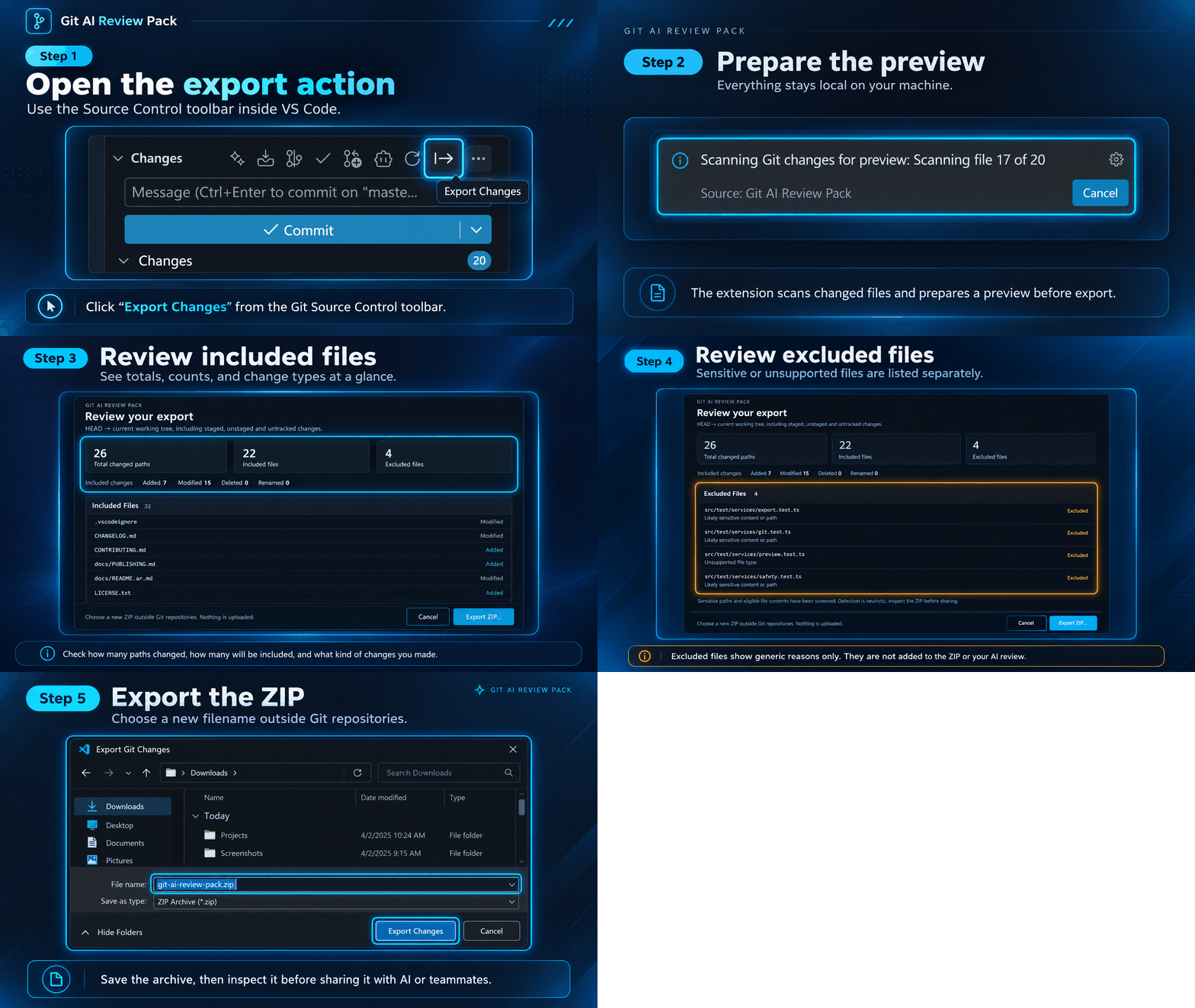
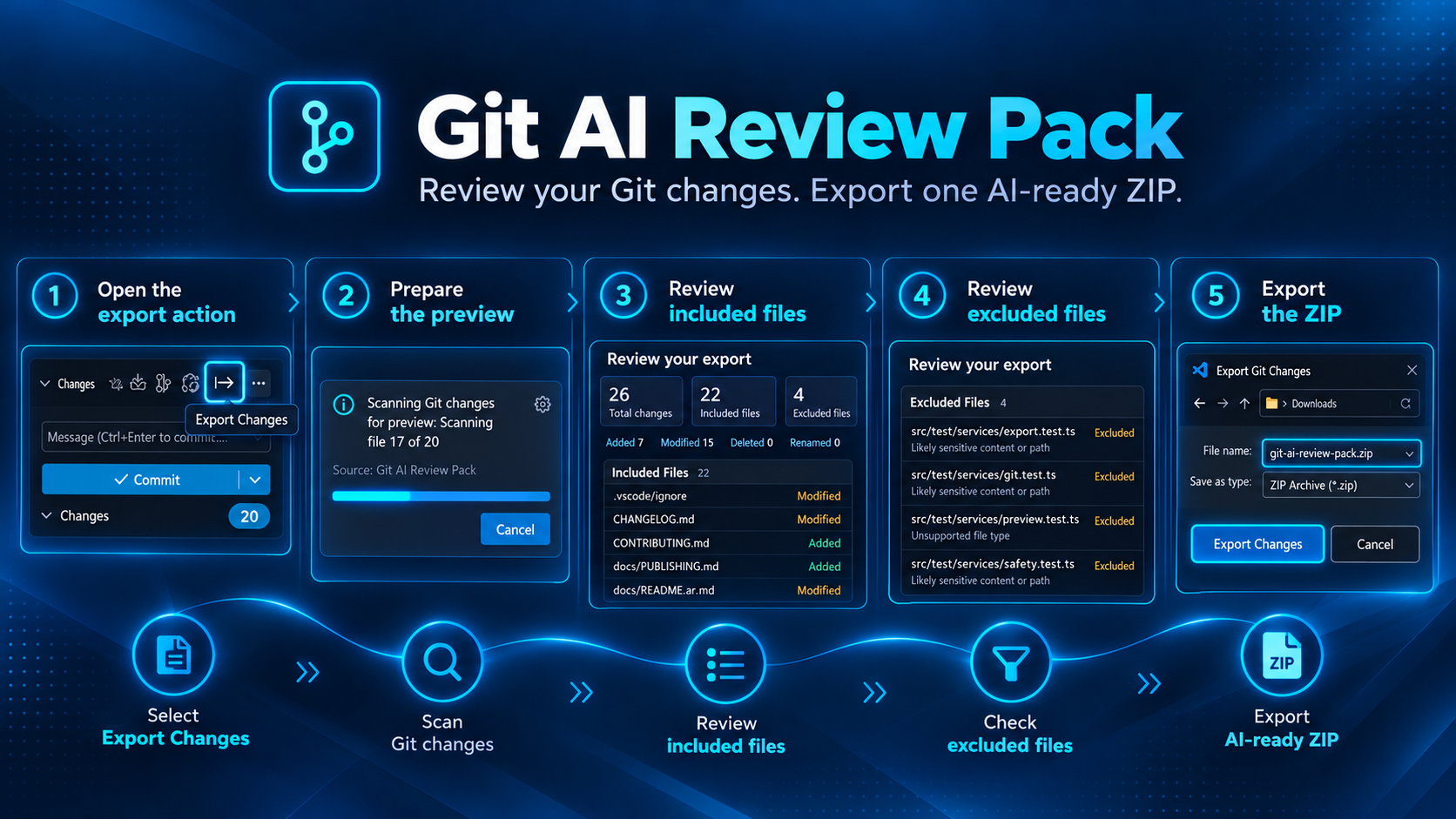
How It Works
Git state and included files are checked again before generation. You can cancel the preview without creating a ZIP. Staged and unstaged edits are combined into the final on-disk version. A detected rename may combine two changed paths into one included file. Workflow at a GlancePrefer a static guide? This overview shows all five steps together.
Getting StartedYou need VS Code 1.140.0 or later, Git available on
For a supplied What's Inside the ZIP?
Added files have no original version; deleted files have no current version. Renames retain both paths. Text bytes, line endings, UTF-8 BOMs and missing final newlines are preserved. Privacy & SecurityEverything runs locally. The extension does not contact an AI service, upload source code, collect telemetry, stage changes or change Git configuration. Sensitive filenames, likely credentials, binary content, unsupported text, symlinks and unsafe paths are excluded. Both original and current eligible content are checked: a finding on either side excludes the whole file and its patch. Reports identify the affected version using generic reasons. Excluded file contents are absent from the ZIP and any AI review based on it. Lockfiles and documentation receive the same checks as other text files. If Git rejects a repository because its owner differs from the current process, Trust for this export authorizes only that exact repository for that operation. Approve only repositories you recognize; this does not change filesystem permissions or save a global trust rule. Secret detection is heuristic. It can miss secrets or exclude harmless examples. Always inspect the archive before sharing it. Unchanged files are outside the export and are not scanned. Limitations
FAQDoes this review my code with AI?It prepares the package and a review prompt. You decide whether and where to share it; no AI request is sent. Why is a file missing?Check Excluded Files in the preview and the archive's summary/manifest. Sensitive paths, likely secrets, binary files and unsupported content are common reasons. Ignored untracked files and unchanged files are outside the export scope. Can I cancel?Yes. Use Cancel, press Escape in the preview, or close its tab. Cancelling the preview creates no ZIP. Scanning and generation also provide cancellable progress. How do updates work?VS Code handles Marketplace extension updates according to your update preferences. Installing a VSIX manually disables auto-update for that extension by default; you can manage it in the extension's menu. See VS Code's extension update documentation. Contact & SupportFor feedback or support, email az@ahmed-zaky.cloud. When reporting a problem, include your operating system, VS Code and Git versions, expected behavior, and sanitized reproduction steps. Never share real credentials or private exports. Changes appear in VS Code's Changelog tab. LicenseGit AI Review Pack is free to use under its proprietary license. The source repository remains private. Copyright © 2026 Ahmed Zaky. Bundled third-party components retain their own licenses and notices, supplied in ArabicGit AI Review Packتغييرات Git في ملف ZIP واحد، جاهز للمراجعة. حوّل تغييراتك المحلية إلى حزمة منظّمة لمراجعة الكود بمساعدة الذكاء الاصطناعي أو بالتعاون مع فريقك، دون رفع الكود تلقائيًا إلى أي خدمة.
العربية · English ماذا تفعل الإضافة؟إضافة إلى VS Code تجمع التغييرات المرحّلة وغير المرحّلة والملفات الجديدة غير المتجاهلة، مقارنةً بآخر تثبيت يمكنك استخدام الحزمة مع أداة المراجعة التي تفضّلها أو مشاركتها مع زميل بعد فحصها. لا تحتاج إلى حساب ذكاء اصطناعي أو مفتاح API. أبرز المزايا
كيف تعمل؟
تُراجع حالة Git والملفات المضمّنة مرة أخرى قبل إنشاء الحزمة. يمكنك إلغاء المعاينة دون إنشاء ملف ZIP. تُدمج التعديلات المرحّلة وغير المرحّلة في النسخة النهائية الموجودة على القرص. وقد تُجمع مسارات الحذف والإضافة في ملف واحد عند اكتشاف إعادة تسمية. الخطوات في نظرة واحدةإذا كنت تفضّل دليلًا ثابتًا، تجمع هذه الصورة الخطوات الخمس في مكان واحد.
البدء السريعتحتاج إلى VS Code 1.140.0 أو أحدث، وأداة Git متاحة في
لتثبيت ملف ماذا تحتوي الحزمة؟
لا توجد نسخة أصلية للملف المضاف، ولا نسخة حالية للملف المحذوف. تحتفظ إعادة التسمية بالمسارين. تبقى البايتات النصية ونهايات الأسطر وعلامة UTF-8 BOM وغياب السطر الأخير كما هي. الخصوصية والأمانتعمل الإضافة محليًا؛ لا تتصل بخدمات ذكاء اصطناعي، ولا ترفع الكود، ولا تجمع بيانات استخدام، ولا تُرحّل تغييرات، ولا تعدّل إعدادات Git. تُستبعد أسماء الملفات الحساسة وبيانات الاعتماد المحتملة والمحتويات الثنائية والنصوص غير المدعومة والروابط الرمزية والمسارات غير الآمنة. تُفحص النسختان الأصلية والحالية المؤهلتان؛ وإذا وُجد سبب استبعاد في إحداهما، يُستبعد الملف كله وفروقه. توضّح التقارير النسخة المتأثرة بأسباب عامة فقط. لن تتضمن الحزمة محتوى الملفات المستبعدة، ولن تشملها أي مراجعة بالذكاء الاصطناعي تعتمد على هذه الحزمة. تخضع ملفات قفل الاعتماديات والتوثيق للفحص نفسه دون استثناءات خاصة بأسمائها. إذا رفض Git المستودع لاختلاف مالكه عن مستخدم العملية الحالية، يتيح Trust for this export الثقة في ذلك المسار لهذه العملية فقط. لا توافق إلا على مستودع تعرفه؛ فهذا الإذن لا يغيّر صلاحيات الملفات ولا يحفظ قاعدة ثقة عامة. الفحص استدلالي، وليس ضمانًا لكشف كل الأسرار. قد يفوّت بيانات حساسة أو يستبعد أمثلة سليمة؛ افحص الحزمة قبل مشاركتها دائمًا. الملفات غير المتغيّرة خارج نطاق التصدير والفحص. حدود الاستخدام
أسئلة شائعةهل تراجع الإضافة الكود بالذكاء الاصطناعي؟تجهّز الحزمة وتعليمات المراجعة فقط. أنت تقرّر إن كنت ستشاركها ومع أي أداة؛ لا يُرسل طلب إلى خدمة ذكاء اصطناعي. لماذا لم يظهر ملف في الحزمة؟راجع Excluded Files في المعاينة، ثم الملخص وملف الوصف داخل الحزمة. من الأسباب الشائعة المسارات الحساسة والأسرار المحتملة والمحتوى الثنائي أو غير المدعوم. الملفات غير المتغيّرة والملفات الجديدة المتجاهلة خارج النطاق أصلًا. هل يمكن الإلغاء؟نعم، عبر Cancel أو مفتاح Escape داخل المعاينة أو إغلاق تبويبها. إلغاء المعاينة لا ينشئ ملف ZIP. يمكن أيضًا إلغاء الفحص وإنشاء الحزمة من إشعار التقدم. كيف تصل التحديثات؟يدير VS Code تحديثات Marketplace وفق تفضيلاتك. عند تثبيت VSIX يدويًا، يُعطّل التحديث التلقائي لتلك الإضافة افتراضيًا؛ يمكنك إدارته من قائمة الإضافة. راجع توثيق تحديث الإضافات في VS Code. التواصل والدعمللملاحظات أو طلب الدعم، راسلنا على az@ahmed-zaky.cloud. عند الإبلاغ عن مشكلة، اذكر نظام التشغيل وإصدارات VS Code وGit والسلوك المتوقع وخطوات إعادة الإنتاج بعد تنقيحها. لا تشارك بيانات اعتماد حقيقية أو حزمًا من مستودعات خاصة. يمكنك الاطّلاع على التغييرات من تبويب Changelog داخل VS Code. الترخيصإضافة Git AI Review Pack مجانية الاستخدام بموجب ترخيصها المملوك، مع بقاء مستودع الكود المصدري خاصًا. حقوق النشر © 2026 Ahmed Zaky. تحتفظ مكوّنات الطرف الثالث بتراخيصها وإشعاراتها المستقلة، المتاحة في ملف |