AGR Document Viewer
View Word, Excel, PowerPoint, PDF and draw.io documents, and preview Markdown notes, right inside Visual Studio Code, by AGR Labs.
Features
- Open a
.docx, .xlsx, .xlsm or .pptx file from the Explorer: it shows in a VS Code tab, single or double click alike.
- Open in Office, the button at the top of the viewer, opens it in its default app (Word, Excel, PowerPoint, Pages, Numbers…) to edit it.
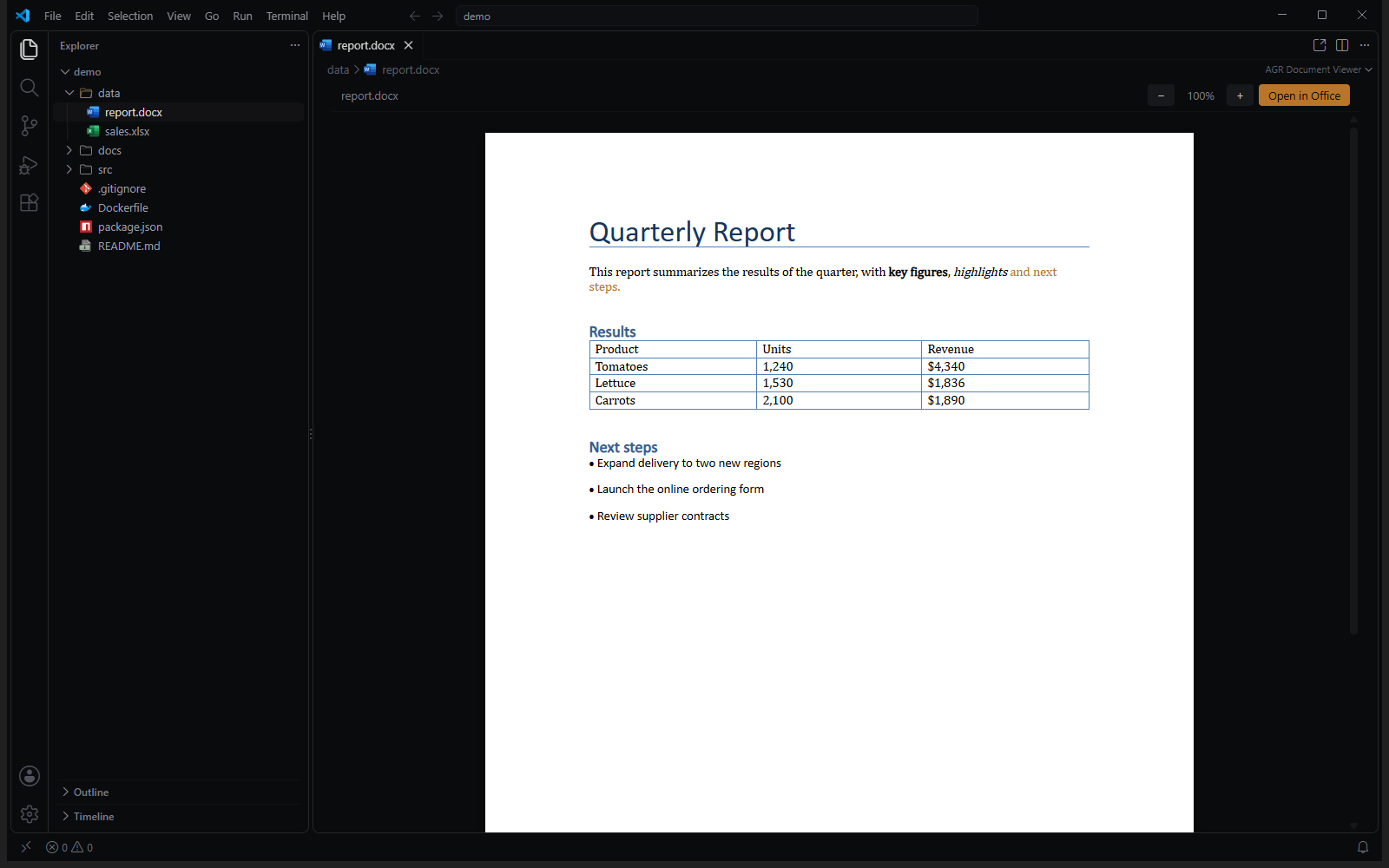
- Word: white pages with headings, tables, lists, images and colors.
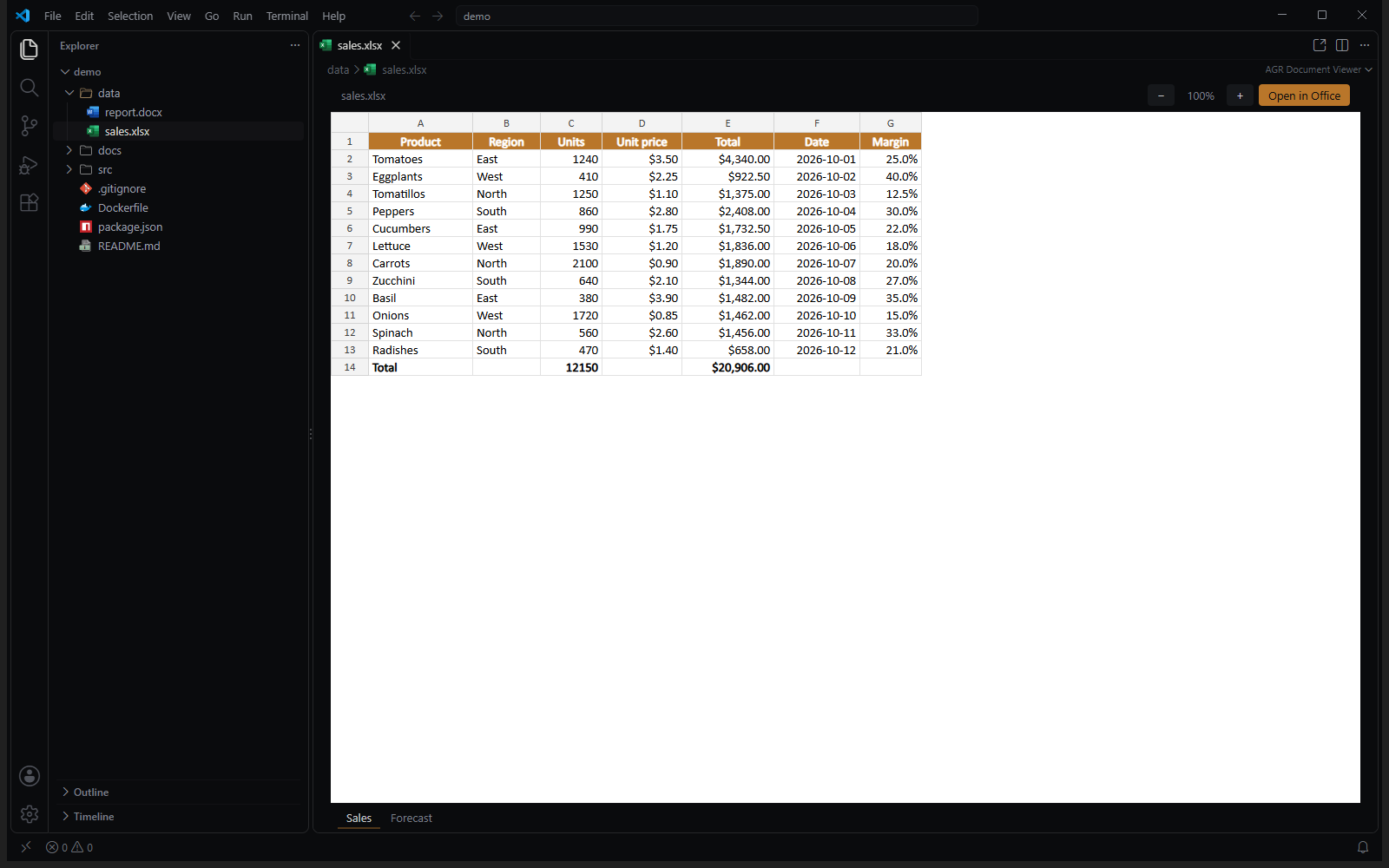
- Excel: the real grid with cell colors (explicit, theme and indexed colors), number formats (currencies as the workbook sets them, dates, times, percentages), merged cells, column widths and sheet tabs. Large sheets load progressively as you scroll.
- PowerPoint: slides stacked one under another.
- PDF: pages stacked one under another, with selectable and copyable text and working links (web links go through VS Code's confirmation, except for domains you trust; internal links jump to their page). Large PDFs load page by page as you scroll. Open in Default App opens it in your PDF reader.
- Find with
Ctrl+F (Cmd+F on macOS): the VS Code find widget searches the document shown.
- Zoom with
− / + or Ctrl + / − (Ctrl+0 to reset); PDF pages are redrawn at the new size, so text stays sharp. The view reloads when the file changes on disk and keeps your place: scroll position, active sheet, zoom and PDF page.
draw.io diagrams
- Single click on a
.drawio or .dio file: the diagram opens in a VS Code tab, drawn by draw.io's own engine with all its shapes and icon libraries. Open in draw.io opens it in the draw.io desktop app to edit it.
- Zoom with the mouse wheel (around the pointer),
− / + or Ctrl + / − / 0; drag to move; Fit shows the whole diagram.
- Page tabs at the bottom for multi-page diagrams. The file is never modified.
- No draw.io app on this computer? Open in draw.io offers to download it; the diagram stays readable in VS Code.
.drawio.svg and .drawio.png files that contain their diagram open in the same viewer with Reopen Editor With… → AGR draw.io Viewer.
CSV, email, HTML, network captures and Visio
- CSV and TSV: the Excel grid, with titles as headers and sorting by column. Open them with Reopen Editor With… → AGR Document Viewer (preview), or associate
*.csv with agrOffice.preview.
- Email (.eml): header card, cleaned body, embedded images; web images on demand; attachments listed with Save As… (never opened).
- HTML: the page rendered in an isolated frame with its own styles and images, scripts off unless you click Run Scripts (still no network). Same option as CSV:
agrOffice.preview.
- Network captures (.pcap, .pcapng, .cap): packet list, details and bytes, with a filter such as
dns, tcp and port 443 or 192.0.2.10.
- Visio (.vsdx): drawn by draw.io's Visio importer, with pages, zoom and drag. Some Visio templates may look approximate.
Markdown preview
- Open Preview or Open Preview to the Side (editor title bar, Explorer right-click or Command Palette) shows a
.md or .markdown note rendered, with your theme's colors and font. Show Source goes back to the text.
- Tables, task lists, strikethrough, footnotes, heading anchors, syntax-highlighted code blocks and raw HTML, sanitized.
- The YAML front matter becomes a card at the top: tags as badges, then the other fields. Invalid YAML is reported.
- Wiki links
[[Note]], [[Note#Section]], [[Note|label]] open the note (found anywhere in the workspace) at its section; links to notes that don't exist yet are greyed.
- Scroll sync between the text and the preview side by side (
agrOffice.markdown.scrollSync).
- Mermaid diagrams in
```mermaid blocks.
- The preview follows your typing, before you save.
- Relative links open the linked file in VS Code;
#anchors scroll within the note.
- Local images are shown. Web images are blocked unless you click Show Remote Images for the open note, or turn on
agrOffice.markdown.showRemoteImages.
- To open every Markdown file in the preview, add
"*.md": "agrOffice.markdown" to workbench.editorAssociations.
Read-only for documents: the viewer never modifies your files. The Markdown preview only reads the note you are editing.
Privacy
Everything runs locally and offline. No document is ever uploaded, and no remote content is loaded. Links inside a document open only when you click them, and only web (http, https) and mailto: links: VS Code asks for confirmation before opening a website, unless you have added its domain to your trusted domains; a mailto: link opens your mail app directly. JavaScript embedded in a PDF is never run, and HTML embedded in a Word document is not displayed. In a Markdown note, raw HTML is sanitized (no scripts, event handlers, forms or frames) and web images load only if you ask for them. Open in Office and Open in Default App only open Word, Excel, PowerPoint and PDF files.
Known limitations
- Word: pages are split only at explicit page breaks, and floating (anchored) images may be misplaced.
- PowerPoint: some layouts inherited from the slide master (bullets, vertical alignment), charts and SmartArt can be approximate.
- Excel: a formula never calculated by Excel is shown as the formula itself, in grey italics. Colors that come from a table style or from conditional formatting are not shown. Dates are always written as
yyyy-mm-dd, whatever the cell's date format.
- PDF: password-protected files, form filling and thumbnails are not supported yet; use Open in Default App.
- Find only searches what is on screen or already loaded: in a PDF, the pages near the visible area; in a large sheet, the rows loaded so far. While it is open, the find widget covers the right side of the viewer's toolbar.
- Legacy formats (
.doc, .xls, .ppt) are not supported; use Open in Office.
- draw.io: images that a diagram loads from the web are not shown (a notice says how many);
.drawio.svg and .drawio.png files open as regular images.
- Markdown: math (
$...$) is not rendered; ![[Note]] links to the note instead of including it.
Settings
agrOffice.markdown.showRemoteImages (default false): show web images in every Markdown preview.agrOffice.markdown.scrollSync (default true): scroll the preview and the text of the same note together.- If another PDF extension is installed, VS Code asks which one to use; to choose AGR Document Viewer, right-click a PDF tab → Reopen Editor With… → Configure default editor for '*.pdf'.
Credits
Rendering by docx-preview (Apache-2.0), ExcelJS (MIT), pptx-preview (ISC) Mozilla's PDF.js (Apache-2.0), the draw.io viewer, shapes and stencils by JGraph (Apache-2.0), markdown-it and its plugins (MIT), yaml (ISC), DOMPurify (Apache-2.0) and highlight.js (BSD-3-Clause) and Mermaid (MIT). See THIRD-PARTY-NOTICES.txt. Microsoft Word, Excel and PowerPoint are trademarks of Microsoft; they are mentioned only to describe the file formats.
Made by AGR Labs.
| |

