Skip to content
| Marketplace
Sign in
Visual Studio Code>AI>AgentReview (ARV)New to Visual Studio Code? Get it now.
AgentReview (ARV)

AgentReview (ARV)

AgentReview

| (1) | Free
AI code review workflow — review threads anchored to code regions
Installation
Launch VS Code Quick Open (Ctrl+P), paste the following command, and press enter.
Copied to clipboard
More Info

AgentReview for VS Code

Code review for AI-generated changes. Anchor review threads to specific lines, track resolution, and let agents fix issues automatically.

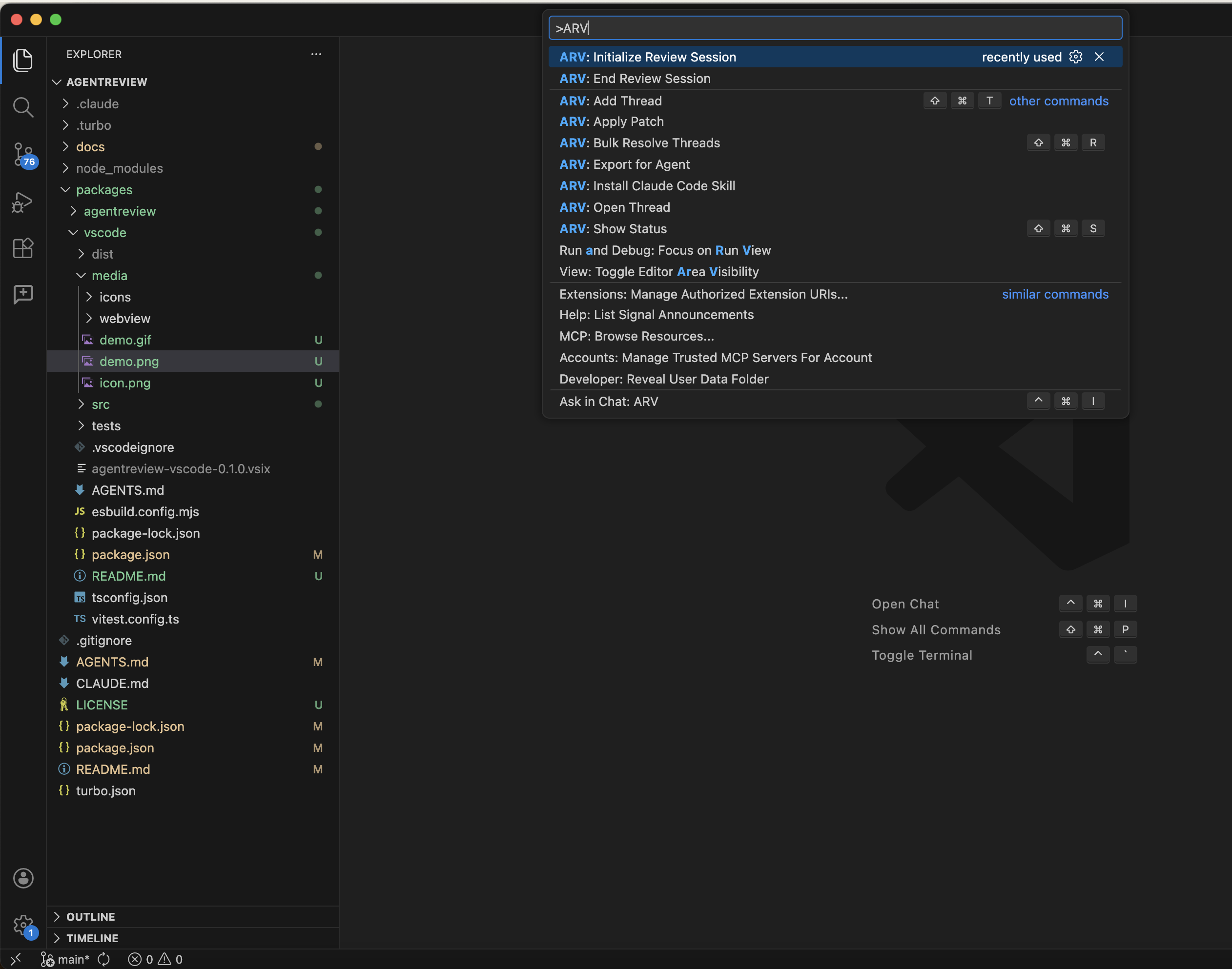
Initialize a review session from the command palette (Cmd+Shift+P).

Step 1: Initialize review session

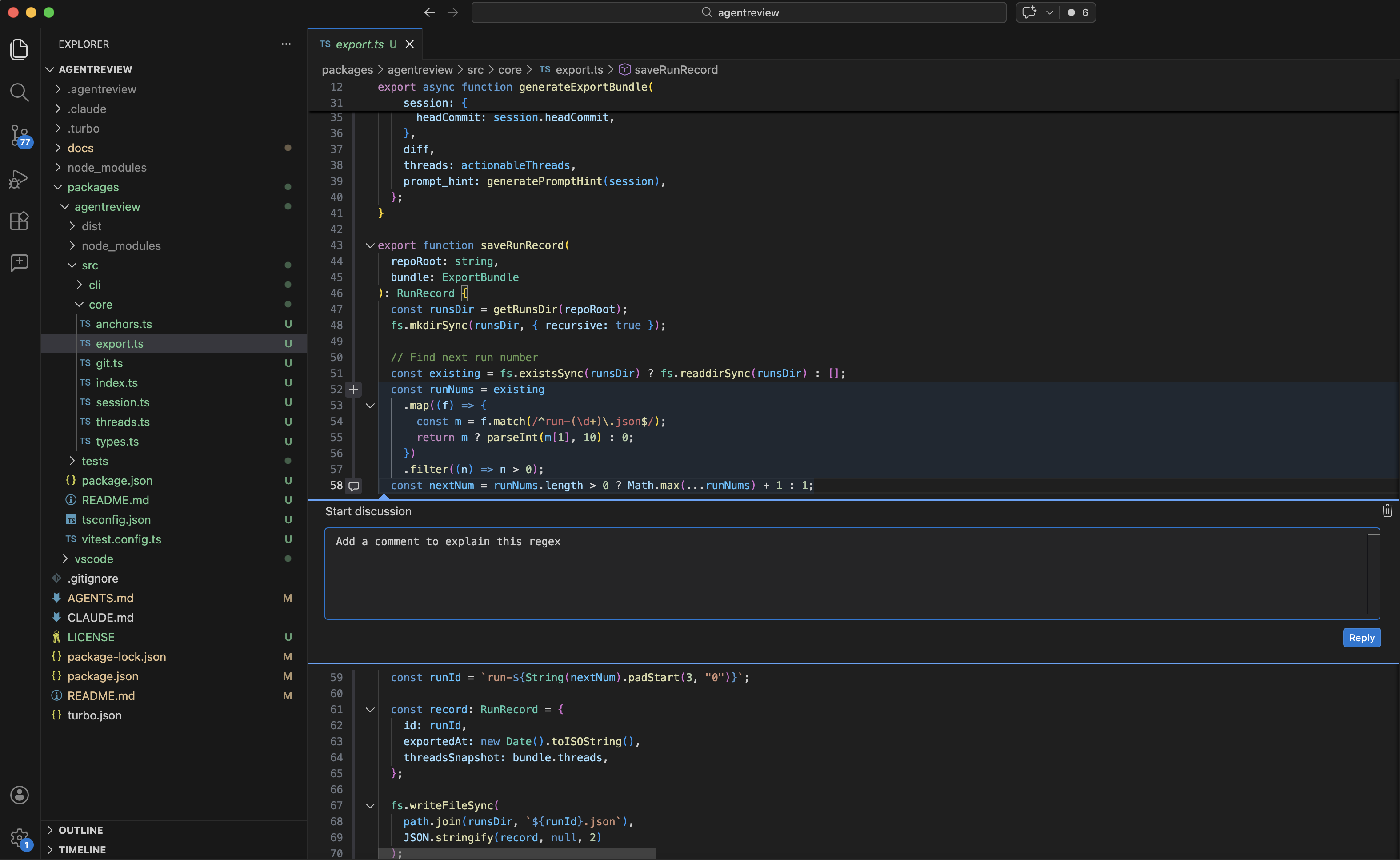
Select code and add review comments — threads anchor to the exact lines you selected.

Step 2: Review code and add comments

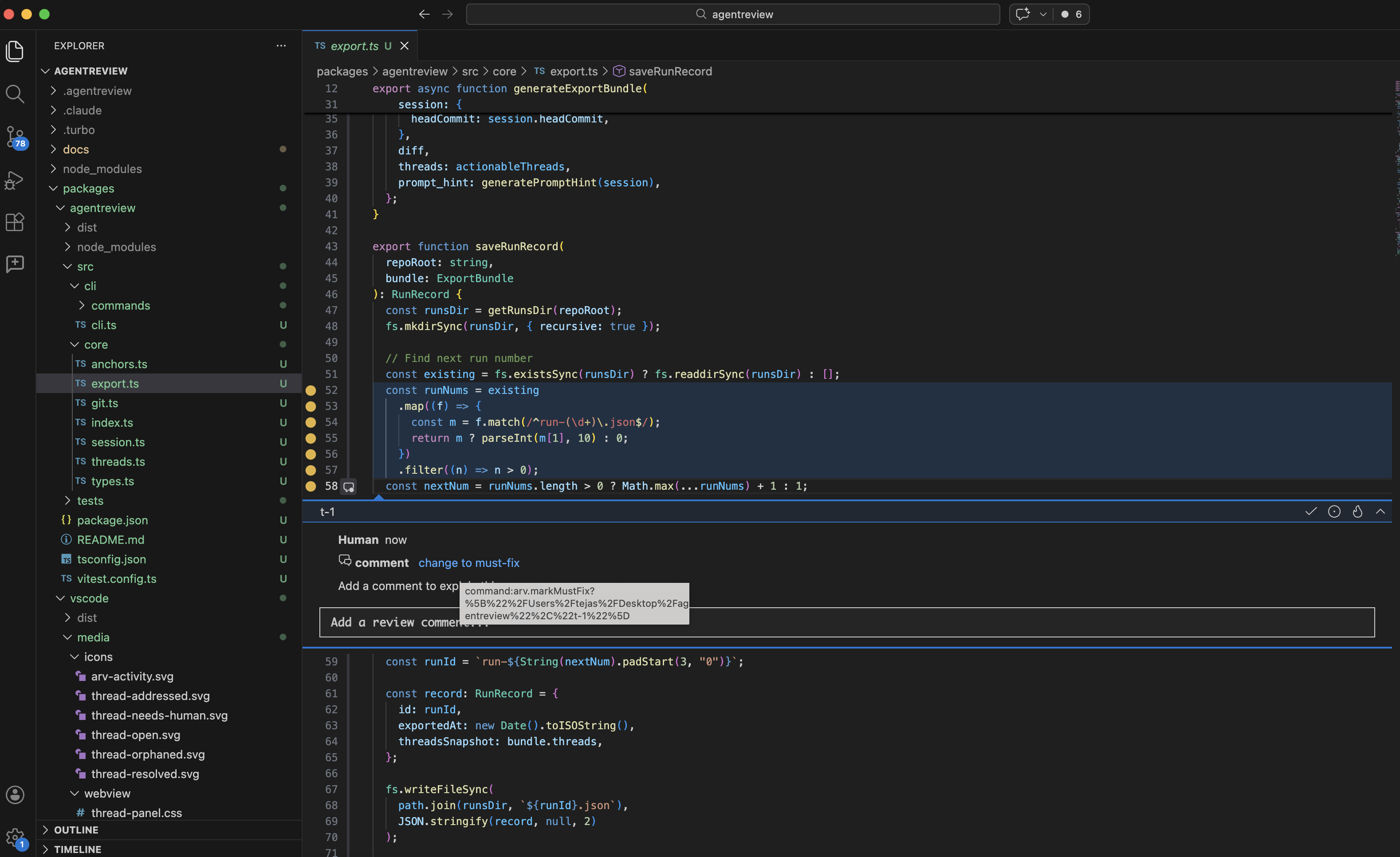
Escalate issues to must-fix by clicking the severity badge in the comment.

Step 3: Mark comments as must-fix

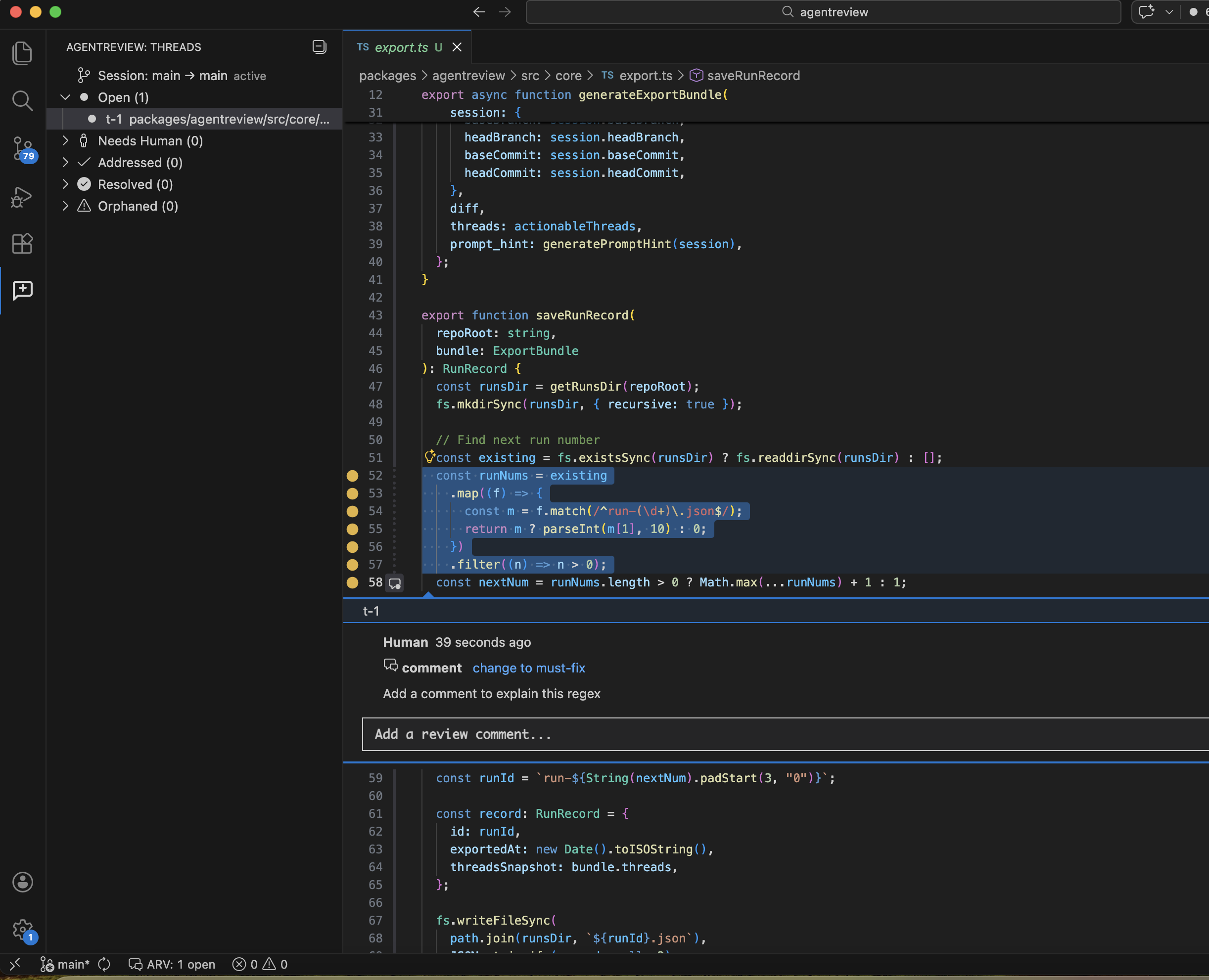
Track all open threads in the Activity Bar panel, grouped by status.

Step 4: Review open threads

Let Claude fix everything — type /arv in Claude Code and it addresses each thread automatically.

Step 5: Ask Claude to fix issues

Quick Start

  1. Open a repo in VS Code
  2. Run ARV: Initialize Review Session from the command palette (Cmd+Shift+P)
  3. Select code, right-click → ARV: Add Thread (or Cmd+Shift+T)
  4. Type your review comment — it anchors to the selected lines

Adding Threads

Select code in the editor, then:

  • Right-click → ARV: Add Thread
  • Keyboard: Cmd+Shift+T (Mac) / Ctrl+Shift+T
  • Command palette: ARV: Add Thread

Threads appear as inline comments in the editor, just like PR review comments. Each thread is anchored to the exact code region you selected.

You can also create a thread by typing a comment on any uncommented line — this creates a comment-severity thread automatically.

Thread Severity

Threads have two severity levels:

  • comment (default) — observations, suggestions, questions
  • must-fix — blocking issues that must be addressed

Toggle severity using the icons in the thread header:

  • Click the flame icon to escalate to must-fix
  • Click the comment icon to downgrade to comment

Thread Lifecycle

Each thread has a status:

Status Meaning
open Awaiting action
needs-human Agent flagged for human review
addressed Anchor text changed after a patch was applied
resolved Marked done
orphaned Anchor lost after code changed significantly

Use the inline icons on each thread to resolve, reopen, or reply.

Activity Bar

The Agent Review panel in the activity bar shows all threads grouped by status. Click any thread to jump to its location in the editor.

Each status group shows a count. Resolvable groups have a Resolve All button to bulk-resolve threads in that category.

Status Bar

The status bar shows a live summary: ARV: X open, Y addressed, Z resolved. Click it to focus the thread panel. Hover for a full breakdown.

Bulk Actions

Run ARV: Bulk Resolve Threads (Cmd+Shift+R) to resolve threads in bulk. Options:

  • All open threads
  • All addressed threads
  • All threads in the current file
  • All unresolved threads

Working with Agents

Agents with file access (Claude Code, Cursor, etc.)

Agents can read .agentreview/session.json and .agentreview/threads.json directly from the repo root — no export needed.

Sandboxed agents

Run ARV: Export for Agent to generate a JSON bundle containing the session, threads, and diff. Feed this to your agent.

Applying patches

After an agent produces changes, run ARV: Apply Patch. Threads automatically re-anchor to their new locations and update status:

  • Threads whose anchor text changed → addressed
  • Threads whose anchor can't be found → orphaned

Claude Code Integration

If you have Claude Code installed, the extension automatically installs the /arv skill on activation. In Claude Code, type /arv and the agent will:

  1. Read all review threads
  2. Fix must-fix issues first, then comment threads
  3. Reply to each thread explaining what was changed
  4. Print a summary table

You can also install the skill manually from the command palette: ARV: Install Claude Code Skill.

Gutter Decorations

Anchored lines show gutter icons colored by status. Hover over a decorated line to see the thread ID, severity, status, and first message, with a link to open the full thread.

Multi-Repo Support

Open a folder containing multiple git repos — the extension auto-discovers all .agentreview/ sessions and manages them independently. The status bar and tree view aggregate across repos.

Commands

Command Shortcut Description
ARV: Initialize Review Session Start a review on the current branch
ARV: Add Thread Cmd+Shift+T Add a review thread on selected code
ARV: Show Status Cmd+Shift+S Show session summary and thread counts
ARV: Export for Agent Export review data as JSON
ARV: Apply Patch Apply a diff and re-anchor threads
ARV: Bulk Resolve Threads Cmd+Shift+R Resolve multiple threads at once
ARV: End Review Session Close the current session
ARV: Install Claude Code Skill Install the /arv skill for Claude Code

How It Works

All state lives in .agentreview/ at the repo root (auto-added to .gitignore). The extension watches these files and refreshes the UI automatically when they change — whether edited from the CLI, an agent, or another tool.

Anchor relocation uses exact text matching first, then fuzzy matching (longest common subsequence, 60% similarity threshold).

License

MIT

  • Contact us
  • Jobs
  • Privacy
  • Manage cookies
  • Terms of use
  • Trademarks
© 2026 Microsoft