Agent Factory Main Chat
One conductor for all your AI coding agents, inside VS Code.
Tell the Conductor what you want. It turns your message into work requests, hands them
to performers running on Codex, Claude Code or Antigravity, compares every report with
what you asked for, and tells you what actually happened.
How it works
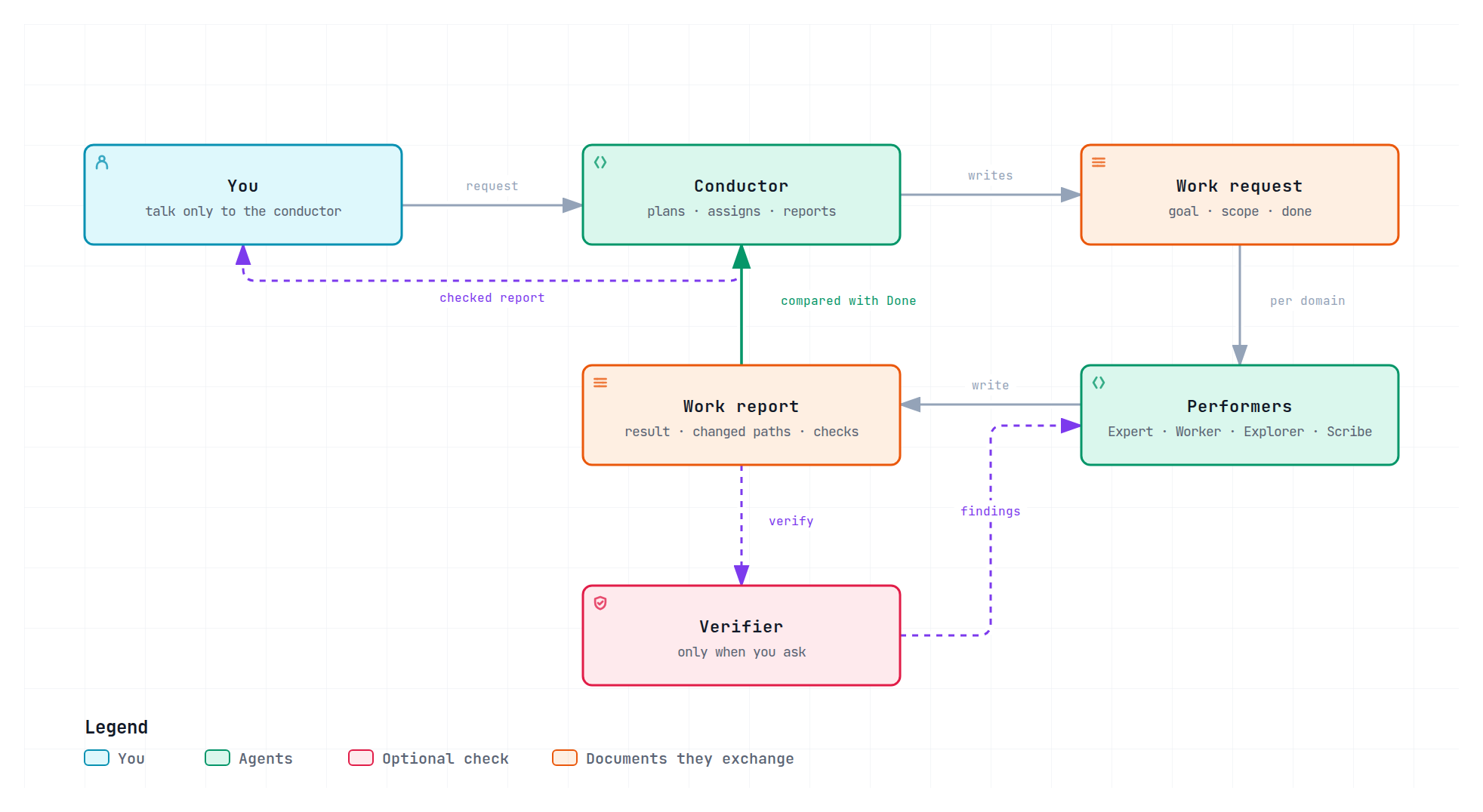
- You talk to one Conductor. It plans, asks when something material is missing,
assigns work and reports back. Conversation and questions stay with the Conductor.
- Performers do the work. Each task goes to the role that fits it: Expert for
open-ended changes, Worker for bounded changes that are already decided,
Explorer for read-only research and Scribe for documents.
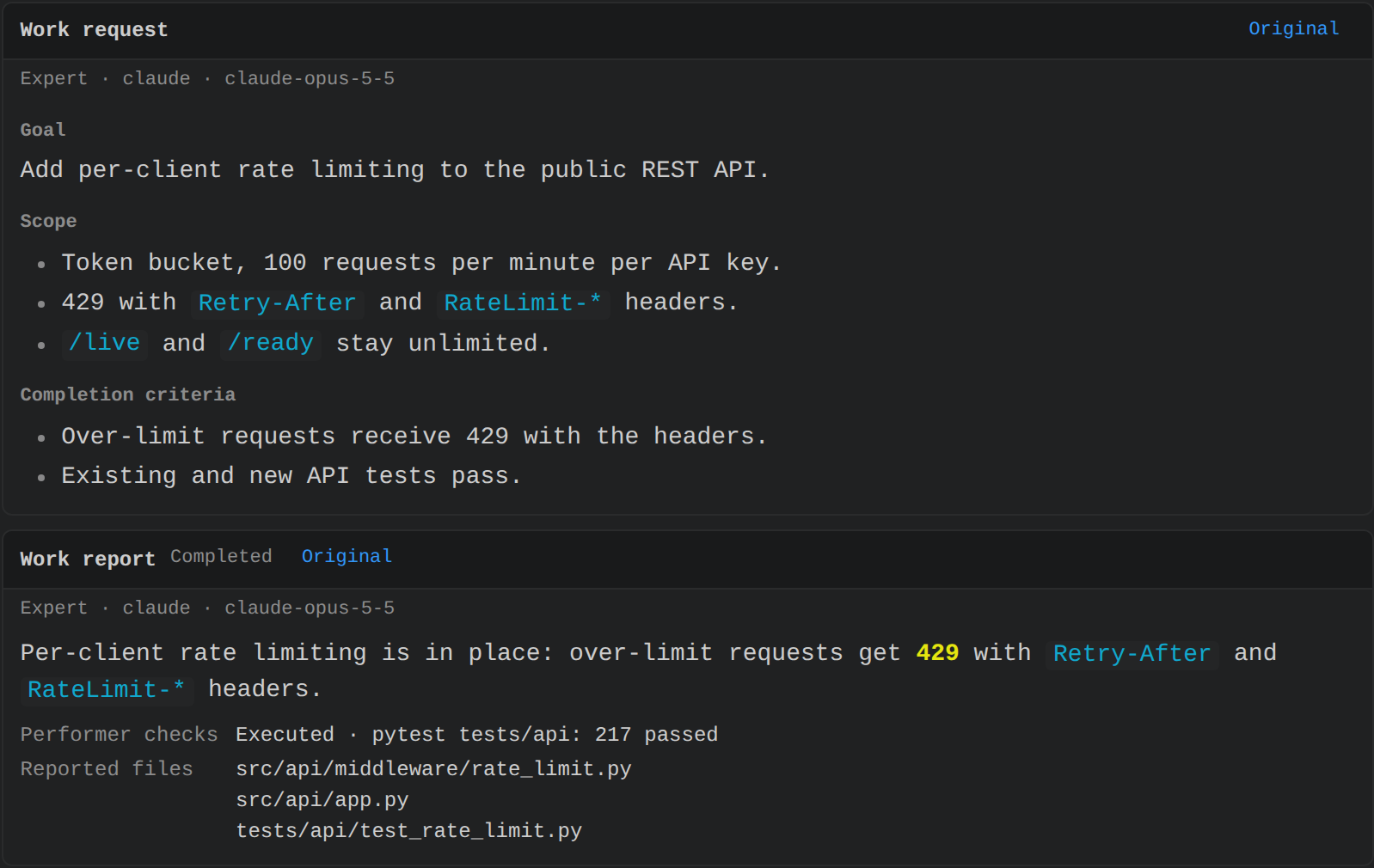
- Two documents connect them. The work request (goal, scope, Done criteria) is
the only thing a performer receives; the work report (result, changed paths, own
checks) is what comes back. Both appear as cards in the chat and the Control Center.
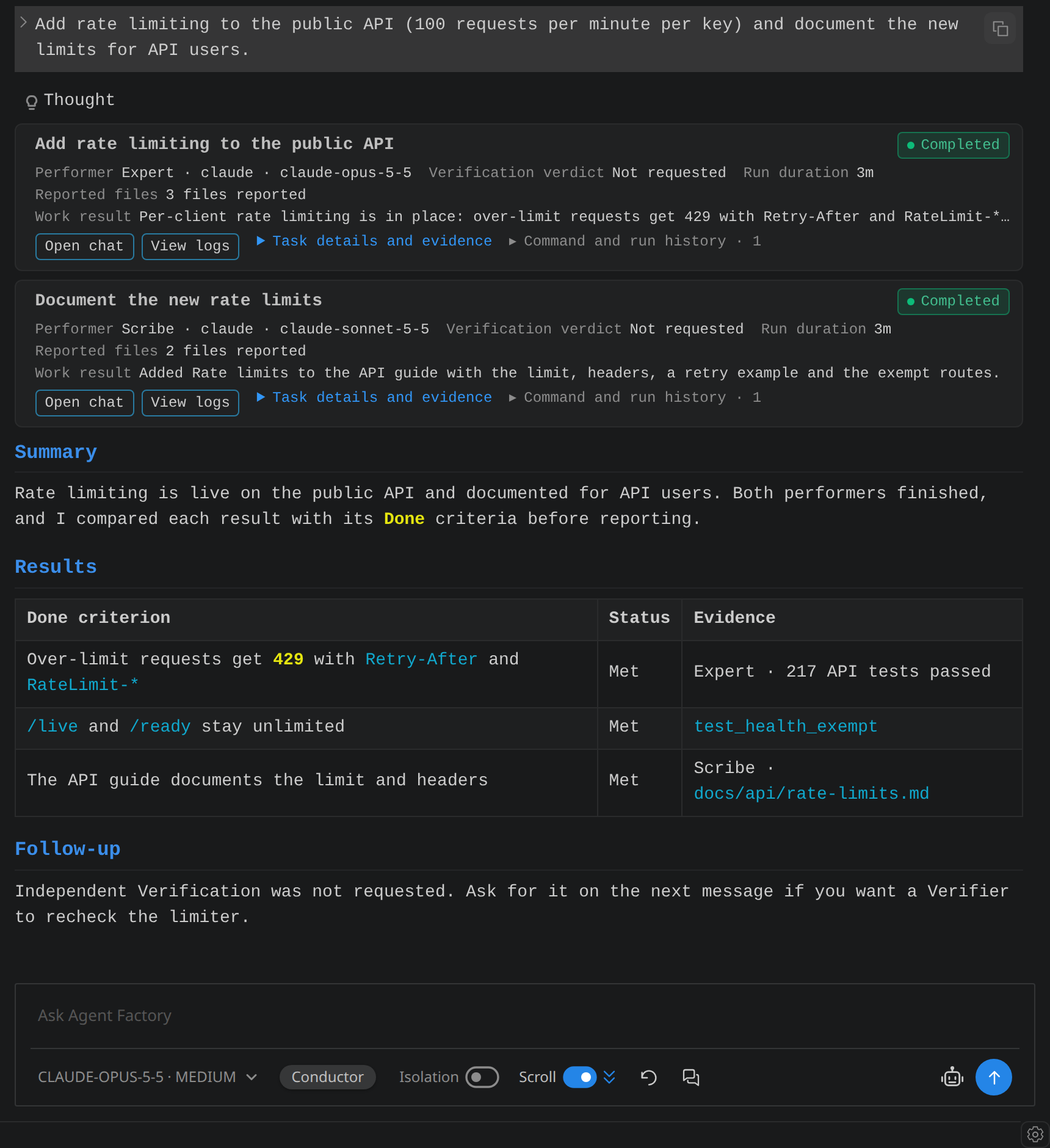
- Nothing is reported unchecked. Before answering, the Conductor compares each
report with its Done criteria and sends a mismatch back to the same performer.
- Verification on request. Ask for it and a Verifier, preferably on another
vendor's model, checks the work independently; findings return until it passes.
- Domains keep work organized. Performers belong to work areas such as API or
Documentation; follow-up work in a domain goes to its performers.
Architecture
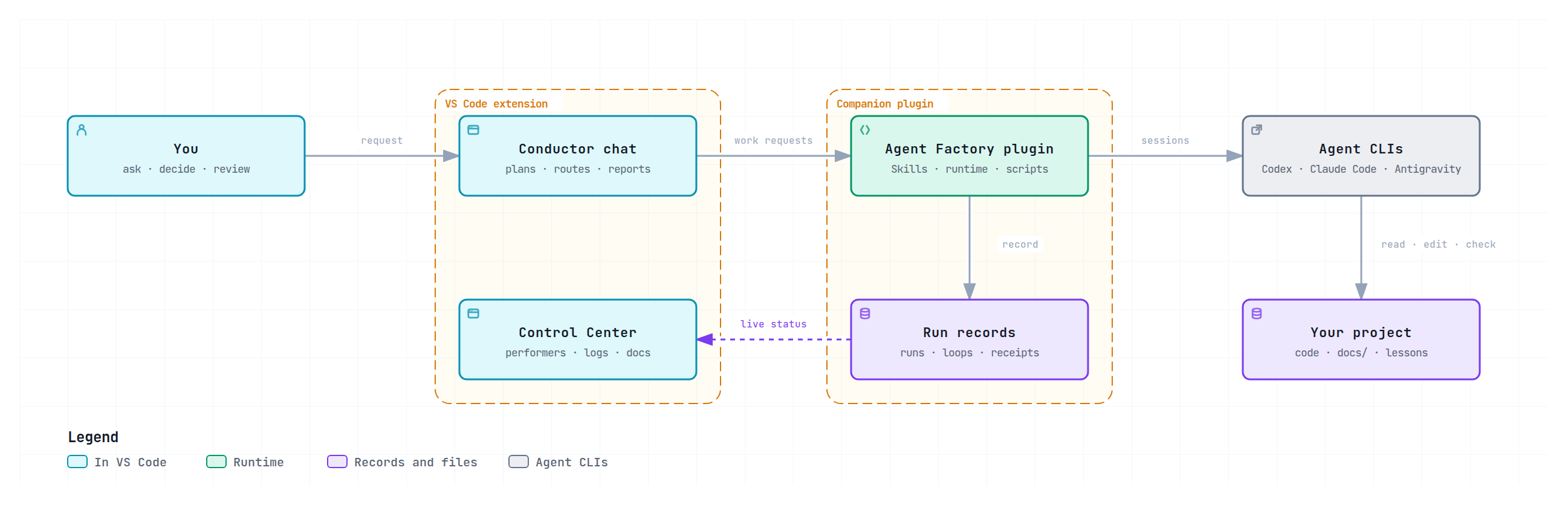
- The extension installs or updates the matching Agent Factory companion plugin for every
detected CLI. The plugin owns the Skills and the runtime that starts each session.
- Agents run in the CLIs you already use, with your existing logins. No API key, MCP
server or cloud account is needed.
- Every request, report, check and decision is kept as a run record, so the Control
Center and later work can read what actually happened.
Core features
1. Document system
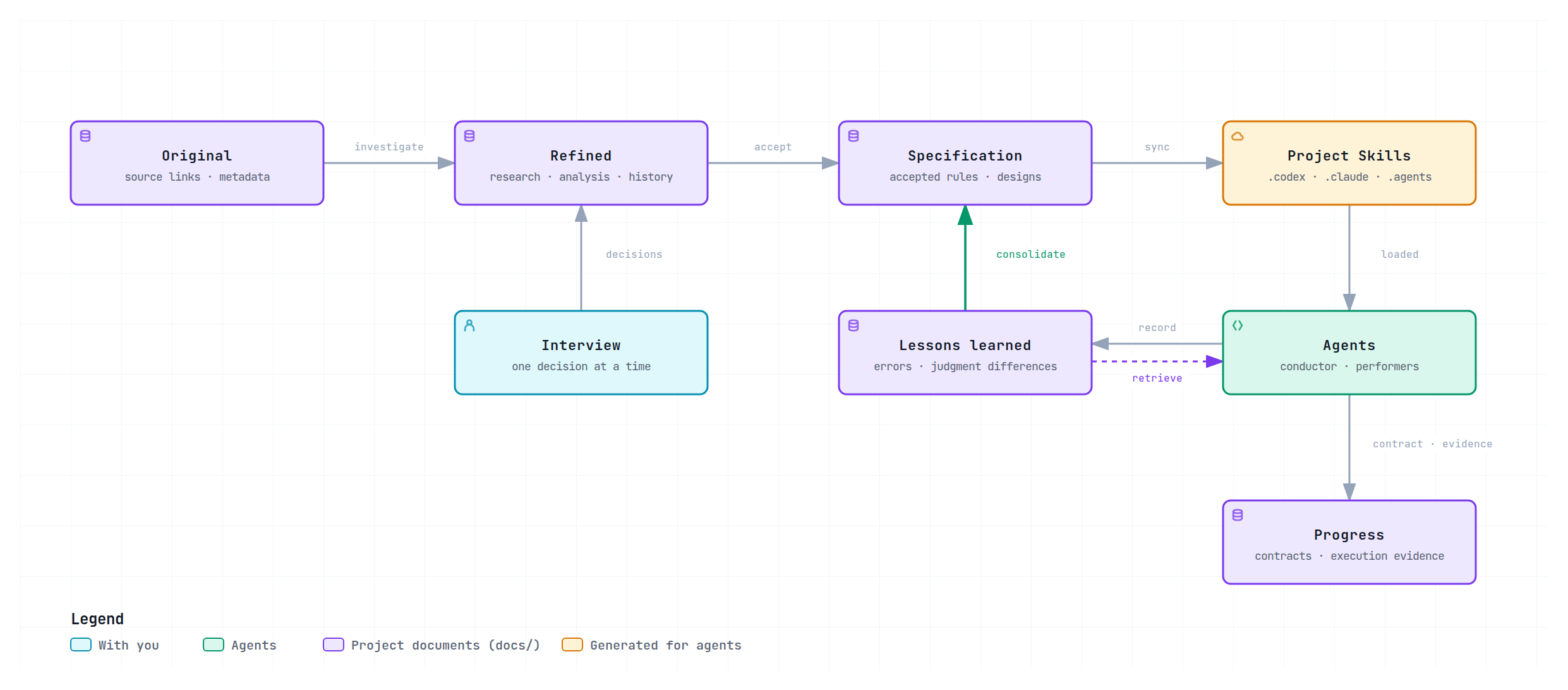
- Keep project knowledge in one searchable structure with one editable source per
document: source references (Original), research and history (Refined),
accepted rules and designs (Specification), contracts and execution evidence
(Progress) and Lessons Learned.
- Accepted Specifications are synchronized into project Skills for Codex, Claude Code
and Antigravity, so every agent works from the same rules.
- Evidence, assumptions and accepted decisions stay distinct: writing a document does
not make it a rule. Existing documents are migrated only when you ask.
- Open any
*.architecture.json or *.sequence.json file to explore it right away in the
official interactive Archify viewer: zoom, pan,
node focus, relations and export. Each diagram reopens where you left it, and a diagram
in the Documents view opens there when chosen. Every diagram on this page is one of them.
When a saved change cannot be drawn, the last diagram stays dimmed under the renderer's
findings; each links to its JSON line and appears in the Problems panel. Architecture and
sequence JSON get completion and validation from the pinned official schemas.
2. Contracts → Work–Verification loop
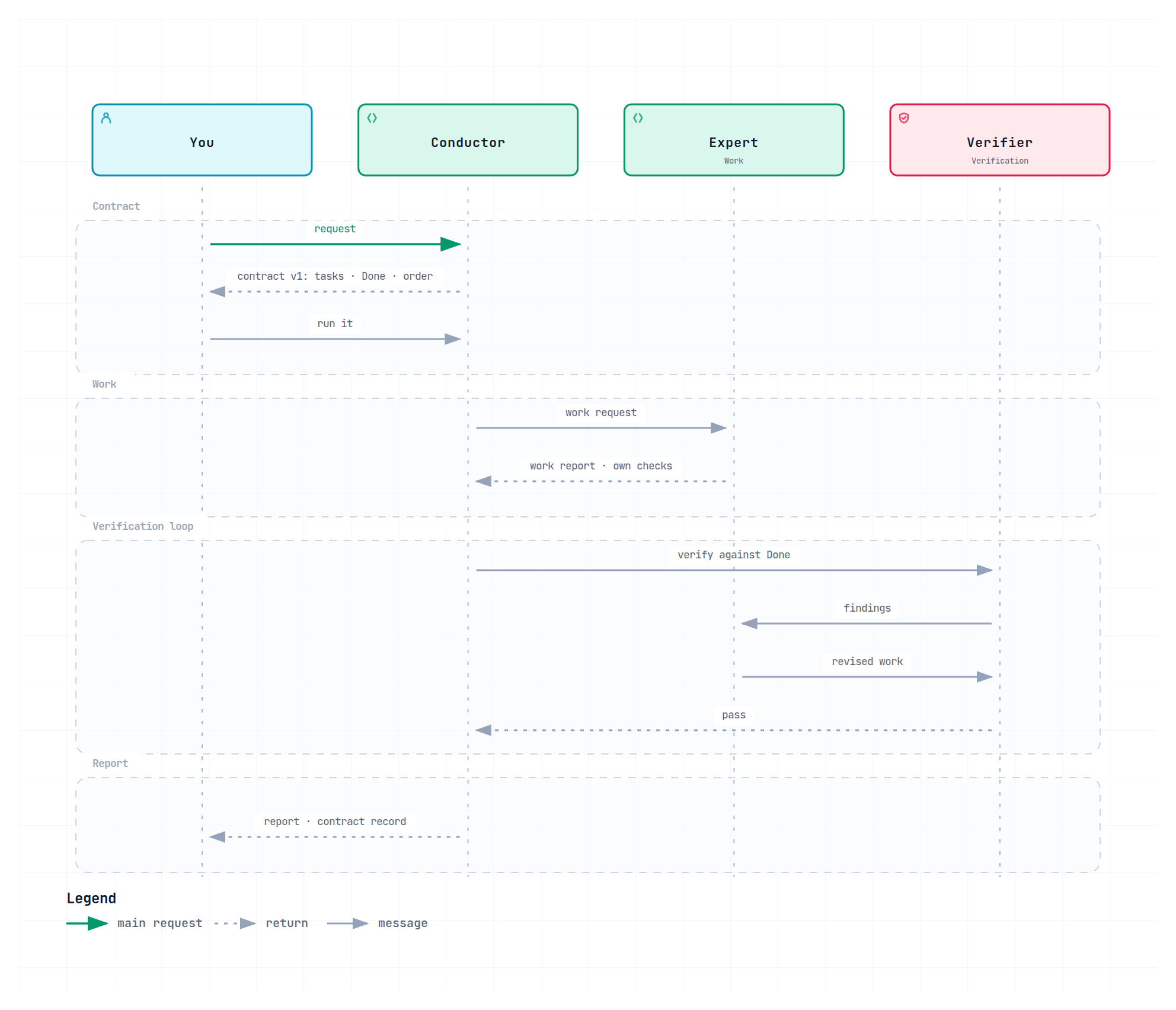
- Turn a conversation into a work contract: the performers and their IDs, task goals
with Done criteria, constraints and dependencies, a file tree of planned changes and a
task-order diagram.
- Each version is saved in
docs/progress/<contract-id>/contract-v<N>.md together with
its execution record: runs, performers, Work and Verification status and evidence per
task. Revisions create a new version and keep the earlier ones.
- Choose the route per message: delegated Work, Work–Verification, or direct work by
the Conductor.
3. Interviews
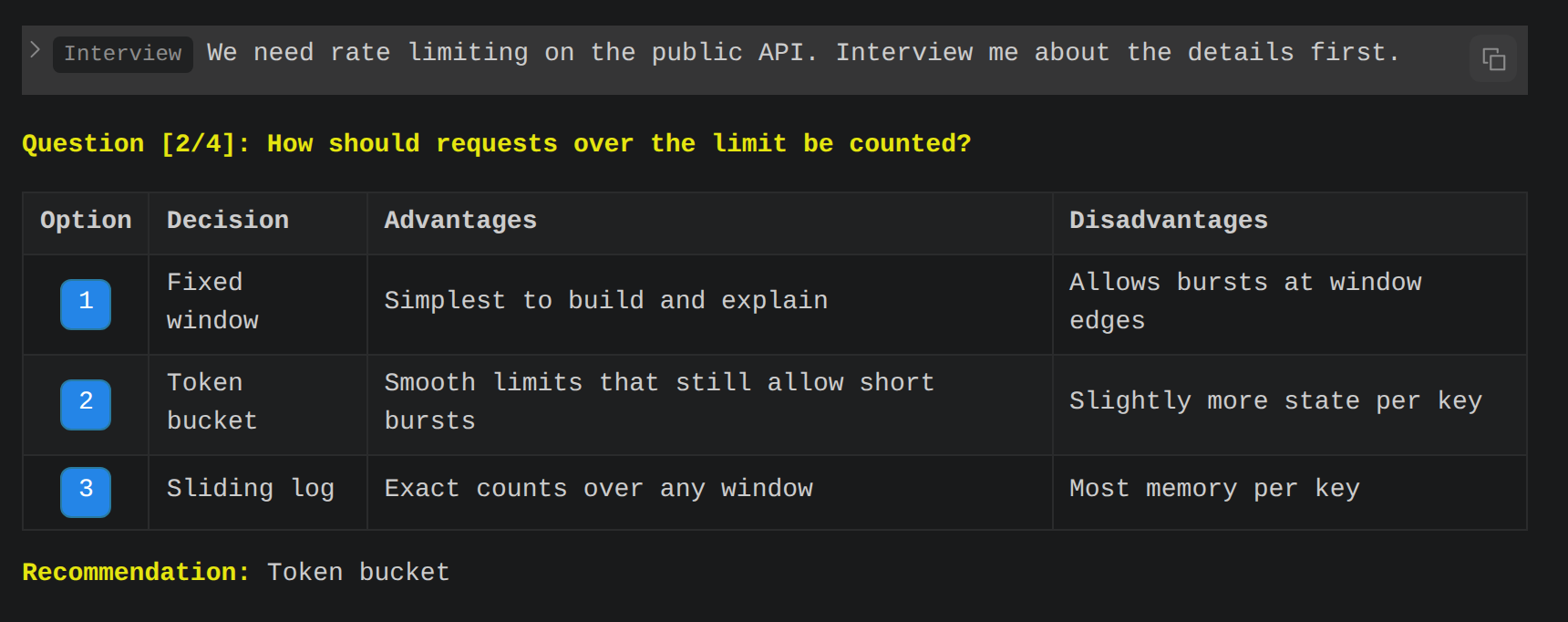
- Resolve missing requirements through guided questions, one decision at a time,
each with options, their trade-offs and a recommendation. Answer by clicking an
option.
- Existing context is used first; only gaps that would change the outcome are asked.
Skip, defer or correct any question.
- The interview ends with a summary of your decisions and remaining gaps, which can be
saved as a document and carried into a contract.
4. Lessons learned
- Errors, recovered failures and differences between your judgment and the agent's are
recorded with their context, causes, attempts and outcomes.
- Relevant lessons are retrieved before related work; each use records whether the
lesson helped, needed correction or failed again.
- The runtime notes what it observes in every run (failed tools and runs, rework,
failed Verification, your corrections) and queues it for lesson writing.
- On request, supported lessons are consolidated into project rules. Lessons never
become rules on their own.
Settings and feature screens
Open Settings from the chat title bar or the Agents view. It contains general,
agent, provider, status-bar, domain and bot configuration. Its shortcuts open each
feature in a separate editor beside the chat:
| Screen |
What it shows |
| Work |
Requests, performers, execution records and results, with controls for the selected work. |
| Dashboard |
Account quota remaining by default, provider token trends, and collapsible project usage with provider, model and period filters. Switch between used and remaining quota without changing the project totals. |
| Logs |
Searchable run logs of every Conductor and performer session. |
| Documents |
The project's and your global documents, with recently changed ones first. |
| Notes |
Global and workspace notes. |
| Secure keys |
Stored credentials and secure references. |
Agents, models and providers
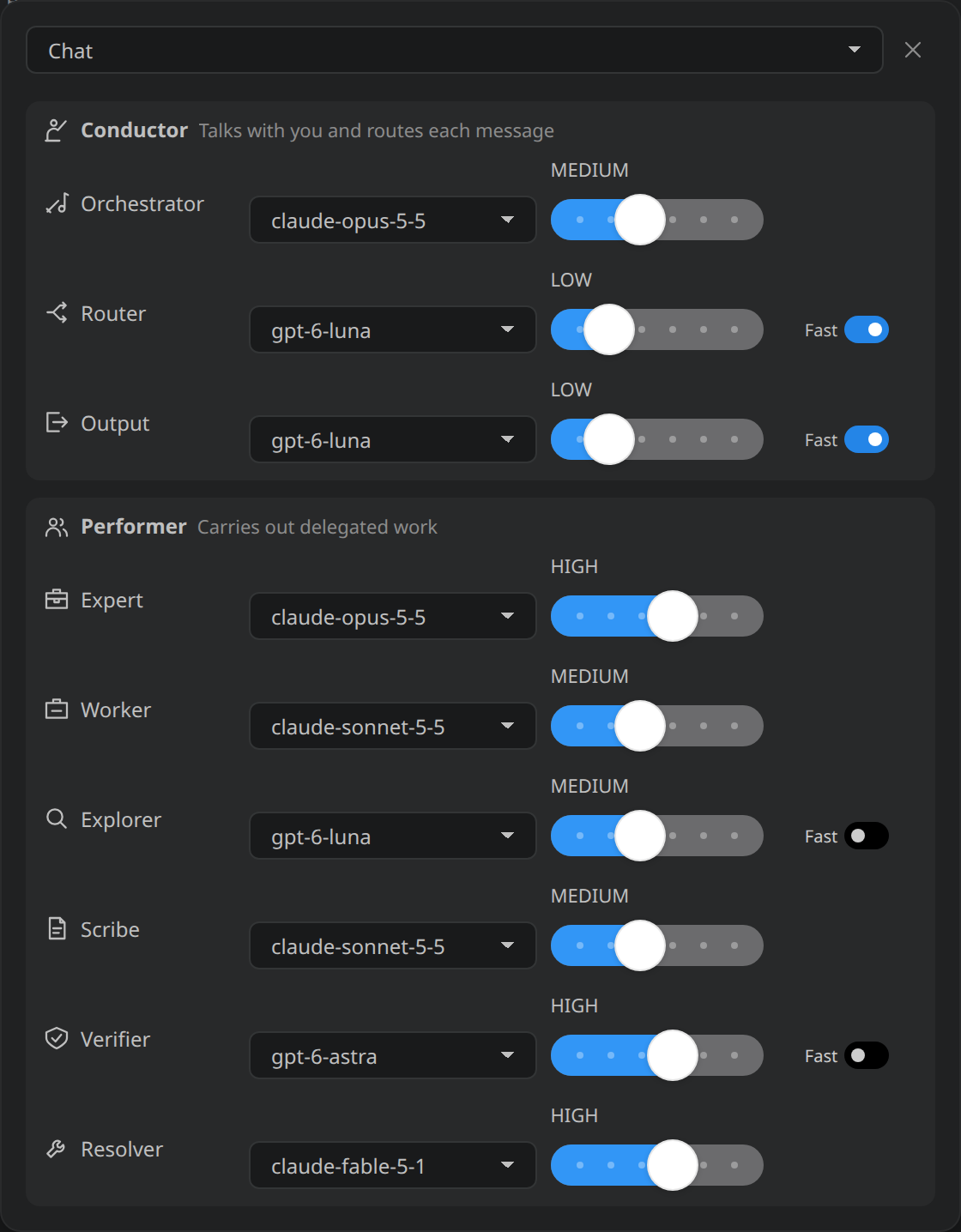
- Each chat sets a model, reasoning level and, where supported, Fast for every role.
The Router chooses which Conductor session answers a message, Output combines
answers into one reply, and the Resolver takes over when the Expert could not
solve a task.
- Keep settings in sets: the built-in Codex, Claude, Antigravity and
Maestro sets, or your own. Maestro picks each role's model from the providers
installed on this machine. Use as project default chooses the set new chats use.
- Automatic provider switch. When a provider's 5-hour or weekly quota is nearly used
up (95%), every role on it, the Conductor included, moves to the same role's model on a
provider with quota left. A task stopped by the quota continues there, and the chat
tells you about every switch. Roles return when the quota refills.
- The model picker groups models by vendor (OpenAI, Anthropic, Google) and
runtime. Claude models come from Claude Code's own account catalog
(
~/.claude/cache/model-catalog/); Antigravity models appear once agy is signed in.
Chat workspace
Prompt shortcuts. An ordinary send goes to the Conductor. Type / in the message box
to search your saved prompts and the built-in request phrases: planning, interview,
document migration, lessons to rules, contract, work, work-verification, deployment
pipeline and goal. Choosing one only replaces that /word in the draft, so you can
combine several with your own text and attachments; nothing is sent until you send it,
and the Conductor reads the request as written. Built-in phrases follow the UI language,
and a saved prompt with the same name stays listed separately.
Keep talking while work runs. A chat runs up to agentFactory.chat.concurrentSessions
Conductor sessions (default 2): an independent question is answered by another session
while a request is still running. Messages that continue the running request wait in
the chat's queue.
Isolation runs delegated work in its own worktree and merges it back; Work
Units move a whole task into its own Git worktree, branch and chat, then merge it.
Attach files, folders and images. Earlier history loads 50 runs at a time.
Status bar items below the chat (run status, project, branch, context, usage and
more) are chosen and ordered in agentFactory.mainChat.statusItems.
Settings: General (startup chat, notifications, periodic documents check), Agents,
Providers, Status bar, Usage, Domains, Bot and Keyboard shortcuts.
The Agents sidebar lists chats and their performers; group, rename, delete or
restore them. Companion bots Lumi and Factory Bot can sit above the message box.
Get started
- Have Python 3.10+ and at least one of the Codex CLI, Claude Code (
claude) or the
Antigravity CLI (agy) available on the VS Code host. Installed CLIs are detected
automatically.
- Run Agent Factory: Add Conductor Chat from the Command Palette.
- Ask for something. Conversation stays with the Conductor; work is delegated.
| Setting |
Purpose |
agentFactory.mainChat.pluginUpdateMode |
auto (default) installs or updates the companion plugin when a CLI is detected or its path changes; manual updates only from Settings → General. |
agentFactory.mainChat.codexPath, claudePath, antigravityPath |
A CLI path when it is not found automatically. |
agentFactory.mainChat.pythonPath |
The Python 3.10+ interpreter. |
agentFactory.mainChat.executionMode |
Permissions for the next Conductor run. |
The diagram viewer also needs Node.js 18+ and a trusted workspace; on first use it
downloads and verifies the pinned official Archify renderer in temporary storage.
Execution permissions
Permissions map to Claude permission modes as follows. These modes do not provide an OS
sandbox.
| Extension setting |
Claude permission mode |
| Full access or Full bypass |
bypassPermissions |
| Workspace |
acceptEdits |
| CLI default |
permissions.defaultMode in Claude settings; read-only when unset |
| |

