Atlas
A visual architecture workspace for VS Code and Cursor where the architecture model is the source of truth — and code becomes a generated artifact.
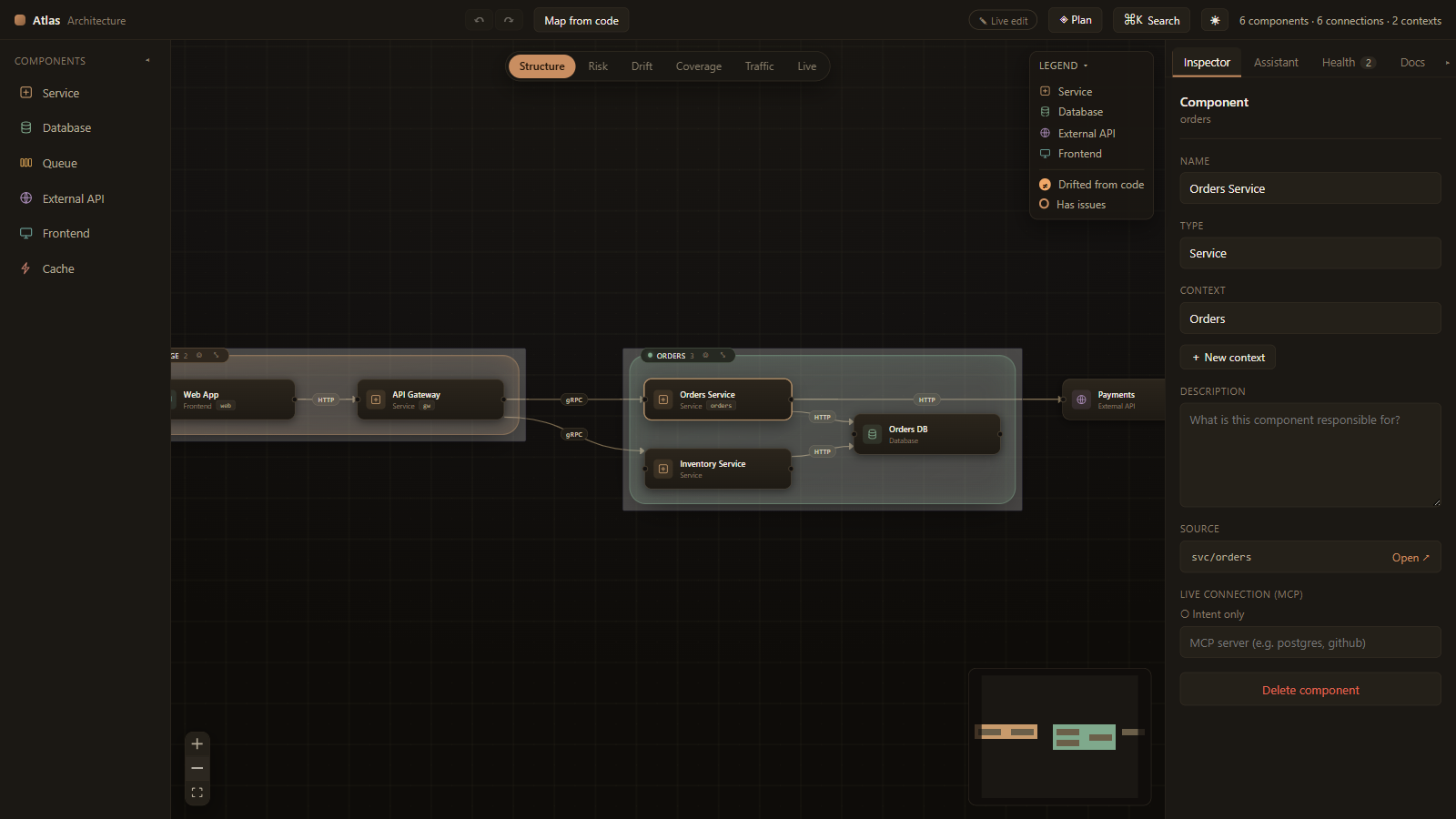
Atlas is not a diagramming tool. It is an editable "map of the world" for your
system: AI generates it from your real repository, you reshape it visually or by
talking to a copilot, and every structural change becomes a proposed code
change you review before it's applied.
        ┌──────────────────── Atlas workspace ────────────────────┐
Repo ──► AI detection ──► atlas.yaml ──► editable canvas + AI chat
                              ▲                    │
                              │     drag / connect / rename / chat
                              │                    ▼
                              └──── interpret ──► confirm ──► Apply
                                                               │
                                                               ▼
                                                    code generation ──► git diff
atlas.yaml lives in your repo as plain, diff-friendly YAML — the single source
of truth that the canvas, the AI, and (optionally) your existing Claude Code all
read and write.
What it does
- Detect architecture from code — Claude analyzes the repository and
produces the architecture map (components, connections, and the code path each
component maps to).
- Edit it visually — drag & drop, zoom, pan, connect, and inspect on an
interactive React Flow canvas.
- Bounded contexts — group components into domains, rendered as auto-fitted
regions. Detection, chat, and Claude Code (via MCP) can all organize the map
into contexts.
- Talk to an architecture copilot — ask questions, or describe a change
(“add a Redis cache in front of the orders DB”). The AI replies and can return
a proposal to apply.
- Apply → generate code → verify — applying pending changes runs an agentic
code-generation pass, shows you the resulting git diff, and verifies
the code realizes the change (mapped paths exist; an optional
atlas.verifyCommand like npm run typecheck passes). The architecture
baseline only advances on a verified match — otherwise the change stays
visibly pending. Code generation is sandboxed: no shell, and writes are
confined to the workspace.
atlas.yaml as source of truth — the canvas and file stay synchronized in
both directions; everything auto-saves.- Architecture rules — built-in checks (a frontend reaching a datastore
directly, components with no code mapping, orphaned nodes) surface in an Issues
panel and as badges on the canvas. Add your own in
atlas.rules.yaml, and gate
pull requests with the atlas check CLI (node dist/atlas-check.mjs).
- MCP interop — Atlas exposes the live map as an MCP server, so your existing
Claude Code can read and edit the architecture too. Its edits appear on the
canvas instantly.
- Modern dark-first UI — clean, rounded, minimal. Linear × Raycast × VS Code.
Phase 1 was the visual editor. This release adds the AI layer (detection,
chat, code generation) and the MCP server. See the roadmap for
what's intentionally still ahead.
How AI is wired in
Atlas's native AI (Detect, chat, Apply → code) runs on one of two engines,
picked automatically per job:
| Engine |
When |
Mechanism |
| Claude Code |
The claude CLI is installed (best experience — reuses your login) |
Claude Agent SDK in the extension host |
| Built-in loop |
You stored an Anthropic, OpenAI, or Gemini API key — no CLI needed |
Atlas's own agent loop; tools execute in the extension host |
This is what makes the AI features work in Cursor and any other VS Code
fork: bring an API key from the provider of your choice
(Atlas: Set AI API Key) and every button works. Pin an engine explicitly with
the atlas.provider setting; pick models with atlas.model,
atlas.openai.model, or atlas.gemini.model.
Separately, the MCP server exposes the live map so your existing agent
(Claude Code, Cursor, …) can read and edit the architecture from its own
workflow. Because everything writes the one atlas.yaml, and Atlas watches
that file, every change — wherever it comes from — shows up live on the canvas.
Data disclosure: the AI features send repository content (file listings
and the files the model chooses to read) to the configured AI provider
(Anthropic, OpenAI, or Google). Nothing is sent except when you explicitly
run an AI action.
Quick start
Prerequisites
- Node.js 18+ and npm
- VS Code 1.85+ (or Cursor)
- For the AI features, one of:
- the
claude CLI installed and logged in, or
- an Anthropic, OpenAI, or Gemini API key (stored via
Atlas: Set AI API Key)
Install
Install Atlas — Architecture Workspace from the VS Code Marketplace (or
Open VSX in Cursor), then:
- Open your project folder.
- Run
Atlas: Open Architecture from the Command Palette.
- Click Detect from code to generate the map — or drag components from the
palette to draw one by hand.
Running from source instead
npm install
npm run build
Open this folder in VS Code and press F5 (Run Atlas Extension),
then open a project folder in the Extension Development Host window. See
docs/DEVELOPMENT.md.
Authentication
Atlas prefers your existing Claude Code login (no setup needed if you're already
logged in). Without the claude CLI — for example in Cursor — run
Atlas: Set AI API Key and store a key for Anthropic, OpenAI, or Gemini;
keys live in VS Code SecretStorage. atlas.provider picks the engine (auto
prefers Claude Code, then the first configured key); you can also pin models or
a claude path in Settings → Atlas.
Usage
| Action |
How |
| Generate the map from code |
Detect from code (toolbar) or Atlas: Detect Architecture |
| Add / move / connect / edit |
Palette + canvas + the Inspector tab |
| Ask or request a change |
The Assistant tab — chat with the copilot |
| Apply a chat proposal |
Apply & generate code on the proposal card |
| Apply your own canvas edits |
Apply N changes (toolbar) → review the diff |
| Let Claude Code edit the map |
Atlas: Register MCP Server, then use Claude Code |
All architecture edits auto-save to atlas.yaml. Code changes are only made when
you explicitly apply, and are always shown as a diff first.
version: 1
nodes:
  - id: orders-service
    name: Orders Service
    type: service          # service | database | queue | externalApi | frontend | cache
    description: Owns the order lifecycle.
    position: { x: 360, y: 80 }
    groupId: orders            # optional bounded context membership
    mapping:
      path: src/services/orders   # links the component to its code
      language: typescript
      framework: express
edges:
  - id: edge-orders-service-orders-db
    source: orders-service
    target: orders-db
    protocol: grpc         # http | grpc | graphql | kafka | rabbitmq | redis | custom
groups:
  - id: orders
    name: Orders
    description: Order management bounded context.
    color: '#4fd1a1'
Node positions live in a separate atlas.layout.yaml sidecar, so atlas.yaml
(the source of truth) only changes on real architectural edits — not on every
drag — and reviews cleanly as a pull request. Entities are sorted by id to avoid
ordering conflicts. Commit the sidecar too, or .gitignore it if you treat
layout as a personal preference.
Documentation
- Architecture — how the extension is structured,
the AI and MCP layers, the sync model, and the extension points for future
growth.
- Development — setup, build pipeline, project
layout, and how to extend it.
- MCP — connecting the Atlas MCP server to Claude Code.
Roadmap
Designed so each of these attaches to the model rather than threading through the
UI:
- Live architecture ↔ code sync (continuous, not just on demand)
- Deeper architecture validation & policy rules
- Deployment, Kubernetes, and runtime-metrics overlays
- DDD bounded contexts, sequence diagrams, event-flow views
- ADR generation & architecture history
- Multi-repository workspaces
License
MIT — see LICENSE.

