🚀 Dock – Project Manager & Project Switcher for VS Code
Lightweight project manager & workspace switcher for VS Code
Bookmark, organize, expand, and switch between projects instantly — without losing focus.




⚡ See Dock in Action
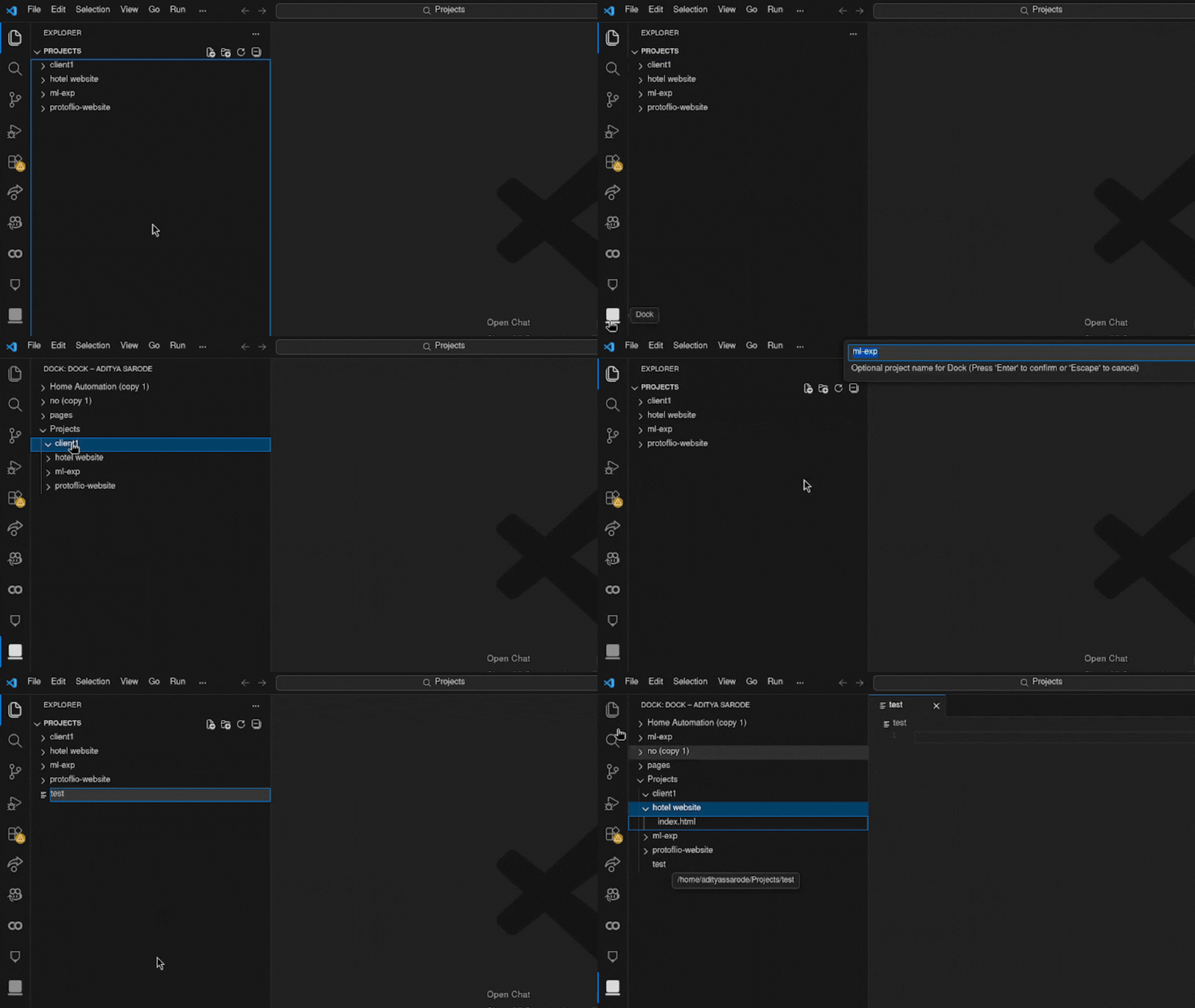
🎯 Marketplace Optimized Overview
Dock helps developers:
- Manage multiple repositories
- Switch between workspaces instantly
- Bookmark important folders
- Expand project structure inside a dedicated sidebar
- Reduce context switching friction
If you work across multiple projects in VS Code, Dock keeps everything structured and accessible.
✨ What Makes Dock Different?
Unlike file explorers or heavy workspace managers, Dock is:
- ⚡ Fast
- 🎯 Focused
- 🧠 Context-driven
- 🧩 Minimal
- 🌍 Globally persistent
It is a project hub, not a bloated file manager.
📂 Interaction Model (Clean & Intentional)
🖱 Single Click
Select project or file.
🖱 Double Click
Expand folder structure.
🖱 Right Click
Full control menu:
- Open
- Open in New Window
- Open in Current Window
- Add to Workspace
- Rename
- Move
- Copy Path
- Reveal in OS Explorer
- Remove from Dock
- Delete from Disk (with confirmation)
Safe. Predictable. Professional.
🧠 Core Features
📌 Register Existing Folders
Right-click any folder → Register to Dock
🆕 Create Projects Instantly
Create project folders directly from Dock.
🔄 Live Auto Refresh
Updates automatically when:
- Files are created
- Folders renamed
- Git pulls happen
- External changes occur
🔎 Smart Project Search
Search by:
- Project name
- Detected languages
- Path
🌍 Global Storage
Projects persist across:
- VS Code restarts
- Multiple windows
- Sessions
No hidden .dock folders. No workspace pollution.
⚙ Configuration
dock.defaultOpenMode
Choose how projects open:
"newWindow"
"currentWindow"
"addToWorkspace"
Default:
"currentWindow"
🗺 Roadmap – v2.0
Planned improvements:
- ⭐ Project pinning / favorites
- 🏷 Tags support
- 🔄 Manual refresh command
- 📊 Project metadata insights
- 🧩 Drag-and-drop reordering
- 🎨 Custom icons per project
- ⚡ Performance optimization for large folders
- 🌙 Improved UI theming support
Dock is actively evolving.
🚀 Who Dock Is For
- Students managing coursework
- Freelancers juggling clients
- Developers handling multiple repositories
- Builders who value structured workflow
- Anyone tired of digging through folders
💡 Philosophy
Dock improves context switching.
Less time navigating. More time building.
⭐ Support Dock
If Dock improves your workflow:
- ⭐ Leave a rating on Marketplace
- 📝 Share feedback
- 🚀 Recommend to other developers
Every install helps improve visibility.
👨💻 Built By
Aditya Sarode
Focused on building tools in AI, ML, and developer productivity.

