GitHub Actions Cron Calendar
Read GitHub Actions cron schedules without leaving your editor. Open any file under
.github/workflows/, and every cron: entry gets a one-line summary above it — when it runs, in
which timezone, and how long until the next run. Click it for a calendar of the whole month.
No account, no GitHub token, no network calls. Everything is calculated locally.
Pro goes one step further and shows what GitHub actually did with those schedules: which runs
started, how late, which failed, and which GitHub silently skipped. More below.
What it does
Given a workflow like this:
name: Nightly checks

on:
  schedule:
    - cron: '0 4 * * 1-5'
    - cron: '30 2 * * 0'
      timezone: 'Asia/Yerevan'

jobs:
  build:
    runs-on: ubuntu-latest
    steps:
      - run: npm test
you see a short CodeLens above each schedule, not a wall of text:
📅 Mon–Fri · 04:00 UTC → 08:00 local · next in 6h 24m
   - cron: '0 4 * * 1-5'
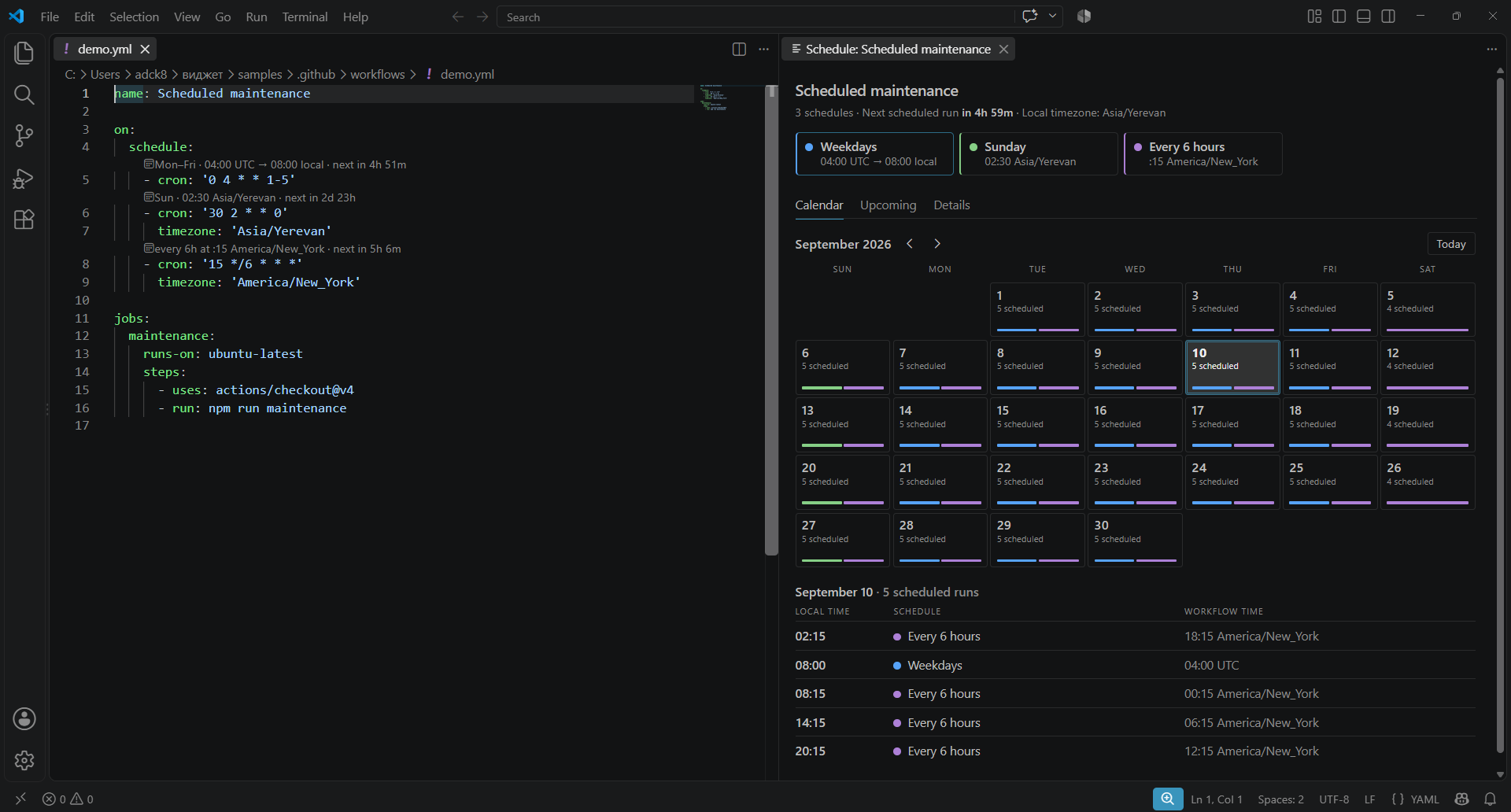
Click it and the Schedule Calendar opens beside the file:
Nightly checks
3 schedules · Next scheduled run in 5h 37m · Local timezone: Asia/Yerevan

● Weekdays            ● Sunday             ● Every 6 hours
  04:00 UTC → 08:00     02:30 Asia/Yerevan    :15 America/New_York

[ Calendar ]  Upcoming   Details

September 2026  ‹ ›                              Today
  SUN     MON     TUE     WED     THU     FRI     SAT
                    1       2       3       4       5
                5 sched 5 sched 5 sched 5 sched 4 sched
                  ▄▄▄▄▄   ▄▄▄▄▄   ▄▄▄▄▄   ▄▄▄▄▄   ▄▄▄▄▄
    6       7       8       9      10      11      12
  ...

September 10 · 5 scheduled runs
LOCAL TIME  SCHEDULE          WORKFLOW TIME
02:15       ● Every 6 hours   18:15 America/New_York
08:00       ● Weekdays        04:00 UTC
08:15       ● Every 6 hours   00:15 America/New_York
14:15       ● Every 6 hours   06:15 America/New_York
20:15       ● Every 6 hours   12:15 America/New_York
Every schedule in the file is drawn on the same month, each with its own colour, so you can see
where two workflows collide. Click a day to see the exact times.
These are the runs GitHub would start from the cron expression — not a history of runs that
happened. The extension never calls the GitHub API.
Features
- Short CodeLens above every
cron: entry: Mon–Fri · 04:00 UTC → 08:00 local · next in 6h 24m.
The countdown refreshes while you work, and clicking anywhere on it opens the calendar.
- Schedule Calendar panel with three views:
- Calendar — a month grid with the run count and a colour bar per schedule on every day.
Days are your days: a run is drawn on the date it happens in your timezone. Selecting one lists
its runs underneath, sorted by your local time, next to the workflow time. Today is selected
automatically.
- Upcoming — the next scheduled runs of all schedules merged into one chronological list.
- Details — the cron expression, its full description, the timezone, the next scheduled runs, and the
GitHub-specific notes.
- Your local time next to the workflow time. A schedule declared as
04:00 UTC also shows as
08:00 Asia/Yerevan if that is where you are, everywhere times appear.
- Hover details on the cron value — description, timezone, next scheduled runs and notes, without opening
anything.
- Cron autocomplete. Type
cron: and pick a ready-made schedule — every day, every weekday,
every Monday, every hour, every 6 hours, first of the month — already moved off the busy :00
minute, with its next runs in the preview. After timezone: you get every IANA zone, yours
first.
- Command Palette —
GitHub Actions: Open Schedule Calendar and
GitHub Actions: Preview Schedule (a Quick Pick breakdown, useful when you just want a glance).
- Validation in the Problems panel:
- invalid cron expressions, including the 5-field rule (
@daily and friends are not valid on
GitHub Actions);
- schedules that fire more often than the GitHub Actions minimum interval of 5 minutes;
- non-standard cron syntax (
L, W, #, ?) that GitHub does not support;
- unknown timezone names;
- schedules that can never run, like
0 0 30 2 * (February 30th);
- a day of the month and a day of the week together:
0 9 1 * 1 runs on the 1st and on
every Monday, not on Mondays that fall on the 1st.
- Hints about dates that behave oddly: day 31 skips five months of the year, February 29 comes
every fourth year, and with a
timezone: that observes daylight saving the hint names the day the
run falls into an hour the clocks skip or repeat.
- GitHub-specific notes you would otherwise have to remember, shown as a separate block:
scheduled workflows only run on the default branch, scheduled runs can be delayed under load, and
XX:00 is the busiest minute to pick.
- Quick fix for the top of the hour. A
0 4 * * * schedule gets a hint and a one-click fix
(Ctrl+. / Cmd+.) that moves it to an off-peak minute such as 17 4 * * *. The minute is
picked per file, so two workflows fixed the same way do not collide again.
- Quick fix: add
workflow_dispatch. A scheduled workflow without it can only be tested by
waiting for the cron. The fix adds it, so the workflow gets a Run workflow button on GitHub.
- Handles multiple schedules per workflow and multiple workflow files, and stays quiet on
workflows that have no
schedule trigger.
- Never modifies your YAML on its own — only when you apply a quick fix or pick a completion.
Pro
Pro is $2/month or $12 once, through Lemon Squeezy. Run
GitHub Actions: Get Cron Calendar Pro from the Command Palette, or open the History tab in
the calendar.
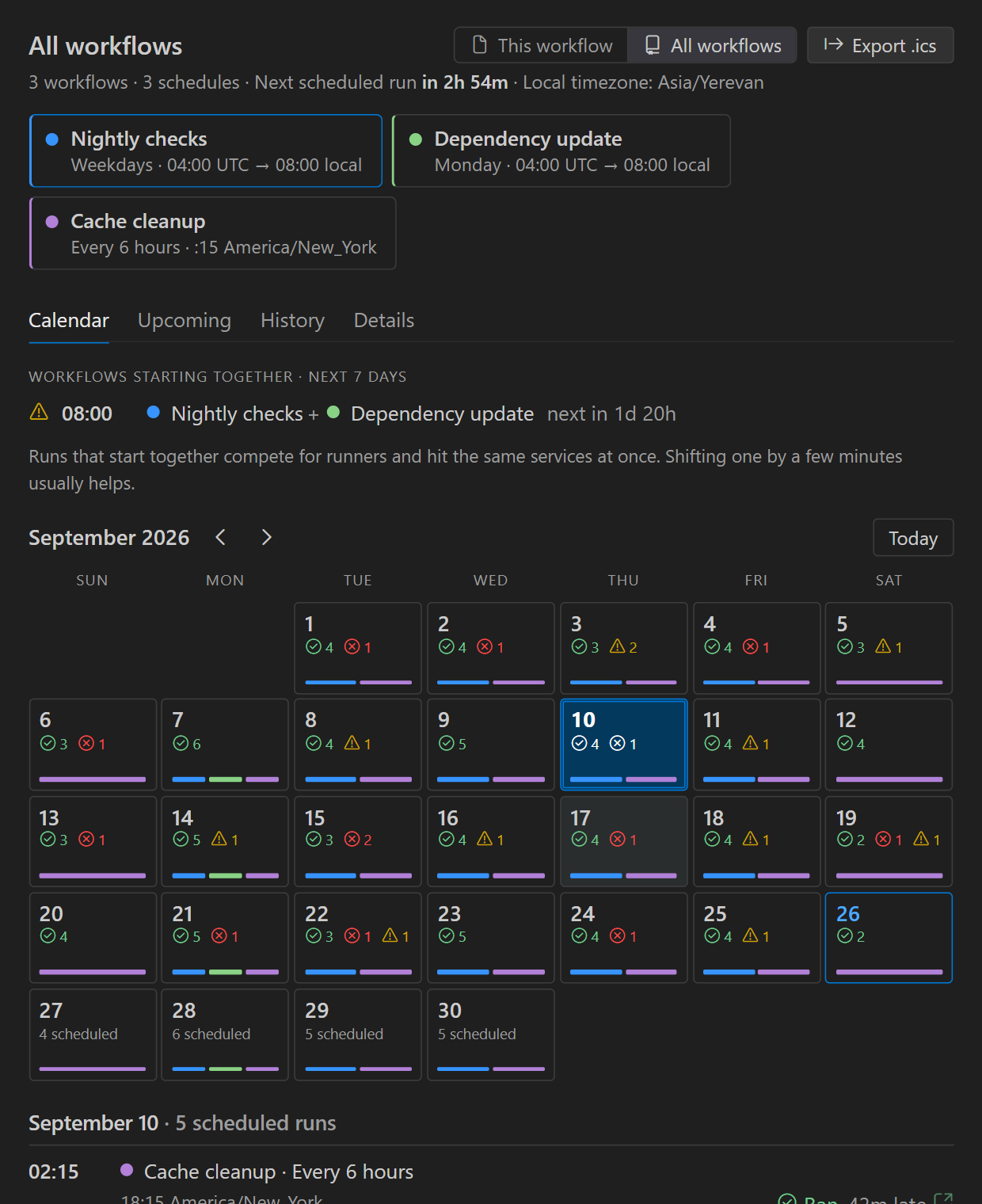
- Run history. For the last 30 days, every scheduled run of the workflow: whether it ran,
failed or was cancelled, how many minutes late GitHub started it, and — the part GitHub never
tells you — the slots where no run started at all. It shows up in three places:
- the CodeLens:
Mon–Fri · 04:00 UTC · next in 6h 24m · last ✓ 12m late;
- the calendar, where past days show ✓ / ✗ / ⚠ counts and the day table gets a Result column
with a link to each run;
- a History tab with a 30-day summary (passed, failed, missed, median start delay).
- Notifications. When a scheduled run fails, or GitHub never starts it, VS Code tells you, with
a link to the run. Checked every 15 minutes while you are signed in to GitHub; only runs due after
you start watching are reported.
- What your schedules cost. Scheduled runs in the next 30 days × how long a run usually takes =
Actions minutes a month, and for private repositories the price at GitHub's Linux rate
($0.006/min, adjustable). The all-workflows view ranks the workflows by minutes, so the expensive
cron is easy to find.
- Disabled workflows, switched back on in one click. GitHub turns scheduled workflows off after
60 days without repository activity, silently. Pro shows it in the CodeLens and the calendar, with
a Re-enable button.
- All workflows on one calendar. Switch the panel from This workflow to All workflows to see
every schedule of the repository together, or run
GitHub Actions: Open Schedule Calendar for All Workflows.
- Workflows that start together. The all-workflows view lists the minutes in the coming week
when two or more workflows start at once, so you can spread them out.
- Export to your calendar. Export .ics writes the next 60 days of scheduled runs to a file
you can import into Google Calendar, Outlook or Apple Calendar.
Run history uses the GitHub sign-in built into VS Code; public repositories work without signing
in. After buying, paste the licence key from the receipt with
GitHub Actions: Enter Cron Calendar Pro Licence Key.
Timezone support
GitHub Actions interprets cron schedules in UTC unless a timezone is declared next to the entry:
on:
  schedule:
    - cron: '0 4 * * 1-5'
      timezone: 'Asia/Yerevan'
The extension uses that timezone for every calculation and labels it everywhere. When no timezone
key is present, it falls back to UTC and tells you so. If the timezone name is not a valid IANA
identifier, you get a warning and UTC is used instead.
Alongside the workflow's own timezone, the panel shows the same instant in your local timezone:
Workflow    04:00  UTC (default)
Your time   08:00  Asia/Yerevan
Runs that land on a different calendar day locally are marked, so a 23:30 UTC job does not
silently look like it runs today.
Screenshots
Installation
- VS Code Marketplace — search for “GitHub Actions Cron Calendar” in the Extensions view
(
Ctrl+Shift+X / Cmd+Shift+X) and click Install.
- Open VSX (VSCodium, Gitpod, Cursor and friends) — search for the same name in the Extensions
view.
- From a
.vsix — code --install-extension github-actions-cron-viewer-0.5.0.vsix, or
Extensions → … → Install from VSIX…
Usage
- Open a repository that contains
.github/workflows/*.yml.
- Open a workflow that uses
on: schedule.
- The summary and the countdown appear above each
cron: line.
- Click the CodeLens — or run GitHub Actions: Open Schedule Calendar from the Command Palette
(
Ctrl+Shift+P / Cmd+Shift+P) — to open the calendar beside the file. It follows whichever
workflow you are editing and updates as you type.
Settings
| Setting |
Default |
Description |
githubActionsCron.enableCodeLens |
true |
Show the inline CodeLens above each cron schedule. |
githubActionsCron.nextRunsCount |
5 |
How many upcoming runs to calculate. |
githubActionsCron.use24HourFormat |
true |
Use a 24-hour clock instead of AM/PM. |
githubActionsCron.showDiagnostics |
true |
Report cron problems in the Problems panel. |
githubActionsCron.showRunHistory |
true |
Pro. Read scheduled runs from GitHub and show how they went. |
githubActionsCron.notifyFailures |
true |
Pro. Notify when a scheduled run fails or never starts. |
githubActionsCron.pricePerMinute |
0.006 |
Pro. Dollars per Actions minute for the cost estimate. |
Limitations
- Only files matching
.github/workflows/*.yml and .github/workflows/*.yaml are analysed. That is
where GitHub Actions looks for workflows, and it keeps the extension out of the way in every other
YAML file.
- Next runs are computed from the cron expression alone. They are what GitHub would schedule —
actual runs can be delayed, and scheduled workflows are disabled automatically after 60 days of
repository inactivity.
- The free version has no run history and never calls the GitHub API; it reads your files and
nothing else. Run history is part of Pro.
- Run history matches runs to the cron in your editor. Right after you change a schedule, slots of
the old one can show as missed until the new one has run for a while.
Privacy
The free version runs entirely offline. It does not collect telemetry, does not contact any server,
does not require authentication, and never writes to your workflow files unless you apply a quick
fix.
Pro makes exactly two kinds of requests: to api.github.com, to read the scheduled runs of your
workflows and whether the repository is private (with your VS Code GitHub sign-in, when there is
one) and, when you press Re-enable, to switch a workflow back on; and to api.lemonsqueezy.com, to
activate and periodically check the licence key. Nothing else leaves your machine, and there is still
no telemetry.
Contributing
Issues and pull requests are welcome on
GitHub.
License
MIT

