Skip to content
| Marketplace
Sign in
Visual Studio Code>Programming Languages>Streamscope: HTTP Client with Live StreamingNew to Visual Studio Code? Get it now.
Streamscope: HTTP Client with Live Streaming

Streamscope: HTTP Client with Live Streaming

Preview

Achraf El Khnissi

|
1 install
| (0) | Free
Send requests from .http files and watch streaming responses (NDJSON, SSE, LLM streams) arrive event by event. Capture values from any event and reuse them.
Installation
Launch VS Code Quick Open (Ctrl+P), paste the following command, and press enter.
Copied to clipboard
More Info

Streamscope

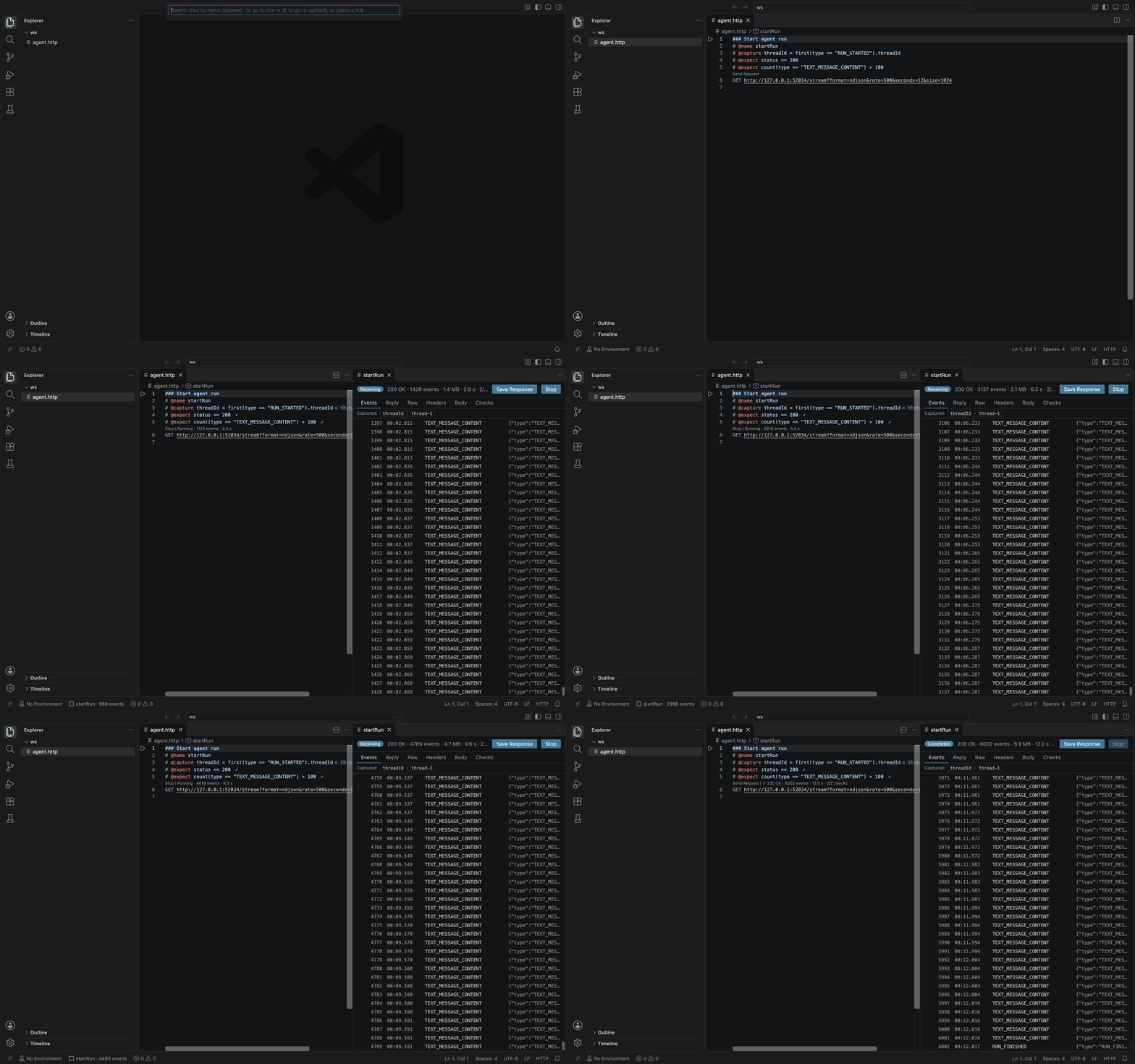
Streamscope sends HTTP requests from .http files and shows streaming responses as they arrive. NDJSON and Server-Sent Events, including LLM streams, appear one event at a time, even when the server labels NDJSON as application/json. Capture a value from a single event, such as the threadId of a RUN_STARTED event, and use it in the next request while the stream is still running.

A streaming response in Streamscope: events arrive live in the Events view while the editor shows the request with its capture and checks

Streamscope reads REST Client's request syntax, so you can keep your existing .http files. Using Streamscope with REST Client lists what this release does not support.

Features

  • Live streaming responses. Each NDJSON or Server-Sent Event gets its own row as it arrives, and the Reply view assembles the text of AG-UI, OpenAI, Anthropic and Ollama streams.
  • Captures from single events. # @capture threadId = first(type == "RUN_STARTED").threadId takes a value from one event, and a request that uses {{threadId}} can be sent as soon as that event arrives. You can also click a value in the response and let Streamscope write the line.
  • Live checks. # @expect lines pass or fail at the event that decides them, while the stream runs.
  • File runs in the Testing view. Run every request of a file in order and see which passed, failed, errored or were skipped.
  • REST Client syntax. Requests, file variables, request references and system variables, with environments from rest-client.environmentVariables or http-client.env.json files.
  • Masked secrets. {{$secret name}} values live in VS Code's secret storage, and credentials are masked in the log, hovers, history and errors.
  • Private. No telemetry, no account, and no network requests except the ones you send.

Quick start

  1. Install Streamscope, then open or create a file ending in .http or .rest.

  2. Write a request, with your own endpoint in place of the example URL:

    ### Start agent run
    POST https://agent.example.test/run
    Content-Type: application/json
    
    {"message": "hello"}
    
  3. Put the cursor in the request and press Cmd+Alt+Enter (Ctrl+Alt+Enter on Windows and Linux), or click Send Request above it.

The response panel opens beside the editor and adds each event as it arrives. To cancel a running request, click Stop above the request or in the panel. Next, capture a value from one of the events and use it in another request.

Streaming responses

Each request has one response panel, and a new run of the request replaces what it shows. The panel has six views:

View What it shows
Events One row per event, added as each one arrives. Expand a row to read the event, open it with Open Event in Editor, or click a value in it and then Capture This Value…
Reply The text assembled from an LLM stream's deltas, for AG-UI, OpenAI Chat Completions, OpenAI Responses, Anthropic Messages and Ollama streams
Raw The response text exactly as received
Headers The status line and response headers, the request as sent, each redirect and the timing. Credential headers are masked in both the request and the response
Body The body of a response that is not a stream, with JSON indented and its numbers and duplicate keys kept as received
Checks The result of each # @expect line

Streamscope detects NDJSON and Server-Sent Events from the response bytes as well as the Content-Type, and never adds an Accept header you did not write. To set the format yourself, put # @stream on the request.

A long stream keeps its newest events in memory and older ones on disk, so it can run for hours. Streamscope: Save Response saves the body as received, after decompression, and Streamscope: Show History lists the last 50 runs of the session.

Captures

A # @capture line takes a value from a response, or from a single event of a stream, and keeps it for later requests:

@baseUrl = https://agent.example.test

### Start agent run
# @name startRun
# @capture threadId = first(type == "RUN_STARTED").threadId
# @capture messageId = last(type == "RUN_FINISHED").result.messageId
# @capture secret sessionToken = headers["x-session-token"]
POST {{baseUrl}}/agent/run
Content-Type: application/json

{"message": "hello"}

### Continue
POST {{baseUrl}}/agent/continue
Content-Type: application/json

{"threadId": "{{startRun.threadId}}", "messageId": "{{messageId}}"}

{{startRun.threadId}} reads the capture of the request named startRun, and {{messageId}} reads the newest capture with that name. Variables gives the full lookup order. Captures can also filter and reshape values, as in body.items[?status == "ok"].id | join(",") or body.next | default("none"), and Expressions lists every source, operator and filter.

When a value is ready

Expression Ready when
status, headers, cookies The response headers arrive
first(…), nth(k, …) The matching event arrives, while the stream is still running
body, jsonpath("$…") The whole body has arrived
last(…), all(…), count(…), text The stream ends

A stream labelled application/json becomes NDJSON when its second line arrives, so a first(…) capture that matches the first line resolves only when the second line arrives. Put # @stream ndjson on the request to read it as NDJSON from the first line.

Waiting and failures

A request that needs a pending value waits for it, up to streamscope.capture.waitTimeout (30 s by default), and its CodeLens shows "Waiting for startRun › threadId" beside Stop. If the request that produces the value has not run in this session and nothing else defines the name, the request is not sent, and the message offers to run the producer. Streamscope never runs it on its own.

A capture that fails, for example because the event never arrived or a field is missing, blocks the requests that need it and gives the reason. After a run, each # @capture line shows its value or the reason it failed, and the response panel lists the run's captured values.

Capturing a value from the response

In the response panel, click a value in an expanded event or in the Body view, then click Capture This Value…. In an event or body opened in the editor, put the cursor on the value and run Streamscope: Capture This Value…. Streamscope suggests a name, writes the line on the request that produced the response, for example # @capture delta = nth(3, type == "TEXT_MESSAGE_CONTENT").delta, and selects it. The line takes effect the next time the request runs.

Secret captures

Write secret before a capture's name to mask its value, as for sessionToken above. Streamscope also masks, without the keyword, a capture that reads a credential header or a credential cookie such as a session cookie, and a capture whose name contains token, bearer, apikey, secret or password. When you capture a value from the response, Streamscope writes secret for you if the name or the value's key looks like a credential, such as sessionId or auth.

A masked capture shows as ••••••. The response body and its events still show the value as received.

Checks

A # @expect line states what a response must satisfy. Checks use the capture expressions plus exists(…), before(…) and unique(…):

### Start agent run
# @name startRun
# @expect status == 200
# @expect exists(first(type == "RUN_STARTED"))
# @expect count(type == "TEXT_MESSAGE_CONTENT") > 2
# @expect before(type == "RUN_STARTED", type == "RUN_FINISHED")
# @expect !exists(first(type == "RUN_ERROR"))
POST {{baseUrl}}/agent/run

Each check settles at the first event that decides it, while the stream is still running, and does not change afterwards: count(…) > 2 passes at the third match, and !exists(first(type == "RUN_ERROR")) fails at the first error. A failed check does not stop the stream or block captures.

The Checks view lists every check with its expected and actual values, such as status == 201 got 500. The panel's status line and the CodeLens above the request count the passed checks, as in ✓ 200 OK · 120 events · 4.3 s · 5/5 checks, and each # @expect line gets a ✓ or ✗ with the detail on hover. Values in a check's detail are masked like captured values.

File runs

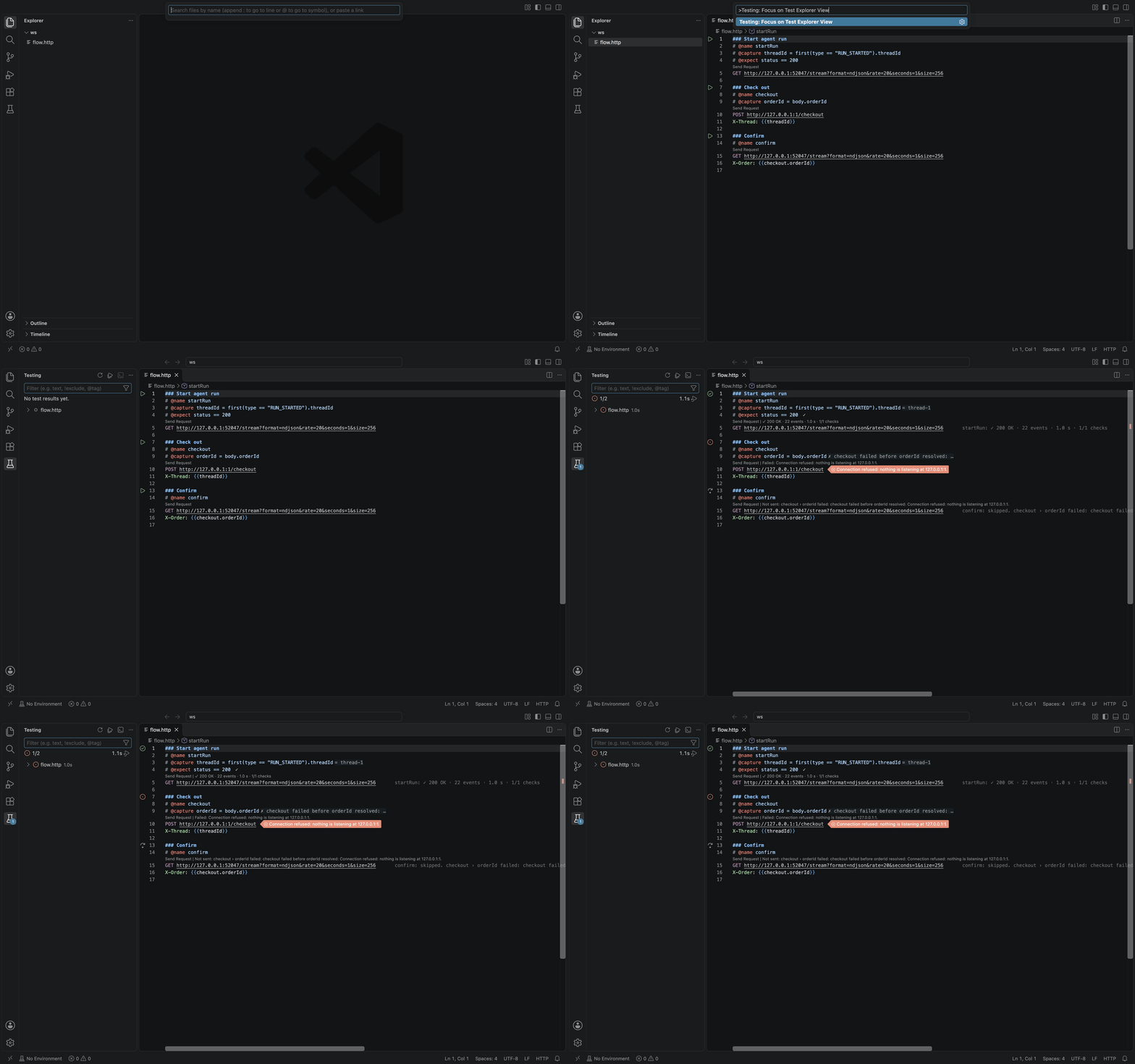
Each .http and .rest file is a suite in VS Code's Testing view, and each request is a test with a run button in the gutter. Run a whole file from the Testing view or with Streamscope: Run File:

A file run in the Testing view: the first request passes, the second cannot connect, and the third is skipped because it needs a value from the second

@baseUrl = https://agent.example.test

### Start agent run
# @name startRun
# @capture threadId = first(type == "RUN_STARTED").threadId
# @expect status == 200
# @until type == "RUN_FINISHED"
POST {{baseUrl}}/agent/run

### Continue
# @name continue
# @timeout 30s
# @expect body.threadId == "synthetic-thread-1"
POST {{baseUrl}}/agent/continue
X-Thread: {{threadId}}
  • Requests run one at a time, in file order, and each one finishes with its checks settled before the next starts. The run uses the file's text at the moment it starts, saved or not.
  • A request passes when it gets a response and all its checks pass, whatever its HTTP status. A failed check is reported at its # @expect line, for example `status == 201` got 500. A request that cannot connect, times out or cannot be sent is an error.
  • A request is skipped when it needs a capture from a request that failed, was not sent or was stopped in the same run, and the test output gives the reason. Skips carry down a chain of requests.
  • Stopping the run cancels the request in progress and leaves the rest not run.
  • File runs open no response panels. A request whose panel is already open shows its new run there.
  • The Testing view lists the workspace's .http and .rest files and untitled ones, and skips node_modules. It does not read a closed file that is a link, sits in a linked folder outside the workspace, or is larger than 1 MiB.
  • File runs need a trusted workspace.

Writing requests

A request is a request line, optional header lines, a blank line and an optional body. Lines starting with ### separate requests, and lines starting with # or // are comments.

@baseUrl = https://api.example.test

### List open orders
GET {{baseUrl}}/orders
    ?status=open
    &limit=20
Accept: application/json

### Create an order
POST {{baseUrl}}/orders HTTP/1.1
Content-Type: application/json

{"item": "item-1", "quantity": 2, "requestId": "{{$guid}}"}

### Import orders from a file
POST {{baseUrl}}/imports
Content-Type: application/json

<@ ./orders.json
  • The method is optional and defaults to GET, and so is the HTTP version at the end of the request line. Query parameters can continue on the following lines, each starting with ? or &.
  • < path sends a file as the body unchanged, and <@ path replaces the variables in it first. To read a file in an encoding other than UTF-8, name it, as in <@latin1 path. A relative path is looked up from the workspace folder, then from the .http file's folder, and the file must be inside the workspace folder.
  • A request that refers to a value Streamscope cannot resolve is not sent, and the message names the variable and its line.

Variables

Write {{name}} anywhere in a request. Streamscope uses the first value it finds, in this order:

  1. The newest capture of that name from a request in the same file that still has the # @capture line
  2. A file variable, defined by an @name = value line, whose value can refer to other variables
  3. The active environment
  4. The $shared environment
  5. A capture of that name from another file

With this order, @cursor = start seeds a request that captures cursor itself: the first send uses start, and later sends use the captured value.

To read from a specific request, write {{startRun.threadId}} for a capture of the request named startRun, or use REST Client's request references, which read the latest response of a named request: {{login.response.body.*}}, {{login.response.body.$.token}} (JSONPath) and {{login.response.headers.X-Token}}.

System variables start with $:

Variable Value
{{$guid}} A random UUID
{{$randomInt 1 100}} A random whole number from the first number up to, but not including, the second
{{$timestamp}} The current Unix time in seconds; {{$timestamp -1 d}} shifts it
{{$datetime iso8601}} The current UTC time as rfc1123, iso8601 or a format such as "YYYY-MM-DD", with an optional shift
{{$localDatetime rfc1123}} The same in local time
{{$secret name}} A value kept in VS Code's secret storage
{{$dotenv name}} A value from a .env file
{{$processEnv name}} A variable from VS Code's own environment
{{$shared name}} The $shared environment's value, even when the active environment defines the same name

A shift is a whole number and a unit: y, Q, M, w, d, h, m, s or ms. Environments and secrets covers $secret, $dotenv and $processEnv.

Directives

Directives are comment lines before the request line:

Directive Effect
# @name startRun Names the request, so other requests can read its captures and response
# @capture threadId = … Takes a value from the response or from one event (see Captures)
# @expect status == 200 States what the response must satisfy (see Checks)
# @until type == "RUN_FINISHED" Ends a stream at the first matching event, closes the connection and counts the request as completed
# @stream ndjson Reads the response as sse, ndjson, json, text or raw instead of detecting its format (auto detects)
# @timeout 30s Limits the request's total time
# @no-redirect Returns a redirect response instead of following it
# @insecure Skips TLS verification for this request only

With sse or ndjson, the response is split into events; json, text and raw show it as one body.

Editor support

Hover over {{…}} to see its value and where it comes from; secrets and credentials stay hidden. Completion offers variables after {{ and directives after # @. Undefined variables get a warning. A capture or check with a syntax error is marked at its exact position and keeps the request from being sent. The outline lists the file's variables and requests.

What Streamscope sends

Streamscope sends the headers you write. Besides what HTTP needs (Host, Content-Length, Connection), it adds only Accept-Encoding when you did not set one, and Authorization when the URL holds user info. It decompresses gzip, deflate, br and zstd responses, follows redirects unless told not to, and uses VS Code's proxy settings, such as http.proxy.

Environments and secrets

Environments

Streamscope reads environments from REST Client's rest-client.environmentVariables setting, and from http-client.env.json and http-client.private.env.json next to the .http file or at the root of its workspace folder. For the same name, the private file wins over the public file, which wins over the setting. $shared values apply to every environment, and an environment can set "streamscope.insecure": true to skip TLS verification for its requests.

Choose the active environment from the status bar or with Streamscope: Select Environment. Streamscope remembers the choice per workspace.

Secrets

{{$secret name}} asks for the value once, keeps it in VS Code's secret storage for this workspace, and masks it everywhere Streamscope shows it. Streamscope: Set Secret, Streamscope: Clear Secret and Streamscope: List Secrets manage the stored values. On a file variable whose name looks like a credential, such as @apiToken = …, a quick fix moves the value into secret storage.

.env files and process variables

{{$dotenv name}} reads .env.<environment> or .env next to the .http file, or in a parent folder up to the workspace folder. {{$processEnv name}} reads VS Code's own environment. Both accept %name, which first looks up the real name in the active environment.

A missing value never becomes an empty one: the request is not sent.

Expressions

# @capture, # @expect and # @until share one expression language. A syntax error is marked in the editor, and the request is not sent until it is fixed.

Sources

Expression Value
status The status code
headers["x-request-id"] A response header. The name is case-insensitive, and repeated headers are joined with ,
cookies.session A cookie set by this response's Set-Cookie headers
body The body, parsed when it is JSON, otherwise its text. On an event stream, read events instead
first(cond), last(cond) The first or last event that matches cond; without a condition, the first or last event
nth(3, cond) The third matching event, counting from 1
all(cond) The list of matching events; a path after it applies to each one
count(cond) How many events match
text The reply text assembled from an LLM stream, as in the Reply view
jsonpath("$.items[0].id") A JSONPath query (RFC 9535) on the body, or on the list of events of a stream
exists(x) Checks only: true when x has a value
before(cond1, cond2) Checks only: true when the first event matching cond1 comes before the first matching cond2
unique(list) Checks only: true when the list has no repeated items

A jsonpath(…) query that matches one node gives its value, several give a list, and none gives no value.

Event conditions

Inside first(…), last(…), nth(…), all(…), count(…), before(…) and # @until, a bare name such as type or result.status reads a field of the event. @ is the whole event, and @sse.event and @sse.id are a Server-Sent Event's event and id fields.

Paths

  • .name or ["name"] reads a field, and [0] reads an item of a list. A negative index such as [-1] counts from the end.
  • [*] takes every item of a list, and [?status == "ok"] takes the items that match a condition, in which bare names read the item's fields. Both give a list.

Operators

  • Comparisons: ==, !=, <, <=, > and >=.
  • x in ["a", "b"] is true when x is an item of the list. x contains "a" is true when the text x contains "a", or when the list x has "a" as an item. x startsWith "a" is true when the text x starts with "a", and x matches /^run-\d+$/ tests a regular expression.
  • &&, ||, ! and parentheses combine conditions.

Filters

A filter follows |:

Filter Effect
default("none") Gives this value when the expression has none. Without it, a missing value makes the capture fail
join(",") Joins a list into one text
json Turns the value into compact JSON, so a text keeps its quotes
match(/orders\/(\d+)/) Gives the first group of a regular expression, or the whole match when the pattern has no group

Values

  • Literals are texts in double or single quotes, numbers, true, false, null, lists such as ["a", "b"], and regular expressions such as /run-\d+/i.
  • Regular expressions accept the flags i, m, s and u. Backreferences and lookaround are not supported.
  • A captured text is inserted as it is, and a whole number keeps every digit. Other numbers are inserted the way JavaScript prints them, so 1.50 becomes 1.5. An object or list is inserted as compact JSON.

Settings

Setting Default Description
streamscope.request.connectTimeout 30s How long to wait for the connection, including the TLS handshake
streamscope.request.headersTimeout 300s How long to wait for the response headers once connected
streamscope.request.followRedirects true Follow redirects; # @no-redirect turns it off for one request
streamscope.request.maxRedirects 10 The most redirects to follow for one request
streamscope.request.caFile "" A PEM file of extra certificate authorities to trust, added to the default and system ones. Absolute or relative to the workspace folder
streamscope.capture.waitTimeout 30s How long a request waits for a captured value that has not arrived yet
streamscope.stream.maxEventSize 16MiB The largest single event to read; a larger one becomes an oversize event with a preview
streamscope.stream.memoryEvents 10000 How many of the newest events of a stream stay in memory; older ones are read from disk
streamscope.stream.maxSpillSize 512MiB The most raw data kept on disk for one streaming response
streamscope.stream.maxTotalSpillSize 2GiB The most raw data kept on disk across all runs in the history
streamscope.stream.typeFields ["type","event","object"] The JSON fields whose value labels an event, tried in order
streamscope.view.default events The view a streaming response opens on until you pick another: events, reply or raw
streamscope.codeLens.enabled true Show Send Request and the last outcome above each request

Durations accept 500ms, 30s or 5m, and sizes 512KiB, 16MiB or 2GiB.

Commands

Commands are in the Command Palette under Streamscope:. Those that act on a request or a response appear when an .http file or a response is active. You can bind any command to a key in Keyboard Shortcuts.

Command What it does
Streamscope: Send Request Sends the request under the cursor (Cmd+Alt+Enter, Ctrl+Alt+Enter)
Streamscope: Stop Request Stops the request under the cursor
Streamscope: Run File Runs every request of the file in the Testing view
Streamscope: Show Response Shows the response panel of the request under the cursor, or of a response document
Streamscope: Switch Response View… Picks the panel's view: Events, Reply, Raw, Headers, Body or Checks
Streamscope: Open Response Body in Editor Opens the response body as an editor document
Streamscope: Open Response Headers in Editor Opens the Headers view as an editor document
Streamscope: Save Response Saves the body as received, after decompression
Streamscope: Capture This Value… Writes a # @capture line for the value under the cursor in an event or body document
Streamscope: Show History Lists the session's last 50 runs
Streamscope: Select Environment Picks the active environment
Streamscope: Set Secret Stores a value for {{$secret name}}
Streamscope: Clear Secret Removes a stored secret
Streamscope: List Secrets Lists the names of stored secrets, never their values
Streamscope: Move to Secret Storage Moves a file variable's value into secret storage. Not in the Command Palette: use the quick fix on the variable's line
Streamscope: Show Log Opens Streamscope's output log

Using Streamscope with REST Client

Streamscope uses the same http language as REST Client and reads its request syntax, request references, system variables and rest-client.environmentVariables setting, so both extensions can open the same files. When REST Client or httpyac is installed, Streamscope offers once to turn off their Send link above each request, so only one shows. Streamscope's shortcut, Cmd+Alt+Enter (Ctrl+Alt+Enter), does not clash with REST Client's.

Not supported in this release:

  • GraphQL requests, cURL import and export, and code snippet generation
  • A cookie jar: cookies from one response are not sent with later requests
  • Prompt variables (# @prompt) and request confirmation (# @note)
  • Digest, AWS Signature v4, Azure AD and OpenID Connect authentication, and client certificates. Basic authentication from user info in the URL works.
  • {{name.request.…}} references, and XPath in {{name.response.body…}}

Privacy

Streamscope sends no telemetry, needs no account, and makes no network requests except the ones you send. Responses stay on your machine. Streamscope keeps the newest events in memory and also writes each response body to a private file, readable only by you, in its storage folder. The file is deleted when its run leaves the history, when VS Code closes, or at the next start after a crash. Secrets you enter stay in VS Code's secret storage.

Security

  • Streamscope masks credentials wherever it describes a request, a response or a captured value: in the log, notifications, hovers, the Headers view, captured values, the Testing view, history and errors. It masks:
    • credential headers in requests and responses, meaning any header whose name contains a word such as auth, authorization, token, key, secret, password, session, cookie or signature. These include Authorization, Proxy-Authorization, Cookie, Set-Cookie and X-Api-Key;
    • user info in URLs;
    • {{$secret …}} values and secret captures;
    • the values of variables whose names contain token, bearer, apikey, secret or password, such as apiToken.
  • A credential typed into a URL query string is not masked. A {{$secret …}} value in the URL is.
  • Response bodies, events and raw data are shown and saved as received.
  • Redirects to another origin drop Host, credential headers and any header that contains one of the masked values. A 307 or 308 redirect that would resend the request body to another origin, or from https to http, stops the request instead.
  • TLS verification stays on unless you turn it off for one request (# @insecure) or one environment.
  • Body files must be inside the workspace folder, and a captured value or response can never choose which file is sent.
  • The response panel runs with a strict content security policy and shows response data as text only.

Report a vulnerability privately as described in SECURITY.md.

Restricted workspaces

In a workspace you have not trusted, Streamscope still highlights, outlines and checks .http files, and asks once per session before it sends a request. In such a workspace it:

  • does not read secrets, .env files, http-client.private.env.json, environments from your user settings, process variables or body files;
  • ignores # @insecure and environment TLS opt-outs;
  • uses streamscope.request.caFile only from your own settings, and only when it is an absolute path;
  • does not run files from the Testing view.

When you trust the workspace, later requests stop using the values captured and the responses received before that, so run those requests again.

Accessibility

The response panel works from the keyboard alone: arrow keys move between its views and through the event list, and Enter expands an event. Its tabs, event list and live status use the roles screen readers expect, and it follows VS Code's colour themes, including both high-contrast themes. Accessibility lists every key and what screen readers announce.

Requirements

VS Code 1.101 or later, desktop only, on macOS, Windows or Linux.

Feedback

Report bugs in GitHub issues, with made-up hosts, ids and values in place of real tokens and URLs. The source code is at github.com/achrafelkhnissi/streamscope.

License

MIT

  • Contact us
  • Jobs
  • Privacy
  • Manage cookies
  • Terms of use
  • Trademarks
  • Your Privacy Choices
  • Consumer Health Privacy
© 2026 Microsoft