Acacus Code
An AI coding agent and inline autocomplete for Visual Studio Code, powered by your Acacus plan. Chat with an agent that reads your project, plans, edits files and runs commands with your approval, and get fill-in-the-middle completions while you type. Open models (DeepSeek, Qwen, Kimi, GLM and more) behind one sign-in, with a full Arabic, right-to-left interface.
Beta (preview). Acacus Code is under active development. Expect rough edges; see Known limitations.
Features
- Ask mode by default. Questions about your code are answered by a light, read-only assistant that keeps each request small, so your daily allowance goes further. Switch to Code with one click when you want changes made.
- Code agent. Plans, reads and searches the project, edits files, runs shell commands (each risky step asks first), and shows a diff you can review. Checkpoints let you roll back.
- More modes. Debug and Plan modes for larger tasks; custom modes in your project.
- Inline autocomplete. Fill-in-the-middle suggestions as you type, from the same plan.
- Your allowance at a glance. The Profile page shows the free daily allowance or your plan's session and weekly allowance, and when each one renews.
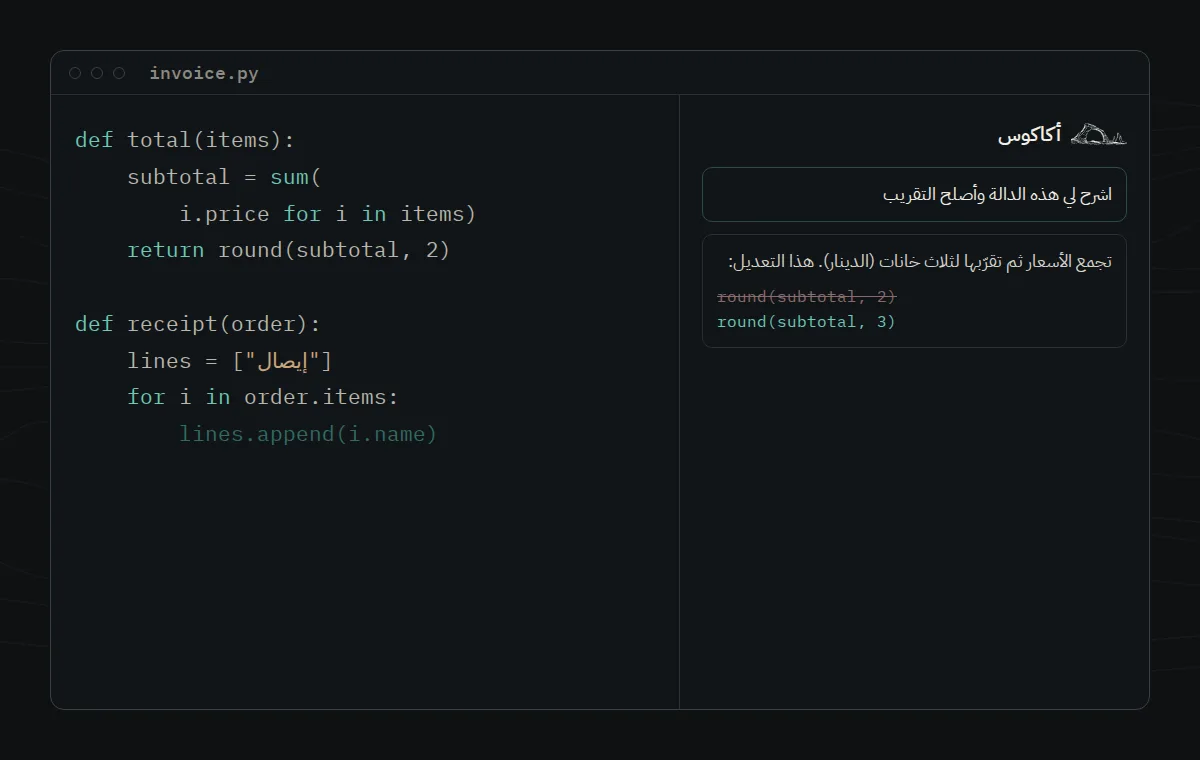
- Arabic interface, right to left. Arabic (fusha) texts, correct bidirectional text in the chat and the input box, plus 20 other languages.
- No telemetry. Acacus Code sends no usage analytics or crash reports.
Get started
- Install the extension, then open the Acacus Code icon in the activity bar.
- Choose Sign in. Your browser opens acacus.ly and shows a short code; confirm the same code in the browser to approve this editor. No password is typed into VS Code and no API key is needed.
- Type a question in Ask mode, or switch to Code mode and describe a task.
Create an account for free at acacus.ly. If you already have a plan, the editor uses it automatically.
Plans and allowance
Every account has a free daily allowance. A paid plan (باقة) adds a larger session allowance and a weekly allowance, and unlocks more models and inline completions. When an allowance is used up, the chat tells you when it renews and links to the plans at acacus.ly/pricing. Prices are in Libyan dinars. Acacus Code itself is free to install.
Privacy
- What is sent to Acacus: your messages, the files and snippets the agent reads or you attach, the tool results it needs, the selected model, and for inline completions the code around your cursor. Requests also carry the editor name and version, the extension version and an anonymous VS Code installation identifier, which Acacus uses to list your signed-in devices.
- Your sign-in token is stored on your own machine, in the agent's local data folder in your user profile, never in your project. Signing out or removing the device on acacus.ly invalidates it.
- Acacus does not sell your data and does not train models on your conversations. Language-model providers process requests as described in the privacy policy.
- The extension contains no analytics, no crash reporting and no connection to Kilo's cloud services.
Requirements
- Visual Studio Code 1.105.1 or newer (also works in compatible editors that install from Open VSX).
- Windows 10/11 (x64), macOS (Apple silicon or Intel) or Linux (x64). The agent runs as a bundled local program; no Node.js install is needed.
- An Acacus account and an internet connection.
Known limitations
- Beta software: behaviour and prompts change between releases.
- The free daily allowance is small; heavy agent sessions need a plan.
- Some inherited Kilo Code features (cloud sessions, marketplace of third-party modes, voice input) are removed or disabled.
- On Windows, SmartScreen or antivirus software may inspect the bundled agent program (
kilo.exe) the first time it runs.
- Language packs other than Arabic and English are inherited from Kilo Code and may use older wording.
Support
Questions and bug reports: acacus.ly/contact. Product page: acacus.ly/downloads/acacus-code.
Credits and licence
Acacus Code is released under the MIT licence. It is based on the open-source Kilo Code (MIT) and, through it, opencode (MIT). Parts of the autocomplete come from Continue (Apache-2.0). See NOTICE, LICENSE and THIRD_PARTY_LICENSES. Acacus Code is not affiliated with Microsoft, Kilo Code or the opencode project.
أكاكوس كود
وكيل برمجة بالذكاء الاصطناعي وإكمال تلقائي داخل Visual Studio Code، يعمل بباقتك في أكاكوس. تحدّث مع وكيل يقرأ مشروعك ويخطّط ويعدّل الملفات وينفّذ الأوامر بموافقتك، واحصل على اقتراحات إكمال أثناء الكتابة. نماذج مفتوحة (DeepSeek وQwen وKimi وGLM وغيرها) بتسجيل دخول واحد، وواجهة عربية كاملة من اليمين إلى اليسار.
نسخة تجريبية. أكاكوس كود قيد التطوير. قد تصادف أخطاء؛ راجع «القيود المعروفة» أدناه.
المزايا
- وضع «اسأل» افتراضيًا. يجيب مساعد خفيف للقراءة فقط عن أسئلتك حول الشيفرة ويُبقي كل طلب صغيرًا، فتدوم حصتك اليومية أطول. انتقل إلى وضع الشيفرة بنقرة واحدة عندما تريد إجراء تعديلات.
- وكيل الشيفرة. يخطّط ويقرأ المشروع ويبحث فيه ويعدّل الملفات وينفّذ أوامر الطرفية (وتطلب الخطوات الحساسة موافقتك)، مع عرض فروقات تراجعها ونقاط استعادة للرجوع.
- أوضاع أخرى. التصحيح والتخطيط للمهام الكبيرة، وأوضاع مخصّصة لمشروعك.
- إكمال تلقائي. اقتراحات أثناء الكتابة من الباقة نفسها.
- حصتك أمامك. صفحة الملف الشخصي تعرض الحصة المجانية اليومية، أو حصة الجلسة وحصة الأسبوع في باقتك، وموعد تجدّد كل منها.
- واجهة عربية من اليمين إلى اليسار بنصوص فصحى واتجاه صحيح للنص في المحادثة وحقل الكتابة.
- بلا تتبّع. لا يرسل أكاكوس كود أي تحليلات استخدام أو تقارير أعطال.
البدء
- ثبّت الإضافة ثم افتح أيقونة أكاكوس كود في الشريط الجانبي.
- اختر تسجيل الدخول. يفتح المتصفح موقع acacus.ly ويعرض رمزًا قصيرًا؛ أكّد الرمز نفسه في المتصفح للموافقة على هذا المحرّر. لا تكتب كلمة مرور داخل VS Code ولا تحتاج إلى مفتاح API.
- اكتب سؤالك في وضع «اسأل»، أو انتقل إلى وضع الشيفرة وصِف المهمة.
أنشئ حسابًا مجانيًا في acacus.ly. وإن كانت لديك باقة فسيستخدمها المحرّر تلقائيًا.
الباقات والحصة
لكل حساب حصة مجانية يومية. وتضيف الباقة حصة جلسة أكبر وحصة أسبوعية وتفتح نماذج أكثر والإكمال التلقائي. عند استنفاد الحصة تخبرك المحادثة بموعد تجدّدها وتعرض رابط الباقات في acacus.ly/pricing. الأسعار بالدينار الليبي. تثبيت أكاكوس كود نفسه مجاني.
الخصوصية
- ما يُرسل إلى أكاكوس: رسائلك، والملفات والمقاطع التي يقرؤها الوكيل أو ترفقها، ونتائج الأدوات اللازمة، والنموذج المختار، وفي الإكمال التلقائي الشيفرة المحيطة بالمؤشر. وتحمل الطلبات أيضًا اسم المحرّر وإصداره وإصدار الإضافة ومعرّفًا مجهولًا لنسخة VS Code تستخدمه أكاكوس لعرض أجهزتك المسجّلة.
- يُحفظ رمز الدخول على جهازك في مجلد بيانات الوكيل المحلي ضمن ملف المستخدم، وليس في مشروعك. ويُبطله تسجيل الخروج أو إزالة الجهاز من acacus.ly.
- لا تبيع أكاكوس بياناتك ولا تدرّب النماذج على محادثاتك. وتعالج مزوّدات النماذج الطلبات كما توضّح سياسة الخصوصية.
- لا تحتوي الإضافة على أي تحليلات أو تقارير أعطال ولا اتصال بخدمات Kilo السحابية.
المتطلبات
- Visual Studio Code 1.105.1 أو أحدث.
- Windows 10/11 (x64) أو macOS (Apple silicon أو Intel) أو Linux (x64). يعمل الوكيل كبرنامج محلي مرفق ولا يحتاج إلى تثبيت Node.js.
- حساب في أكاكوس واتصال بالإنترنت.
القيود المعروفة
- برنامج تجريبي: يتغيّر السلوك والتعليمات بين الإصدارات.
- الحصة المجانية اليومية صغيرة؛ جلسات الوكيل الكبيرة تحتاج إلى باقة.
- بعض مزايا Kilo Code الموروثة (الجلسات السحابية وسوق الأوضاع الخارجية والإدخال الصوتي) محذوفة أو معطّلة.
- في ويندوز قد يفحص SmartScreen أو برنامج مكافحة الفيروسات برنامج الوكيل المرفق (
kilo.exe) عند أول تشغيل.
الدعم
للأسئلة وبلاغات الأخطاء: acacus.ly/contact.

