RenPy Code
Complete Ren'Py development suite for Visual Studio Code — syntax highlighting, code completion, diagnostics, debugger, flow graph, live preview, and more.
English | 日本語
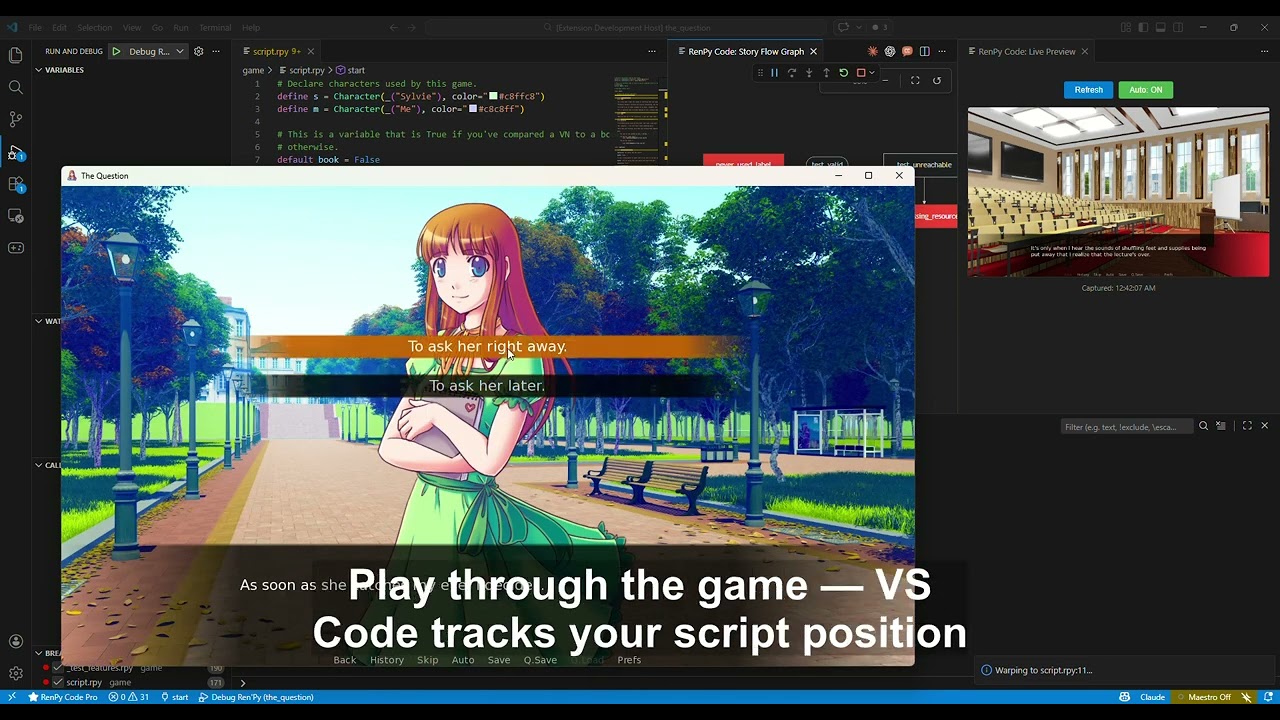
Watch the demo video — Flow Graph, Live Preview, Debugger, Warp to Label, and runtime variable editing in action.
Features
Free
- Syntax Highlighting — Full TextMate grammar + semantic tokens for Ren'Py scripts
- Code Completion — Labels, characters, screens, statements, built-in classes, screen keywords
- Hover Documentation — Statement syntax, character info, label details (English / Japanese)
- Go to Definition / References — Jump to label, character, and screen definitions; find all usages
- Document & Workspace Symbols — Outline view and Ctrl+T symbol search
- Diagnostics — Undefined labels, undefined characters, invalid jump targets, mixed indentation
- CodeLens — Reference counts above label definitions
- Inlay Hints — Character display names, jump targets, dialogue word counts
- Code Actions — Quick fixes for missing labels and characters
- Signature Help — Parameter hints for
Character() and built-in functions
- Document Links — Clickable file paths in strings
- Color Picker — Hex color swatches in Character definitions
- Code Folding — Indent-based and block-aware folding
- Call Hierarchy — Incoming/outgoing call analysis for labels
- Snippets — 40+ templates for labels, menus, characters, screens, and more
- Game Runner — Launch, lint, and warp from the command palette
- Dashboard — Sidebar with project stats, bridge status, and quick actions
- Japanese Localization — Full i18n support
- Story Flow Graph — Interactive Mermaid-based visualization of jump/call relationships
- Debugger — Breakpoints, variable inspection, stack frames via DAP
- Live Preview — Screenshot-based scene preview
- Variable Tracker — Real-time monitoring of game variables
- Heatmap — Playtest path visualization with visit frequency
- Asset Manager — Visual browser with unused asset detection
- Translation Dashboard — Completion tracking and untranslated string finder
- Test Runner — Discover and run Ren'Py testcases
- Refactoring — Safe rename of labels/characters/screens, route extraction
Quick Start
- Install the extension from the VS Code Marketplace
- Open a Ren'Py project folder (containing
game/)
- Set the SDK path: Settings → RenPy Code → SDK Path (e.g.,
C:/renpy-8.5.2-sdk)
- Start editing
.rpy files — completion, hover, and diagnostics work automatically
- Press
Ctrl+Shift+P → RenPy Code: Launch Game to run your project
Setup Tips
Open the project root folder — Open the folder that contains the game/ subfolder, not the game/ folder itself. For example, if your project is at C:/MyGame/game/, open C:/MyGame/ in VS Code.
Launch the game through the extension — Pro features (Live Preview, Variable Tracker, Heatmap, etc.) require the bridge, which only activates when you use the "Launch Game" button in the Dashboard sidebar or Ctrl+Shift+P → RenPy Code: Launch Game. Launching from the Ren'Py SDK launcher directly will not connect the bridge.
Settings
| Setting |
Default |
Description |
renpyCode.sdkPath |
"" |
Path to Ren'Py SDK directory |
renpyCode.diagnostics.enable |
true |
Enable real-time diagnostics |
renpyCode.diagnostics.undefinedLabel |
true |
Warn on jump/call to undefined labels |
renpyCode.diagnostics.undefinedCharacter |
true |
Warn on dialogue with undefined characters |
renpyCode.diagnostics.invalidJump |
true |
Warn on invalid jump/call targets |
renpyCode.diagnostics.indentation |
true |
Warn on mixed indentation (tabs + spaces) |
Requirements
- VS Code 1.85+
- Ren'Py SDK 7.x or 8.x
License
Commercial license — see LICENSE.md for details.
Free-tier features are available at no cost for personal and commercial projects.
Pro features require a one-time $5 license key.
Author
abyo-software (Youichi Uda) — abyo.net
| |

