Xcode Classic ThemeA port of Xcode's built-in Default (Dark) and Default (Light) color schemes. Unofficial and not affiliated with Apple Inc. Installation Launch VS Code Quick Open ( Ctrl+P), paste the following command, and press enter.Copied to clipboard |

Xcode Classic Theme
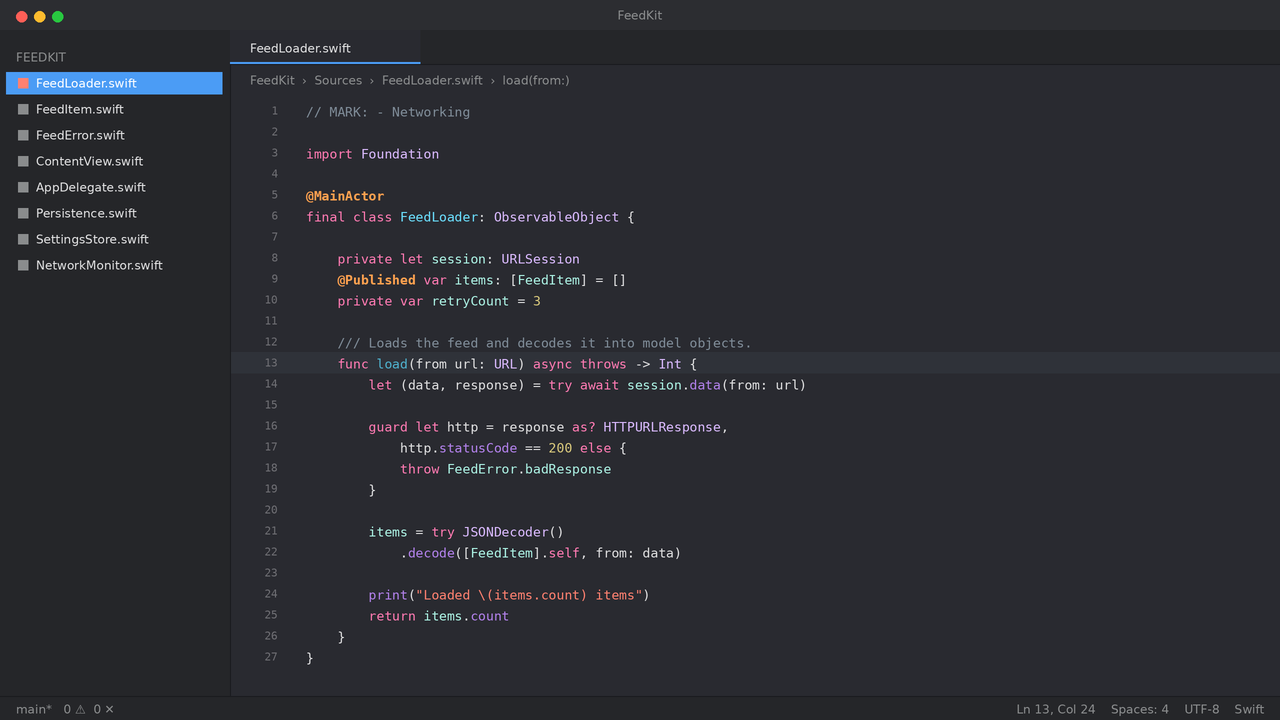
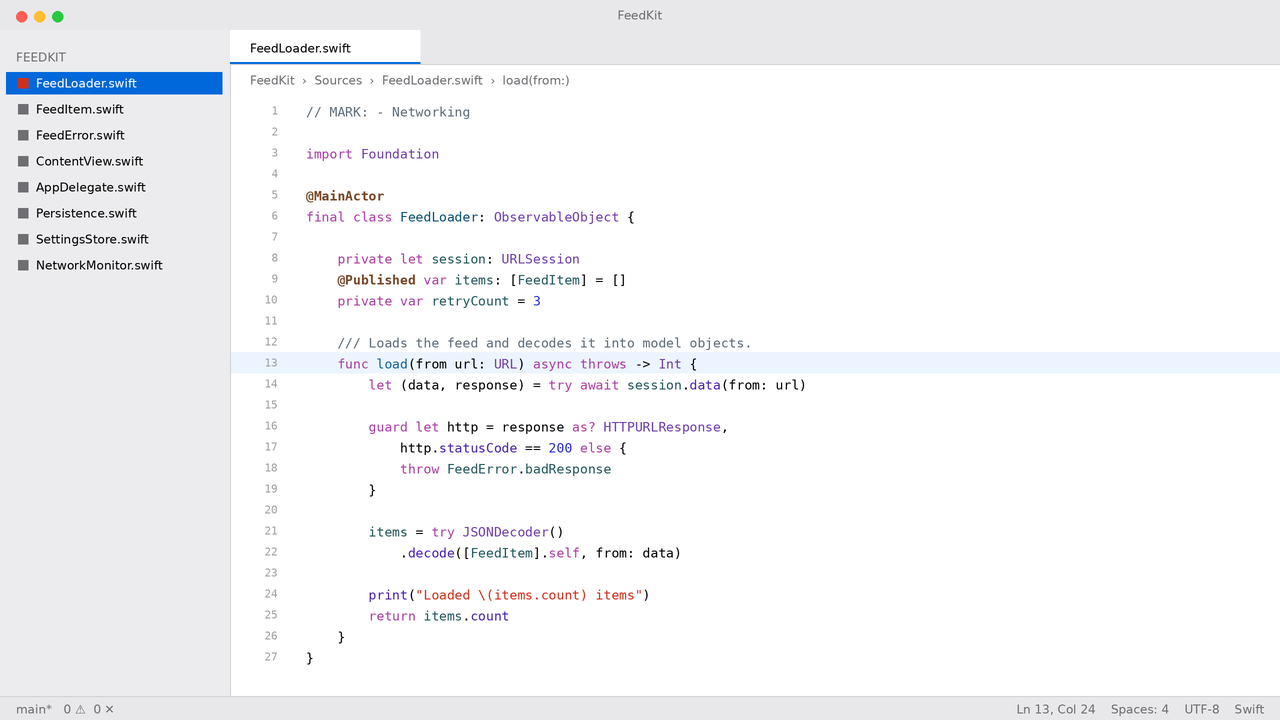
A Visual Studio Code port of Xcode's built-in Default (Dark) and Default (Light) color schemes. Screenshots
InstallSearch for Xcode Classic Theme in the Extensions panel and click Install, or run: Then press Follow the system appearanceTo switch automatically when macOS or Windows toggles between light and dark: FontXcode's source editor uses SF Mono Regular. This extension cannot ship the font — Apple's license does not permit redistribution, and VS Code extensions cannot install system fonts. You need to handle this yourself. macOS: SF Mono is already installed; it ships with Terminal.app. Windows and Linux: download the SF Mono package from
Apple's developer fonts page. It arrives as
a Open source alternativesIf you would rather not install SF Mono, these come close. DejaVu Sans Mono is listed first for a reason: SF Mono descends from Menlo, and Menlo is based on DejaVu Sans Mono, so they share an ancestor and similar letterforms.
Settings
Xcode does not use ligatures. Keeping On size: Xcode defaults to roughly 11 pt, but macOS points and VS Code pixels do not map one to one. Start at 13 on Windows and 12 on macOS. Interface font: Xcode uses SF Pro for its chrome. VS Code's sidebar, tab and menu fonts cannot be changed by a theme — that requires an extension which patches the VS Code core, which this theme deliberately does not depend on. Optional layout tweaksXcode has no vertical icon strip along the edge of the window. Hiding VS Code's activity bar is the single change that gets closest to Xcode's layout: Explorer, Search and Source Control remain reachable through PaletteDark
Light
How the project and SDK split worksXcode colors identifiers defined in your own project differently from ones that
come from the SDK — mint versus purple in dark, teal versus purple in light.
This theme reproduces that split through VS Code's semantic highlighting, using
the The split therefore requires an active language server (TypeScript, Pylance, C#, rust-analyzer, and so on). In files without one, the theme falls back to TextMate scopes and everything defined locally gets the project color. ContributingIf you spot a color that does not match Xcode, please open an issue. Including a screenshot from Xcode and the affected TextMate scope or semantic token name makes it much faster to fix. You can find the scope under any cursor position with Developer: Inspect Editor Tokens and Scopes from the command palette. LicenseMIT |