Multi ExplorerPin folders as separate file trees inside the Explorer. Drag a folder in and see only its contents. Installation Launch VS Code Quick Open ( Ctrl+P), paste the following command, and press enter.Copied to clipboard |

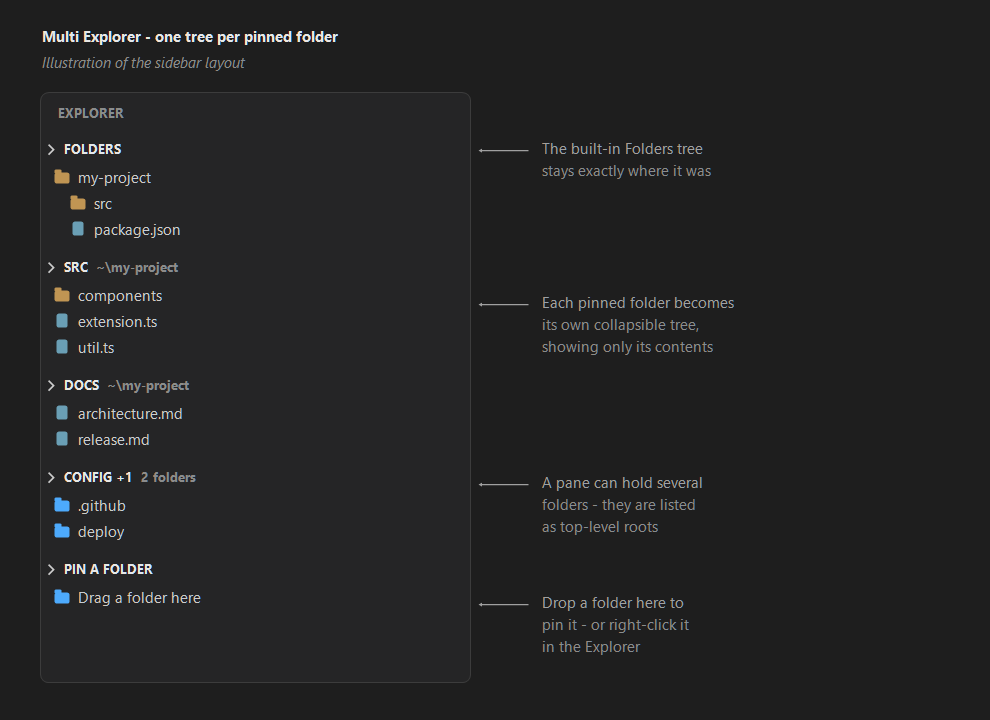
Multi ExplorerVS Code shows exactly one file tree. Multi Explorer adds as many as you like: drag a folder into the sidebar and it becomes its own tree, showing only that folder's contents.
The images above are diagrams of the layout, not captured screenshots: in your editor the rows use your own file icon theme and Git colours. Each pinned folder gets a separate, collapsible pane in the Explorer — right next to the built-in one. Drag a pane to the Secondary Side Bar or the bottom panel if you want the trees side by side. Pinning a folder
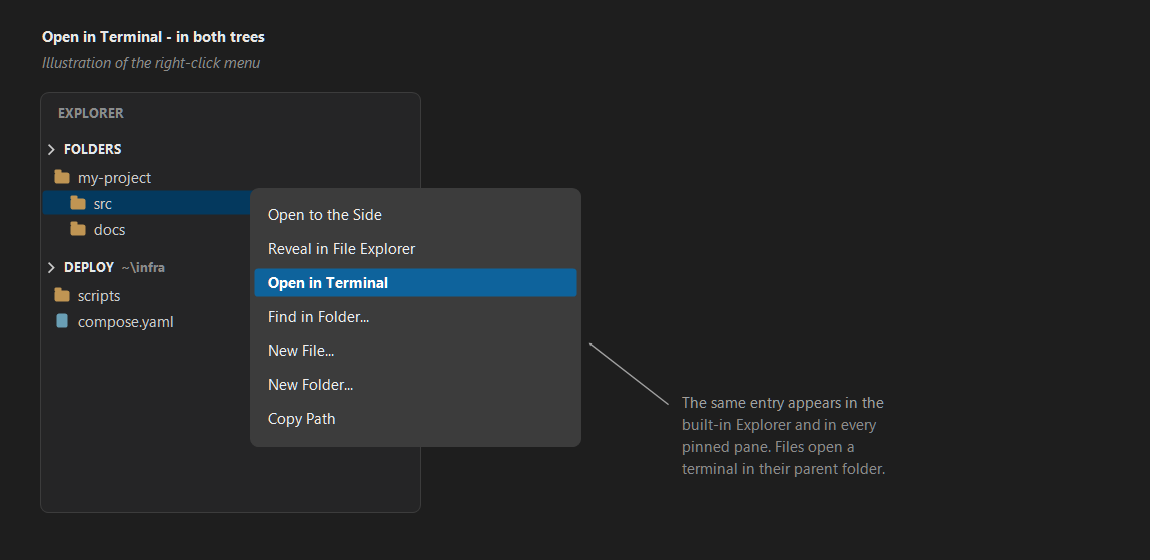
Drop a folder onto an existing pane to add it there as a second root. A pane with one folder shows its contents directly; a pane with several lists them as top-level folders. Files in a drop are ignored — a pane always shows folder contents, and nothing on disk is ever moved by a drop. In a panePanes behave like the Explorer: file icons, Git decorations, single-click open, drag a file out into the editor. The context menu has New File, New Folder, Rename, Delete, Copy Path, Copy Relative Path, Reveal in File Explorer, Open in Terminal and Find in Folder. The pane title bar adds Reveal Active File, renaming, reordering and Unpin. Panes refresh themselves when files change on disk. Open in TerminalRight-click anything — in a Multi Explorer pane or in the built-in Explorer — and choose Open in Terminal to get an integrated terminal at that path. Files open a terminal in their parent folder. It is also on the Command Palette, where it uses the folder of the active editor.
Where panes are storedBy default panes are saved inside the extension, per workspace — nothing is written to your repository. If you would rather keep them in a settings file (to commit them with the project, or to share them across all projects), set Supported tokens: Settings
TürkçeVS Code'da tek bir dosya ağacı bulunur. Multi Explorer ile istediğiniz kadar ağaç ekleyebilirsiniz: bir klasörü kenar çubuğuna sürükleyip bıraktığınızda yalnızca o klasörün içeriğini gösteren ayrı bir ağaç oluşur.
Bir klasörü mevcut panele bırakırsanız o panele ikinci kök olarak eklenir. Tek klasörlü panel doğrudan içeriği gösterir, birden fazla klasörlü panel bunları üst düzeyde listeler. Bırakılan dosyalar yok sayılır; sürükle-bırak diskte hiçbir şeyi taşımaz. Paneller varsayılan olarak eklentinin kendi deposunda, çalışma alanı başına saklanır — projenize hiçbir dosya yazılmaz. Terminalde Aç: Hem Multi Explorer panellerinde hem de yerleşik Explorer'da bir öğeye sağ tıklayıp Terminalde Aç diyerek o yolda tümleşik terminal açabilirsiniz; dosyalar için üst klasör kullanılır. Çoklu seçimde her ayrı klasör için bir terminal açılır, üçten fazlaysa önce onay istenir. Aynı klasörde açık terminal varsa yenisi oluşturulmaz. Arayüz, VS Code diliniz Türkçe olduğunda Türkçe görünür. RequirementsVS Code 1.85 or newer, on a local (non-virtual) file system. LicenseMIT © Abdullah Karagoz |