Abacus AI Agent
Abacus AI Agent is a coding agent for VS Code that works with any model. Hand it a task and it reads your project, plans, edits files and runs terminal commands, showing every edit as a diff. Run it on one Abacus.AI plan with every frontier model, on the ChatGPT subscription you already have, on your own API keys, or on local models.
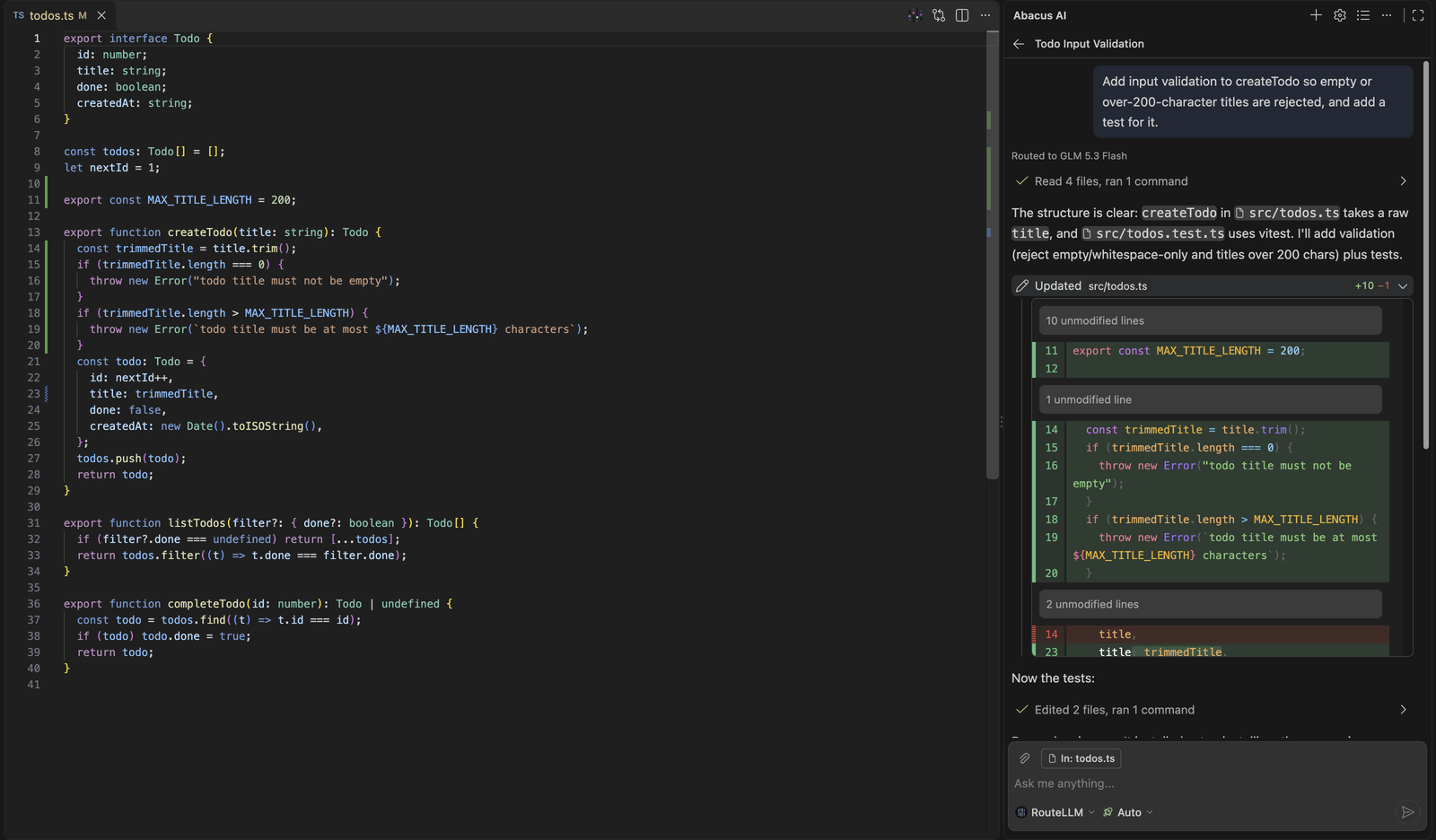
- Review before it lands. Every edit shows as a diff in the chat. When your mode asks first, edits open in VS Code's diff editor to accept or reject: side by side, or hunk by hunk inline with
abacusAgent.inlineDiffEditor.
- Choose how much it does alone. Auto (default), Supervise, Accept edits, Plan and Unsupervised. Switch mid-conversation, and set allow, ask and deny rules.
- Plan first when it matters. Plan mode researches without touching files and waits for your approval before it implements.
- Rewind and fork. Checkpoints let you take the conversation and your code back to any earlier message, or branch a new conversation from it.
- Keep working while it works. Queue a follow-up or steer the current turn, and let it run dev servers in background shells.
- Your context.
@ file mentions, your editor selection, attached images, and your project and personal AGENTS.md, loaded automatically.
- Extensible. MCP servers with OAuth sign-in, and reusable skills you can search and install from settings.
- Fits your layout. Keep the chat in the secondary sidebar, the activity bar or an editor tab, with searchable history.
- Speaks your language. The interface follows VS Code's display language, in English and 14 others.
Use any model, including the subscription you already pay for
- One Abacus.AI plan. Claude, GPT and Gemini families plus open models such as Kimi, Qwen, DeepSeek and GLM. RouteLLM can pick a model for each turn.
- Your ChatGPT subscription. If Codex is signed in with ChatGPT, the extension detects it and offers those models. No setup, no credentials copied, and the picker tells you it spends that subscription.
- Your API keys. OpenAI, Anthropic and Google keys, saved from the settings page to the encrypted credential file the extension and the CLI share.
- Local and OpenAI-compatible models. Ollama, LM Studio, vLLM, Groq, Together, OpenRouter, DeepSeek or any OpenAI-compatible endpoint. With a local provider, the agent loop runs on your machine and nothing about the turn reaches Abacus.AI.
Switch models mid-conversation, even across providers. Each conversation remembers its model.
Chat launcher
The bottom-right Abacus AI status-bar launcher opens the configured chat host.
Disable it in General settings or with abacusAgent.showStatusBar.
Conversations and tabs
When chat lives outside the primary sidebar, that sidebar keeps conversation history.
Selecting a conversation focuses its existing tab or opens it in the configured host.
New Conversation in an editor tab opens another independent tab; closing or moving
a tab does not close the other conversations. Use VS Code's editor move/window actions
to move tabs; the window placement opens a side editor group, not a detached window.
Review a plan
The plan approval card can be resized. Open plan in editor opens the exact plan
snapshot as editable Markdown with a full VS Code preview; use Save As to keep a
.md copy. Copy raw Markdown preserves the source instead of copying rendered text.
Use Source lines to cite a line in Feedback for further planning, then choose
No, keep planning to send the citation and feedback without approving implementation.
The plan stays available in conversation history after rejection and reload, including
plans originally read from a file. Historical line references can be copied into a later
message. Editing or saving a preview does not approve the plan or change its snapshot.
Get started
- Install the extension. It is also on Open VSX for VS Code-compatible editors.
- Open the Abacus AI view and sign in with your email or an Abacus.AI API key. Need an account? See pricing.
- Pick a model, or add your own keys and local models under Settings → Providers & models, then describe a task.
The Get Started with Abacus AI walkthrough on the Welcome page covers the rest.
Also in your terminal
The abacusai CLI is the same agent with the same account and conversation history. Run it in VS Code's integrated terminal and it connects to this window: it follows your active file and selection, reads language-server diagnostics and opens edits awaiting your approval in VS Code's diff viewer. It also runs headless (abacusai -p) for scripts and CI. See the CLI install guide.
Privacy
Your code is not used for training. Abacus.AI has zero data retention agreements with model providers, and data is encrypted in transit. With a local provider, nothing about the turn reaches Abacus.AI. See the privacy policy and terms of service.
Docs and support
Requirements
- VS Code 1.105 or later, on Windows, macOS or Linux. Works in remote windows over SSH, WSL, Dev Containers and Codespaces.
- An Abacus.AI account to sign in.
| |



