TabExpert
Turn chaotic tabs into a clean, vertical workflow with custom groups and rule-powered organization.
TabExpert is a companion tab manager for VS Code that keeps the native tab strip intact while giving you a powerful sidebar for focused tab navigation.
Why TabExpert
- Reduce tab clutter with a dedicated vertical tab workspace.
- Build custom named groups that match how you actually work.
- Auto-organize with rule groups, then fine-tune manually.
- Keep context with preview labels, dirty/git badges, and active-tab sync.
Get productive in 30 seconds
- Open the TabExpert Activity Bar container.
- Click Enable Vertical Mode to hide/show native tabs when needed.
- Right-click a tab → Move Tab To Group to create your first custom group.
- Use Create Rule Group to auto-collect matching files.
- Open Open Settings from the toolbar to manage rules and preferences.
Screenshots
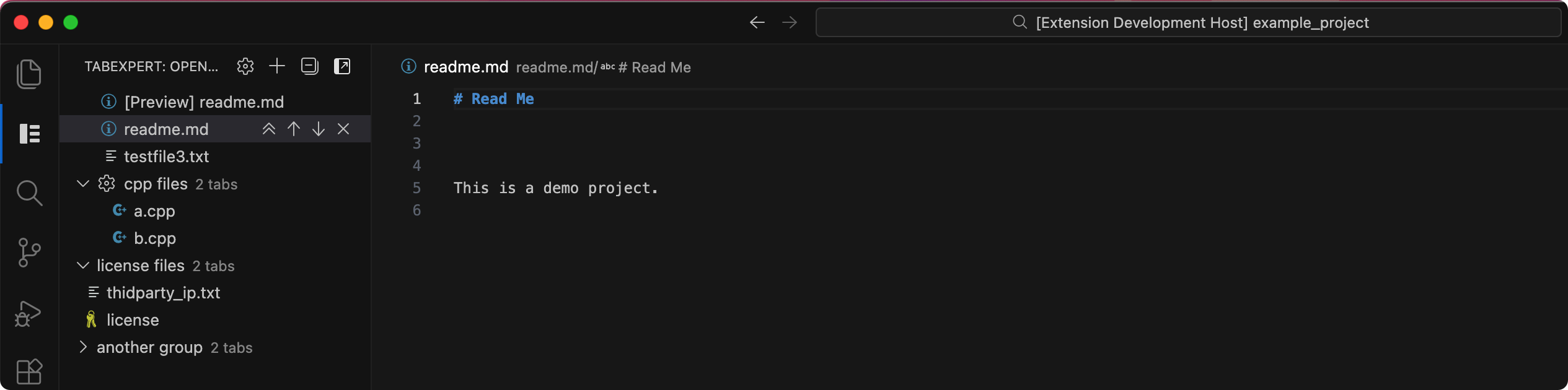
Demo for how to create a mannual tab group:
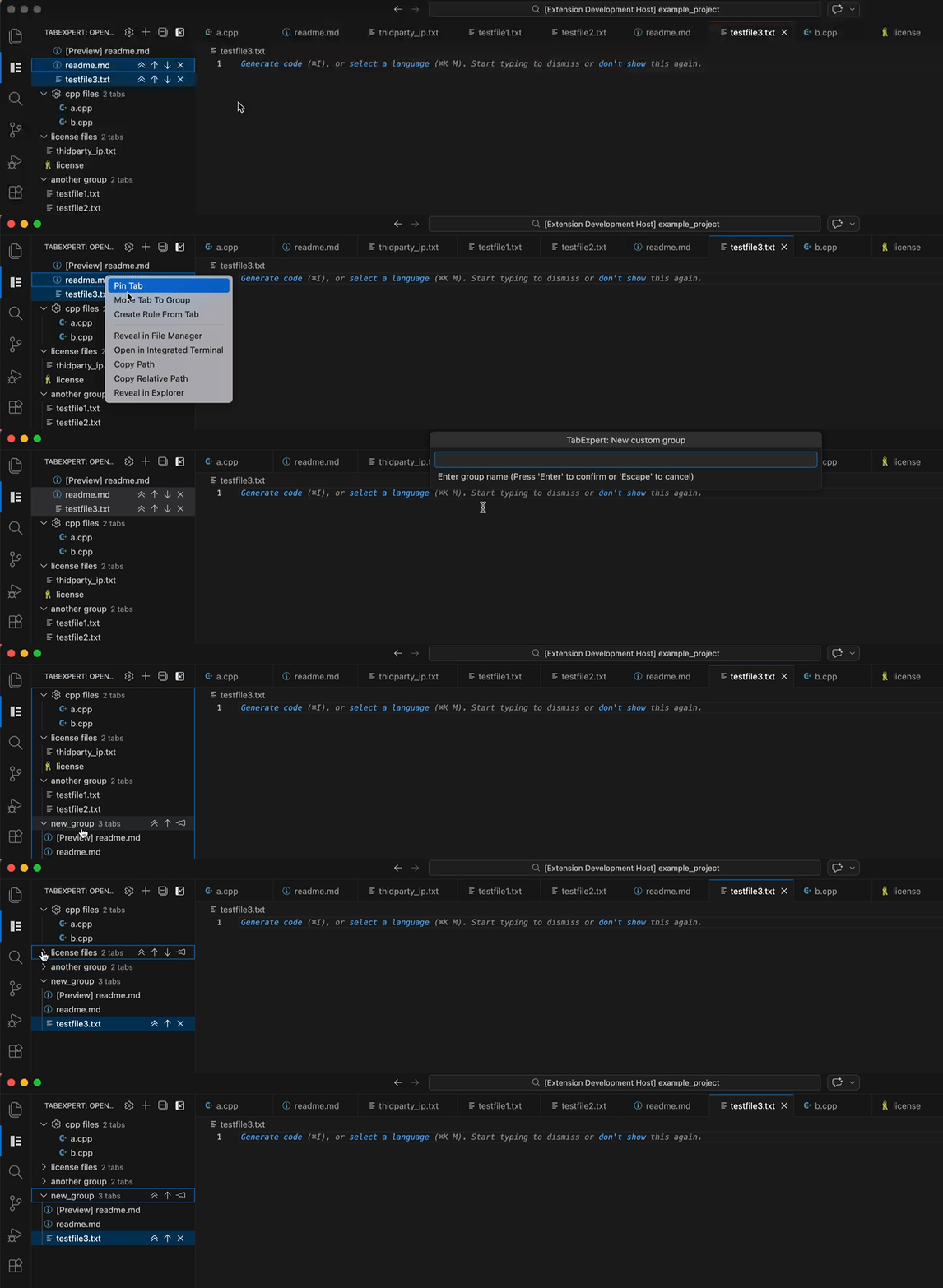
Demo for how to create a rule based tab group:

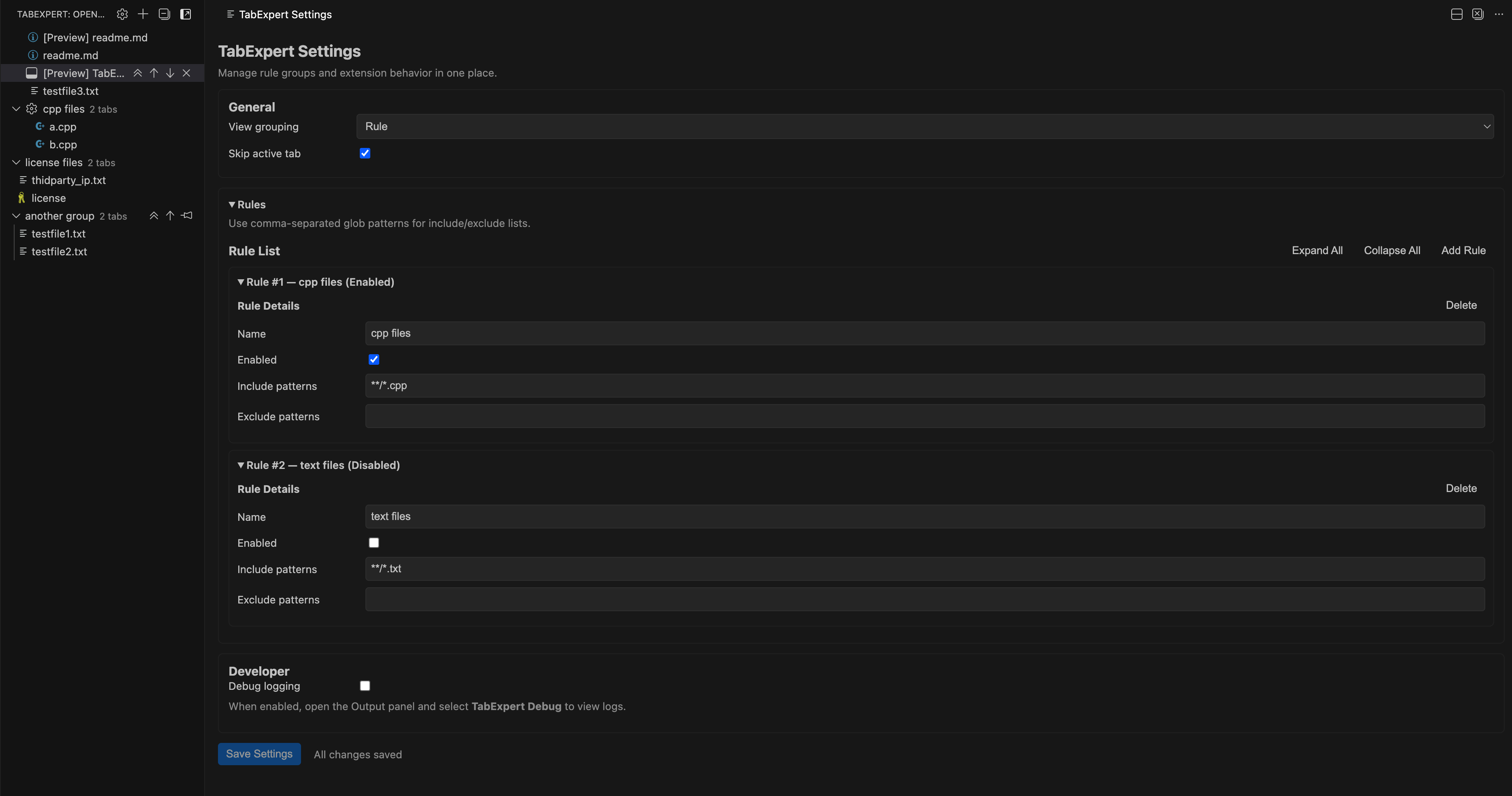
You can open the settings page to mange the extension settings and created rule based groups:
Features
- Vertical tab companion view in a dedicated Activity Bar container.
- One-click vertical mode toggle to hide/show native editor tabs.
- Custom named groups with manual ordering and move up/down/to-top actions.
- Rule groups with create/edit/disable workflows from settings and tab context.
- Inline tab actions for move-to-top, move up/down, and close/pin state handling.
- Group bulk actions: pin/unpin all, sort tabs, merge groups, ungroup all.
- Multi-select and drag-and-drop flows for fast group assignment.
- File state badges (dirty + git status) rendered in the tab rows.
- Distinct labels for content previews (
[Preview]) and editor preview tabs ((preview)).
- Active tab synchronization between native tab strip and TabExpert sidebar selection.
Quick start
- Open the TabExpert activity bar container.
- Use the toolbar button to enable vertical mode.
- Right-click a tab and choose Move Tab To Group to create your first custom group.
- Use Create Rule Group to add automatic matching rules.
- Open Open Settings from the toolbar to manage all TabExpert settings and rules.
Configuration
tabExpert.view.groupBy: group sidebar by editorGroup or rule.tabExpert.grouping.skipActiveTab: skip active tab during grouping operations.tabExpert.debug.enableLogging: enable debug output in the TabExpert Debug channel.tabExpert.rules: manage named rules with include/exclude glob patterns and target group.
Commands
Enable Vertical ModeDisable Vertical ModeOpen SettingsCreate Rule GroupFold All Groups / Unfold All GroupsMove Tab To Group
Development
npm install
npm run check
To launch the extension host in VS Code, press F5.
Packaging and publishing
Build a VSIX package locally:
npm run package:vsix
Publish manually (if needed):
npm run publish:vsce
For automated publishing, this repository includes a tag-based GitHub Actions workflow.
If your source repository is private, set GitHub repository variables VSCE_BASE_CONTENT_URL and VSCE_BASE_IMAGES_URL to publicly accessible URLs (for example, a public assets repo or CDN) so Marketplace README links and images render correctly.
Support
Issues and bugs
- Please report bugs and feature requests in the GitHub issue tracker:
What to include
- VS Code version
- Operating system
- TabExpert version
- Reproduction steps
- Screenshots or logs if available
Debug logging
Enable tabExpert.debug.enableLogging and reproduce the problem.
Then copy relevant entries from the TabExpert Debug output channel.
Security
If you need to report a sensitive issue privately, open an issue and request a private contact channel.

