ZONTAL Studio - ASM Language Features
ZONTAL Studio - ASM Language Features provides language support for Allotrope Simple Model (ASM) files (.asm + .json) plus Turtle (.ttl) and N-Triples (.nt).
Features
- Syntax highlighting for
asm, turtle, ntriples.
- IntelliSense, suggestions, validation, hover, formatting and folding.
- Clickable links for
http(s)://... URIs.
- Copilot Chat
ASM manifests
Allotrope Simpe Model (ASM) is a JSON-based data format that is common in data-driven research, analysis, and collaboration across various scientific disciplines.
To understand the structure of ASM files, we use ASM manifests. ASM manifests describe the shape of the ASM file, as well as value sets, default values, and descriptions. The ASM support shipped with this extension supports all versions.
Servers like the Allotrope-Public Gitlab Repository provide manifests for commonly used techniques. However, manifests can also be defined in a file in the VS Code workspace.
The association of an ASM file to a manifest is done in the ASM file itself using the $asm.manifest attribute.
Mapping in the ASM
In the following example, the ASM file specifies that its contents follow the Plate Reader manifest.
ASM
{
  "$asm.manifest": "https://purl.allotrope.org/manifests/plate-reader/REC/2026/03/plate-reader.manifest"
}
Editing ASM with Visual Studio Code
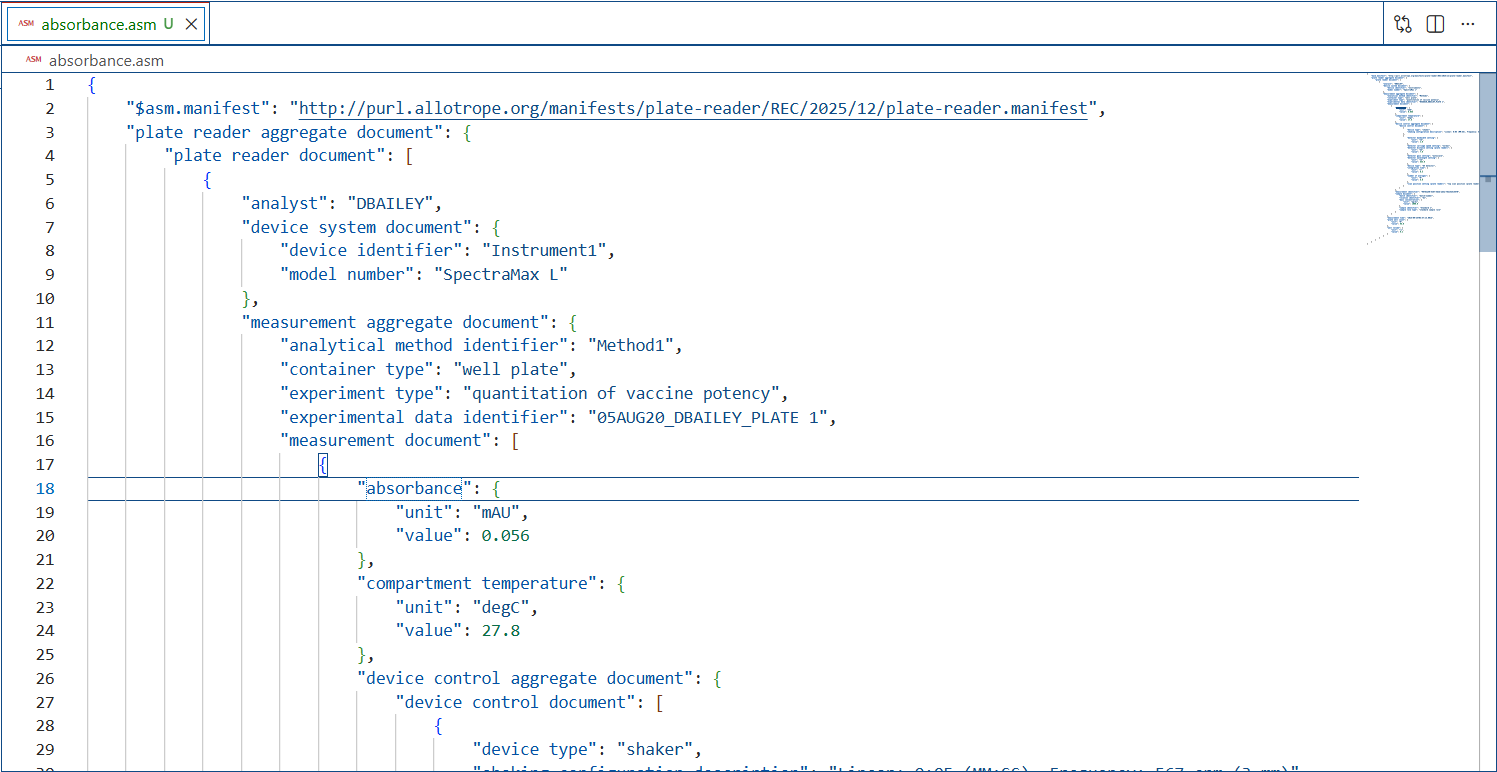
When opening a file that ends with .asm, ASM Language Features provides features to make it simpler to write or modify the file's content.
Change the language for the selected file
In VS Code, we default the language support for a file based on its filename extension. However, at times you may want to change language modes, to do this click on the language indicator - which is located on the right hand of the Status Bar. This will bring up the Select Language Mode dropdown where you can select another language for the current file.

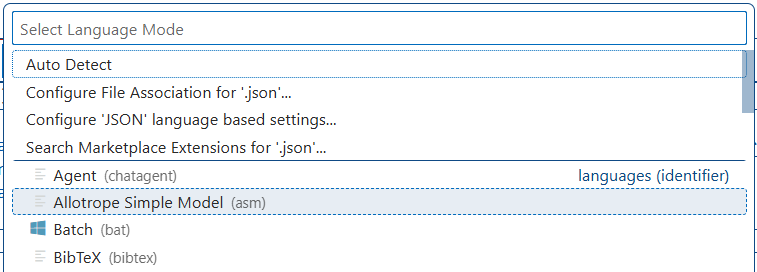
Tip: You can get the same dropdown by running the Change Language Mode command (Ctrl+K M).
IntelliSense and validation
For properties and values we offer up suggestions as you type with IntelliSense.
We also perform structural and value verification based on the associated ASM manifest giving you red squiggles. To disable validation, use the studioASM.asm.validate.enable setting.
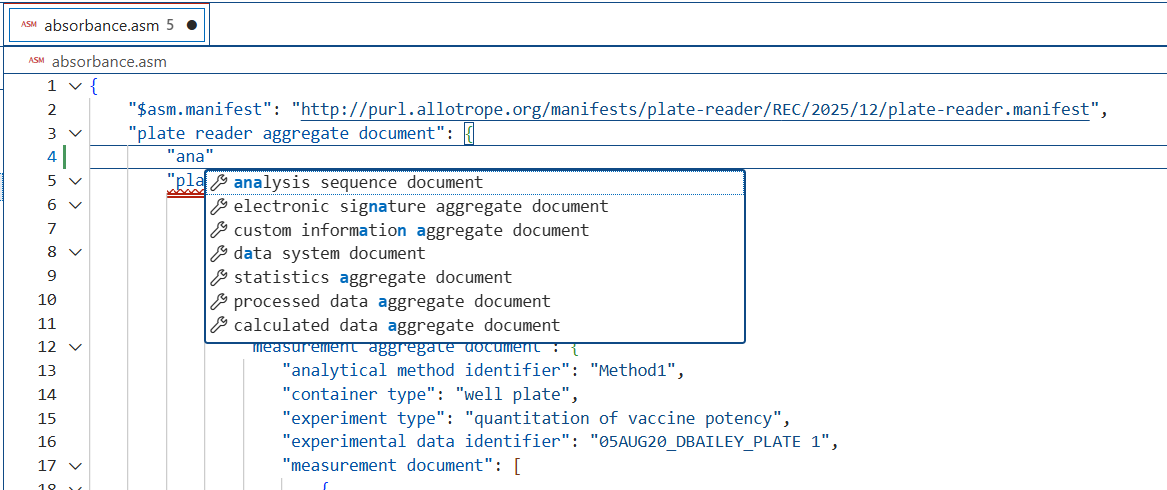
You can also manually see suggestions with the Trigger Suggestions command (Ctrl+Space).
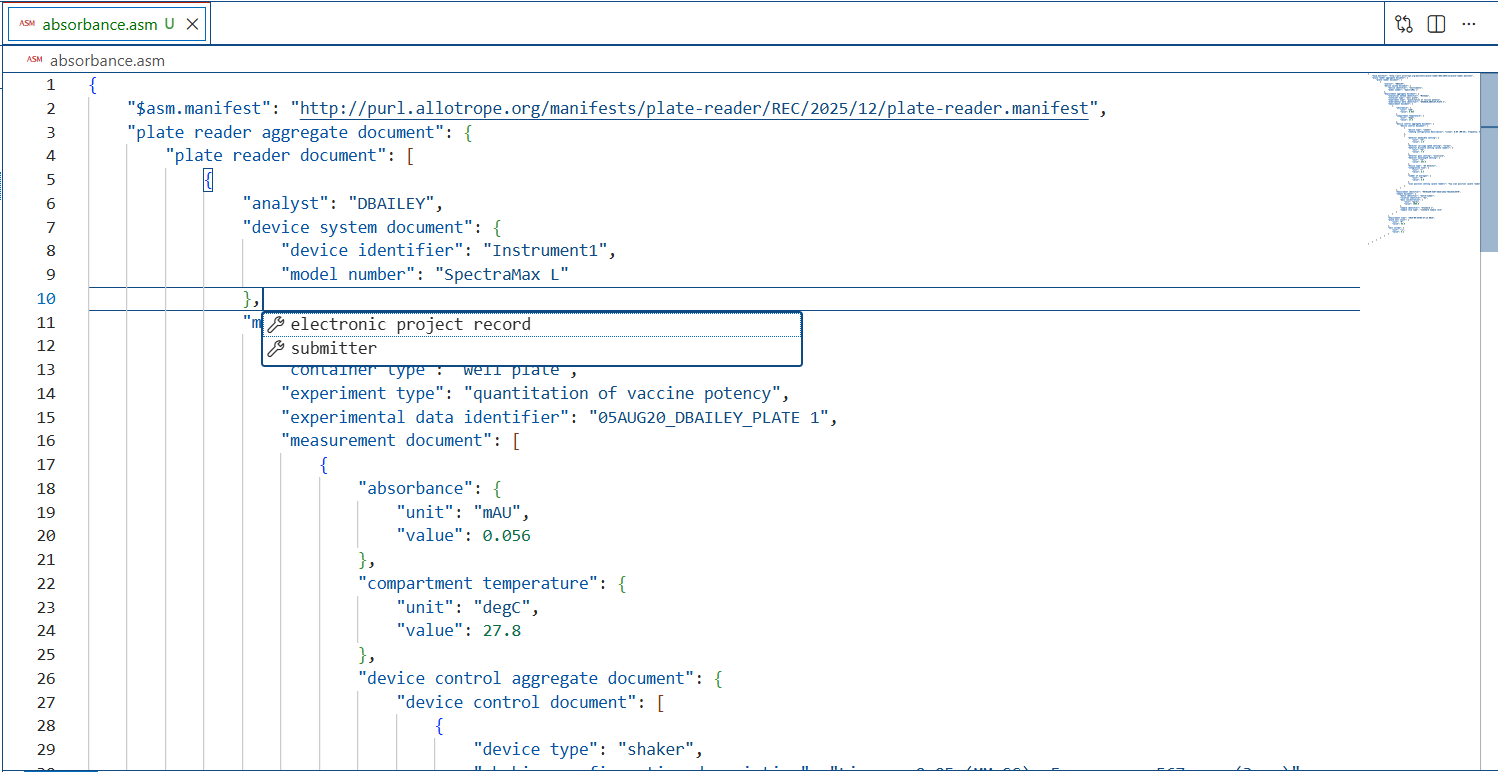
Quick navigation
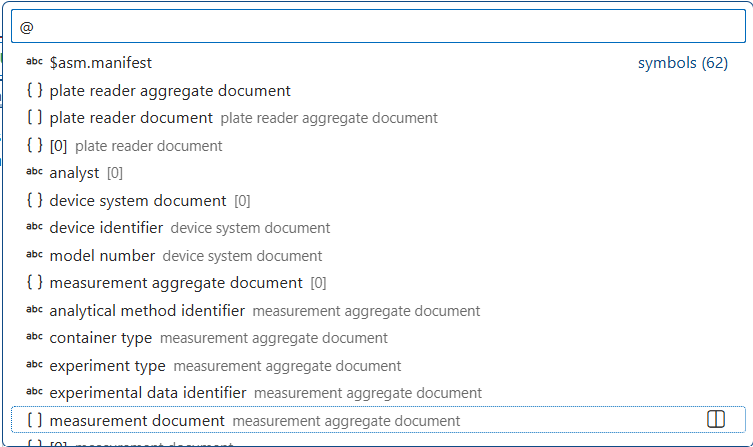
ASM files can get large and we support quick navigation to properties using the Go to Symbol command (Ctrl+Shift+O).
Hovers
When you hover over properties and values for ASM data with manifest, we will provide additional context.
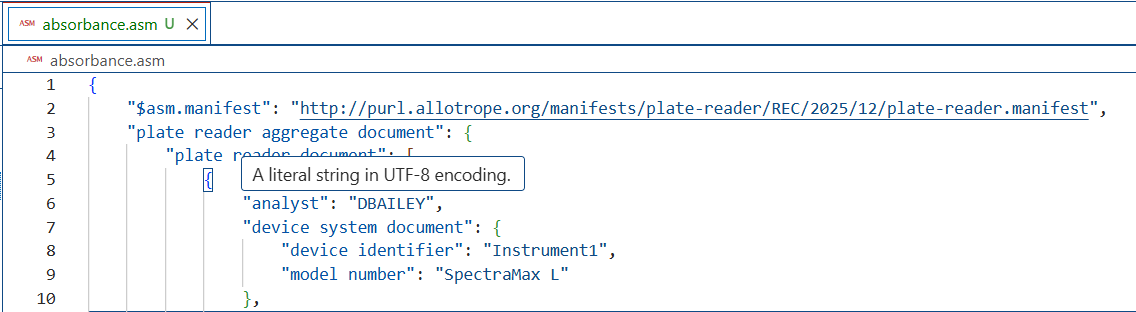
ASM Language Features will use the standard description field from the JSON Schema specification in order to provide information about properties on hover and during autocomplete.
For Turtle (.ttl) files, hover on a prefixed name (e.g. qudt:Pascal), the keyword a, or a full <http://...> IRI resolves the IRI and — when the IRI is owned by a known vocabulary — enriches the tooltip with the term's label (skos:prefLabel / rdfs:label), definition (skos:definition / rdfs:comment / dcterms:description), parent and child IRIs (rdfs:subClassOf / rdfs:subPropertyOf, skos:broader / skos:narrower), and (for QUDT units) symbol / UCUM code. The IRI header and every parent/child are clickable links that open the resource.
The same vocabulary-aware enrichment is available for absolute http(s):// IRI strings inside JSON, JSON Schema (*.schema.json) and ASM (.asm) files — useful for IRIs that appear as const, enum or value-set entries in JSON Schemas. Toggle via studioASM.json.hover.enable.
You can format your ASM document using Shift+Alt+F or Format Document from the context menu.
Folding
You can fold regions of source code using the folding icons on the gutter between line numbers and line start. Folding regions are available for all object and array elements.
Copilot Chat
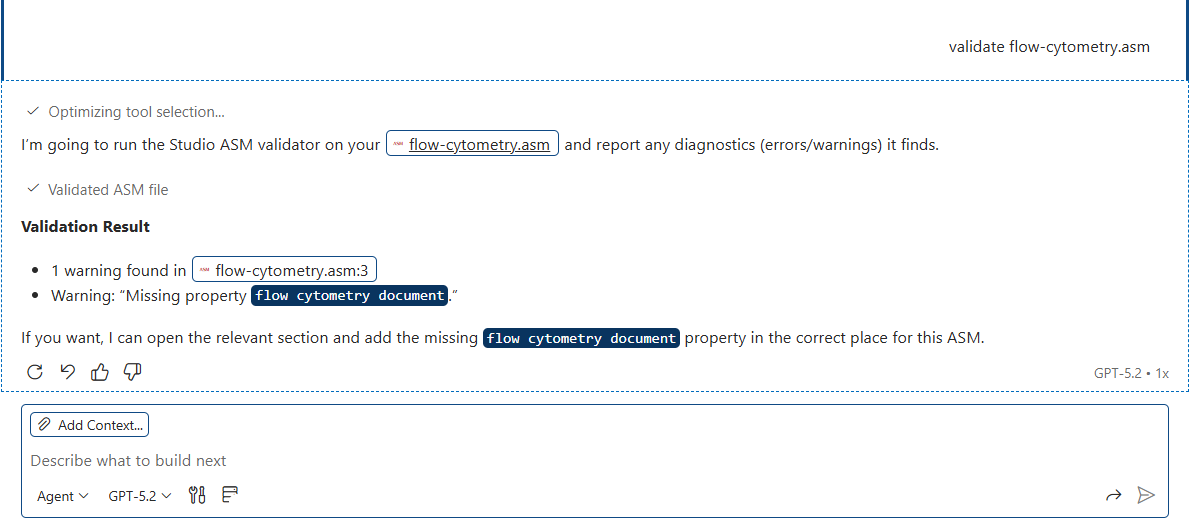
You can chat about your ASM files, manifests, JSON schemas, shapes and vocabulary using the Copilot chat.
The chat will answer questions about ASM.
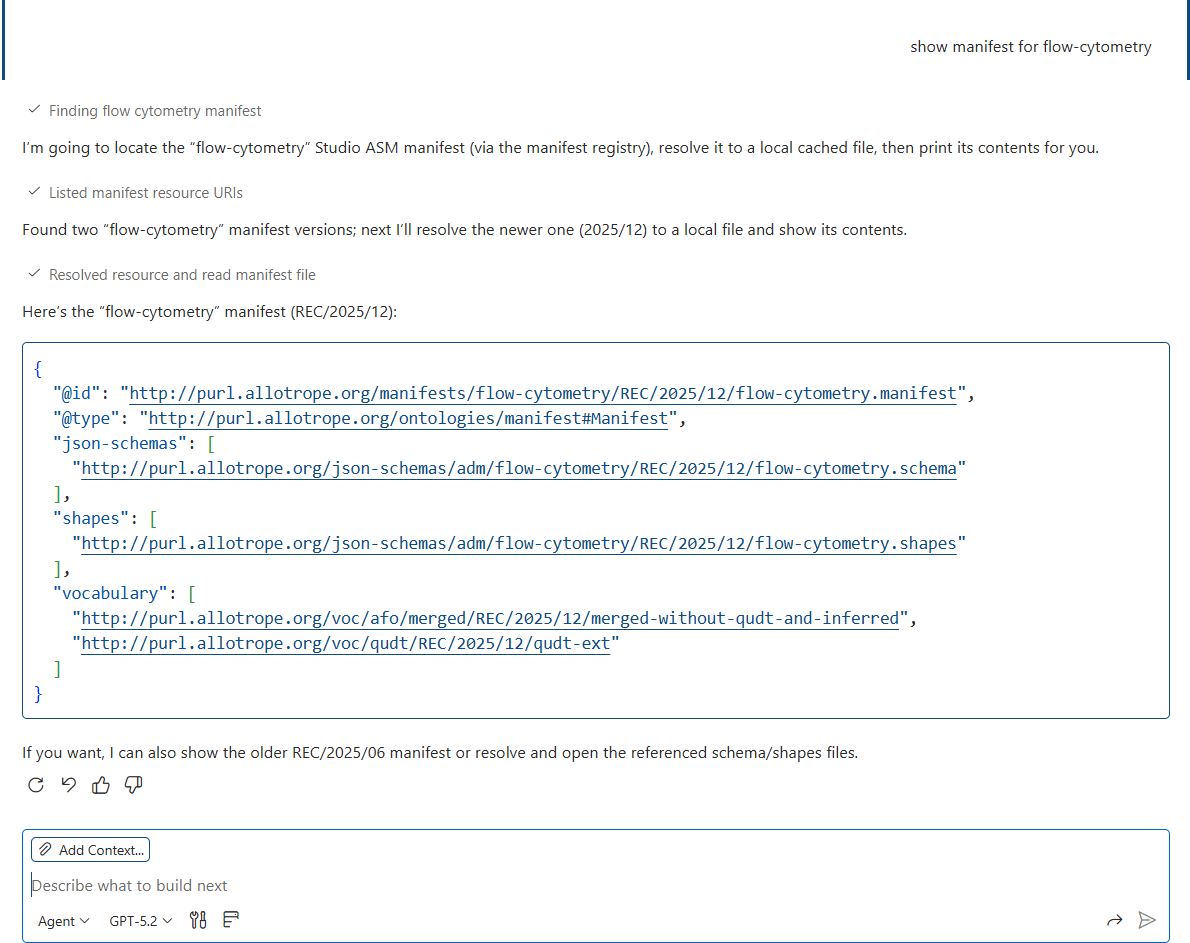
The agent will help you to edit and validate your ASM files.
Resource caching model
This extension caches downloaded resources under the .asm_cache/** directory.
- Directory catalogs (listing only) are stored under
.asm_cache/directories/**/catalog.json for directory sources that need them (for example the built-in GitLab listings).
- Workspace directories are scan-based (glob search) and do not write catalogs.
- When resources change, the extension clears related in-memory caches and revalidates open documents.
If you delete .asm_cache, the extension will repopulate directory catalogs and downloaded files as needed (configurable).
Network access
To populate caches, the extension may fetch:
https://gitlab.com/allotrope-public/asm — manifest and JSON schema listings.http://purl.allotrope.org — Allotrope manifests, schemas, shapes, and vocabularies (AFO, QUDT, …).- Curated mirrors for common third-party vocabularies referenced by
@prefix in TTL files (e.g. FOAF, Dublin Core, GoodRelations via the LOV snapshot).
- Any resource referenced by an ASM manifest, JSON Schema
$ref, or Turtle namespace IRI (on-demand).
All downloads are cached into .asm_cache/**. No telemetry is collected.
Offline mode
The studioASM.download.enable setting controls whether the extension fetches resources from http and https.
A warning triangle will show in the status bar when the current editor would like to use resources that cannot be downloaded.
Logging
This extension logs diagnostic and operational messages to VS Code Output channels (to help troubleshoot catalog creation, caching, schema resolution, and language features).
To view logs:
- Open View → Output.
- Select the Studio ASM channel from the dropdown.
To avoid spamming the Output view, many messages are rate-limited (logged with a TTL, typically a couple seconds per unique message key). Some user-facing warnings are also TTL-limited.
Commands
This extension contributes the following commands:
- Studio ASM: Open Resource: opens the resource file if present, otherwise opens the URL in the browser.
- Studio ASM: Refresh Resource Catalogs: refreshes directory listings (does not download resource contents).
Extension Settings
ASM Language Features contributes the following settings:
Feature settings:
Cache settings:
- studioASM.cacheDir (default:
""): override the directory used to cache downloaded ASM resources. Use a path relative to the workspace root. When empty, the default .asm_cache directory is used.
Online/Offline settings:
Directory settings:
Resolution settings:
The extension contributes language model tools that can be invoked by Copilot Chat (and other VS Code LM clients).
Tools:
listResourceUris: list known resource IDs (manifests/schemas/shapes/vocabulary).resolveResourceUri: resolve a resource ID to a local VS Code URI.validateFile: validate an ASM, JSON, or Turtle file and return diagnostics.lintFile: lint a Studio ASM artifact (asm/schema/vocabulary/manifest) and return rule-based diagnostics.vocab: query a Studio ASM vocabulary (lookup / search / subclassOf / symbols / summary / owner).
Extension API
Other VS Code extensions can consume a programmatic API:
- Extension id:
zontal.vscode-asm-language-features
- Access:
const api = await vscode.extensions.getExtension('zontal.vscode-asm-language-features')?.activate();
The returned API exposes:
registerDirectory(kind, service) — register a DirectoryService for 'manifest' | 'schema' | 'shapes' | 'vocabulary'.registerResolution(service) — register a ResolutionService.listResourceUris(kind, options?) → { uris: vscode.Uri[]; nextAfter: string | null } — list resource IDs (PURLs, not file: URIs).resolveResourceUri(uri) → vscode.Uri | null — resolve a resource ID to a local URI (workspace-first, then .asm_cache/**).validateFile(uri, options?) → vscode.Diagnostic[] — schema validation (kind?: 'asm' | 'json' | 'ttl', strict?: boolean).lintFile(uri, options?) → vscode.Diagnostic[] — rule-based lint (kind?: 'asm' | 'schema' | 'vocabulary' | 'manifest', rules?, disabledRules?, limit?).vocabIndex / vocabLookup / vocabSearch / vocabSubclassOf / vocabSymbols / vocabSummary — RDF/Turtle vocabulary queries (AFO, QUDT, ...). Each accepts a vocabulary resource ID (PURL or file:// URI).
Notes:
listResourceUris(...) returns resource IDs; call resolveResourceUri(id) before opening a file.- Resolution is workspace-first, then HTTP download into
.asm_cache/** with ETag/expiration handling.
validateFile(...) honours studioASM.validation.strict (overridable via options.strict).
DirectoryService
Directory services provide resource ID listings (not file URIs). They are used by listResourceUris() APIs and by schema/manifest lookup.
Shape:
export interface DirectoryService {
  /** Stable identifier for registry/de-dupe. */
  readonly id: string;
  readonly displayName: string;
  readonly kind: 'manifest' | 'schema' | 'shapes' | 'vocabulary';

  /** Lists resource IDs (URIs as strings) plus optional metadata. */
  listEntries(options?: {
    limit?: number;
    after?: string;
    filter?: { uriGlob?: string; uriRegex?: string };
  }): Promise<{ entries: Array<{ uri: string; size?: number; mtimeMS?: number; etag?: string }>; nextAfter: string | null }>;

  /** Optional: refreshes an on-disk catalog/listing (must not download resource contents). */
  refresh?(folder: vscode.WorkspaceFolder): Promise<void>;
}
Guidelines:
listEntries() should be best-effort and fast; it should not download resource contents.- If your directory source needs network access, prefer implementing
refresh() to update a listing/catalog, and keep listEntries() reading from that catalog.
ResolutionService
Resolution services map a resource ID (string URI) to a local VS Code URI (file:), downloading into .asm_cache/** if needed.
Shape:
export interface ResolutionService {
  /** Stable identifier for registry/de-dupe. */
  readonly id: string;
  readonly displayName: string;

  /** Returns a local VS Code URI, or null if the service does not apply. */
  resolveUri(uri: string): Promise<vscode.Uri | null>;
}
Guidelines:
- Your service will be considered for all URIs; return
null quickly when it does not apply.
- Prefer workspace-first behavior when applicable, then cache-backed remote resolution.

