VERTEX is a new set of plugins for VS Code and Eclipse ADT.
Serverless, in VS Code - the ABAP transpiler runs ABAP on your machine:
- a report, a method of a local class or a function module, its parameters asked in a panel and kept as named variants
- only SELECTs go to the SAP system, read through ADT; the logic runs locally
- every step and every value change recorded: step, set breakpoints, replay the run to any step
- a value followed back to a clickable formula of how it was calculated, each part opening the line that produced it
Against SAP:
- AI assistant over any SAP system, and an MCP server for Claude Code, Codex and Copilot
- enhanced ABAP editor: ABAP Unit, ATC, block-by-block review before activation
- AI-driven ADT debugger: conditions SAP evaluates, a verdict naming the line
- VERTEX Smart Debugger with recording and replay
- forward and backward usage analysis, down to the formula of a value (BSE)
- the path to a line: the conditions inside its METHOD or FORM under which it runs
- version history, diff and transport review
- code explorer: metrics, UML, Logic and Calls diagrams
- data explorer (SelecTor): tables, joins, pivots
Several of them grew out of earlier SAP GUI tools.
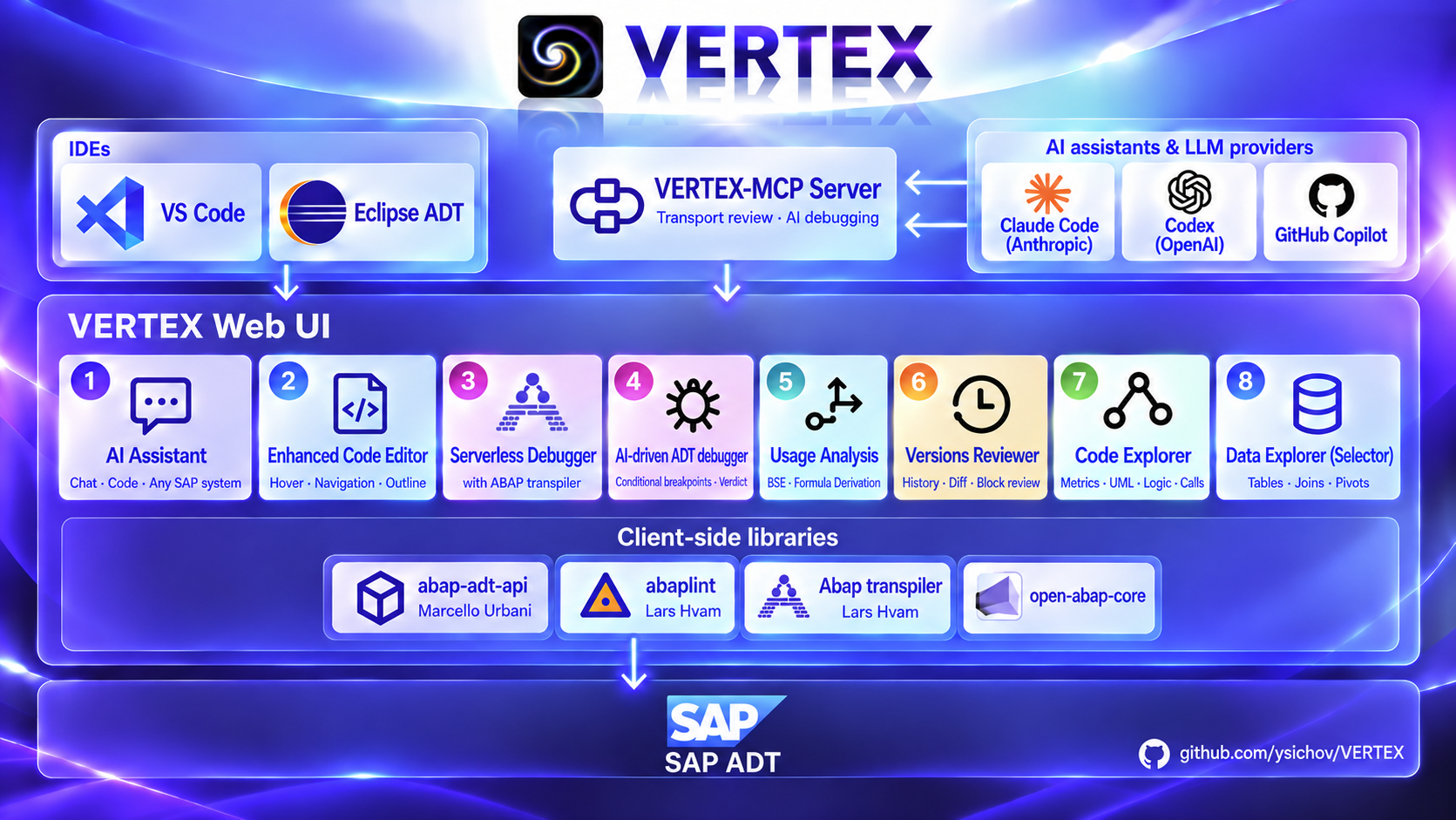
The ABAP side, this repository's src/, is
optional: everything works over ADT alone. With it, a transport's review can also be saved to SAP,
in the ZAVE_REVIEW table AVE uses; without it, reviews are saved to files. The last column says
what needs it.
| Tool |
Grew out of |
What it does |
ABAP backend |
| Enhanced Code Editor |
— |
Hover with a data element's domain resolved, Go to (F12), Outline, Save & Activate and block-by-block Review & Activate, ABAP Unit into the Test Explorer (Ctrl+Shift+F10), ATC into Problems (Ctrl+Shift+F2), where-used (Shift+F12), SAP's keyword documentation (F1) |
not needed |
| AI-driven ADT debugger |
Smart Debugger |
Breakpoints with conditions SAP evaluates and watchpoint logs, the run started in WebGUI, the stops, a verdict naming the line and the values |
not needed |
| VERTEX Smart Debugger |
— |
The same session on screen: source, breakpoints, stack, every variable, tables as grids, and the flow chart and player for a recorded run. SAP & Transpiler Logs lists SAP recordings and available transpiler runs for replay or deletion; SAP recordings can also be renamed. |
not needed |
| Value Origin |
ACE |
Where a value came from, backwards across calls: the static call stack, the derivation as FLOW, Formula or Expression, each as a tree or a diagram |
not needed |
| AI Assistant |
ABAP-AI-Code |
Chat over any configured SAP system: reads, explains and changes code — the change lands in the tab, reviewed block by block before activation — runs the tests and ATC on an object, and drives the debugger |
not needed |
| Versions Reviewer |
AVE |
Version history, the diff between two versions, the review of a whole transport with approve, decline and comments, and the two MCP transport tools |
to save reviews in SAP |
| Code Explorer |
ACE |
Metrics (McCabe, Halstead, maintainability), UML, the Calls diagram of an object and the Logic view of one method; a method opened from Calls draws its Logic view in the same picture |
not needed |
| Data Explorer (SelecTor) |
Simple Data Explorer |
Tables, views and CDS with select-options, a join built from the dictionary's foreign keys, a pivot over either |
not needed |
Grew out of names where a tool's ideas were worked out first; those projects are not developed
further. VERTEX does not depend on them: nothing from Simple Data Explorer, ACE, AVE, Smart
Debugger or ABAP-AI-Code has to be installed, and none of their code is called. Code Explorer,
Value Origin and VERTEX Smart Debugger read ADT source and analyse it with abaplint in the editor; SelecTor
builds its statements and reads them through ADT's standard data preview; the version history and its diff
come from ADT's revision feed, as in Eclipse's Revision History, and the review of a transport is
built from them in the window. Saving a review to SAP needs one resource of VERTEX's own ABAP,
src/, because ADT's data preview can read a table but not write it; the AVE repository itself is
not needed.
Getting started
Recommended companion extension:
ABAP by Lars Hvam
(larshp.vscode-abap). It is optional; VERTEX registers ABAP independently.
Open Welcome with VERTEX: Get Started in the Command Palette.
Local ABAP execution
For calculation code that can run without SAP services, use the transpiler and
runtime bundled with VERTEX. Open a saved local .abap file and choose
VERTEX Smart Debugger in the editor's context menu; its Run with ABAP Transpiler runs it - the selection
screen first, then to the first breakpoint, or to the end with the output when there is none. From the Command
Palette, VERTEX: Run with ABAP Transpiler runs a local file at once. An SAP program, or the method of an SAP
class the cursor stands in, runs the same way from Run with ABAP Transpiler beside Run in SAP in its VERTEX
Smart Debugger panel, which reads it, its includes and the classes and interfaces it uses from SAP first. The panel is shared with SAP runs;
for local files its title is VERTEX Smart Debugger (transpiler) and its Run button is Run with ABAP Transpiler. Run
asks the selection screen in a window of its own, laid out as SAP lays out screen 1000: blocks with their frame and
title, lines of several elements, comments, SKIP and ULINE; radio buttons, checkboxes and value fields with their
DEFAULT (a value is upper-cased as SAP does unless LOWER CASE, and its LENGTH holds); SELECT-OPTIONS as rows of sign,
option, low and high, with + row unless NO-EXTENSION and without high under NO INTERVALS. Each element is named by
its selection text - from the abapGit text pool beside a local file, from SAP for an SAP program; if SAP's texts cannot
be read the window says so and shows the technical names. A field marked OBLIGATORY must be filled before Execute (F8)
runs. A pushbutton, a tabbed block or a function key is named in the window as not drawn, and another screen
(BEGIN OF SCREEN) is not asked.
A program runs in a window of its own, as SAP GUI shows a report. VERTEX: Run with ABAP Transpiler on a program
opens it in an editor tab, in the colours of the VS Code theme: a title bar, a toolbar, the selection screen, and a
status bar. Execute (F8) runs it and shows the list it wrote; Back (F3) returns to the screen with the values
given, to run again. A program without a selection screen runs at once. A local file is transpiled again only when a
source of its folder changed - an edit, a new file, a removed one; otherwise the last build runs at once. Each run is recorded, and VERTEX Smart Debugger always shows the latest one -
without an Output of its own, as the list is in the window: See flow history
brings it to the front - its steps, values and flow - and a run that reaches a breakpoint opens it there by
itself, to step on - the source it follows opens beside the window, which stays in sight; Run in that VERTEX Smart Debugger
brings the window to the front again. A transpiler run has no session
to leave, so its panel has no Detach: Exit program ends a stopped run. For an SAP program the toolbar has Recompile too. A method or a function module opens the same window on the
screen of its parameters, with its variants; its results follow the list - a value as a line, a structure as a tree
and a table as a grid, both opening and closing (in VERTEX Smart Debugger's Output, as indented text). The panel counts the breakpoints of its own object and the sources it uses - a point in another object's file
neither shows nor stops it, and Clear all leaves it; All BP in the Breakpoints header counts every ABAP breakpoint
in VS Code instead. Opened by Run with ABAP Transpiler and with none of those set, the panel is a run: the Run button and the
Output, nothing else; set a breakpoint and it is the debugger, and back when the last one is removed. A transpiler run
always records every step with its values: it is fast enough that there is no record switch. Beside the routine's
variables a step shows SY - the fields the run has set (SY-SUBRC, SY-TABIX, SY-INDEX, SY-DBCNT, SY-FDPOS) - and
SQL, each SELECT the statement before it ran with the rows it brought or why it failed. A run that fails says
where in the ABAP: the error, then the object and line it happened on and each call that led there; Node's own text
is in the VERTEX Local ABAP channel. A run stays alive while
the panel is closed: opened again, the panel shows it as it stands - the steps, where it stopped, the output - and
Clear starts a new one.
For an SAP object, the saved build includes the source and the SAP Dictionary definitions it used. Opening the same successful build can reuse that snapshot. Recompile reads the sources and dictionary again, including changes made in SAP by someone else; a failed build also requires a fresh read before the next attempt. When the snapshot format changes, each older build is refreshed when its object is next opened. Other saved objects are not compiled in advance.
A method or a function module runs too. With the cursor inside a method of a local class
(zcl_x.clas.abap) or inside a function module of a local function group (zfg.fugr.z_fm.abap, abapGit
layout), the panel's screen is the call's: the constructor's importing parameters for an instance method, then
the importing, changing and tables parameters - a field for a simple type (its DEFAULT shown), the fields of a
structure, and a grid for a table with + row and × per row. An optional parameter left empty is not passed.
Variant keeps named sets of the values in VS Code, per method or module: Save, pick, Delete. Execute writes a
small ABAP program that sets the values and calls the method (NEW zcl_x( ... )->m( ... ), zcl_x=>m( ... ))
or the module (CALL FUNCTION), and runs it as any program: breakpoints, steps, the record. That program lives in a
temporary folder, is written again for every run, and is not recorded - the run starts in the method or module
itself. The exporting, changing and returning results are written to Output: a simple value, a structure field by
field, a table as a table - a heading of its columns and a line per row, each column as wide as its type. A function module's file is recognised by its abapGit name, <group>.fugr.<module>.abap.
Any method runs, whatever its visibility: the transpiler does not check it, so a private or protected method is
called as a public one would be (SAP itself would refuse that call). A method of an interface the class
implements (METHOD zif_x~m) is called through the interface. A TYPE REF TO parameter has a
class-variables button in place of a text field; it opens a read-only view of the class's declared
variables. A required class reference is initialized for the standalone call, and its values appear
in Variables. A parameter of a type with no name or one not among the local sources, a table inside a structure, and a project with its own abap_transpile.json are refused with the
reason; nothing else is run in their place. Opened by Visual
Analysis / Debug it is always the whole panel, for analysis with no run at all. A SELECT that fails says why in the
Output and the VERTEX Local ABAP channel instead of reading as an empty result. VERTEX
instruments generated program and class modules: the program pauses before each
mapped statement, and its line and changed variables are recorded. Run stops at the
first breakpoint; Single Step, Execute, Return and Continue (F5-F8, in the panel or
the editor) run the program on to the next stop, and the history slider replays what
was recorded so far. The Output section shows what the program wrote with WRITE up to where it stands. Some
ABAP constructs still need broader instrumentation.
Breakpoints on standalone declarations such as DATA x TYPE i are removed because
they are not calculation steps; an inline declaration such as DATA(x) = ... is a
statement and stops.
VERTEX creates a temporary transpiler config for the selected ABAP file, its
statically referenced global classes and interfaces, classes reached by VERTEX's
call graph, and matching table XML metadata. Standard DDIC data elements and domains
come from the bundled open-abap-core subset. The resolved class list appears in the
VERTEX Local ABAP output channel before transpilation.
Unrelated files in a large src folder do not block a simple report. For
dynamically named classes or additional DDIC types, provide an
abap_transpile.json in the project; it takes precedence. A custom configuration
can look like this:
{"input_folder":"src","input_filter":[],"output_folder":"output","write_unit_tests":true,"write_source_map":true}
Put report sources under src/, for example zcalc.prog.abap. For ABAP Unit,
the project must have test classes that the transpiler can discover. The separate
VERTEX: Run Local ABAP and VERTEX: Debug Local ABAP Command Palette entries
also work; the Debug command opens VERTEX Smart Debugger (transpiler). Both use a temporary
configuration when the project has none.
The VERTEX Local ABAP output channel shows transpiler diagnostics. Automatic projects
send Open SQL SELECT to the configured SAP system through the same ADT data preview
used by SelecTor; data remains in SAP. Load test data in SAP if a calculation
depends on table rows. SQL writes and SAP service dependencies
still need local implementations or an SAP system. Projects
that install their own transpiler CLI use that version; VERTEX supplies its runtime
to generated output when the project has none. No project npm install is required
for basic local runs.
Run SELECT also works manually in a local .abap editor: put the cursor on
the SELECT and invoke the command from the editor menu or Command Palette. It
runs directly in the selected SAP system without transpiling or running the
report. The result window shows any conditions omitted because they depend on
program variables. A small standalone calculation example is
examples/zvertex_fibonacci.prog.abap.
Idea for use: ABAP Unit in CI. A GitHub Actions workflow can run the same
transpiler pipeline on every push for tests independent of SAP: npm ci,
abap_transpile, then node output/index.mjs. Unlike interactive VERTEX, the
CI runner needs its own npm dependencies and abap_transpile.json; see
open-abap-core's test scripts.
Tests requiring SAP services need local substitutes or a SAP-backed job.
For the built-in VERTEX Assistant, choose Claude Code, Codex, GitHub Copilot or
an API provider in LLM Providers. Copilot uses the models available from a
signed-in GitHub Copilot extension through VS Code; it can call the same SAP
tools as the other providers. API providers are Anthropic, OpenAI, Mistral,
Gemini, Groq, Cerebras, OpenRouter and NVIDIA. This is separate from Copilot
Chat's MCP setup.
Every Get Started step has an ⓘ Info button opening its explanation: SAP
system import, connection testing, assistant choice and MCP capabilities.
Claude Code uses the executable bundled with its installed VS Code extension
or the native CLI from PATH or ~/.local/bin. When both are found, VERTEX
asks which to use once. Change vertex.ai.claudeSource in Settings to switch
between them or set it to ask to choose again.
LLM Providers shows the installation in use and offers a selector when
both are available.
Restart VS Code after installing the CLI so it inherits the updated environment.
LLM Providers checks Claude availability before showing its model list, so a
missing executable is reported on opening settings, as it is for Codex.
Codex also accepts a standalone native CLI, the executable inside ChatGPT.app
on macOS, or the native executable in its global npm package through PATH.
When the CLI and openai.chatgpt extension are both present, VERTEX asks
which to use once. Change vertex.ai.codexSource in Settings to switch or
set it to ask to choose again. Restart VS Code after installing a CLI;
the selected installation is also shown and changeable in LLM Providers;
npm command wrappers are resolved to the native executable.
Windows detection also checks %APPDATA%/npm independently of PATH.
The ABAP backend
The repository's src/ is needed for one thing:
saving a transport's review to SAP. It carries the ZAVE_REVIEW table, which AVE uses too, and
ZCL_VX_ADT_RES_STORE, which writes a review into it; pull it with abapGit
and activate it. On a system without it, reviews are saved to files (see Code review of a
transport), and the review page says so. Everything else - Code Explorer, Value Origin, SelecTor,
the version history, its diff and building a review - reads SAP over ADT and needs no backend.
First run
- Install the extension from the Marketplace and reload the window.
- To save reviews in SAP, install the ABAP backend: pull the
VERTEX repository's
src/ with
abapGit on the SAP system and activate it. Nothing else waits for this
step; without it, reviews are saved to files.
- Name your system: Ctrl+Shift+P → Preferences: Open User Settings (JSON), and add
vertex.systems and vertex.active as in Settings below. The url is the ICM port, not the
one SAP GUI connects to.
- Open VERTEX from its icon in the Activity Bar, or Ctrl+Shift+P → VERTEX: Open Panel.
The top line shows the active system; VERTEX: Switch System picks another.
- Open an object: VERTEX Tools in the panel, pick a type, type a name -
Z* lists what
matches - and pick a function. For basic, VERTEX asks for the password once per system and keeps it in the
operating system's credential store; SNC logs on through Secure Login Client without a prompt. Or just ask the chat: open table SFLIGHT. When a name resolves to one object, the answer links its name and package to their SAP tabs; opening a source uses the current editor group.
Settings
In the VERTEX panel's title, the server icon opens the SAP Systems table, the sparkle opens LLM Providers, and the gear opens every VERTEX setting in the Settings editor.
Connecting
Configure vertex.systems in VS Code settings. authType defaults to basic: use
your SAP user and password. VERTEX asks for the password once and keeps it in the
OS credential store through VS Code SecretStorage, never in settings. A refused
password is discarded; the next operation asks again. Basic also works on remote
extension hosts. VERTEX: Forget Credentials clears the active system's stored
credentials.
SAP Systems (the server icon in the VERTEX panel's title, or the link under vertex.systems in Settings) lists every configured system in a table. Per row: the radio button makes it the active system; SNC switches it between SNC single sign-on and password authentication; On switches it off or on - a system switched off stays in vertex.systems ("disabled": true) but is left out of every list, switch and test, and a tab opened from it says so; Log in asks for the password and keeps it in the OS credential store, then tests - where a password is already kept, the button reads Save new password (SAP is not asked to tell); Test asks ADT on that system alone and shows the answer in the row, kept there until the window is reloaded, also when the table is closed; Delete removes it from vertex.systems after a confirmation. Import from SAP Logon and Eclipse and Edit in settings.json stand above the table.
In SAP Systems, the SNC checkbox switches a system between SNC single sign-on and password authentication.
Turning SNC off keeps its connection details in settings; turning it back on
requires snc.partnerName and rfc.ashost/rfc.sysnr. The checkbox changes only
that system's authType, without deleting or re-importing it. Basic authentication
asks for a password on the next request.
The universal VSIX carries prebuilt RFC bindings for Windows x64 and macOS on
Apple silicon. SNC requires local VS Code, Secure Login Client, and the SAP NW
RFC library installed on your computer. On Windows, VERTEX looks for
sapnwrfc.dll in SAPNWRFC_HOME, Windows System32, SAP GUI and PATH. On macOS,
put the SDK's lib directory on DYLD_LIBRARY_PATH before starting VS Code.
Your SAP account needs RFC authorization for SADT_REST_RFC_ENDPOINT.
Over RFC, hover and navigation send the whole source of the open object to SAP, and SADT_REST_RFC_ENDPOINT can dump (XML_FORMAT_ERROR) on a large one. vertex.rfc.maxAnalysedLines (default 0, no limit) sets the longest source sent; an object whose source once made SAP dump is not sent again until the window is reloaded. For such a source, hover reports that it was not sent, and double-click and F12 find the name with abaplint inside that source - a name declared in another object is reached only through the static and instance calls VERTEX resolves itself.
The direct SNC connection builds on [fr0ster-forks' auth-broker PR #1](https://github.com/ysichov/VERTEX/pull/1): VERTEX sends ADT requests over RFC through sap-rfc-lite and SADT_REST_RFC_ENDPOINT. This path does not use SAP ADT for VS Code. Since 0.9.11, the universal VSIX includes Windows x64 and macOS Apple silicon bindings, searches for an installed sapnwrfc.dll on Windows, and imports SNC/RFC settings from SAP Logon. The SAP RFC library itself stays outside the VSIX. A separate SDK installation may be unnecessary when a compatible library is already present, but that library is still required at runtime.
"vertex.systems": [
  {
    "name": "<display name>",
    "url": "https://<ADT address>:<ICM port>",
    "client": "<client>",
    "user": "<ABAP user>",
    "authType": "snc",
    "snc": { "partnerName": "p:CN=SID, O=ACME", "qop": "9" },
    "rfc": { "ashost": "<application server>", "sysnr": "00" }
  }
]
For SNC, user identifies the ABAP user the debugger targets; no password is
prompted for. Secure Login Client supplies the logon. snc.partnerName and
rfc.ashost/rfc.sysnr are required; the RFC address is never derived from url.
Optional SNC settings are qop ("1", "2", "3", "8", "9"), library
(the SNC library path, discovered when omitted), and myName (the local SNC
name). rfc.saprouter is optional. url remains required for identity and WebGUI.
SNC can be refused before connecting:
- "SNC needs the local VS Code on Windows or macOS; this window runs on a remote host (‹remoteName›)."
- "SNC runs on Windows x64 and macOS on Apple silicon only."
- "This VERTEX package has no SNC support" if the RFC binding is missing.
If the SAP library or binding cannot load, VERTEX names the missing component
and includes the load failure.
Running a program under the debugger opens WebGUI. ADT breakpoints do not catch
a SAP GUI (SAP Logon) session. For SNC systems too, browser logon for WebGUI is
SAP's (SSO certificate/SPNego or password), independent of SNC.
The Eclipse plugin inherits its connection from the ABAP project. There is no
project to inherit from here, so the systems are a list and one of them is
active. They live in VS Code's own settings file: Ctrl+Shift+P →
Preferences: Open User Settings (JSON), and the entries below go into it.
Workspace settings (.vscode/settings.json) work too and override the user's.
A first install opens Get started with VERTEX (VS Code's Get Started page; later Help > Get Started): import the systems, test them, choose the assistant, add the VERTEX MCP server - each step with its button. The quickest way is VERTEX: Import SAP Systems (also a button in SAP Systems and a link under vertex.systems in Settings); it offers only systems not yet configured. It takes each
system's host and instance from SAP Logon or an Eclipse ADT project (so SAP Logon is optional on macOS), and the client and user from the ADT workspace. Recent workspaces from Eclipse installations, including macOS .app bundles, are offered when they still contain ADT projects or logon settings; an old remembered workspace is not offered separately. Another folder can be chosen. On macOS, SAP GUI for Java connections are read automatically from ~/Library/Preferences/SAP/SAPGUILandscape.xml (also SAPUILandscape.xml and SAPUILandscapeGlobal.xml). Choose No Eclipse workspace to import from SAP GUI alone; client and user are then requested. A connection without systemid is accepted when its name is an exact three-character SAP system ID, such as E19. It then
looks for ADT on the usual ports - 443NN and 80NN for the instance, then 44300, 8000, 50001, 50000, 443, 80, 8443,
8080 - offering only addresses that answer. VERTEX: Test SAP Systems then logs on to each configured system and
says what is wrong, if anything; for basic, the password it asks for is kept in the OS credential store, never in settings. VERTEX: Remove SAP Systems lets you select entries to delete from vertex.systems; it switches to a remaining system if the active one was removed. The original SAP Logon or ADT entries stay available for a later import. The import also checks where the debugger can open WebGUI (/sap/bc/gui/sap/its/webgui): on the system's url it needs nothing; served on another address that answered - say url on HTTP 8000, WebGUI on HTTPS 44300 - or behind a redirect to a host this computer resolves, it writes that as webgui; found nowhere, it says so, and webgui is set by hand.
By hand, the entries look like this; the HTTP(S) port is in SMICM > Goto > Services.
"vertex.systems": [
  {
    "name": "DEV",
    "url": "https://host.example.com:44300",
    "client": "100",
    "user": "DEVELOPER"
  }
],
"vertex.active": "DEV"
The url is the ICM port, not the one SAP GUI connects to.
allowInsecureCertificate accepts a certificate that cannot be verified, which
development systems often have; it is off by default on purpose.
Systems with SNC single sign-on
A system that logs on with SNC single sign-on - SAP Logon's Activate Secure Network
Communication without SNC logon with user/password - has no password VERTEX could use over HTTP.
VERTEX: Import SAP Systems reads a direct SAP Logon entry's SNC name, protection level, application server and instance into VERTEX's own SNC connection. It finds the ADT HTTP address; the client and user come from the selected Eclipse workspace or are asked. An SNC logon group without a named application server is skipped with an explanation.
Code reviews are saved where vertex.review.storage says: table (default) - SAP's
ZAVE_REVIEW, shared with AVE; file - one JSON file per request; both - the table is read
first and every save writes both. A system without VERTEX's ABAP keeps reviews in files whatever
the setting says. vertex.review.folder is where the files go, one <system>/<request>.json
each; empty means .vertex/reviews in the first workspace folder.
"vertex.review.storage": "file",
"vertex.review.folder": "C:/reviews"
Commands
SelecTor's Technical names / Text toggle changes field labels in Selection and table headers. The choice is remembered; fields without a description keep their technical name.
Breakpoints set through VERTEX Smart Debugger or MCP appear as native VS Code points in the VERTEX source editor gutter. Click a point to remove it from SAP and VERTEX Smart Debugger too. Conditions, disabled state and logpoint mode are synchronized; opening a source tab refreshes its points.
VERTEX: Open Panel — also available from the VERTEX icon in the Activity Bar.
The panel holds the VERTEX chat, the active SAP-system selector, provider and
model controls, and the VERTEX Tools button.
VERTEX Tools — opens the unified tools window. Choose an object type,
enter its name (a name with * or +, such as Z_VX*, lists the objects of that type that
match; pick one with the mouse or the arrow keys and Enter; a plain name that is not found
lists the names starting with it), then choose the available function (for example Data,
UML diagram, Metrics, Calls diagram, Logic view, Diff or Versions). Only the functions that
apply to the chosen type are offered: a transport has Versions and its review, a class or a
program metrics, diagrams and diff, a package its package-level views. Object Navigator, first and the default for a
package, a transport request, a program, an include (its program's tree), a function module (its group's tree), a class or an interface, is SE80's Repository Browser tree: a package's subpackages and its objects
by category and type (in an ABAP editor, VERTEX Tools → Object Navigator in the context menu opens it for that
object; for a program in local files the tree - includes, events, local classes with their methods, subroutines - is
read from the program and its include files, each entry opening in its own file), a request's objects, its tasks' included, by type, a program's includes, fields, events, subroutines (opening at their FORM), screens, GUI statuses, tables and local classes (unfolding to their methods and attributes), a class's superclass (Inherited from), types, attributes, methods, events with their visibility and friends (Friends of); an interface's types, attributes, methods and events.
A subpackage, class, interface or function group unfolds where it stands; a click on the name of an object or component opens
its source in the editor beside the tree, a component at its line, and the tree keeps the focus. Calls diagram shows which program, class or
method calls which in the whole object (ACE's Calls Flow): Classes | Methods draws a block
per class or per method, and picking an event or a form in Parts starts the calls there, as a
double-click in ACE's tree does (a click on the object's name at the top of the parts list goes back to the whole program). Logic view is one method, as its code (Code) or as its flowchart (Diagram, ACE's Flow Scheme). A magnifier follows the
pointer over every diagram; Shift and two fingers on the touchpad (or the wheel) change its strength; Ctrl and a pinch zoom
the whole picture. The available functions depend
on the selected object type; there are no separate SelecTor, Metrics or
Versions commands any more. For a class or a program the window keeps one Parts list at
the left: pick a method, a section, a form or an event there, and every function shows that
part; switching the function keeps the list and the choice. Diff keeps its own Parts and
Versions column, AVE's layout, and opens on the same part.
Metrics for a class or program has a Table / Visual switch. In Visual, tile area scales with the selected indicator and every tile shows its method or unit name and value. CC and MI colours follow the table's risk grades; other indicators use a relative ranking within the object. Single-click a tile to select it; double-click or press Enter to open its source beside the view.
Visual has a 2–300% scale control and a Fit button that fits the whole map into the pane. Fit and the ± buttons animate scale changes; Ctrl+wheel changes scale immediately, as in UML, while ordinary scrolling moves around the map. Zoom changes tile space and reveals more labels without enlarging text.
Logic opens on Code: the method's lines as written, coloured by token in the theme's colours (keywords,
strings, numbers, comments, method calls, classes), with their line numbers - a click on a number opens the line
in the editor, and the editor's cursor marks its line here. Diagram shows the same method as a flowchart. Both
fold to the same Depth, and a block opened in one is open in the other.
Depth in Logic (1 by default) is how many levels inside the method are shown: 1 its own statements - an IF with
its ENDIF, not what is inside -, 2 the inside of those blocks too, and so on. A block deeper than that shows its opening
and closing statement, with what is inside folded into one node that says how many operations it hides; a click on that
node opens the block in place, a step at a time: a block with branches (WHEN, ELSEIF, ELSE, CATCH) first shows its
branches, each with its own inside folded, and a branch opens to one more level on its own click. A double-click on the line that opened a block or a
branch folds it again.
Every statement in the Logic view leads to its line in the source with a click - plain operations, CONTINUE and
ENDIF included; a single left-out operation in Logic only is drawn as itself, and only two or more fold into one
block. The code moves the diagram, not the other way round: a click, a key or a scroll in the editor positions the
diagram, and scrolling into another method opens that method's diagram; scrolling the diagram stays in the diagram, and
it reaches the code only by a click on a node.
In Code Explorer, ? explains every metric: what ACE counts, the formula, and which values
are good.
Versions is laid out as AVE's was: the parts of the object on the left, the
versions of the chosen part under them — the line between the two is dragged to
share the height — and the diff on the right. Picking a version shows the change
it made. Pin a version with ◇ and every version picked afterwards is compared with
that base instead. Prev | Any chooses what a picked version is compared with: the
one before it, or any version pinned as the base with ◇ — the active version until one
is pinned. Inline | 2 pane
in the diff's bar shows the change in one column or the two versions side by side; in
2 pane the parts and versions move to a band above the diff so the code gets the full
width. A changed line - one at least half the same as the line it replaced - shows what changed
inside it: Inline draws it once, as the new line marked ~ with the removed words struck through
and the added ones marked; 2 pane puts it beside the old line, each side marking its own words. The versions list folds on its own with the arrow at the right of its bar. The parts column can be folded away and resized.
The diff compares whole lines and finds the shortest edit script (Myers' algorithm), as
Eclipse's Text Compare does, with nothing on top: no pairing of a line with its commented-out
copy, no reordering of declarations. VERTEX has its own implementation, written from the
published algorithm, because Eclipse's comparer is under the EPL and VERTEX is MIT.
AVE's three switches sit beside it: TOCs shows the versions written by
transports of copies (off by default), Dups hides a version whose source is the
same as the one before it (on), Case/ind compares without case and indentation
(on).
A transport's overview. Review of a request with no saved review shows, under Build review, each object it holds: type, object,
class, the kind of object as ADT names it, who worked on it, in how many tasks, and from the first task to the
last - tasks released into the request included. Code SAP generates is marked as not reviewed, and an object deleted since is shown in red, as
it is under Not reviewed in the review.
Code review of a transport. A transport request in Versions shows its review: every part
it changed, the diff of that part and the diff cut into blocks. The pair of versions is chosen
by AVE's rule: the request's newest version, or the active one when ADT records it under the
request and no other request's version sits above it, against the first older version that is
not the request's. The request's own transports of copies count as the request. A released
request is reviewed only from its own versions; a part it holds no version of is listed with the
reason instead. With Ignore SAP generated, code SAP generated is not reviewed: a part whose new version is authored by SAP*,
the Gateway classes *_MPC, *_MPC_EXT and *_DPC (not *_DPC_EXT), a function group's main
program SAPL*, a new object of comment lines only and a class section holding nothing but its
header. A generator's stamp line rewritten in place (generation date:, regenerated at, the
maintenance generator version, SEGW's has been generated on) is not a change. The
Blame toggle beside Versions | Review, off by default, names the developer who wrote each changed line: the versions
between the pair are replayed (one more read per version, so a long history takes longer),
and a version is credited to the owner of the task it came from - a transport of copies to the
task of the request it copies - not to whoever released or copied it. A block belongs to whoever
wrote most of its lines, and Developers counts each developer's own lines and blocks. Hover
the name for the version, date and request. With Blame off, a block is the author's of the new
version. A review saved by AVE with Blame shows its line authors when the toggle is on. Opening a review only reads a saved one. A review that is not saved yet is built from ADT
with Build review: each part appears in the summary as soon as it is read, and the status line
says which part is being read; an object opens once the whole review is built. The
Ignore SAP generated checkbox beside Build review and Rebuild from ADT, on by default,
leaves out the generated code listed above; cleared, it is reviewed like any other. Rebuild from ADT builds it again from the request as it is now, and Save keeps it. A saved review takes Approve,
Decline and comments on each block, the way AVE records them, so AVE and every VERTEX window
read the same review. Where reviews are kept is vertex.review.storage: the ZAVE_REVIEW table
(needs the ABAP backend), files, or both. A review kept both in the table and in a file is
shown with both copies named - who saved each and when - and a Table | File switch opens
either; nothing is merged, and a change goes back to the copy shown. On a system without the ABAP
backend the table can be read but not written, so a change to the table copy goes to the file,
and the page says so. A saved review is shown at once and checked against the request beside it, by each part's
versions; when the check is done, a part that changed since, joined the request or left it is
named above the table, or the review is marked up to date. Rebuild from ADT, under the line that says when and by whom the review
was saved, replaces the saved review with one built from the request as it is now - its verdicts
and comments are dropped. A released request is not
checked: its versions no longer change, and later work of other requests is not its review's
concern. Two people saving the same review at once do not
overwrite each other: the second save is refused and asks to read the review again.
The review opens on a summary as AVE draws it: Developers - each author's rows added, changed
and deleted, blocks, approved, declined and the share approved; a developer opens the objects they
changed, and ← Review goes back - then the objects, a group per
kind (programs, each class with its parts) under a caret, each with its total; Expand all and
Collapse all fold them, and Reviewers - each reviewer with a verdict or a comment, their
approved, declined and total; a reviewer opens the objects they reviewed. A row opens the object's blocks. There each block has Open (its code
in the editor), ASK AI (the block on the chat's chip) and, on a saved review, Approve,
Decline and Comment; beside the object's name ASK AI takes all its blocks, and Copy
prompt: diff / Copy prompt: full put a ready prompt on the clipboard - the blocks with five
lines around each, or the whole source with the changes marked - for a chat where no AI is set up here.
VERTEX: Switch System
VERTEX: Forget Credentials
Add the VERTEX MCP server to Claude Code or Codex — the link under vertex.mcp.port in
Settings: choose Codex or Claude Code to copy configuration for both the review and debugger servers
(Debug with an assistant)
VERTEX: Review & Activate — editor title or context menu; opens the block-by-block
Code Change panel described below.
VERTEX: Save & Activate — editor title; saves the whole tab without the block review.
VERTEX: Run ABAP Unit Tests — Ctrl+Shift+F10 or the beaker in the editor title of a class
or program tab, as in Eclipse. SAP runs the object's test classes (risk level harmless, every
duration) and VS Code's Test Explorer shows object, test class and test method with pass or
fail, the time, the alert text, and a link to the line where the failure was raised. A tab with
unsaved changes is refused: the tests run the active source. The same run is VERTEX: Run ABAP Unit Tests in the command palette.
Where-used — Shift+F12 (peek) or Shift+Alt+F12 (list) in a SAP tab: the places that use
the name under the cursor, from SAP's where-used over the saved source. A place in a source
VERTEX cannot open as a tab is named in a warning.
VERTEX: ABAP Documentation — F1 or the context menu in a SAP tab: SAP's keyword
documentation for the statement under the cursor, beside the source. In these tabs F1 replaces
the command palette key; Ctrl+Shift+P still opens it.
VERTEX: Run ATC Check — Ctrl+Shift+F2, the checklist in the editor title, or VERTEX: Run ATC Check
in the command palette. Checks the object with the system's default ATC variant; the findings
appear in the Problems view and underlined in the tab, priority 1 as errors, 2 as warnings,
3 as information. A new run replaces the last one's findings for that object.
VERTEX: Go to (by context) — F12 or double-click in a VERTEX SAP source tab; follows a
supported name according to its ABAP context.
VERTEX: Back — Alt+Left; returns to the preceding location followed by VERTEX navigation.
Clickable ABAP source
The old SAP GUI was great because every meaningful name was something that could be clicked.
VERTEX applies that idea to the editable vertex-sap source document rather than replacing the
editor with a read-only code viewer. The aim is that ABAP names become hoverable and clickable as
their context becomes known.
Currently supported:
- Hover a local variable or conventional class attribute to see its
TYPE or LIKE declaration.
Lookup prefers the current method, then its parameters, and finally the class sections. The
popup shows the compact declaration result without unrelated call-site text.
- Hover a method to see only its parameter sections, with one parameter per line. This applies to
multiline and chained
METHODS: declarations as well as local methods; a supported static
CLASS=>method call is resolved after its target class has been read.
- Press F12, double-click, or run VERTEX: Go to (by context) on
METHOD / METHODS to
switch between a method declaration and implementation in the same class document. The same
action follows an unqualified local call such as build_layout( ), and follows a supported
variable to its declaration.
- A name declared in another object -
abap_bool from the type pool, an interface constant,
another class's attribute - shows its declaration in the hover, and double-click or Go to
opens it there: a class or a program as its VERTEX tab, any other kind read-only.
- Hover a data element such as
versno to see its domain, type and length.
- Hover, double-click and Go to work inside a read-only view too.
- Interfaces open as editable VERTEX tabs, like programs and classes; creating one is not offered.
- Double-click the class in
NEW zcl_foo( ) to open its constructor.
- The Outline view lists a class's sections and methods, or a program's events, forms, modules and
local classes; a click goes to the implementation. Ctrl+Shift+O, the breadcrumbs and sticky
scroll use the same list.
- Double-click
IF or CASE to jump to ENDIF / ENDCASE and back; Ctrl+click or F12 walks
through ELSEIF, ELSE and WHEN.
- A static call such as
ZCL_FOO=>bar( ) opens the target class at the implementation of bar.
An instance call such as mo_splitter->set_row_sash( ) does the same when mo_splitter has a
visible TYPE REF TO declaration. CALL FUNCTION 'Z_FOO' opens the function module source,
including systems that expose it through an alternate FUGR/* ADT reference.
- VERTEX: Back (
Alt+Left) returns along the locations opened by VERTEX. On a variable
declaration, repeating Go to also returns to the previous VERTEX location.
Interface method calls navigate to the implementation reported by SAP, including calls on references inferred from factory results. The target can be an interface-qualified METHOD interface~method. If SAP supplies no implementation, VERTEX does not substitute the interface declaration.
Navigation is provided only for source read through VERTEX and therefore does not depend on an
ADT project being open. If SAP ABAP Development Tools is available, its own editor navigation and
context-menu commands remain available too.
Source view versus editable source
Every object does not have the same action set. The object type determines the available VERTEX
functions: transports focus on Versions and review; classes and programs can offer source,
metrics, flow/scheme and diff; packages offer their package-level views. This keeps unavailable
or meaningless actions out of the toolbar.
There is no View source function. The source is the editor: choosing an object to read opens its
VERTEX tab (ask the chat to open it, as below), and the structure of that tab - a class's
sections and methods, a program's forms, events and local classes - is VS Code's Outline, Ctrl+Shift+O and
the breadcrumbs, with a click to go to the line. In Tools an object starts on its first function: UML for a
class, Metrics for a program. The Parts list at the left of Tools stays for the functions that follow one
part: the Logic and Calls diagrams. Metrics and UML draw the whole object and have none.
The chat context follows the active function. UML sends the diagram's object, nodes, method names and relationships instead — not
a method signature — so it can be analysed directly. Ask the chat explicitly to open or edit
an object — for example, Open ZCL_FOO please — to open a normal, editable VS Code tab instead.
Changes made there are still sent to SAP only through VERTEX: Review & Activate or VERTEX: Save & Activate.
Value Origin
In VS Code the analysis is reached through VERTEX Smart Debugger: a breakpoint's Analyze flow path is
Forward Usage Analysis from that point - to the next checked point the flow meets, else to the end - for the value
chosen in Variables, and its Where used is Backward Usage
Analysis. Neither has an editor menu or palette entry of its own. What follows describes the analysis itself.
Without a value chosen in Variables, Analyze flow path offers FLOW with Full scope; Formula, Expression and BSE are disabled until a value is chosen.
Both Value Origin windows expose Analysis log directly above the flow. Copy log copies the engine, source loading and parsing times, source closure, definitions, dependency edges, traversal, warnings, and Formula/Expression diagnostics. The log is accessible without enabling the technical sections.
Experimental client BSE. In a VERTEX ABAP source tab, select the same variable and run VERTEX: BSE — only ADT + linter beside VERTEX: Forward Usage Analysis. The new command loads source through standard ADT, parses it locally with bundled @abaplint/core, and opens a separate window labelled ADT + abaplint. It does not request the SAP ACE origin index. It uses open editor buffers, including unsaved edits; compare saved, activated code to give both engines the same input. Source loading follows the selected value: main files first, external dependencies and local class includes only when needed, with metadata and source cached within each analysis. Full FLOW shows the loaded source closure. Interface-qualified method names are supported. The implementation shares the existing slice algorithm and reports unsupported statements. Alias analysis, dynamic dispatch and source closure are still experimental.
Choose a value in Variables of VERTEX Smart Debugger and click Analyze flow path on a breakpoint
(Forward Usage Analysis, formerly Analyze Variable Value Origin). It answers where that value came from, backwards across calls, without running
the program: ACE indexes and the customer sources they reference (Z*, Y*, /namespace/)
are read from the same system, and standard ABAP objects stay analysis boundaries.
With no value chosen it draws the flow forward from the breakpoint - the routine from there on and every customer routine it calls - without a slice of a value.
The result has a Type. FLOW is what the program does - its statements grouped by class and
method, nested by blocks and their branches, with a node on each call edge naming what that call
passes (lv_scenario -> IV_SCENARIO); it narrows from Full to BSE, which is what the
analysis found and the path that led to it. Formula is how the value was computed: a = b + c
at the top, and the definitions of b and c as its branches. Tree and Diagram are two
views of whichever Type is chosen; Depth decides how far the tree opens - along the call
stack in FLOW, along the derivation in Formula - and one button beside it, which offers Collapse all and then Expand all, says whether the levels shown are open, whatever
the depth. Breakpoints in the editor stop the flow where a run would stop: VERTEX names the breakpoint reached and asks whether to stop the analysis there, continue to the next breakpoint or ignore the breakpoints.
Where used (Backward Usage Analysis) goes the other way: from the routine at the breakpoint up into the code that calls it - a where-used that follows the value. SAP's where-used finds the calls in the saved sources; in each caller the value is followed on from the call - what it is assigned to, tested in, passed to, written with - and, where it leaves the caller through a parameter of the caller's own, up again. A value passed in is followed to where each caller took it from. With a variable under the cursor that variable is followed (a local through the parameters and attributes it reaches); with none, every parameter of the routine and every attribute it uses; with neither, the calls themselves, as SAP's where-used gives them. Standard SAP code is not followed and is named. Breakpoints stop the walk as in Forward Usage Analysis, a level of callers at a time. The tab must be saved: where-used searches the saved source.
Run Select. VERTEX: Run Select (editor context menu of a VERTEX ABAP tab): the SELECT at the cursor runs through ADT's data preview, read only, as Eclipse's SQL console runs a query, and the rows open beside the code. What only the running program would supply is left out: INTO and FOR ALL ENTRIES go, UP TO n ROWS is the row limit (otherwise 100; SELECT SINGLE reads one), and a WHERE condition that reads a program value - a variable, a parameter, a select-option - is dropped, an OR holding one dropped whole. What was dropped is listed above the rows. A program value under NOT or outside WHERE, or a dynamic table, list or condition, refuses the SELECT and says why. The statement is parsed with abaplint, saved or not. A SELECT on one table whose WHERE select-options can say opens in SelecTor instead, its conditions filled in as selection lines and each program value as an empty line to fill in; any other SELECT runs in the plain window, which says why it did not open in SelecTor. A SELECT with INNER or LEFT OUTER joins opens in SelecTor's Join, its tables in order, their ON conditions and the SELECT list carried over, when SelecTor's join takes them - it joins only the tables the dictionary offers; the selection starts folded. In a table the selection panel is a list of fields, as SAP GUI's selection screen is, each with a Shown checkbox. From Run Select the result immediately includes the SELECT fields plus fields used by WHERE, JOIN ON and ORDER BY, without duplicates; only existing dictionary fields become result columns, and ABAP structure components used as WHERE values are not columns. Grouped queries retain their pivot shape. The selection panel starts folded. Show hidden reads every field of the table and leaves the ones the SELECT did not ask for unticked, still there to select on.
Expression is a third Type beside FLOW and Formula: the derivation written out as one formula,
by substitution alone. Each definition stands where its value is read; a step that adds or takes
off a share of the value before it (a = a + a * p) is written as that value times one plus (minus)
the share, so the formula grows by a factor per step, not by a copy of everything before it. A value
that every statement of a step reads stays a named step. Type conversions (CONV decfloat34( ... ))
are left out of Formula and Expression alike. Under the formula, each value that comes from a table
is a link to the statement that reads it, written by its own name (WEIGHT_KG; the class shows on
the pointer, and only two values of one name carry the class), with the SELECT cut to the field
that concerns it, the table and the conditions. When the order of the steps is data, as in a loop
over a configured pipeline, Load selected configuration reads ZLOG_PIPELINE for the chosen
scenario: the steps then stand in the order the pipeline runs them, and a step the pipeline lacks is
named above the tree as not run. Without it the definitions stay side by side - their order is not
in the code.
The debugger's Analyze flow path draws Flow, Formula and Expression with the same code: only
where the rows come from differs. The assistant is given what is on screen - the flow, the formula
or the expression, within the depth set - labelled as analysis, not a run.
What it does not claim: a concrete database-dependent iteration order, a runtime value, or which
branch a dispatch takes. Those stay explicit boundaries, and the analysis log below the tree
says what was read and where it stopped.
VERTEX chat
The VERTEX panel in the Activity Bar has a free-prompt chat. The panel's title holds
three icons: SAP Systems, LLM Providers, and the gear for every VERTEX
setting. The top line holds the SAP system list. The question
box, the provider and model lists and New conversation stay at the bottom of the panel; the
answers scroll above them, questions and answers in different colours. Asking for a VERTEX
function — open table SFLIGHT, show the diff of ZCL_FOO — opens a VERTEX Tools window on
it. To begin with a package or program, name it in the first request, for example open package
Z_BILLING or open program Z_INVOICE. A single match opens in Object Navigator; if a plain
name has no exact match, VERTEX tries a prefix and then a contained-name search. An explicit
wildcard is used as written.
With a local .abap file active, the chat receives its current editor text, including unsaved
edits (up to 24,000 characters). It can explain that source without a configured SAP system;
SAP search, changes, tests and debugger actions require a system.
For API-key providers, the chat displays the provider's input, cached and output token counts
for the complete answer, including model requests made around tool calls when reported by the API.
Set vertex.ai.logPath to write a Claude-compatible JSONL conversation log in its
claude_compatible subfolder. vertex.ai.log.questions, .answers, .tools and .request
control which content is retained. Program bodies are omitted from tool arguments, results and request context, with links to the current ABAP object or local file instead. Enable vertex.ai.log.request to inspect VERTEX instructions, source-free request context, tool definitions and answer schema in new entries. Conversation history and local paths can be included, so it is off by default. The provider's own hidden
instructions are not available to VERTEX. Direct Anthropic API tool calls are included when .tools
is on. Each direct Anthropic, compatible API and Copilot model call gets a separate assistant
record with its reported usage; Claude Code and Codex subscriptions have one record per VERTEX
CLI invocation because their internal model calls are not exposed. The format is the same for
every provider and does not capture raw HTTP payloads. Use Choose log folder... in LLM
Providers or the folder link beside vertex.ai.logPath in Settings; the gear opens the log settings.
The 📜 AI button on the panel's top line opens the session report beside the active editor. It reads the
configured log folder and shows sessions, prompts and token usage by day or across all dates.
Filter by provider, model or prompt text; expand a session and its sections to inspect the content
retained by the log settings. Sessions and their content sections start collapsed: User, Model answer, Tools, instructions and request context open independently. Three theme-aware accent colours distinguish user questions, plain model answers and technical details. JSON tool results are indented for reading. Each tool call starts collapsed under its name; expand it to inspect its arguments, matching result and links. The report has a refresh button and a log-folder picker. Each assistant transpiler call links to its recording when one exists. With tool logging enabled, SAP runs started by the assistant save observed stops to vertex.debug.runPath (or extension storage) and link to that recording; intermediate statements skipped by Continue are not recorded. Links open an offline replay without running the program again. Assistant transpiler recordings are kept in extension storage by default, so their links survive a restart; vertex.transpiler.runPath selects another folder.
Request-context entries retain compact UML and metrics JSON snapshots. Open recorded UML and Open recorded metrics render the exact structure and values supplied to the assistant without reading SAP again. UML snapshots contain class/interface names, supplied method names and relationship endpoints; metrics snapshots contain the supplied columns, rows and totals, including any original truncation. Open current object opens today’s source, which may differ from the source used for that request. Program source snapshots remain part of separate execution recordings for offline replay, rather than the assistant JSONL log. Select conversation checkboxes and use Clear selected conversations to delete their JSONL logs after confirmation. Execution recordings remain in their own folders; pending responses do not recreate cleared conversations.
Local ABAP programs and classes also have VERTEX navigation in the editor: Outline,
Go to Definition for local method and class calls, and Back. The VERTEX Tools context
menu opens UML for classes, metrics, Logic and Calls diagrams from local source using the
bundled ABAP parser. Forward Usage Analysis and Backward Usage Analysis run on local
workspace files and include unsaved editor text. Backward usage locates callers by textual
call matching within the workspace, so check ambiguous calls. Diagram links return to local
source lines. Diff/version history, SAP where-used, tests, ATC, debugger and activation
require a configured SAP system.
VERTEX: Path to This Line (editor context menu, ABAP sources) opens a panel with what the line under the cursor needs to run inside its METHOD or FORM: the enclosing IF, ELSEIF, CASE/WHEN, LOOP and CATCH branches with the earlier branches that must be false, the CHECKs before it, and the earlier branches that must not be taken because they leave the routine (RETURN, RAISE, LEAVE PROGRAM, EXIT) - with conditions nested inside them shown under the branch. A CHECK, CONTINUE or EXIT that only leaves one pass of a loop counts only for lines inside that loop. Conditions are shown exactly as written in the code, their keywords, strings, numbers, comments, methods and classes coloured as in the Logic view's Code; a click on a line number goes to it. While the panel is open, a click on another line of the same source builds that line's path in it; the Value sources toggle stays as it was set. A line after a statement that always leaves is reported as not reachable. The source is parsed locally, unsaved text included, so no SAP system is needed. The path stays inside the routine: callers, dynamic calls and values changed between a check and the line are not followed. In the Logic view (VERTEX Tools), the Reachability toggle does the same on the picture: with it on, a click on a node of a METHOD or FORM lights up the path that reaches it - the same branches, CHECKs and avoided exits - and quiets the rest. With vertex.pathToLine.methodRelativeLines on, the panel numbers lines from the routine's METHOD or FORM statement (line 1), as SAP GUI numbers a method; a click still goes to the source line. The Value sources toggle colours each variable read in the path's conditions, one colour per variable, and shows where it gets its value: the statement that last writes it before that condition stands in the path right above the condition, its line number in the variable's colour, and a list under the path repeats them, inside the routine, that writes it - an assignment, an IMPORTING or CHANGING parameter of a call or a function module, SELECT INTO, an inline DATA( ). Constants are not marked; a variable the routine does not write is listed as a parameter, an attribute or a global. abaplint finds the reads and writes, unknown types included.
ABAP blocks fold in the editor by their structure, not by indentation, so unformatted code folds as well as formatted: IF, CASE, LOOP, DO, WHILE, SELECT loops, TRY, METHOD, FORM, FUNCTION, MODULE, CLASS and INTERFACE from the opening statement to the line before the closing one, and each ELSEIF, ELSE, WHEN, CATCH and CLEANUP up to the next branch. A condition written over several lines stays visible when its block is folded.
For a folder of local ABAP files, choose VERTEX Tools: Analyze Local ABAP Package
from its Explorer context menu. UML includes its classes and interfaces; Metrics summarizes
all recognized .abap objects in that folder and subfolders. Source links open files from
the selected tree. If the same object name appears in more than one subfolder, select the
specific package folder. For navigation from a single file, its own folder is searched first.
If the folder is shown in a custom Explorer view, run VERTEX Tools: Analyze Local ABAP Package
from the Command Palette and select the folder in the dialog.
In the main VERTEX Tools window, choose Local Folder from the object type list
to pick a folder directly. The selected folder stays visible beside a Browse... button;
switch between UML diagram and Metrics in the function list.
Both views show analysis progress, the object count and elapsed time. Switching views reuses parsed local source until a file changes.
Both views show analysis progress, the object count and elapsed time. Switching views reuses parsed local source until a file changes.
In package Metrics, Expand all / Collapse all above Objects opens or closes every object's unit table.
Package Metrics includes classes, interfaces and programs. Visual sizes each object by the selected metric and subdivides it into methods, forms and events. Double-click a unit or press Enter to open its source; click the object header to open its unit table. A program's forms and events, including those in its INCLUDEs, count toward its program. Indicators without fixed risk thresholds use one relative colour scale for all visible units in the package. The Visual Objects filter can hide classes, programs, interfaces or individual objects without rerunning analysis. The map heading shows the sum of the selected indicator for visible objects, such as total LOC.
Click a method in UML to open its source, whether the object is in SAP or a local ABAP folder.
The source opens beside UML while focus stays on the diagram.
Metrics method links also open source beside the table and keep focus on Metrics.
UML shows interface method implementations in their implementing classes.
The FLOW and Value Origin diagrams can render large graphs with more than 500 edges.
The chat also runs the two checks the editor has: run the tests for ZCL_FOO runs ABAP Unit on
the object and answers with how many test methods passed, how many failed and why, and run ATC
on ZCL_FOO answers with the variant and the findings by priority. Both need no open tab, both
show the same run in the Test Explorer and the Problems view, and both are refused while that
object's tab holds unsaved edits — the run needs the active SAP source. Where-used and the
keyword documentation stay editor commands, Shift+F12 and F1 in a source tab: SAP answers them
for a position in the source, not for a name, so the chat says which key does it instead.
Providers
| Provider |
What is paid for |
What has to be installed |
| Claude subscription (Claude Code) |
Your Claude subscription |
The Claude Code extension, signed in |
| ChatGPT subscription (Codex) |
Your ChatGPT subscription |
The Codex (OpenAI) extension, signed in |
| GitHub Copilot (VS Code) |
Your Copilot access |
The Copilot extension, signed in |
| Anthropic API (key) |
Tokens, billed to the API key |
Nothing — only the key |
| OpenAI, Mistral, Gemini, Groq, Cerebras, OpenRouter, NVIDIA APIs |
Usage billed by the selected provider |
That provider's API key |
A subscription is used through its installed client. VERTEX runs the Claude Code
or Codex CLI from its VS Code extension or a native installation. Copilot models
come from VS Code's Language Model API. VERTEX never reads the clients' login
tokens. Each API provider can keep several named keys in VS Code SecretStorage.
Choose the active name manually in LLM Providers; VERTEX uses that key for
model loading and requests. Existing single keys appear as DEFAULT. API
requests go directly to the selected provider.
The panel shows the provider's short name. Changing the provider there
switches at once and clears the chosen model (vertex.ai.provider, vertex.ai.model).
Which models are offered
LLM Providers shows every provider with its own checkbox, In use switch,
and a fold button for its model list. Each provider can be expanded or collapsed
independently. Clear all / Select all switches that provider's model checks
in one click; after clearing, tick the models you want before saving. Only the
ticked models appear in the model lists; with no model
chosen, the first enabled model is used. A provider switched off
keeps its model ticks but is left out of every provider choice; the one in use cannot be switched
off - choose another first. Save refuses a provider with no model ticked, and resets a chosen
model that is no longer offered. The choice is kept in vertex.ai.modelConfig.
If a provider has no model entries, the panel explains that instead of showing a blank table.
Model-loading errors in the sidebar appear below the model selector.
- Claude subscription lists Claude versions by full id (
claude-opus-5, claude-sonnet-4-6,
...). Claude Code reports no list of its own, so this list is VERTEX's, in assistant.js
(CLAUDE_VERSIONS), and is updated when a new model comes out. The newest of each family is
ticked by default. Check and add takes any other id and keeps it only after Claude Code has
answered one short request with it.
- ChatGPT subscription lists the catalog Codex reports. A model named in
~/.codex/config.toml is offered too, because VERTEX runs Codex without that file.
- API providers list models returned by their
/models endpoint. Add or
replace named keys in that provider's section, then select the active key.
VERTEX does not rotate keys automatically. Models without chat and tool
calling support may appear in a provider's catalog; leave those unticked.
Several systems
The panel's chat can reach every system in vertex.systems. Name one in the question — copy
ZCL_FOO from E19 to QAS — and the SAP tools run against it; without a name they use the system
chosen in the panel. A copy is a read in one system and a change in the other: it goes into the
target system's tab, unsaved, and nothing is written until you save it there. A new object has
no tab yet: it opens as a draft in the Code Change reviewer, with the target system in its
title.
A VERTEX Tools window keeps the system that was active when it opened, and its tab is named
after it — VERTEX E19. Everything started from the window, its Ask AI chat included, works
against that system; choosing another system in the panel affects only windows opened later. The
window's chat uses the panel's provider and model.
In both the Activity Bar panel and the Tools chat, Enter sends a question and
Ctrl+Enter inserts a new line.
Ask in any language, for example show ZCL_TR_TEXT_DATA, explain this method
or add a check for an empty table here. The chat searches and reads SAP
source itself and opens the object in an editable tab on the right. Follow-up
requests about "this code" use the active SAP editor tab as context. The chat
never writes to SAP on its own: a change it makes goes into the object's tab, unsaved, and you
save it with VERTEX: Save & Activate or VERTEX: Review & Activate - or undo it with Ctrl+Z. If the tab
already holds edits that SAP does not have, the chat's change is refused rather than written over
them: save or undo yours first.
Code reviewer
Edit SAP source in a VERTEX editor tab, then choose VERTEX: Review & Activate in the
editor title or context menu (or ask the chat to save your edits). The
Code Change panel shows the edits against the current SAP source, cut into
blocks with context lines:
- Approve / Decline each block, or approve all;
- ASK AI on a block puts it on a chip above the chat's input - Review · object · block 2; ASK AI
on another block of the same review adds it, and ASK AI beside Approve All takes every block.
Type your question and press Enter: the chat shows the question, and the blocks - each with its
method, line and surrounding lines - go to the model with it. Enter with nothing typed asks what the
change does and whether it has a real problem. The chip's × asks without the blocks;
- VERTEX: Save & Activate writes only the approved blocks. SAP locks the object,
checks syntax, saves, activates and verifies the active source. If the active
or inactive source changed since it was read, nothing is overwritten.
Ctrl+S saves the local copy only, never SAP.
Development status
Review instructions and conversations
In Versions' Assistant, choose a review profile above the conversation. Expand
Review instructions to edit it. Save profile updates the profile with that
name; enter a new name to create another. The current text is sent with each
request, including unsaved edits. Built-in profiles cover general review,
SQL/performance, security and tests.
Follow-up requests include previous messages and their object/version context.
Profiles and the conversation are kept in the webview's local storage when
available. New conversation, or sending new conversation, clears the
conversation while keeping profiles. This clears messages, not the current view.
Tool outputs are not archived in the conversation; the assistant can reread sources.
The tested integrations are GitHub Copilot in VS Code, Claude Code, and Codex in VS Code.
Claude web, ChatGPT web, Claude Desktop, and other MCP clients are not supported or tested yet.
The remote HTTP host is experimental and documented for future development only.
Where MCP comes in
| Who |
Uses MCP |
Setup |
| The SelecTor, Versions and Metrics windows, used by hand |
No: they read SAP directly over ADT |
— |
| The Assistant panels in SelecTor and Versions |
Yes, internally |
None: for each request the extension hands Claude Code or Codex the window's own MCP address, /selector or /versions |
| Supported assistants |
Yes |
GitHub Copilot in VS Code, Claude Code, and Codex in VS Code |
| The debugger |
Yes: /chat for the VERTEX chat, /debug for Claude Code and Codex |
None for the chat; one command for the others — Debug with an assistant |
| Other chats and MCP clients |
Not supported/tested yet |
Claude web, ChatGPT web, Claude Desktop, and other clients are development work |
MCP is how Claude Code and Codex are given tools in both cases. The difference is
who connects them: the extension, for one request, or you, once.
Review transports with Copilot, Claude Code or Codex
VERTEX serves two read-only MCP tools. sap_transport_changes lists what a
transport request changed; sap_transport_diff gives the changes of one object,
cut into review blocks, with saved verdicts and comments when available.
They read ZAVE_REVIEW through standard ADT data preview; without a saved review
or the table, they build an unsaved review from ADT version history. VERTEX's
ABAP classes and custom review resource are not required. The tools cannot save
reviews or approve blocks; ADT failures are reported as errors, not as a clean transport.
The same tools come from two servers. Which one depends on where the assistant
runs:
| Assistant |
Server |
Setup |
| Copilot in this VS Code |
this extension |
none |
| Claude Code or Codex, with VS Code open |
this extension |
one command, below |
| Claude Code or Codex with VS Code closed |
mcp/server.js |
Development/standalone mode; not part of the tested VS Code workflow |
The Assistant panels in SelecTor and Versions need neither: the extension
starts Claude Code or Codex for them itself.
The server in this extension
It starts with VS Code, on 127.0.0.1 at the port vertex.mcp.port (default
37777), and answers only requests that carry its token, which VS Code keeps in
SecretStorage. It reads the SAP system chosen with VERTEX: Switch System, so a
VS Code window with VERTEX has to stay open while an assistant uses it.
- Copilot (VS Code 1.101 or newer): nothing to do. In Copilot Chat's Agent
mode, the tools picker lists the server as VERTEX SAP.
- Claude Code: in Settings, search
vertex.mcp.port and click Add the VERTEX MCP server to Claude Code or Codex,
choose Claude Code, and run the copied command in a terminal. If vertex
is registered already, run claude mcp remove vertex --scope user first.
claude mcp list shows it; start a new conversation.
- Codex: the same command, choose Codex, and paste the copied section into
~/.codex/config.toml (%USERPROFILE%\.codex\config.toml on Windows),
replacing an existing [mcp_servers.vertex] rather than adding a second one.
Restart the Codex extension and start a new conversation. The section carries
the token, so keep that file out of version control. It uses Codex's
HTTP MCP configuration.
A window reload changes nothing about a registration. After changing
vertex.mcp.port, reload VS Code and copy the address again. Two VERTEX windows
at once need two ports: a port that is already taken is reported, rather than
the assistant silently reaching another window's SAP system. Port 0 takes a
temporary port, and then the address has to be copied again after every reload.
Then ask, for example: Review transport DEVK900123 using the VERTEX SAP tools.
Debug with an assistant
An assistant can run the ABAP debugger by itself: set breakpoints, start the program,
look at what the program held where it stopped, decide where to look next, and end with a
verdict that names the line and the values that prove it. You describe the problem; you do
not step through the code.
Z_CALC computes the wrong discount. Find out why with the debugger.
The debugger sets breakpoints and holds a listener. It never changes a variable, never jumps
over code and never writes source or data.
At a stopped SAP session, debug_watchpoint adds a real ADT watchpoint for a variable;
Continue stops when SAP reports a change. The agent can list and remove watchpoints.
In VERTEX Smart Debugger 0.9.15, enter a name beside Variables or right-click a variable and choose Watch.
Without a condition, the same control stops SAP or a live transpiler run on any change;
a recorded transpiler run can also continue to its next recorded change. The optional
When field accepts a comparison of the new value such as >= 10 or = 'DONE'.
The program stops only when that comparison holds. Watch Follow uses the
existing value analysis to watch the names it follows through assignments and calls,
including renamed parameters such as LS_VAR-COUNT and CS_VAR-COUNT when the analysis
connects them. The same When comparison is applied to every name. Each watchpoint is
listed separately and can be removed. The local transpiler supports numeric and quoted
text comparisons; SAP evaluates the corresponding ABAP condition through ADT.
Before you start
- VERTEX for VS Code 0.7.3 or newer, with the SAP system in
vertex.systems.
- Nothing on the ABAP side. The debugger uses only SAP's standard ADT services; VERTEX's
ABAP (
src/) is not needed for it.
- In SAP, for your user: the authorisation to debug (the standard object
S_DEVELOP with
object type DEBUG), and the WebGUI service active in SICF
(/sap/bc/gui/sap/its/webgui) - the debugger starts reports there.
- For the VERTEX chat: a provider set up in LLM Providers. For Claude Code or Codex:
the client installed and signed in.
- A strong model. Debugging is a loop of many steps - set, run, wait, read, decide - and a
small model gives up early or "fixes" the wrong line. In the pilot Claude Haiku once answered
from reading the code instead of debugging, and once proposed a fix that did not fix anything;
Claude Opus found the cause with the values that prove it, and the right fix.
Quick start
- Install VERTEX 0.7.3 or newer and reload the window.
- Choose the system in the panel's SAP system list (or VERTEX: Switch System) and
for basic, enter the password once; SNC uses Secure Login Client without a prompt.
- Close any other debugger for your SAP user - an Eclipse debug session, ABAP FS - or tell the
assistant it may take over.
- For Claude Code or Codex only: register
vertex-debug once, as described below, and start a
new conversation.
- Ask about a report of yours: Z_MY_REPORT prints the wrong invoice total. Find out why with the debugger.
- When the browser opens WebGUI, log on if asked. The assistant waits for the program.
- Read the verdict. Ask it to fix the code if you agree: the change lands in the program's
tab, unsaved; save it with VERTEX: Save & Activate or VERTEX: Review & Activate.
Where it runs
| Assistant |
How it gets the debugger |
Setup |
| The VERTEX chat in the panel |
on its own /chat address, beside the source tools |
none |
| Claude Code or Codex |
a second MCP server of the extension, /debug, registered as vertex-debug |
once, below |
The debugger runs on the active system - the one chosen with VERTEX: Switch System or in
the panel's system list - with its configured authentication. Naming another system in a chat
question does not move the debugger there; switch first. Switching while breakpoints or a
stopped program are still on the old system is refused until debug_stop has removed them.
A VS Code window with VERTEX has to stay open while it works.
The standalone MCP server in mcp/server.js does not have it.
Claude Code or Codex: click Add the VERTEX MCP server to Claude Code or Codex under vertex.mcp.port in Settings and
choose Claude Code or Codex. Both review and debugger registrations are copied together.
- Claude Code: paste the copied command into a terminal and run it.
claude mcp list then
shows vertex-debug: http://127.0.0.1:37777/debug (HTTP) - Connected. Start a new
conversation - one already open does not see a server added after it began.
- Codex: paste the copied
[mcp_servers.vertex-debug] section into ~/.codex/config.toml,
restart the Codex extension and start a new conversation.
vertex-debug sits beside the review's vertex; neither changes the other.
The VERTEX chat and vertex-debug agents can run eligible ABAP with run_abap_transpiler.
When no run mode is specified, the agent tries the local transpiler first and reports that its
result is a simulation. screen_only returns the selection screen or method arguments; the
agent can then pass radio choices, parameters and ranges in selection. Missing required
values are reported before execution. Names are matched without regard to case, as in ABAP:
a radio group is given as {"SC": "P_PREC"}. A key the selection screen does not have, or a
choice its radio group does not offer, stops the call with an error naming what the screen
accepts, instead of running the defaults. A completed run returns its output and a GUID
session_id (also returned as run_id for compatibility).
read_abap_transpiler_history pages through every recorded step and its variable changes;
by default each step contains only changed variables. Pass include_state: true to read
the full state at each step. run_abap_transpiler also accepts local scalar
interventions with object, line, variable, value and optional occurrence. A rerun applies
each replacement before that executable line and records its before and after values in
the history, so the agent can test a hypothesis against the original run.
find_abap_transpiler_stops finds source lines or changes to a variable, including a
structure field such as LS_RESULT-AMOUNT. These are virtual watchpoints over the recorded
run. To compare runs, explain a result or find a cause, the agent must query that history
before answering and back every statement about values, control flow or a cause with a
run_id and the step, line and value; if the history cannot be read, it reports the run
outputs and marks the rest as not verified. When a question covers several scenarios and a run of one of them is missing, the agent runs it rather than asking; a kept run open in VERTEX Smart Debugger is reported to the agent as such and counts only for the selection it ran with. If the transpiler cannot run the code, the agent asks before switching to a SAP run.
You can ask for the full comparison in one request, for example: Run all scenarios for Z_PRICING,
compare their results, and explain the differences. The assistant runs the available scenarios,
reads each run's history, and cites the steps behind its comparison. A run already open in Visual
Debug counts only for the selection it used.
Runs are numbered within a chat conversation from 1, and New conversation starts again at 1.
The agent cites its evidence as [run d6c436b8 step 13]; the chat shows such a citation as
run 2, step 13, a link when it names exactly one known run (a run from another conversation
keeps its id). The link opens that run in VERTEX Smart Debugger at the cited step, with its record, variables, SQL and output, without running the program again. A kept
run is looked at, not executed; Run in that panel says so.
A run started with Run with ABAP Transpiler in VERTEX Smart Debugger is also registered in this history. Its run_id is included in the debug context sent to chat, so the assistant can cite its steps as [run <first 8 characters of run_id> step <n>]; the link opens that run's recorded trace.
The chat’s transpiler runs are kept on disk in VERTEX extension storage. Set
vertex.transpiler.runPath to use another folder. Each run has its own folder
(vertex-run.json and copies of the sources it stepped through), so citations still open
after a restart. A folder copied elsewhere or sent to someone else opens with
VERTEX: Open Transpiler Run.... Deleting a recording makes its old citations unavailable.
How a run is caught
- The assistant sets breakpoints. Setting the first one starts a listener for your SAP
user - without a listener, SAP lets every breakpoint pass.
- It starts the program with
debug_run: WebGUI opens in your browser on
…/sap/bc/gui/sap/its/webgui and runs the report at once. Log on there if the browser
asks.
- The program reaches a breakpoint, the listener catches it, and the assistant reads the stop.
Runs from the standalone SAP GUI are never caught. SAP does not apply ADT breakpoints to a
session opened through SAP Logon - not for VERTEX, not for Eclipse, not for any ADT client
(SAP's documentation).
They do apply to WebGUI, to the SAP GUI embedded in Eclipse, and to any HTTP or RFC request
made under your user. A class or a function module is started by you, through whatever calls
it over HTTP or RFC; the assistant asks.
WebGUI opens at the system's url. Two things can get in the way:
- A certificate that names a host. Use the host name the server's certificate names (for
example
https://s4.example.com:44300 rather than an IP address), or the browser warns.
- A redirect to a host this computer does not know. Many systems send WebGUI from their HTTP
port to HTTPS on their own full host name -
https://sap-host.corp.example:44300/... - and the
browser answers "cannot find the server". Two ways round it:
- Give the system a
webgui address that works from here, and the debugger opens WebGUI
there directly:
{ "name": "DEV", "url": "http://10.0.0.5:8000", "webgui": "https://10.0.0.5:44300",
  "client": "100", "user": "DEVELOPER" }
- Or teach this computer the name: one line in
C:\Windows\System32\drivers\etc\hosts
(administrator rights needed), with the address and the name from the failed redirect:
10.0.0.5 sap-host.corp.example. Then the redirect works as it is.
One debugger per user. SAP gives each stop to one listener. If Eclipse or ABAP FS is
already debugging for your user, the assistant is told so and does not take over unless you
agree - otherwise the other debugger would silently lose its stops. Close the other debug
session, or tell the assistant it may take over.
If it does not work
| What you see |
Why |
What to do |
| The browser says it cannot find the server |
SAP redirected WebGUI to a host name this computer does not resolve |
Give the system a webgui address, or add the name to hosts - see above |
| The browser warns about the certificate |
WebGUI opened at an IP address or another name than the certificate's |
Use the certificate's host name in url or webgui |
| The program ran and nothing stopped |
It was started from SAP Logon; or another debugger took the stop; or it started after the assistant gave up waiting |
Start it through debug_run (WebGUI); close the other debugger; ask the assistant to wait again |
| SAP did not accept the breakpoint |
The line holds no executable statement, or the object is not active |
Pick an executable line; activate the object |
| Another debugger already listens for … |
Eclipse or ABAP FS debugs for the same user |
Close it, or let the assistant take over |
| Debugging is still going on … |
The system was switched while breakpoints were set on the old one |
Ask for debug_stop, then start again |
| A verdict that does not match what the program does |
A small model guessed |
Ask again with a stronger model, and ask what the debugger showed |
Breakpoints: conditions and modes
A breakpoint goes on a line of a program (PROG), an include (INCL) or a class (CLAS,
counted in its main source, as the VERTEX class tab shows it). The assistant cannot yet set one
in a function module; VERTEX Smart Debugger can. The line
has to hold an executable statement; SAP refuses anything else, and the refusal is reported.
A condition is checked by SAP each time the line is reached; the program stops only when
it is true, so a thousand passes cost nothing. It is written like the condition of an ABAP IF
(syntax):
| Condition |
Stops |
lv_total > 1000 |
once the total passes 1000 |
ls_order-customer = 'CUST_B' |
on that customer's rows |
sy-tabix = 3 |
on the third pass of a loop |
LINES( lt_items ) > 0 |
once the table has rows |
sy-subrc <> 0 |
after a failed call |
oref IS BOUND AND oref->attr = 'X' |
the second part is checked only if the first holds |
The built-in functions are LINES( ), STRLEN( ), XSTRLEN( ) and INEXACT_DF( ), with a
blank inside each bracket. At most 255 characters. A name that does not exist is found only
when the line runs: the program then stops there with SAP's message, rather than passing.
Each breakpoint has a mode:
- stop (default) hands the stop to the assistant, which reads, steps and continues.
- log records the variables that changed and lets the program run on at once - a
watchpoint. A loop of a hundred passes costs the assistant no turn; it reads the record
afterwards.
Setting the same line again replaces its condition and mode.
Where the editor goes when the program stops
A stop in a method opens that method's class in the standard VS Code editor and puts the
cursor on the line - the class whole, the way a click on a method opens it, because the
generated CM include a method frame names is not an object an editor tab can hold. Only the
frame the program stands in is opened: a stop deep in a callee does not drag every class
below it into the editor. It opens in the group the ABAP sources are already in rather than
whichever group happened to be active, and Alt+Left returns to where you were.
This is where the debugging was started from. The F5-F8 keys, the docked Debug panel and the
assistant all step from the editor, so the editor follows them. A VERTEX window that drives the
debugger shows the source in its own pane, and a step there opens no editor at all.
It is one tab, not one per class: the stopped source opens in the preview tab and the next stop
takes its place, so a run through many classes leaves nothing to close. A source you opened
yourself keeps its own tab.
The breakpoints are sent twice: to SAP's external set, which is what catches a run, and to the
stopped program's own set as soon as the debugger attaches - without the second, a Continue runs
past them. A point SAP will not place is named in the header above the source rather than left
on screen as a point that stops nothing.
When the program dumps instead of stopping
SAP tells a debugger the same thing whether the program finished or died of a short dump:
the step simply throws. So a run that dumped used to end in silence — F5 into a class whose
load fails, and the session was over with no reason given — and a program that dumped
before reaching any breakpoint left the debugger listening for a stop that would never come.
The debugger now reads SAP's dump feed (/sap/bc/adt/runtime/dumps). Whatever is already
in ST22 when the run starts is this user's history; only what appears afterwards, and only
under this user, belongs to the run. A step that kills the run asks once, immediately, and
answers with dumped — the runtime error, its text and the address of the full dump on SAP
— so a program that merely finished never waits for an answer that is not coming. While
debug_wait waits, the feed is read every ten seconds, which is what catches the run that
died before any breakpoint. If the feed cannot be read at all, that is reported as its own
problem rather than as "no dumps": a missing dump is exactly what this exists to catch.
The section also names the include and the line the program died on, and clicking it opens
that source there. The feed carries no place, so it comes from ST22's own table SNAP
through VERTEX's table resource - which means this one part needs the ABAP backend. Without
it the dump is still reported and the section says why it cannot point anywhere.
Detach continues the program and stops listening, so nothing of VERTEX's will hear how it
ended. It takes one look at ST22 a moment after letting go, and Check ST22 in the Dump
section asks again whenever you want; the chat asks the same question with debug_dumps.
Nothing polls in the background for a program that is no longer being debugged.
In VERTEX Smart Debugger the dump has a section of its own, beside Stack, Breakpoints and Variables.
It opens by itself when a run dies, names the runtime error and what SAP said about it, and
Open ST22 takes you to SAP where that dump is the first entry. The header line above the
source says the run did not finish and points at the section.
The player shows the record as Classes or Methods. A separate Logic toggle opens the same Logic view as Tools, embedded in VERTEX Smart Debugger and linked to the active source editor. Turning it off restores the call graph, including its zoom and scroll position.
The Depth slider governs how deep it is drawn: the program is 0,
a class 1, a routine 2, a statement one below the block that holds it. The maximum is the deepest
statement in the record. Collapse all / Expand all are one button beside the slider, not its ends: it offers the other each time and says
whether the levels that are shown are open (the start: all of them; collapsed: the top only), and moving the slider
keeps the switch.
The record is one control with three positions: No record, Rec steps, or Steps &
values. The third also reads the parameters and locals at every stop - in an event of a report,
outside every routine, the program's globals - and keeps them with the stop, for the player and for
Formula and Expression. That is the expensive half of a stop, and a run is often recorded for its
shape alone.
Recording is also what makes Continue a run of F5 steps rather than SAP's own: with it off,
Continue is Continue. A run always draws where the program is as it goes. Every step reads where the program now is:
the stack comes back with the step in one request to SAP.
One magnifier. Every diagram - Tools (UML, Calls, Logic), the flow of Value origin and the
debugger's diagram - has the same magnifier, a magnifier icon in the toolbar. It follows the pointer
over any point of a flowchart and over a node of a class diagram, whatever the zoom; Shift with the
wheel sets how strong it is.
The panes follow the program. Before the program stops there is no stack and there are no
variables: those sections stay closed and the breakpoints are shown as soon as there are any. When
the program stops, the stack and the variables open. A pane you closed stays closed until the next
change (a stop, or the end of a run).
Variables before the run. Before the program stops, Variables lists what the analysis declares, for the
place you are in: the cursor's line in the VERTEX source in front, else a breakpoint's, else the program. In a
method or a FORM that is its parameters and locals (the globals are read when you turn Globals on); outside
every routine - a program's events, a class's own text - the globals. Names and types, no values, which come
when the program stops. A right-click follows a value, so its slice can be asked for before the program runs.
A variable declared by a call has the type that method returns, and a variable of a structure type opens to its
components, each of which can be followed by its path (LS_RESULT-AMOUNT). A structure that cannot be read is
marked ? with the reason. An object above 20,000 lines is not read on its own: use Analyze flow path.
Analyze flow path. The Breakpoints panel groups the points by object. A point carries Analyze flow
path: it runs the analysis Value origin runs, from this point to the next checked point the flow meets - in
the same object, or below it on the stack in a routine the flow calls - and draws the flow in the diagram: the
program, its classes and routines, the statements of ACE's stream under them with each IF, CASE and LOOP the
parent of its body, a called routine's statements under the statement that calls it, in the order of execution.
The start may be in a program, an include or a class; the end statement is the last one drawn. Classes,
Methods and Statements, Full or BSE, as the record is drawn. With a value chosen in Variables the statements its
slice reaches are marked; without one the flow is drawn alone. A recorded run does not replace it: the analysed path stays whole, with every dependency of the chosen value, however
far the run has gone; with no path analysed the diagram is drawn from the record. With no other checked
point on the way - none set, or none the flow meets - the path runs to the end of the flow.
Where used. Beside Analyze flow path (forward), a point carries Where used (backward): it opens the point's line
and runs VERTEX: Backward Usage Analysis there for the value chosen in Variables - wherever it is named in the
routine - or, with none chosen, for the routine at the point, so where its values go in the callers is shown from the
debugger.
Several values. Follow in a variable's menu adds it to the values followed; Follow on a structure adds its
components - after a run those the run changed, before it all of them. With more than one, a list on the chip in
Variables and at the left of the diagram's toolbar chooses the one Formula, Expression and the places are about; the
path analysed for each is kept, so switching back is immediate. Follow again on a value drops it; the chip's ×
drops them all. The variable trees start closed.
Formula and Expression with the run's values. With a value chosen in Variables and a path analysed, after a run
Formula and Expression are the analysis's formula as the run took it: only the definitions whose line the run
executed take part - once the run is over; until then the formula stays whole - so the alternatives for other paths (otherwise, when sy-subrc = 0 ...) fall away, and
definitions that all ran - every modifier of a pipeline - stand as steps in the order the run executed them, each
reading what the one before left. One calculation is left. With values - shown whenever a value is chosen, on by default - puts
after each of their names, in brackets, the value the record holds for it: in the routine the analysis places it in,
at its last stop there up to the stop shown, so at the end of the record the final values, and it follows the player;
the value on the left, the one the formula comes to, is given the same way.
Formula shows that formula above the tree of the run: each value, the statement that last changed it with its stop,
line and the value before, and what that statement read, back through the record - a node that would open the
same code as the node under it or above it, such as the parameter a call passed, is left out. Every name of the
formula and of the tree, and each formula of the analysis's tree, is itself the link to the statement that set it; a value the record never saw
change is a leaf, not changed in the record. With no path analysed, Expression is written out from the record
instead, the same way. That formula is the one the whole record gives, and it follows the player: an assignment
that has run by the stop shown has a green = and its value, one still to run has a red = and no value; decimal
values are shown without trailing zeros. Values come from Steps & values (a transpiler run always has them); from Rec steps alone the
tree comes from the statements that ran - the last one that wrote each value - without values. In a SAP record a
structure's components are read one level down for this.
A new window starts clean. Opening VERTEX Smart Debugger again, or Clear in its title bar, drops the record, a paused transpiler run, the analysed
path and the values of an earlier local debug session; a live SAP debug session and the breakpoints stay.
Show from here. Right-click a node or a routine frame of the diagram for Show from here, Expand this
branch and Collapse this branch. Show from here draws the diagram from that node down; the path bar above
it returns to a wider view, and Escape steps back. In Tools Logic view, click a folded n operations block to
expand its statements; clicking a source-linked statement such as ENDIF opens that line in the source.
A Visual or Rec run is F8 made of F5 steps, and it ends at a breakpoint it steps onto -
including one in the program that called the class being stepped through, where SAP reports a
step rather than a breakpoint. A deactivated point and a log point do not stop it.
A Visual or Rec run reports it too. Those runs step on their own and take no
events while they step, so a dump used to end them with nothing said; the answer to the
step that killed the run carries it, and the section opens from there as it does for F5.
A click on a dump row shows that dump as SAP wrote it, over the window; Whole dump in the
heading does the same for the first one. Check ST22 asks again at any time - with a dump
already reported it says nothing is new, not that there is none.
A section is shown or hidden by its button in the row above it - Stack, Breakpoints,
Variables, Diagram, Dump, Log - and its height goes to the others. That is the only
control over it: the heading used to fold the same section as well, which is two controls for
one state.
What a stop shows
- where the program stands and the top of the stack;
- five source lines around the statement;
- the variables that changed since the previous stop - all of them at the first stop;
- for a table that changed, its row count and first five rows.
That is deliberately little. Everything else is read on purpose with debug_read: a field, a
structure's fields, or rows from..to of a table (up to 200 at once), by name as ABAP writes
it - LS_ORDER, GS_INVOICE-ITEMS, ME->MV_RATE.
VERTEX Smart Debugger: the debugger on screen (pilot)
VERTEX Smart Debugger is the right-hand panel beside the source tab (programs, classes and function modules); it shows the same
debugger the assistant drives - one session, not a second one:
Use Save log on the replay bar to keep a SAP recording and its available source snapshots as a local file. Each saved SAP recording has a GUID session_id; evidence citations such as [session a1b2c3d4 step 4] open that recording at the cited step. The 📜 SAP sidebar button opens SAP & Transpiler Logs, which lists SAP recordings and available transpiler runs with date/time, type, program and step count. Click a row to open an offline replay. SAP recordings have a rename action; either type can be deleted individually or selected with checkboxes for Delete selected recordings. Deleting a persisted transpiler run removes its recording folder and private source copies, leaving the original source file intact. Transpiler entries marked this session are held in memory and disappear after restarting VS Code. With a recording open, the VERTEX assistant can use its recorded steps as evidence and link to cited steps. The default folder is VERTEX's extension storage; vertex.debug.runPath selects another folder. Existing recordings receive a stable ID the first time VERTEX reads them.
- The source stays in the editor. The panel opens beside the source tab and draws no copy
of it; the lines are those of the active version, which is what the program runs. Breakpoints the assistant set appear
here, and those set here are the assistant's too.
- Where the program stands. At a stop the editor marks the current line and follows it,
also into another include. Single Step (F5), Execute (F6),
Return (F7) and Continue (F8) step, named and drawn as in the classic debugger; a click on a stack level shows that level and its
variables.
- Every variable at once, grouped as SAP groups them; parameters and locals are headed by
the form, method or event they belong to. Structures and objects unfold in place (object
attributes marked public, protected or private); Initials shows the variables with an
initial value and SYST the system fields
SY, both hidden by default; Filter narrows
by name. A value that changed since the previous stop is marked. Right-click a variable and
choose Follow … in the analysis to make it the value that BSE and Points are about; a plain click
only selects or unfolds, so a value is never followed by accident. At a stop of a recorded run - the player moved
to it, in SAP or in the transpiler - the values recorded there are right-clicked the same way, and the menu adds
Flow of … from stop N (Analyze flow path forward from that stop's line) and Backward of … from stop N
(Where used, back from it): the value is followed, Formula is built from the record at that stop, and nothing is
run again. Choose another value and ask again as often as needed. A type SAP names only
\TYPE=%_T... is shown as the source declares it - p LENGTH 8 DECIMALS 2 - or, with no
declaration, as SAP's technical type.
- What is read, and when. Globals, Locals and Params switch a group's reading
on or off: a group switched off is not asked of SAP at all. ADT does not say what a step
changed, so after a step over a plain statement only the variables it names are read again
(the header says which); after a call, a step out of the routine or a Continue, every group
switched on is read.
- Visual. With Visual on, Continue (F8) runs as a string of F5 steps: the current line
moves through the source as the program goes, no variable is read on the way, and it stops at a
stop breakpoint, on Pause, or when the programs it began in are no longer on the stack -
the program is over and F5 would go on into SAP's own code. Each step gets the stack after it
in the same request to SAP (ADT's debugger batch), and with a value followed, that value too.
Loops are stepped through. With Z only on (the default), a step that goes from Z/Y code
into SAP's own is followed by F7 at once: the call runs to its end and the run goes on in your
code - as F6 on that call, Z code called from inside it (a BAdI, an exit) passed with it. The
statistics show the steps, the time per step, and
SAP's step and stack requests apart. Beside it: the steps, the time, and the time per
step - of the whole step and of SAP's step request alone. At its end, ms per step splits a
step's time: SAP's step (with the stack after it, when the step reads it), the rest of the
host's work on the stop, the wait for the debugger's queue, the host's own handling, the page-host round trip, the picture, drawing,
values, and the rest. A click on the statistics copies
them. The variables are read once, when it
stops. A log breakpoint met on the way is still recorded.
- Diagram. A run records which routine calls which - the program's real flow. When the run
stops, Diagram shows it as a Mermaid chart: Classes (classes and
programs, with the number of calls between them) or Methods (every routine, grouped by
its class) - kept across Continue until the program ends or Detach or Exit program is pressed -
zoomed with −, +, Fit or Ctrl + wheel, and shown on the whole window with ⤢ (Esc
goes back). SAP's own code appears as one node for what was called. The chart runs top-down,
the caller above its callees; SAP standard is dashed grey, and the number on an arrow is how
many times that call was made. The chart sits in the right column under Variables; with Visual
on it is redrawn during the run, each time the stack changes. The block running now is filled
green, dark green once it has been called more than once; the mark moves on the drawn chart,
which is drawn again only when a new block or arrow appears. SAP standard is dashed blue.
In Methods each routine is one block, class above and method below, coloured by its class
with no frame around a class, so the levels follow the stack depth.
⏮ ◀ ▶ ⏭ and a slider move through the recorded stops and ⏵ replays them: the source line and the green block
move together with the Stack as it was at that stop (marked recorded), from the record alone,
at 1, 2, 3, 5 or 10 stops a second or as fast as the window draws (max), with the
milliseconds each stop took on screen (kept after the replay). Rec reads a routine's
Parameters and Locals where it starts and where it ends; the player shows them in Variables,
and at the stops between, the values last read in that routine. The first recorded SAP stop
also captures Globals, including selection-screen values, so they can be inspected at that step.
A click on a block moves the player to the next time the run entered that routine, its source
shown here; a SAP standard block the run stepped over shows its source (class, function module
or program). Stack is a table as in SAP's debugger: depth number, event type, event,
program, include and line, the deepest level on top. The frames below the object - SE37's or
SE24's test frame, the screen - are folded into one line, and are not on the chart; a function
module's block carries its name.
- Rec. Beside Visual. While it is on, every stop goes into the record, whoever made it:
F5-F8 in this window, the assistant's steps, a breakpoint - and into the step log, with the key
and the time of a step made here. Continue (F8) then takes the same F5
steps as Visual but draws nothing until the run ends. The player replays the record statement by
statement. Each drawing fits the pane, never above 100 %, until the zoom is set
by hand with −, + or Ctrl + wheel; Fit returns to fitting.
After VS Code Reload Window, VERTEX Smart Debugger reconnects to its last source and SAP system and restores the manually entered Program field without starting the program. In-memory execution state is not resumed; saved recordings remain available from SAP & Transpiler Logs.
Changing a diagram’s direction between Top-down and Left-right automatically fits the new drawing after rendering.
- Sections. The switches at the very top of the window show or hide Main (Clear, help, diagnostics and the run controls:
Run in SAP, the steps, Visual, Z only and the record) and the right column's Stack, Breakpoints,
Variables, Diagram and Log. The line between two visible sections drags to resize them. Diagram
opens by itself when a run has recorded something. Variables and Diagram each have a button
(⤢) that takes the whole window; Esc gives it back.
- Log. A section of its own; it lists every step of the Visual runs:
what was done (F5, F6, F7, F8 and to which points), from where, to where, and
how long it took, SAP's share apart. A filter narrows it, Copy takes it as text. It is kept
like the flow, the last 5000 steps. A line under the buttons says, at each step, what the run
knew and decided - the map, the statement, the step.
- Values in the source. At a stop, the mouse on a name in the source shows its value - a
field, a component such as
ls_new-price, a structure's fields, or a table's row count and
first rows.
- Tables in grids. A click on a table opens its rows below the source, a hundred at a time,
in a tab of its own - as many tables as you like, read again at every stop.
- Run in SAP (first in the header, with the SAP execute clock) starts the program in WebGUI, as
debug_run does. A program runs itself. For a class
or a function module, name the program that calls it in the field - or leave it empty for the
object's test screen, SE24 or SE37 with the name filled in, and start the test there with F8.
- Run SAP in web GUI in a SAP program, class or function module editor's context menu opens the program or the object's test screen directly. No breakpoint is needed; a class or function module test starts with F8 in WebGUI.
- Run with ABAP Transpiler (beside Run in SAP, for a program, a class or a function module) runs the SAP program on
your machine instead - or, for a class, the method the cursor stands in, in the tab of the class's source; or the
function module: the panel asks the parameters, with their DEFAULTs, as for a local one (see
Local ABAP execution). A customer function module the code calls brings its whole function
group - main program, includes and every module - and a step goes into the module's VERTEX tab; the group's other
includes open as copies, having no tab of their own. It reads
selection texts and text symbols for a SAP program's selection screen from ADT, so its controls carry the labels maintained in SAP.
the program's active version, its includes and the customer classes and interfaces the run can reach from where it
starts - those the reached methods and routines name, and the attributes they use, with their local definitions and
implementations, not their test classes - into a temporary folder. A class nothing reached names is not read, and a
method nothing reaches keeps its lines but not its body: its first line fails if the run gets there after all (a
dynamic call, say), naming it as not transpiled. Through SAP's ADT extension only the system's own namespaces - those
with a root package - are customer code; the rest, like standard SAP, is left to the transpiler. The panel then turns
to VERTEX Smart Debugger (transpiler) on them (see Local ABAP execution); SELECTs still read SAP. The dictionary types the code
uses - tables and structures, data elements, domains and table types, and what they are built of - are read from
SAP's DD tables too. A step into an include stands in the include, as in SAP, and a breakpoint can be set there. An
open tab of the program with changes not activated stops it. So does anything that cannot be read, a dictionary type
whose definition names one the dictionary does not have, an
INCLUDE sharing its line with another statement, and a
function module parameter whose DEFAULT is no literal: the reason names the object. Standalone one-line FORMAT
statements are omitted from the transpiler copy because they only style classic list output; their SAP source and
line numbers remain intact. Other statements the transpiler cannot run stop at their line. A name the dictionary does not have
either is left to the transpiler, which names what it cannot resolve.
SAP's own classes the code uses - CX_SY_*, CL_ABAP_CHAR_UTILITIES, RTTI and the rest of open-abap-core,
bundled with VERTEX - run with it; they are not recorded and a step does not go into them.
As SAP runs a program's load and not its text, a run takes the last build of the object - what was read and
transpiled - without asking SAP again; Recompile beside the Run button reads the object and what it uses again
and transpiles it, and its tooltip says when the current build was read. A method or a function module is
transpiled again at each run, as the program that calls it carries the values given, but is not read again.
The run works on those copies, but you stay in the SAP tabs: a step opens and marks the program, include or class
in its VERTEX tab, F5-F8 there step the run, and a breakpoint set in a tab stops the run - the same breakpoint is
set in SAP for Run in SAP too.
- Detach lets the program go and stops listening, but keeps the breakpoints in the list:
Run in SAP sets them in SAP again and listens before it starts the next run.
- Exit program ends the stopped program where it stands, as the debugger's Exit does; the
breakpoints stay and the next run is caught again.
- A breakpoint can be switched off without losing it: Ctrl+click on its dot, Deactivate in its
right-click box, its checkbox in Breakpoints, or Deactivate all. It keeps its line,
condition and mode, shows as a grey ring, and is not in SAP until it is activated again.
- Clear all, in the Breakpoints bar, removes every breakpoint - the assistant's as well, since
they are the same. The assistant's
debug_stop still lets go and removes them all at once.
Because the session is shared, a step or debug_stop by the assistant moves this window too, and the
other way round. The assistant still finds each stop through debug_wait, whoever stepped. Like
the assistant, the window never changes a variable or the code.
This is a pilot: Smart Debugger's history (stepping back), coverage and diagrams are not part of
it. The Eclipse plugin shows the same page over ADT's own debug session; it is in testing there.
| Tool |
Does |
debug_set_breakpoint |
object type, name, line, optional condition, mode stop or log; starts the listener |
debug_clear_breakpoints |
removes one breakpoint by id, or all |
debug_run |
opens a report in WebGUI in your browser |
debug_wait |
waits up to 280 s (60 by default) for a stop or the end of the run; returns the stop, what log breakpoints recorded, and runs that ended |
debug_read |
reads one variable at the current stop |
debug_step |
over, into, out, or continue to the next stop breakpoint |
debug_status |
system, listener, current stop, breakpoints with ids, and what the answers have cost |
debug_log |
everything log breakpoints recorded in this session |
debug_stop |
lets a stopped program run on, stops listening, removes every breakpoint |
Closing the VS Code window does what debug_stop does, so no breakpoint and no listener is
left behind on SAP.
What it costs
Every tool answer stays in the assistant's context for the rest of the conversation, so the
answers are kept short: changes rather than the whole state, tables as a count and a few rows,
one answer cut at 60,000 characters with a note saying so. A condition instead of stepping is
the largest saving: on Z_CALC, two conditional stops took a dozen SAP requests and under a
second, where stepping through every line took 451 requests and 26 seconds. debug_status
reports how many characters the debugger has returned so far, and about how many tokens that
is; the assistant's own total is shown by the assistant (in the VERTEX chat, under each
answer).
A chat request that may use SAP tools waits up to ten minutes for its answer, so that a
debugging run has time for a WebGUI logon and the program's way to its breakpoints.
A session, as it goes
- You: Z_CALC computes the wrong discount. Find out why with the debugger.
- The assistant reads Z_CALC, sets a log breakpoint in the loop and a stop breakpoint with a
condition where the discount is computed, and calls
debug_run.
- You log on in the browser if asked; the report runs.
debug_wait brings back the logged passes and the stop: the running total goes 600, 900,
1600 while the customer changes from CUST_A to CUST_B.- The assistant reads what it needs, calls
debug_stop, and answers: the total is never reset
when the customer changes (the line), so CUST_B's discount is computed from 1600 instead
of 700 (the values).
Set up SelecTor or Versions with a sentence
Assistant in SelecTor's bar opens a chat. It uses the provider and model chosen in the VERTEX
panel; write what to show, for example SFLIGHT for carrier AA, joined with SCARR.
The assistant reads only the table's layout — fields, keys, texts, the tables the dictionary
offers to join — and no row of any table. It answers with the state SelecTor is to be put in;
the extension checks it against the dictionary, and the window fills in the selection panel, the
join and the pivot and runs the query as if it had been clicked. A plan naming something the
table does not have is shown as an error and changes nothing.
Versions has the same Assistant: the last change of CALCULATE in ZCL_MY_CLASS, the
review of DEVK900123, the CALCULATE part, describe the method GET. It reads what the window
can show — parts, versions, the change a version made, whole sources, and a saved review with its
blocks and verdicts — so it describes and reviews code, and it moves the window to what it talks
about the way the clicks would. That source goes to the model you chose, as it does with the MCP
review tools; SelecTor's assistant never sees a table row.
Examples
A request can be written in any language; the answer comes back in the language of the
request.
SelecTor:
- SFLIGHT for carrier AA, joined with SCARR
- keep only the key fields and the airline name
- SBOOK joined with SCARR: smokers per airline as a pivot
- sum of prices by airline and plane type in SFLIGHT for 2026
- SFLIGHT from 01.01.2026 to 31.03.2026, without carrier LH
Versions:
- the last change of CALCULATE in ZCL_MY_CLASS
- versions of program Z_ANY_PROG
- what does transport DEVK900123 change?
- the review of DEVK900123, the CALCULATE part
- describe the method GET, with its review open
- review the change of ZCL_MY_CLASS=>CALCULATE: risks and open questions
A subscription provider needs the Claude Code or Codex extension installed in this VS Code:
VERTEX starts the copy that comes with it, with your login, in an empty folder, with no other MCP
server and no shell. See Providers.
What it writes
Everything reads, with one exception: saving a code review - and approving, declining and
commenting in it - writes the review to ZAVE_REVIEW through this repository's
ZCL_VX_ADT_RES_STORE, or to a file, as vertex.review.storage says.
Acknowledgements
The experimental client BSE parser uses abaplint by Lars Hvam and contributors (MIT). @abaplint/core is bundled in the VSIX; no separate installation or lint extension is required. Its licence is included in licenses/abaplint-MIT.txt.
The VS Code extension talks to SAP ADT through
abap-adt-api by Marcello Urbani (MIT): reading
and writing source, activation, the debugger, ABAP Unit, ATC, where-used, keyword documentation. It travels inside the VSIX with its
licence, as do the other npm packages it depends on (MIT, Apache-2.0, BSD-3-Clause), each in its
own folder. The Eclipse plugin does not use it: it works through the platform and ADT only.
The direct SNC transport uses fr0ster's @mcp-abap-adt/connection, auth broker and sap-rfc-lite, integrated into VERTEX through [PR #1](https://github.com/ysichov/VERTEX/pull/1). Enrico Andreoli's adt-rfc-bridge independently documents ADT over SADT_REST_RFC_ENDPOINT and pointed us to the possibility of finding sapnwrfc.dll in an existing SAP GUI installation. VERTEX does not include its Python bridge. We have not established whether either implementation drew from the other.
Release notes
What changed in each version: history.md.
Licence
MIT. See the project.

