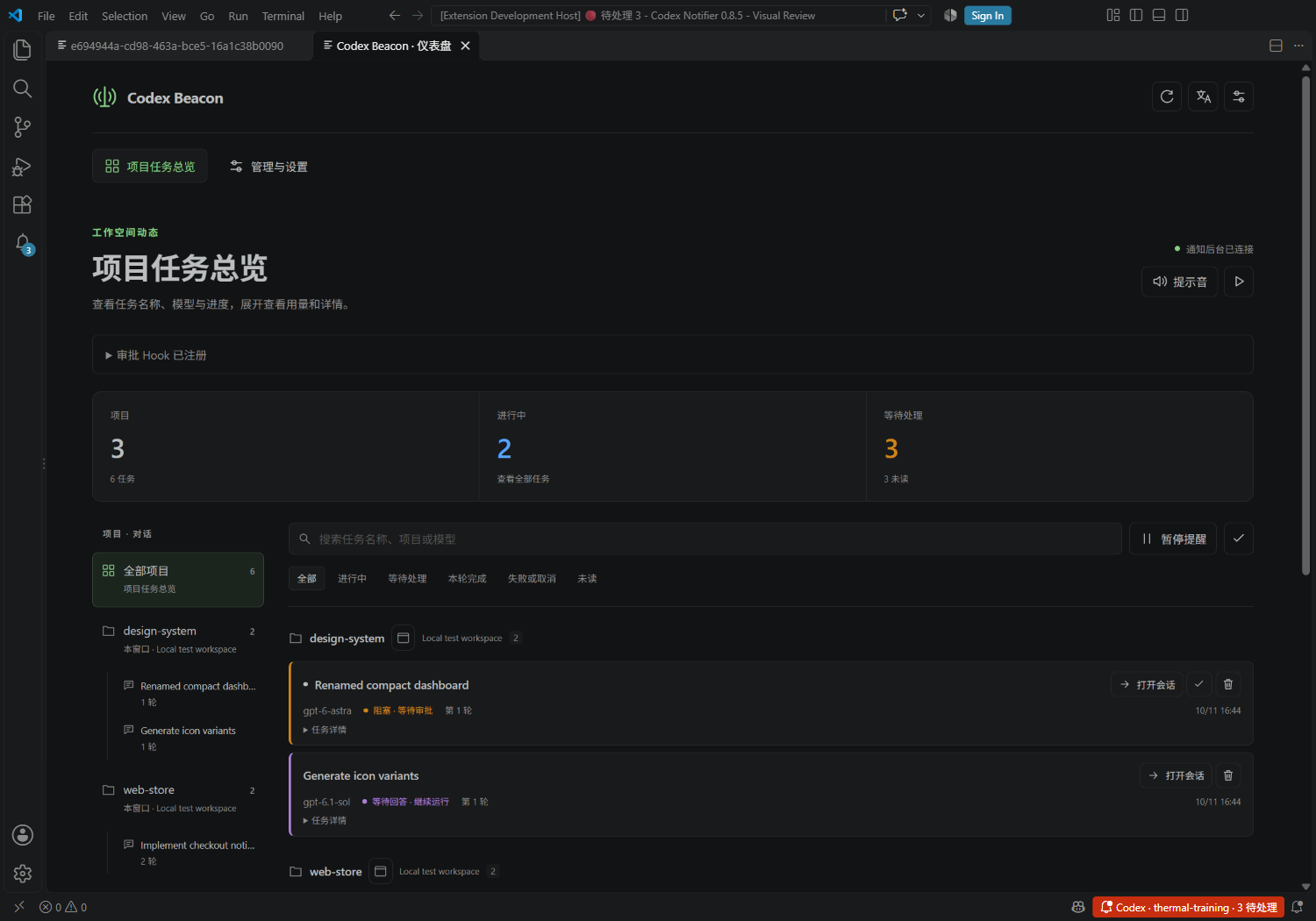
Codex Beacon · Codex 灯塔中文 · English · GitHub · Issues 中文在 VS Code 中按项目管理 Codex 任务,查看彩色状态灯,在每轮回复结束、等待回答或审批时获得提醒。
功能
安装与使用重开窗口或重启采集器后,旧的进行中/等待处理状态需等待新的活动事件确认;明确的完成、失败与取消结果保留。同一项目和对话开始新一轮时,之前轮次的提醒自动已读,历史与用量保留。当前轮次和其他对话的提醒不受影响。 主扩展 ID: 本机安装主扩展即可。点击右下角 Codex 或运行 Codex Beacon: 打开仪表盘,即可打开管理面板。命令面板中的 测试本机弹窗和声音 可检查提醒。 Windows 会自动检测用户/系统标准目录、PATH 中的 Python 和 本机仍需安装 Python 3.8+,扩展不附带 Python,也不会自动下载运行时。若仪表盘提示没有可用运行时,请从 Python 官网安装,或在 默认读取该环境的 SSH/容器项目需要在目标环境安装并启用 Codex Beacon Collector( 提示音与用量在 管理与设置 → 提醒与显示 → 提示音音量 拖动滑块,设置 0–100% 音量,0% 为静音。系统声音、自定义 WAV/MP3、各类提醒和试听共用此音量,默认 100%;不会改变系统或其他应用的音量。也可设置 打开 管理与设置 → 提醒与显示 → 提示音场景,选择通用、本轮完成、等待回答或等待审批,再选择音频文件、试听或恢复默认。每类音效独立保存,留空跟随通用音效;通用音效留空使用 Windows 系统声音。仍受声音总开关控制,完成音效还受 对应设置: 在管理面板选择 自定义提示音,选取本机 WAV/MP3 文件,也可设置 每轮用量和费用放在任务详情里。金额为美元 API 估算,不是实际账单;未知或不完整的数据会明确标注。使用 本轮完成表示 Codex 本次回复结束,不代表训练、部署或其他后台工作完成。状态来自明确事件,静默不会被推断为失败。 等待回答来自结构化提问,普通文字问题无法可靠识别。在受信任的工作区中,采集器正常启动后会自动添加审批 Hook;到 Codex 设置 → Hooks → PermissionRequest 核对 Beacon 的脚本并点击 Trust 即可。Codex 官方 Hook 文档要求用户审核和信任未托管的 Hook;未信任时不会执行,扩展不会代替你作出审批决定。自动添加保留已有 Hook 定义和其他工具的配置;隐私暂停时不会添加。 打开仪表盘的 管理与设置 页,可直接调整语言、会话打开位置、选择或试听音效,查看审批 Hook 注册情况及信任步骤,并运行测试、查看连接、管理通知和清理隐私数据。通知菜单现在直接打开此页。手动移除 Hook 会同时关闭自动添加;重新配置按钮可用于修复配置。关闭自动添加开关会保留现有 Hook。 从旧版迁移此版本使用独立扩展 ID 和 数据与许可没有开发者服务器、遥测上传或账号绑定。仅在本机/已有 VS Code 远端连接中处理通知和任务元数据,不复制聊天正文,不修改 Codex 原始会话。聊天名称按会话 ID 从标题索引和只读状态库匹配。详见 隐私说明。 基于 lengmo1996/codex-vscode-notifier,保留 MIT 版权和许可。本项目由 Young581 独立维护,是社区扩展。 EnglishTrack Codex tasks by project and conversation in VS Code and get alerts when a response ends or input is needed. Compact cards show the chat title, numbered round, model, state and time. Open the session, mark read or delete from the card header; open the project window beside its name. Expand each card independently for tokens, estimated API costs and full identifiers. Marking read hides the unread dot and mark-read button; history remains under All and leaves the Unread filter. The native sidebar groups project → conversation → round, with no token count in row labels. Round numbers refer to retained records and are recalculated after deletion or expiry. Management uses category navigation and one control per row. Use Management and settings → Alerts and display → Notification sound volume to set 0–100% volume for all notifications and previews. 0% mutes sound; the default is 100%. System sounds and custom WAV/MP3 use the same level without changing system or other application volumes. The setting Getting startedAfter a window or collector restarts, saved running/waiting states require fresh activity evidence; completed, failed and canceled results remain final. Starting a new round reads earlier-round reminders in the same project and conversation while retaining history and usage. Current-round reminders and other conversations are unaffected. Install Codex Beacon, ID Local collection is embedded. Windows detects Python in standard installation directories and PATH and validates Python 3.8+ and the required standard libraries before collection starts. Actual runtimes are preferred over launchers; candidates that exit with 101, are missing or are too old are skipped automatically. The optional Python 3.8+ must still be installed locally; the extension does not bundle or download it. If the dashboard reports no usable runtime, install it from python.org or set For SSH/container projects, install Codex Beacon Collector ( In Management and settings → Alerts and display → Sound scenario, select Common, Completion, Question or Approval, then choose a local WAV/MP3 file, preview it or reset it. Each event sound is independent; an empty override inherits Colored states distinguish running, waiting for input/approval, response complete, failed, canceled and unknown. Finishing a response does not prove that background work has finished. Pausing alerts keeps recording history; marking read does not approve an action. Approval reminders require a separately configured and trusted hook. Asynchronous questions count under both Running and Needs attention while work continues; an acknowledgement is not a user answer. Structured replies clear matching pending questions. The approval hook is registered automatically after healthy collection starts in a trusted workspace. Review and trust the Beacon command under Codex settings → Hooks → PermissionRequest. The dashboard's Management and settings page contains sound, language, session location, hook guidance, tests, connections, history and privacy controls. Removing the hook disables automatic setup. See the official Codex hook documentation. Migration and privacyDisable older notifier extensions before enabling Beacon to avoid duplicate alerts. This listing uses independent IDs, the No developer server, telemetry upload or account binding. Notification metadata stays on your computer or travels through your existing VS Code remote connection. Read the privacy policy. Based on the MIT-licensed upstream project, independently maintained by Young581. |