
Amharic Keyboard (ፊደል) — Fidel Phonetic Input & Geez TransliterationFast, real-time Amharic keyboard, Fidel phonetic typing (ፊደል), and Ethiopic / Geez transliteration for VS Code & Cursor. Installation Launch VS Code Quick Open ( Ctrl+P), paste the following command, and press enter.Copied to clipboard |

Fidel Input (ፊደል)
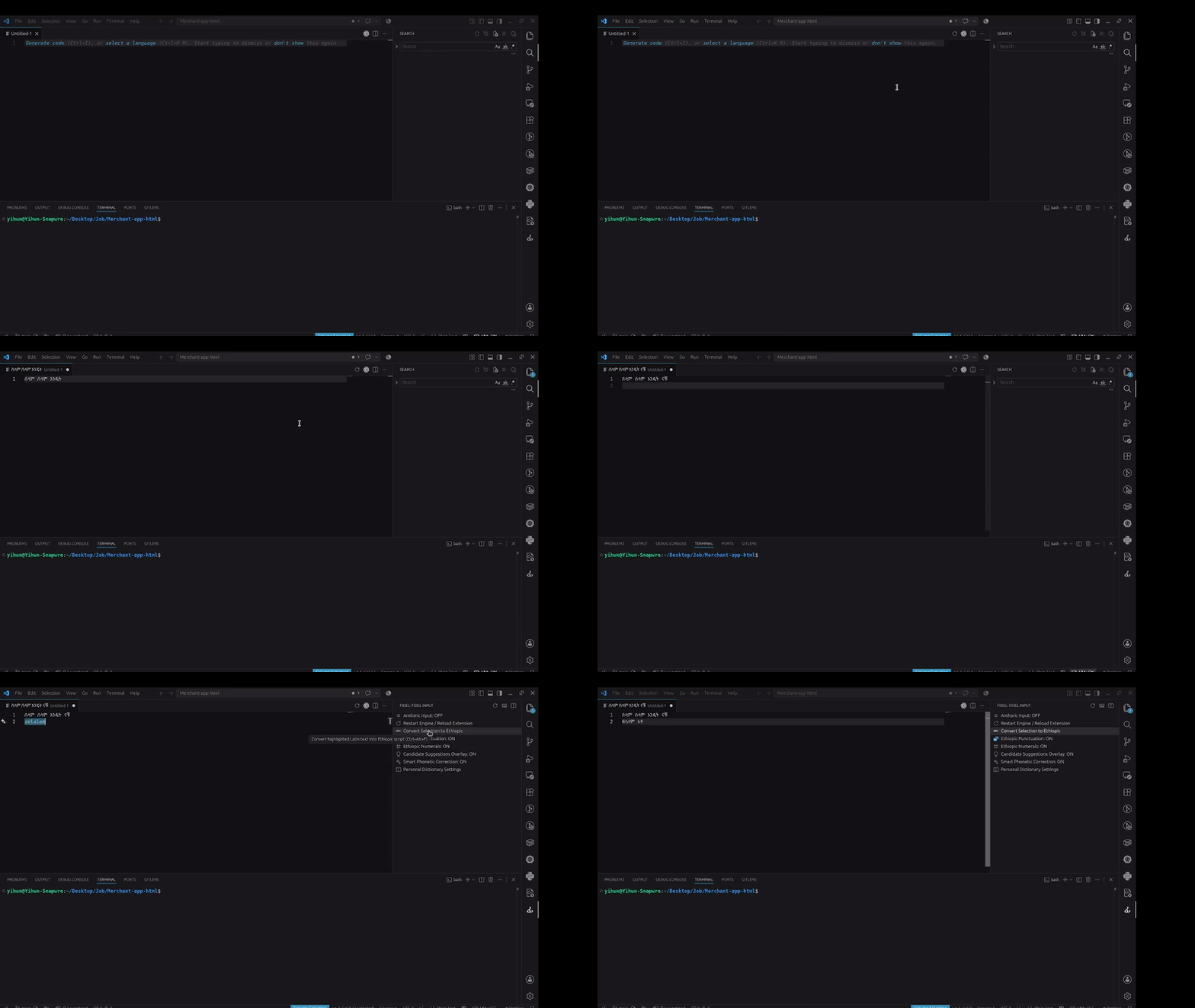
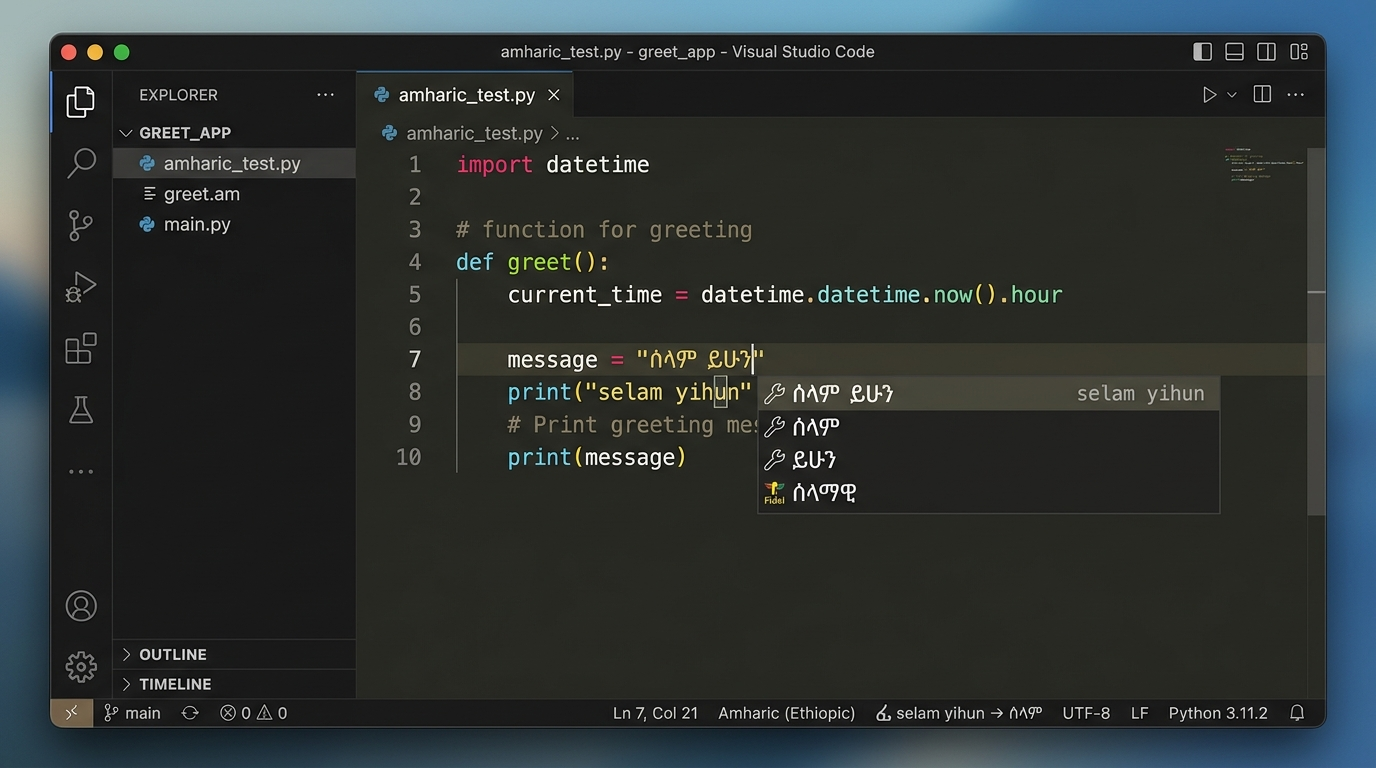
Fast, real-time Amharic Keyboard, Fidel phonetic typing (ፊደል), and Ethiopic / Geez transliteration engine for Visual Studio Code & Cursor. Quick Start • Shortcuts • Feature Guide • Phonetic Reference • Configuration • Credits • License OverviewFidel Input is a native Visual Studio Code extension designed for inputting Amharic text using a standard QWERTY keyboard. Rather than performing static string conversions, Fidel operates as a live Input Method Editor (IME). It intercepts typing inside active editors, maintains an uncommitted composition buffer, and replaces characters dynamically as phonetic syllables are constructed. Visual Demonstration & Media
Play Demonstration Video with Audio (MP4) • Direct Video Download Quick Start
Keyboard Shortcuts & Commands
Feature Guide & How It Works1. Live Composition Buffer EngineFidel intercepts keystrokes continuously, calculating phonetic syllable matches and modifying the document transactionally without forcing manual backspacing. 2. Automatic Word Boundary & Punctuation CommitsComposition buffers commit automatically upon hitting whitespace or punctuation delimiters (
3. Ethiopic Numeral System (
|
| Order | Vowel Suffix (Standard Consonants) | Vowel Suffix (h / H / h' / A Families) |
Example Input | Output |
|---|---|---|---|---|
| 1st Order (ግዕዝ) | e |
a |
se / me / ha / Ha |
ሰ / መ / ሀ / ሐ |
| 2nd Order (ካዕብ) | u |
u |
su / hu |
ሱ / ሁ |
| 3rd Order (ሣልስ) | i |
i |
si / hi |
ሲ / ሂ |
| 4th Order (ራብዕ) | a / aa |
aa |
sa / ma / haa |
ሳ / ማ / ሃ |
| 5th Order (ኃምስ) | ee / ie |
e / ee / ie |
see / he / hee |
ሴ / ሄ |
| 6th Order (ሳድስ) | Bare consonant | Bare consonant | s / h |
ስ / ህ |
| 7th Order (ሣብዕ) | o |
o |
so / ho |
ሶ / ሆ |
| 8th Order (ዲቃላ) | wa / oa |
wa / oa |
swa / hwa |
ሷ / ኋ |
2. Complete Ethiopic Syllabary Table (33 Families & Compounds)
Below is the complete reference table of all 33 Ethiopic consonant families, standalone vowels, and labialized compound forms (ዲቃላ) with their English phonetic inputs and alternative trigger variants:
| Family | Phonetic Triggers / Variants | 1st Order | 2nd Order (u) |
3rd Order (i) |
4th Order | 5th Order | 6th Order (bare) | 7th Order (o) |
8th Order Labialized (wa/oa) |
|---|---|---|---|---|---|---|---|---|---|
| Ha (ሀ) | h |
ሀ (ha) |
ሁ (hu) |
ሂ (hi) |
ሃ (haa) |
ሄ (he/hee) |
ህ (h) |
ሆ (ho) |
ኋ (hwa) |
| La (ለ) | l |
ለ (le) |
ሉ (lu) |
ሊ (li) |
ላ (la/laa) |
ሌ (lee) |
ል (l) |
ሎ (lo) |
ሏ (lwa) |
| HHa (ሐ) | H, hh |
ሐ (Ha/hha) |
ሑ (Hu/hhu) |
ሒ (Hi/hhi) |
ሓ (Haa/hhaa) |
ሔ (He/hhe/Hee) |
ሕ (H/hh) |
ሖ (Ho/hho) |
ሗ (Hwa/hhwa) |
| Ma (መ) | m |
መ (me) |
ሙ (mu) |
ሚ (mi) |
ማ (ma/maa) |
ሜ (mee) |
ም (m) |
ሞ (mo) |
ሟ (mwa) |
| SSa (ሠ) | S, ss, s' |
ሠ (Se/sse) |
ሡ (Su/ssu) |
ሢ (Si/ssi) |
ሣ (Sa/ssa) |
ሤ (See/ssee) |
ሥ (S/ss) |
ሦ (So/sso) |
ሧ (Swa/sswa) |
| Ra (ረ) | r |
ረ (re) |
ሩ (ru) |
ሪ (ri) |
ራ (ra/raa) |
ሬ (ree) |
ር (r) |
ሮ (ro) |
ሯ (rwa) |
| Sa (ሰ) | s |
ሰ (se) |
ሱ (su) |
ሲ (si) |
ሳ (sa/saa) |
ሴ (see) |
ስ (s) |
ሶ (so) |
ሷ (swa) |
| Sha (ሸ) | sh, Sh |
ሸ (she) |
ሹ (shu) |
ሺ (shi) |
ሻ (sha/shaa) |
ሼ (shee) |
ሽ (sh) |
ሾ (sho) |
ሿ (shwa) |
| Qa (ቀ) | q, k', K, Q |
ቀ (qe/Ke) |
ቁ (qu/Ku) |
ቂ (qi/Ki) |
ቃ (qa/Ka) |
ቄ (qee/Kee) |
ቅ (q/K) |
ቆ (qo/Ko) |
ቋ (qwa/Kwa) |
| Ba (በ) | b |
በ (be) |
ቡ (bu) |
ቢ (bi) |
ባ (ba/baa) |
ቤ (bee) |
ብ (b) |
ቦ (bo) |
ቧ (bwa) |
| Va (ቨ) | v, V, B, b' |
ቨ (ve/Be) |
ቩ (vu/Bu) |
ቪ (vi/Bi) |
ቫ (va/Ba) |
ቬ (vee/Bee) |
ቭ (v/B) |
ቮ (vo/Bo) |
ቯ (vwa/Bwa) |
| Ta (ተ) | t |
ተ (te) |
ቱ (tu) |
ቲ (ti) |
ታ (ta/taa) |
ቴ (tee) |
ት (t) |
ቶ (to) |
ቷ (twa) |
| Cha (ቸ) | ch, c |
ቸ (che/ce) |
ቹ (chu/cu) |
ቺ (chi/ci) |
ቻ (cha/ca) |
ቼ (chee/cee) |
ች (ch/c) |
ቾ (cho/co) |
ቿ (chwa/cwa) |
| H'a (ኀ) | h', xh, hx |
ኀ (xha/h'a/hxa) |
ኁ (xhu/h'u) |
ኂ (xhi/h'i) |
ኃ (xhaa/h'aa) |
ኄ (xhe/h'e/xhee) |
ኅ (xh/h') |
ኆ (xho/h'o) |
ኋ (xhwa/h'wa) |
| Na (ነ) | n |
ነ (ne) |
ኑ (nu) |
ኒ (ni) |
ና (na/naa) |
ኔ (nee) |
ን (n) |
ኖ (no) |
ኗ (nwa) |
| Nya (ኘ) | ny, N, GN, n' |
ኘ (nye/Ne) |
ኙ (nyu/Nu) |
ኚ (nyi/Ni) |
ኛ (nya/Na) |
ጜ (nyee/Nee) |
ኝ (ny/N) |
ኞ (nyo/No) |
፝ (nywa/Nwa) |
| A (አ - Standalone) | a |
አ (a) |
ኡ (u) |
ኢ (i) |
ኣ (aa) |
ኤ (ee) |
እ (e) |
ኦ (o) |
ኧ (wa) |
| E (እ - Standalone) | e |
እ (e) |
ኡ (u) |
ኢ (i) |
አ (a) |
ኤ (ee) |
እ (e) |
ኦ (o) |
— |
| I (ኢ - Standalone) | i |
ኢ (i) |
ኡ (u) |
ኢ (i) |
ኢያ (ia) |
ኤ (ee) |
ኢ (i) |
ኦ (o) |
— |
| U (ኡ - Standalone) | u |
ኡ (u) |
ኡ (u) |
ኢ (i) |
ኡኣ (ua) |
ኤ (ee) |
ኡ (u) |
ኦ (o) |
— |
| O (ኦ - Standalone) | o |
ኦ (o) |
ኡ (u) |
ኢ (i) |
ኦኣ (oa) |
ኤ (ee) |
ኦ (o) |
ኦ (o) |
— |
| Ka (ከ) | k |
ከ (ke) |
ኩ (ku) |
ኪ (ki) |
ካ (ka/kaa) |
ኬ (kee) |
ክ (k) |
ኮ (ko) |
ኳ (kwa) |
| KHa (ኸ) | kh, x, X |
ኸ (khe/xe) |
ኹ (khu/xu) |
ኺ (khi/xi) |
ኻ (kha/xa) |
ኼ (khee/xee) |
ኽ (kh/x) |
ኾ (kho/xo) |
ዃ (khwa/xwa) |
| Wa (ወ) | w |
ወ (we) |
ዉ (wu) |
ዊ (wi) |
ዋ (wa/waa) |
ዌ (wee) |
ው (w) |
ዎ (wo) |
— |
| AHa (ዐ) | A, ah, a' |
ዐ (Aa/aha/a'a) |
ዑ (Au/ahu) |
ዒ (Ai/ahi) |
ዓ (Aaa/ahaa) |
ዔ (Ae/ahe/Aee) |
ዕ (A/ah) |
ዖ (Ao/aho) |
— |
| Za (ዘ) | z |
ዘ (ze) |
ዙ (zu) |
ዚ (zi) |
ዛ (za) |
ዜ (zee) |
ዝ (z) |
ዞ (zo) |
ዟ (zwa) |
| ZHa (ዠ) | zh, Z, z' |
ዠ (zhe/Ze) |
ዡ (zhu/Zu) |
ዢ (zhi/Zi) |
ዣ (zha/Za) |
ዤ (zhee/Zee) |
ዥ (zh/Z) |
ዦ (zho/Zo) |
ዧ (zhwa/Zwa) |
| Ya (የ) | y |
የ (ye) |
ዩ (yu) |
ይ (yi) |
ያ (ya) |
ዬ (yee) |
ይ (y) |
ዮ (yo) |
— |
| Da (ደ) | d |
ደ (de) |
ዱ (du) |
ዲ (di) |
ዳ (da) |
ዴ (dee) |
ድ (d) |
ዶ (do) |
ዷ (dwa) |
| Ja (ጀ) | j |
ጀ (je) |
ጁ (ju) |
ጂ (ji) |
ጃ (ja) |
ጄ (jee) |
ጅ (j) |
ጆ (jo) |
ጇ (jwa) |
| Ga (ገ) | g |
ገ (ge) |
ጉ (gu) |
ጊ (gi) |
ጋ (ga) |
ጌ (gee) |
ግ (g) |
ጎ (go) |
ጓ (gwa) |
| T'a (ጠ) | T, t' |
ጠ (Te/t'e) |
ጡ (Tu/t'u) |
ጢ (Ti/t'i) |
ጣ (Ta/t'a) |
ጤ (Tee/t'ee) |
ጥ (T/t') |
ጦ (To/t'o) |
ጧ (Twa/t'wa) |
| C'a (ጨ) | C, CH, c' |
ጨ (Ce/c'e) |
ጩ (Cu/c'u) |
ጪ (Ci/c'i) |
ጫ (Ca/c'a) |
ጬ (Cee/c'ee) |
ጭ (C/c') |
ጮ (Co/c'o) |
ጯ (Cwa/c'wa) |
| P'a (ጰ) | P, p' |
ጰ (Pe/p'e) |
ጱ (Pu/p'u) |
ጲ (Pi/p'i) |
ጳ (Pa/p'a) |
ጴ (Pee/p'ee) |
ጵ (P/p') |
ጶ (Po/p'o) |
ጷ (Pwa/p'wa) |
| TSa (ጸ) | ts, Ts, Tz, S' |
ጸ (tse) |
ጹ (tsu) |
ጺ (tsi) |
ጻ (tsa) |
ጼ (tsee) |
ጽ (ts) |
ጾ (tso) |
ጿ (tswa) |
| TZa (ፀ) | tz, TZ, ts' |
ፀ (tze/TZe) |
ፁ (tzu/TZu) |
ፂ (tzi/TZi) |
ፃ (tza/TZa) |
ፄ (tzee/TZee) |
ፅ (tz/TZ) |
ፆ (tzo/TZo) |
— |
| Fa (ፈ) | f |
ፈ (fe) |
ፉ (fu) |
ፊ (fi) |
ፋ (fa) |
ፌ (fee) |
ፍ (f) |
ፎ (fo) |
ፏ (fwa) |
| Pa (ፐ) | p |
ፐ (pe) |
ፑ (pu) |
ፒ (pi) |
ፓ (pa) |
ፔ (pee) |
ፕ (p) |
ፖ (po) |
ፗ (pwa) |
3. Homophone & Similar-Phonetic Symbol Triggers
Fidel provides intuitive root triggers and uppercase/apostrophe alternates so you can easily type distinguishing homophones without manual menu lookups:
| Category | Primary Root (Base) | Alternate Root (SERA / Apostrophe) | Output Comparison |
|---|---|---|---|
| A-Family (አ vs ዐ) | a (a → አ) |
A, ah, a' (Aa / A → ዐ, Ae → ዔ) |
አ (Alif) vs ዐ (Ayn) |
| S-Family (ሰ vs ሠ) | s (se → ሰ) |
S, ss, s' (Se → ሠ) |
ሰ (Esat Sa) vs ሠ (Nigus Ssa) |
| H-Family (ሀ vs ሐ vs ኀ) | h (ha → ሀ, he → ሄ) |
H, hh (Ha → ሐ, He → ሔ) / xh, h' (xha → ኀ, xhe → ኄ) |
ሀ (Halehame) vs ሐ (Hamer) vs ኀ (Harm) |
| Ch-Family (ቸ vs ጨ) | c, ch (ce → ቸ) |
C, CH, c' (Ce → ጨ) |
ቸ (Cha) vs ጨ (Ejective C'a) |
| T-Family (ተ vs ጠ) | t (te → ተ) |
T, t' (Te → ጠ) |
ተ (Ta) vs ጠ (Ejective T'a) |
| K-Family (ከ vs ቀ vs ኸ) | k (ke → ከ) |
K, q, k' (Ke → ቀ) / x, kh (xe → ኸ) |
ከ (Kaf) vs ቀ (Qaf) vs ኸ (Kha) |
| B/V-Family (በ vs ቨ) | b (be → በ) |
B, v, V, b' (Be → ቨ) |
በ (Bet) vs ቨ (Ve) |
| Ts-Family (ጸ vs ፀ) | ts, Ts, Tz (tse → ጸ) |
tz, TZ, ts' (tze → ፀ) |
ጸ (Tsedey) vs ፀ (Tsehay) |
| P-Family (ፐ vs ጰ) | p (pe → ፐ) |
P, p' (Pe → ጰ) |
ፐ (Pe) vs ጰ (P'eyt) |
| Z-Family (ዘ vs ዠ) | z (ze → ዘ) |
Z, zh, z' (Ze → ዠ) |
ዘ (Zey) vs ዠ (Zha) |
| N-Family (ነ vs ኘ) | n (ne → ነ) |
N, ny, n' (Ne → ኘ) |
ነ (Nehas) vs ኘ (Gna) |
4. Complete Ethiopic Punctuation Reference
When "fidel.convertPunctuation": true is enabled (default), Latin punctuation and shorthand marks convert directly into their authentic Ethiopic typography equivalents:
| Ethiopic Glyph | Amharic Name | Primary Distinct Key | Alternative / Shorthand Triggers | Description & Usage |
|---|---|---|---|---|
| ። | አራት ነጥብ (Arat Neteb) | . |
::, .. |
Full Stop / Sentence Terminator |
| ፣ | ነጠላ ሰረዝ (Netela Serez) | , |
, |
Ethiopic Comma / Phrase Separator |
| ፤ | ድርብ ሰረዝ (Derb Serez) | ; |
,, |
Ethiopic Semicolon / Clause Delimiter |
| ፡ | ሁለት ነጥብ (Hulat Neteb) | : |
: |
Traditional Ethiopic Wordspace |
| ፧ | ይመር (Yimer) | ? |
? |
Ethiopic Question Mark |
| ፥ | ሦስት ነጥብ (Sost Neteb) | \| |
:- |
Ethiopic Colon / Number List Separator |
| ፦ | መቅረዝ (Meqereya) | > |
:-:, ::: |
Ethiopic Preface Colon / Heading Introducer |
| ፠ | ዓይነ ጥላ (Ayne T'ila) | @ |
*, @@ |
Ethiopic Section & Organization Mark |
| ፨ | ይእቲ (Yieti) | # |
**, ***, ## |
Ethiopic Paragraph / Chapter Separator |
| ፟ | ጥብቅ (T'ebiq) | ~ |
_ |
Ethiopic Combining Gemination Mark |
Configuration
Extension settings can be configured in VS Code settings.json:
{
  "fidel.enableByDefault": false,
  "fidel.defaultSyllableMerging": "merge",
  "fidel.compositionBoundaryChar": "-",
  "fidel.compositionMergeChar": "+",
  "fidel.enableHoverDisambiguation": true,
  "fidel.convertPunctuation": true,
  "fidel.convertNumbers": true,
  "fidel.smartCorrection": true,
  "fidel.suggestions": true,
  "fidel.autoDisableOnEnter": false,
  "fidel.dictionary": {
    "myword": "ማይዎርድ"
  }
}
| Setting | Type | Default | Description |
|---|---|---|---|
fidel.defaultSyllableMerging |
"merge" | "standalone" |
"merge" |
Choose default behavior when typing ambiguous consonant+vowel combinations (te $\rightarrow$ ተ vs ትእ) |
fidel.compositionBoundaryChar |
string |
"-" |
Explicit character that splits syllables without being inserted |
fidel.compositionMergeChar |
string |
"+" |
Explicit character that forces merging under standalone mode |
fidel.enableHoverDisambiguation |
boolean |
true |
Show hover tooltip on ambiguous words to swap interpretations |
fidel.smartCorrection |
boolean |
true |
Auto-correct double-consonant typos (e.g. selamm $\rightarrow$ ሰላም) |
fidel.suggestions |
boolean |
true |
Offer candidate suggestion overlays and disambiguation tips |
fidel.convertPunctuation |
boolean |
true |
Convert Latin punctuation marks to authentic Ethiopic typography |
fidel.convertNumbers |
boolean |
true |
Convert Arabic digits to traditional Ethiopic numerals |
fidel.dictionary |
object |
{} |
Custom personal dictionary mappings |
fidel.enableByDefault |
boolean |
false |
Enable Amharic input when VS Code starts |
fidel.enableEscapePrefix |
boolean |
true |
Type backtick (`) to output literal Latin text |
fidel.autoDisableOnEnter |
boolean |
false |
Automatically disable input mode after pressing Enter |
Development & Testing
Built with Bun, TypeScript, and esbuild.
# Type check TypeScript files
bun run check

# Bundle extension code
bun run build

# Run unit and integration tests
bun test
Author & Credits
Fidel Input is created, owned, and maintained by Yihun Shekuri.
- Author: Yihun Shekuri
- GitHub Profile: @Hailemichael121
- Repository: Hailemichael121/fidel-input
License
This project is licensed under the MIT License.
Copyright (c) 2026 Yihun Shekuri.