SuperClaude Command Builder
Build SuperClaude commands with an intuitive visual interface.

Preview
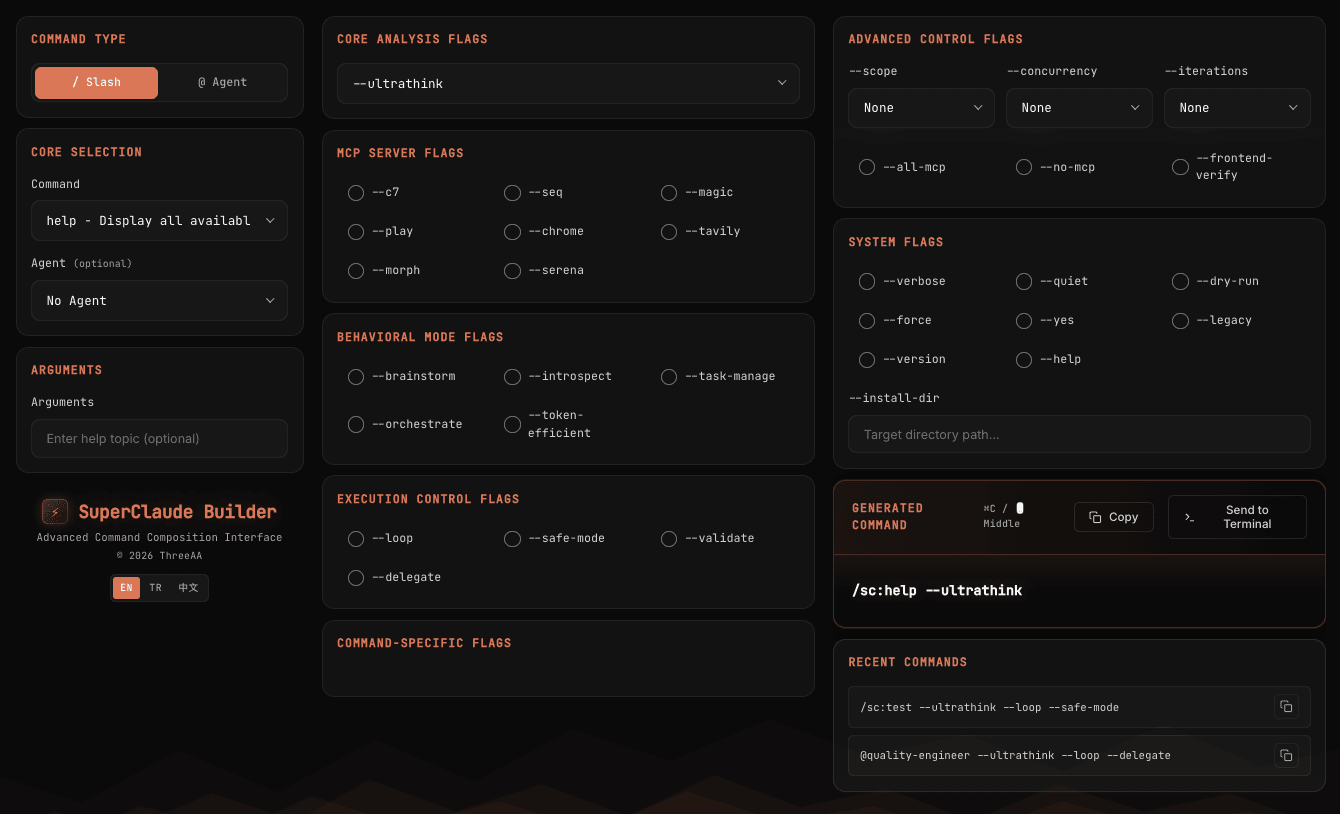
Features
- Visual Command Builder: Create SuperClaude slash commands without memorizing syntax
- Multi-language Support: English, Turkish, and Chinese interfaces
- Smart Flag Filtering: Shows only relevant flags for each command
- Command History: Quick access to your recent commands
- Terminal Integration: Send commands directly to the integrated terminal
- Keyboard Shortcuts: Copy commands with Cmd/Ctrl+C or middle mouse click
Usage
- Open Command Palette (
Cmd+Shift+P / Ctrl+Shift+P)
- Type "SuperClaude" and select SuperClaude: Open Command Builder
- Build your command using the visual interface
- Copy or send directly to terminal
Commands
| Command |
Description |
SuperClaude: Open Command Builder |
Opens the command builder interface |
Supported SuperClaude Commands
Essential Commands
- brainstorm, help, research, implement, analyze
- business-panel, spec-panel, troubleshoot, test
- improve, document, workflow
Development Commands
- workflow, implement, build, design
Analysis Commands
- analyze, research, troubleshoot, explain
Quality Commands
- improve, cleanup, test, document
Management Commands
Utility Commands
Session Commands
- load, save, reflect, select-tool
Flags
The builder supports all SuperClaude flags including:
- Thinking Depth: --think, --think-hard, --ultrathink
- MCP Servers: --c7, --seq, --magic, --play, --chrome, --tavily, --morph, --serena
- Behavioral Modes: --brainstorm, --introspect, --task-manage, --orchestrate
- Execution Control: --loop, --safe-mode, --validate, --delegate
- And many more...
Language Support
Switch between languages using the language buttons in the sidebar:
- EN - English
- TR - Turkish (Turkce)
- 中文 - Chinese
Tips
- Use
Cmd/Ctrl+C to copy the generated command (when no text is selected)
- Use middle mouse button to quickly copy
- Commands are automatically saved to history
- Click a history item to copy it
Requirements
- VS Code 1.60.0 or higher
- Cursor IDE (compatible)
Release Notes
1.0.0
- Initial release
- Visual command builder interface
- Multi-language support (EN, TR, ZH)
- Command history
- Terminal integration
- Smart flag filtering
Author
Yasin Coşkun




License: MIT
For issues and feature requests, visit the GitHub repository.
If you find this extension useful, consider giving it a star on GitHub!
| |

