🏗 Architecture
VS Code Extension (TypeScript)
        ↓
Python Analysis Engine
        ↓
8-Stage Autonomous Pipeline
        ↓
LLM Integration Layer
        ↓
Generated Tests + Diagnostics + Reports
RepoRelic combines a TypeScript VS Code extension with a Python-powered analysis engine to perform deep autonomous repository analysis.
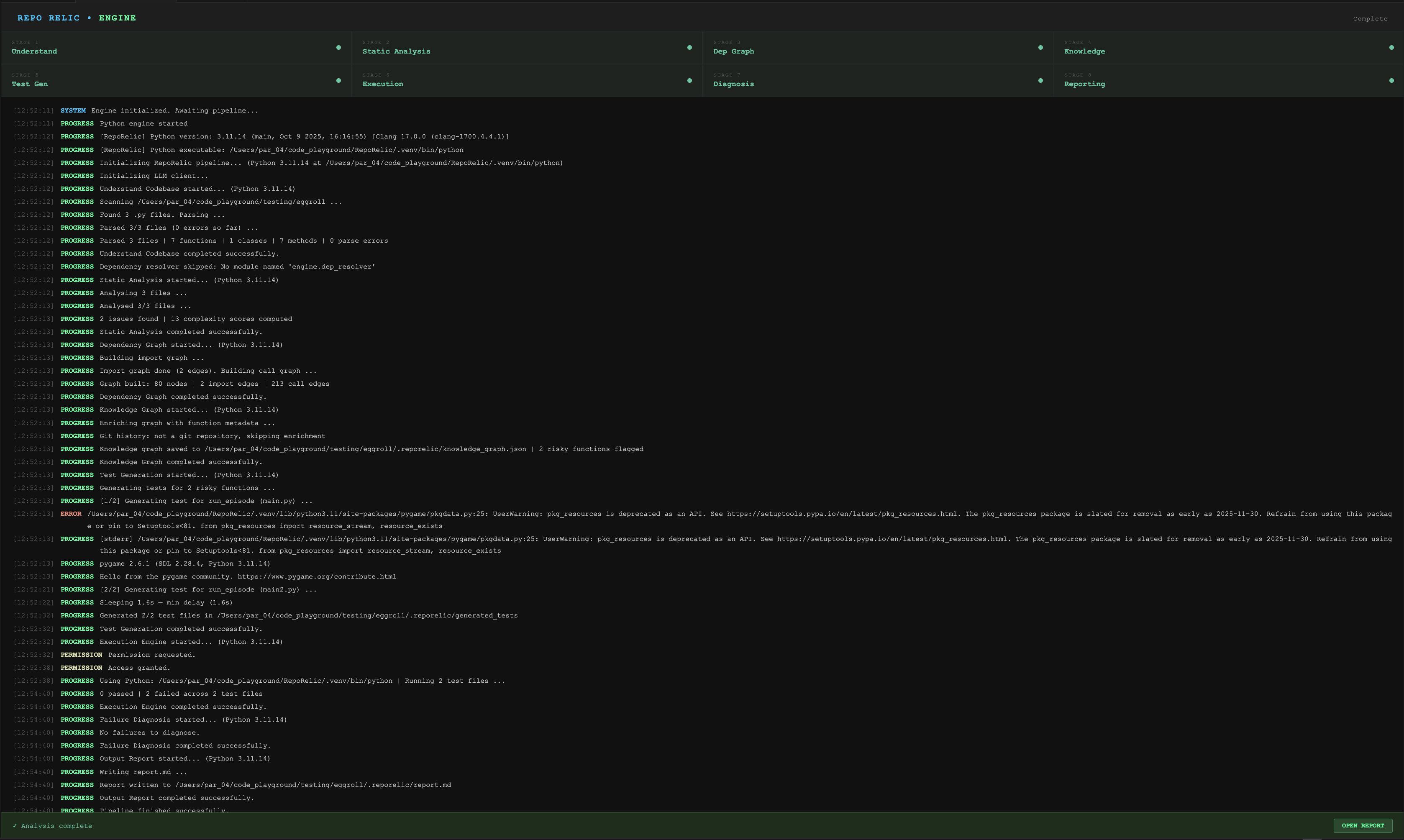
⚡ Analysis Pipeline
Understand Codebase
        ↓
Static Analysis
        ↓
Dependency Graph
        ↓
Knowledge Graph
        ↓
Test Generation
        ↓
Execution Engine
        ↓
Failure Diagnosis
        ↓
Output Report
Each stage enriches repository understanding and feeds structured intelligence into later stages.
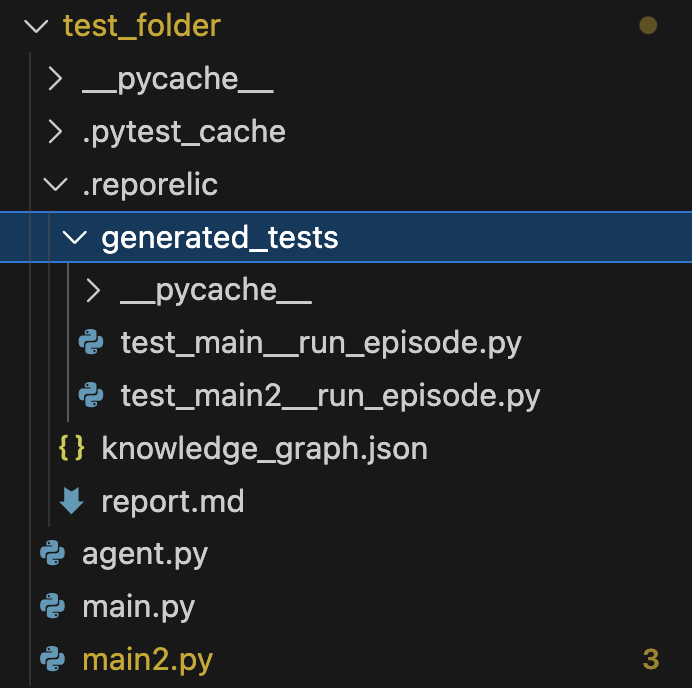
📁 Generated Output Structure
After analysis, RepoRelic creates:
your_project/
├── .reporelic/
│   ├── generated_tests/
│   │   ├── test_example.py
│   │   └── ...
│   │
│   ├── knowledge_graph.json
│   ├── report.md
│   └── diagnostics/
│
├── .pytest_cache/
├── __pycache__/
└── source_files.py
🧪 Generated Tests
The generated_tests/ directory contains:
- edge-case tests
- boundary-condition tests
- regression tests
- integration-style tests
generated automatically for risky functions detected during analysis.
🕸 Knowledge Graph
knowledge_graph.json stores:
- function relationships
- import graph metadata
- call graph structures
- risk annotations
- architectural insights
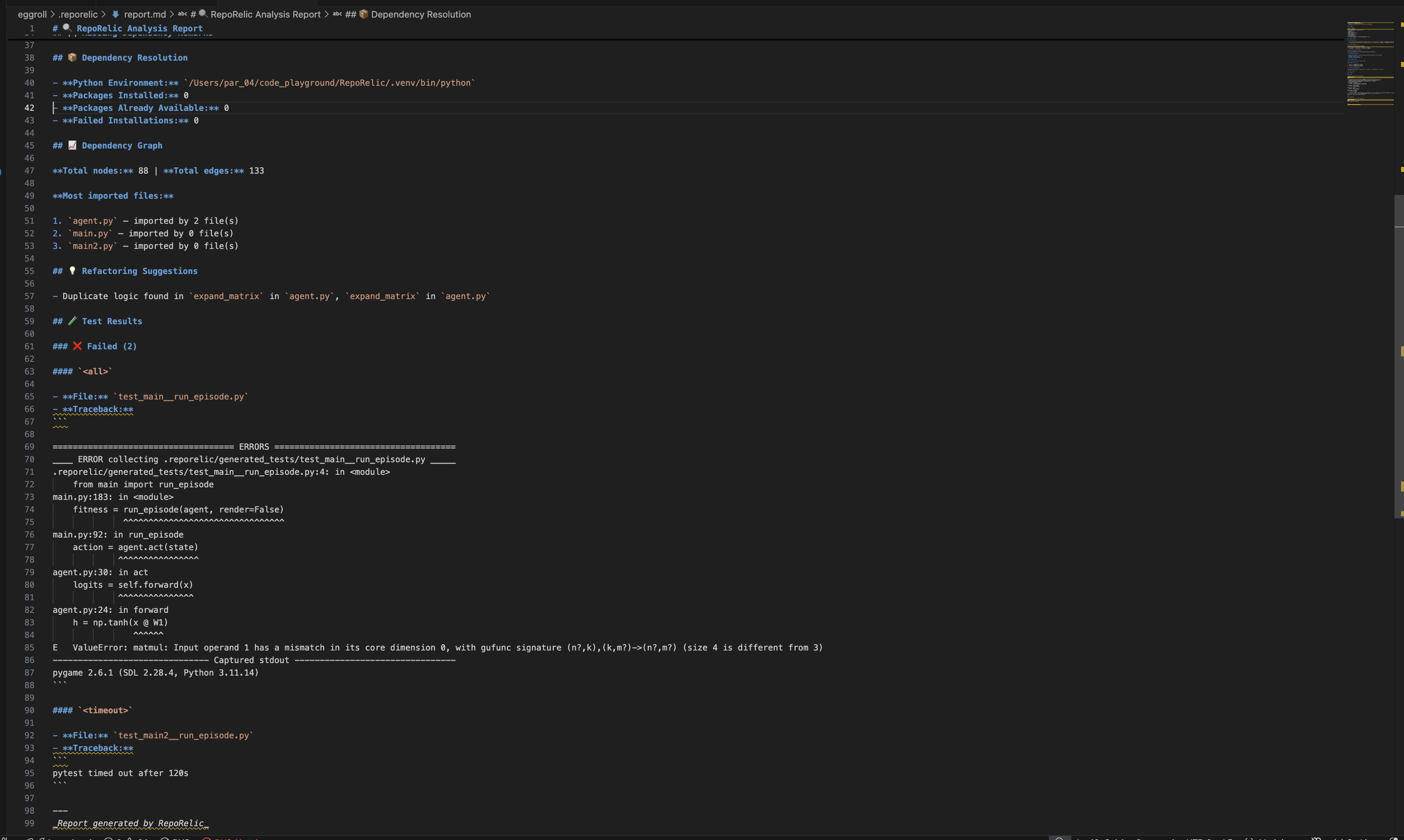
📝 Markdown Report
report.md contains:
- static analysis findings
- complexity hotspots
- risky functions
- dependency remarks
- generated tests
- execution summaries
- failure diagnoses
- refactoring suggestions
📊 Example Report Sections
The generated report includes:
- ⚠ Static analysis findings
- 📈 Complexity hotspots
- 🔴 Risky function rankings
- 🚧 Missing dependency diagnostics
- 🧪 Generated unit tests
- 🐛 Failure explanations
- 💡 Refactoring recommendations
- 🔁 Duplicate logic detection
- 🔗 Dependency insights
🤖 Supported LLM Providers
OpenAI-Compatible
RepoRelic supports any OpenAI-compatible endpoint:
- OpenAI
- DeepSeek
- GPT-OSS
- Claude-compatible gateways
- Local inference servers
- Ollama-compatible wrappers
Example custom base URL:
https://api.deepseek.com/v1
Gemini
RepoRelic also supports Google's Gemini models.
Get a free Gemini API key:
https://aistudio.google.com
🔒 Security
RepoRelic:
- does NOT automatically execute unknown code without permission
- requests execution approval before running generated tests
- stores API keys locally inside VS Code settings
- keeps repository analysis local except for LLM prompts
- never modifies repository source files automatically
Best performance is achieved with:
- Python 3.11+
- virtual environments (
.venv)
- repositories under ~5k Python files
- modern LLM models
Recommended:
- Apple Silicon / modern CPUs
- SSD storage
- isolated Python environments
🛠 Troubleshooting
Python Version Errors
Verify Python version:
python3 --version
Recommended:
Python 3.11+
Missing Dependencies
Install required packages:
pip install -r engine/requirements.txt
LLM Errors
Verify:
- API key is valid
- internet connection works
- base URL is correct
- provider setting matches API type
Test Execution Failures
Check:
- project virtual environment
- missing packages
- invalid imports
- incompatible Python versions
- unsupported dependencies
Virtual Environment Issues
Recommended setup:
python3.11 -m venv .venv
source .venv/bin/activate
Then install:
pip install -r engine/requirements.txt
💻 Recommended Setup
macOS / Linux
python3.11 -m venv .venv
source .venv/bin/activate
pip install -r engine/requirements.txt
Windows
python -m venv .venv
.venv\Scripts\activate
pip install -r engine/requirements.txt
📸 Screenshots
Analysis Pipeline
Generated Markdown Report
Generated Output Structure
🧩 Extension Commands
| Command |
Description |
Analyze with RepoRelic |
Runs the complete autonomous analysis pipeline |
Open RepoRelic Report |
Opens generated markdown report |
Show RepoRelic Logs |
Displays execution and engine logs |
🌟 Why RepoRelic?
RepoRelic combines:
- static analysis
- graph intelligence
- LLM reasoning
- automated testing
- architectural diagnostics
into a single autonomous developer workflow inside VS Code.
It is designed for:
- large repositories
- rapid debugging
- autonomous test generation
- repository intelligence
- engineering productivity
🛣 Roadmap
Planned features:
- Multi-language support
- Autonomous bug fixing
- Interactive graph visualization UI
- Semantic repository search
- CI/CD integration
- Incremental analysis
- AI-generated patches
- Repository embeddings
- Multi-agent debugging
- Local offline LLM support
🤝 Contributing
Contributions are welcome.
Ideas:
- new analyzers
- graph algorithms
- improved prompts
- execution sandboxing
- visualization systems
- performance optimizations
📄 License
MIT License
🔍 RepoRelic
AI-powered repository intelligence inside VS Code.

