
XML Diff and PatchGenerates and applies RFC 5261-compatible XML patch files using XPath selectors. Watches modified XML files and automatically produces diffs on save. Installation Launch VS Code Quick Open ( Ctrl+P), paste the following command, and press enter.Copied to clipboard |

XML Diff and PatchA VS Code extension that automatically generates and applies RFC 5261-compatible XML patch files using XPath selectors, watching modified XML files and producing diffs on save. Originally developed for modding X4: Foundations (which uses RFC 5261 XML patches for game-data mods), the extension is fully generic and works with any XML workflow that follows the RFC 5261 patch format. Features
RequirementsSet Minimal workspace settings example
How folder pairs workEach pair in
Path resolutionWhen a modified file is saved: When a diff file is saved (
For example, if Glob matchingA glob in Symmetric case — the most common pattern, where the same wildcard produces matching results on both sides: Asymmetric case — the two sides expand to a different number of directories: The capture key for both patterns is the parent directory (the segment matched by
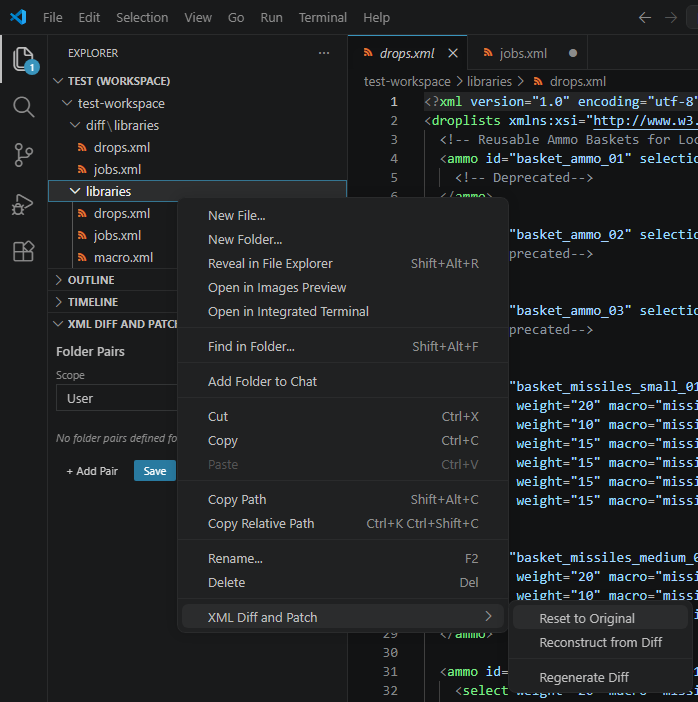
Multiple pairs share the same Context Menu CommandsRight-click any XML file or folder in the Explorer to access the XML Diff and Patch submenu. All three commands are also available from the Command Palette (uses the active editor's file when no selection is made). Selecting a folder processes all XML files within it recursively.
After each run a notification reports how many files were processed, how many were skipped (no matching original or wrong folder role), and how many orphan diffs were deleted. Extension SettingsAll settings are under the Editing Folder Pairs
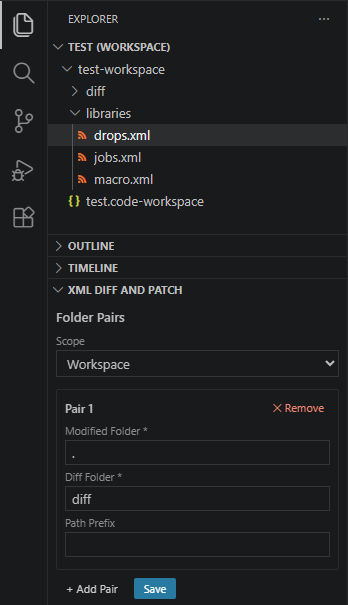
Option 1: Settings Sidebar Panel (recommended)Open the XML Diff and Patch panel in the Explorer sidebar. It shows your folder pairs grouped by scope (User or Workspace). Use the Add pair button to create a new entry, fill in the fields, and click Save. Existing pairs can be edited in-place or removed with the ✕ button.
Option 2: Edit
|
| Setting | Default | Description |
|---|---|---|
originalFolder |
"" |
Path to the vanilla/baseline XML folder. Required. |
folderPairs |
[] |
Array of { modifiedFolder, diffFolder, pathPrefix? } objects. |
watchMode |
"onSave" |
onSave: trigger on explicit save; onTheFly: trigger on any FS change (debounced); contextMenuOnly: disable auto-watching. |
debounceMs |
500 |
Debounce delay in ms for onTheFly mode. |
reflectDiffToModified |
true |
When a diff file is saved, apply it to the original to regenerate the modified file. |
passOtherFiles |
true |
Copy files not found in originalFolder as-is to the output folder. |
emptyDiffBehavior |
"delete" |
Action when diff produces no operations: write, delete, warn, or warnDelete. |
onlyFullPath |
false |
Always emit absolute XPath (no // shorthand). |
useAllAttributes |
false |
Include all attributes in XPath predicates, not just disambiguating ones. |
ignoreDiffInAttribute |
"" |
Attribute name to ignore when comparing elements (e.g. "version"). Leave empty to compare all attributes. |
compactPath |
false |
Compact XPath mode: skip adding attributes to a path step when the element name alone is unique; when it is not unique, prefer following child elements instead of adding attributes. |
qualifiedPath |
false |
Qualified XPath mode: always include at least the first attribute in every path step, even when the element name is already unique on its own. |
xsdPath |
"./diff.xsd" |
Path to an XSD schema for validating generated diff files. Relative paths resolve from workspace root. |
validationFailBehavior |
"warn" |
On schema validation failure: warn (write anyway), error (skip write), or off (disable validation). |
allowDoubles |
false |
Skip duplicate-element guard when applying <add> operations during patch. |
debug |
false |
Enable verbose debug logging in the output channel. |
Troubleshooting
Output channel
All extension activity is logged to the XML Diff and Patch output channel. Open it via View → Output and select XML Diff and Patch from the dropdown. The channel shows which folder pairs were resolved, which files were processed, and any warnings or errors.
Enable debug logging
Set xmlDiffAndPatch.debug to true in your settings to enable verbose logging. Debug output includes the resolved paths for every file event, XPath generation steps, and raw diff operations: useful for diagnosing unexpected diffs or missing output files.
"xmlDiffAndPatch.debug": true
Remember to set it back to false (or remove it) once you are done: debug mode is noisy.
Common issues
| Symptom | Likely cause | Fix |
|---|---|---|
| Nothing happens on save | watchMode is contextMenuOnly, or no valid folder pair matched the saved file |
Check the Output channel for "not configured" or pair-skipped warnings; verify originalFolder and folderPairs are set. |
| "XML Diff+Patch: not configured" status bar warning | originalFolder is empty or folderPairs is empty/invalid |
Add at least one valid folder pair via the Settings sidebar or settings.json. |
| Folder pair skipped with a warning | Glob patterns in modifiedFolder and diffFolder expanded to a different number of directories |
Ensure both globs match the same count of directories; check the Output channel for the expanded lists. |
| File reported as skipped by a context menu command | The selected file is not inside the required watch folder for that command (see Context Menu Commands) | Select the file from the correct folder role (modifiedFolder or diffFolder). |
| Baseline file not found | pathPrefix is wrong, or originalFolder does not contain the expected sub-path |
Enable debug logging and check the resolved original → path printed in the Output channel. |
| XSD validation errors | Generated diff does not conform to the schema at xsdPath |
Review the diff file and the schema; set validationFailBehavior to "warn" to write the file anyway while investigating. |
X4: Foundations Usage
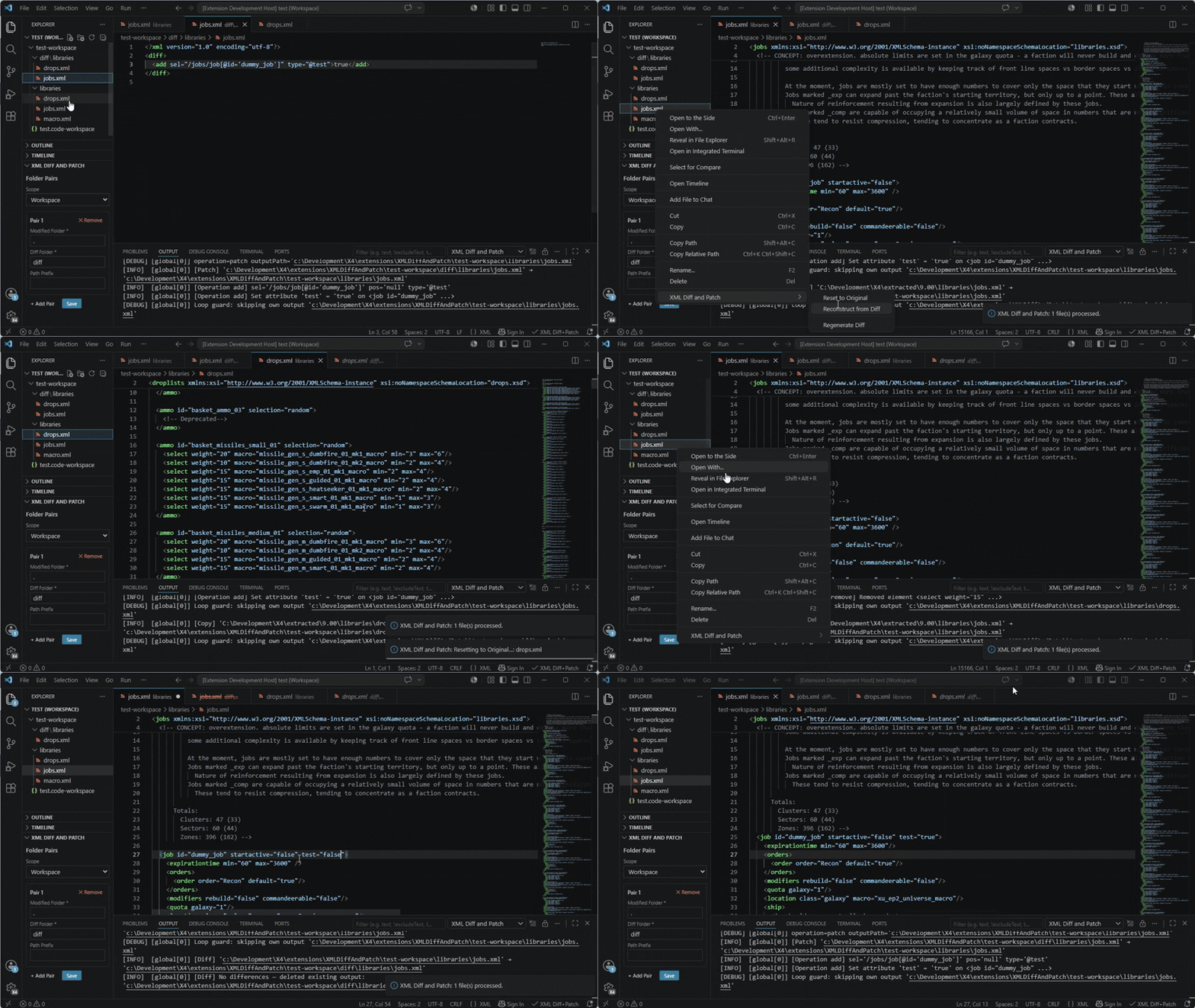
X4: Foundations uses RFC 5261 XML patches to allow mods to modify game data without replacing entire files. This extension automates the diff/patch cycle:
- Set
originalFolderto the extracted X4 game-data folder. - Add a folder pair pointing at your mod's source XML and the diff output directory.
- Edit and save your modified XML: the extension writes the RFC 5261 patch automatically.
- Include the diff files in your mod package.
Demo
License
This project is licensed under the Apache License 2.0 - see the LICENSE file for details.
Credits
- Egosoft - for the game itself (In fact - for the series of games)!
- Members of the x4_modding discord channel - for their answers, support, ideas, and inspiration!
Changelog
[0.7.2] - 2026-05-27
- Fixed
ignoreDiffInAttributecan now be set via the VS Code settings UI. Previously, an incorrect type definition (["string", "null"]) prevented the settings editor from rendering a text input for it; it required manualsettings.jsonediting. Now typed asstringwith an empty-string default (empty = disabled).
- Added
compactPathandqualifiedPathsettings are now visible and editable in the VS Code settings UI. They already existed in the extension logic but were missing from the manifest, so the settings editor did not show them.
- Removed
showDiffEditorOnSavesetting removed. It was never implemented and had no effect.
[0.7.1] - 2026-05-27
- Fixed
- XML files with a UTF-8 BOM are now handled correctly. A BOM before the
<?xmldeclaration no longer causes a parse failure or silently aborts the diff/patch operation. - Errors from the Reconstruct from Diff and Regenerate Diff context menu commands are now shown as a notification instead of being silently swallowed.
- Settings sidebar no longer offers per-folder scope for
folderPairs, which is not supported and previously caused a save error.
- XML files with a UTF-8 BOM are now handled correctly. A BOM before the
[0.7.0] - 2026-05-27
- Fixed
- Unpaired deleted and inserted elements with different tag names now correctly produce a single
replaceoperation instead of a separateremove+addpair. - Elements with two or more differing attributes were incorrectly considered close-enough matches during diff pairing; attribute difference counting is now accurate.
- Unpaired deleted and inserted elements with different tag names now correctly produce a single
- Improved
- Folder pairs with glob patterns no longer require both sides to expand to the same number of directories. The extension now matches directories by the path segment captured by the wildcards, so only folders that have a counterpart on both sides are activated. Unmatched folders are skipped individually with a warning instead of blocking the whole pair.
- Generated
selXPath expressions use globally-unique//anchors where possible, producing shorter and more readable paths (unlessonlyFullPathis enabled). - Elements without their own attributes are now qualified using a child-existence predicate (e.g.
do_else[do_if[@value='...']]) to avoid brittle numeric position indices, preferring the child that lies on the path to the target. - When a single on-path child is enough to uniquely identify a parent element, the natural
parent/child[@attr]form is used instead of the redundantparent[child[@attr]]/child[@attr]form.
[0.6.2] - 2026-05-27
- Fixed
- A Changelog part in README.md
[0.6.1] - 2026-05-26
- Improved
- XPath generation logic, including fallback to the full path.
[0.6.0] - 2026-05-17
- Added
- Initial public version