Flux Helm IntelliSense
Flux Helm IntelliSense is a VS Code extension that provides Helm values IntelliSense inside Flux HelmRelease.spec.values blocks.
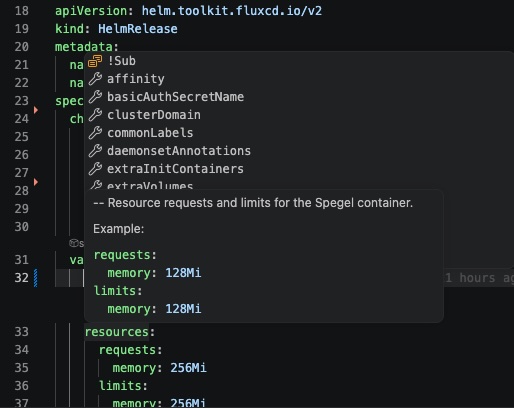
It resolves the HelmRepository or OCIRepository referenced by each HelmRelease, pulls the chart locally with helm, and reads either values.schema.json or values.yaml to provide:
- key completions inside
spec.values
- hover descriptions and examples
- unknown-key diagnostics from strict schemas, with optional best-effort
values.yaml fallback checks including bundled subchart defaults
- per-block CodeLens actions for resolved chart details, bundled subchart values, schema, values, and Helm pull commands
- a status bar indicator for the active HelmRelease
Requirements
- VS Code
^1.90.0
- local
helm installed and available on PATH, or configured through fluxHelmValues.helmPath
- a workspace containing Flux
HelmRelease resources and matching HelmRepository or OCIRepository resources
How It Works
For each YAML document, the extension:
- detects Flux
HelmRelease resources
- scopes IntelliSense to the matching
spec.values block
- resolves either
spec.chart.spec.sourceRef to a HelmRepository or spec.chartRef to an OCIRepository
- pulls the chart with
helm pull
- reads
values.schema.json when available, otherwise values.yaml
- caches resolved chart metadata under the VS Code global storage directory
Repository lookup supports:
- same-file
HelmRepository and OCIRepository resources
- sibling YAML files in the same directory
- full workspace lookup when needed
- configured extra source search paths for local repos outside the current workspace
- namespace-less
HelmRepository manifests that rely on external namespace injection
For OCI charts, the extension supports OCIRepository.spec.ref.tag, semver, semverFilter, and digest, using Flux's digest → semver → tag precedence. Explicit tags are pulled as exact OCI :tag references. When spec.ref is omitted, Flux defaults to the literal latest tag, but Helm OCI charts normally use SemVer tags; the extension therefore falls back to Helm's latest compatible stable version (--version '*'). For semverFilter, the extension asks Helm for candidates from newest to oldest, applies the filter to each OCI tag, and pulls the first match (up to 25 candidates).
Commands
Flux Helm IntelliSense: Refresh Chart CacheFlux Helm IntelliSense: Clear Chart CacheFlux Helm IntelliSense: Show Resolved ChartFlux Helm IntelliSense: Copy Helm Pull CommandFlux Helm IntelliSense: Show Logs
Settings
fluxHelmValues.helmPath: path to the Helm executable, default helmfluxHelmValues.cacheTtlHours: successful chart cache TTL, default 24fluxHelmValues.linting.enabled: master linting switch, default truefluxHelmValues.linting.schema.enabled: warn only where a schema forbids unknown keys, default truefluxHelmValues.linting.values.enabled: opt into advisory values.yaml-backed warnings, default falsefluxHelmValues.repositorySearchPaths: extra files, folders, or glob patterns to scan for HelmRepository and OCIRepository manifests after same-file, sibling, and workspace lookup fails
Example:
{
  "fluxHelmValues.linting.enabled": true,
  "fluxHelmValues.linting.schema.enabled": true,
  "fluxHelmValues.linting.values.enabled": false,
  "fluxHelmValues.repositorySearchPaths": [
    "/Users/me/projects/**/*.yaml",
    "C:\\Users\\me\\projects\\**\\*.yaml",
    "../shared-flux-sources"
  ]
}
Linting
Schema-backed unknown-key warnings are enabled by default when a chart explicitly forbids additional properties. The extension does not warn from values.yaml defaults by default: charts often use those defaults as incomplete examples or pass dynamic configuration through to subcharts and applications.
Set fluxHelmValues.linting.values.enabled to true to opt into these advisory fallback warnings. When enabled, fallback checks include defaults from bundled subcharts such as Grafana and kube-state-metrics.
Private OCI Registries
Flux Helm IntelliSense uses your configured helm executable and does not store registry credentials. For private OCI registries, authenticate Helm first:
helm registry login <registry-host>
For Azure Container Registry, you can also use:
az acr login --name <registry-name>
If helm pull fails, the extension output includes the Helm exit code, signal when available, stderr, stdout, and an OCI registry login hint for authorization failures.
Use Flux Helm IntelliSense: Copy Helm Pull Command or the Copy helm pull CodeLens above a values: block to copy the exact helm pull command the extension uses. Running that command in a terminal is the fastest way to debug registry authentication and verify that helm registry login or az acr login fixed access.
Development
Install dependencies:
npm install
Compile:
npm run compile
Run tests:
npm test
Launch the extension in an Extension Development Host:
- open this repository in VS Code
- run the
Run Extension debug configuration with F5
- open a Flux repository in the Extension Development Host
Manual Testing
This repository includes MANUAL_SMOKE_TEST.md with a step-by-step smoke-test flow against a Flux repo.
Publishing
This repository includes PUBLISHING.md with Marketplace publishing steps and a pre-publish checklist.

