Delphi IDE ThemeA Delphi-inspired color theme for VS Code and Kiro IDE, based on the Delphi 11 IDE Installation Launch VS Code Quick Open ( Ctrl+P), paste the following command, and press enter.Copied to clipboard |

Delphi IDE Theme
A color theme based on the Delphi 11 Alexandria editor, designed to capture the familiar look and feel of the original IDE — including CNPack-inspired structural highlighting. Whether you're maintaining legacy applications or building modern Object Pascal projects, Delphi IDE Theme makes VS Code feel like home.
✨ Features
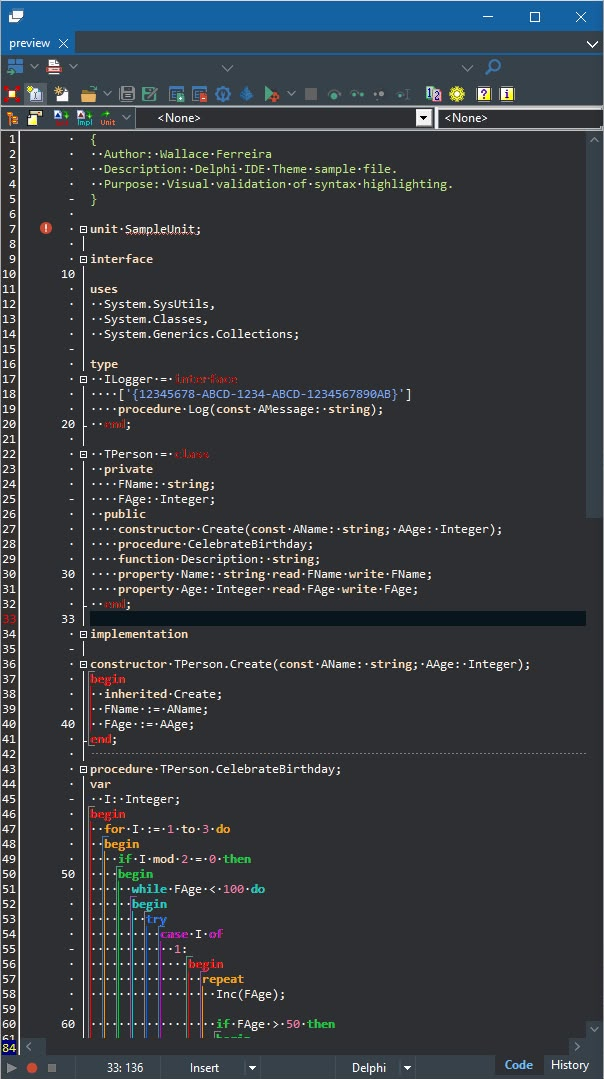
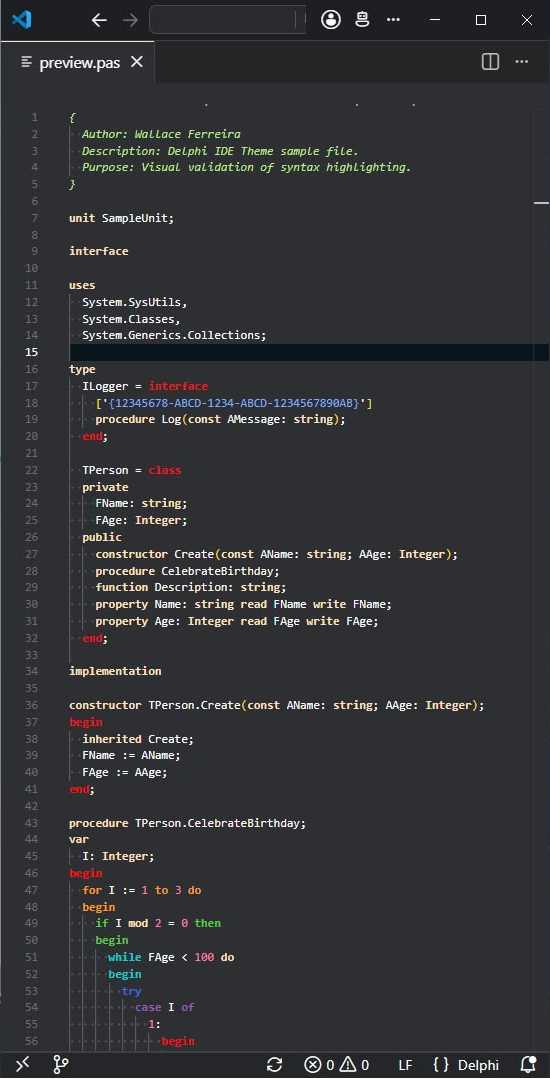
📸 PreviewThe screenshots below compare the original Delphi IDE with Delphi IDE Theme running in Visual Studio Code.
🎨 Included ThemesDelphi IDE DarkDesigned to capture the default Delphi 11 Alexandria Dark theme. Highlights include:
Delphi IDE LightA light version preserving the same semantic structure while adapting colors for light backgrounds. Highlights include:
🌈 Structural HighlightingOne of Delphi's most recognizable editor features is the structural coloring of nested blocks. Supported keywords include:
After level 6, the color cycle repeats. 📦 InstallationInstall directly from the Visual Studio Code Marketplace. Search for: or install manually: 🎛️ CustomizationYou can personalize the Delphi IDE Dark theme appearance through VS Code settings. Open Settings (
Changes apply immediately — no reload needed. 🔧 Required Pascal ExtensionThis theme requires a Pascal extension that provides TextMate grammar scopes and language support for Pascal by Alessandro Fragnani is the recommended extension and the one this theme was developed and tested with. Also available on Open VSX Registry for Kiro IDE and other VS Code-compatible editors. Also recommended
🛣️ Roadmap
🤝 ContributingContributions, suggestions and bug reports are always welcome. If you find any syntax highlighting that differs from the Delphi IDE, feel free to open an Issue. ⚠️ DisclaimerThis is an independent open-source project inspired by the visual appearance of the Delphi IDE. It is not affiliated with, endorsed by, or sponsored by Embarcadero Technologies or the CNPack project. All trademarks belong to their respective owners. 📄 LicenseMIT License 👨💻 AuthorWallace Ferreira Senior Full Stack Engineer • Product-minded Engineer • AI-Assisted Development GitHub: https://github.com/wallacesw11 ⭐ Enjoying the project?If this theme makes your Delphi development experience better, please consider giving the repository a Star. It helps the project reach more developers and motivates future improvements. 🎯 Project GoalsThis project is more than a color theme. It is an effort to reproduce the Delphi IDE editing experience using modern editors such as Visual Studio Code and Kiro IDE, while documenting the language highlighting rules through a specification-driven development approach. The long-term goal is to provide the Delphi community with a high-quality, well-documented and professionally maintained theme.
|