Skip to content
| Marketplace
Sign in
Visual Studio Code>Other>React Component FactoryNew to Visual Studio Code? Get it now.
React Component Factory

React Component Factory

Waed Mohamed

|
3 installs
| (0) | Free
React Component Factory generates all the files you need for a React component in one go, the component itself, types, mock data, tests, Storybook docs, and a clean index export. Just name it, pick a folder, done.
Installation
Launch VS Code Quick Open (Ctrl+P), paste the following command, and press enter.
Copied to clipboard
More Info

Component Factory

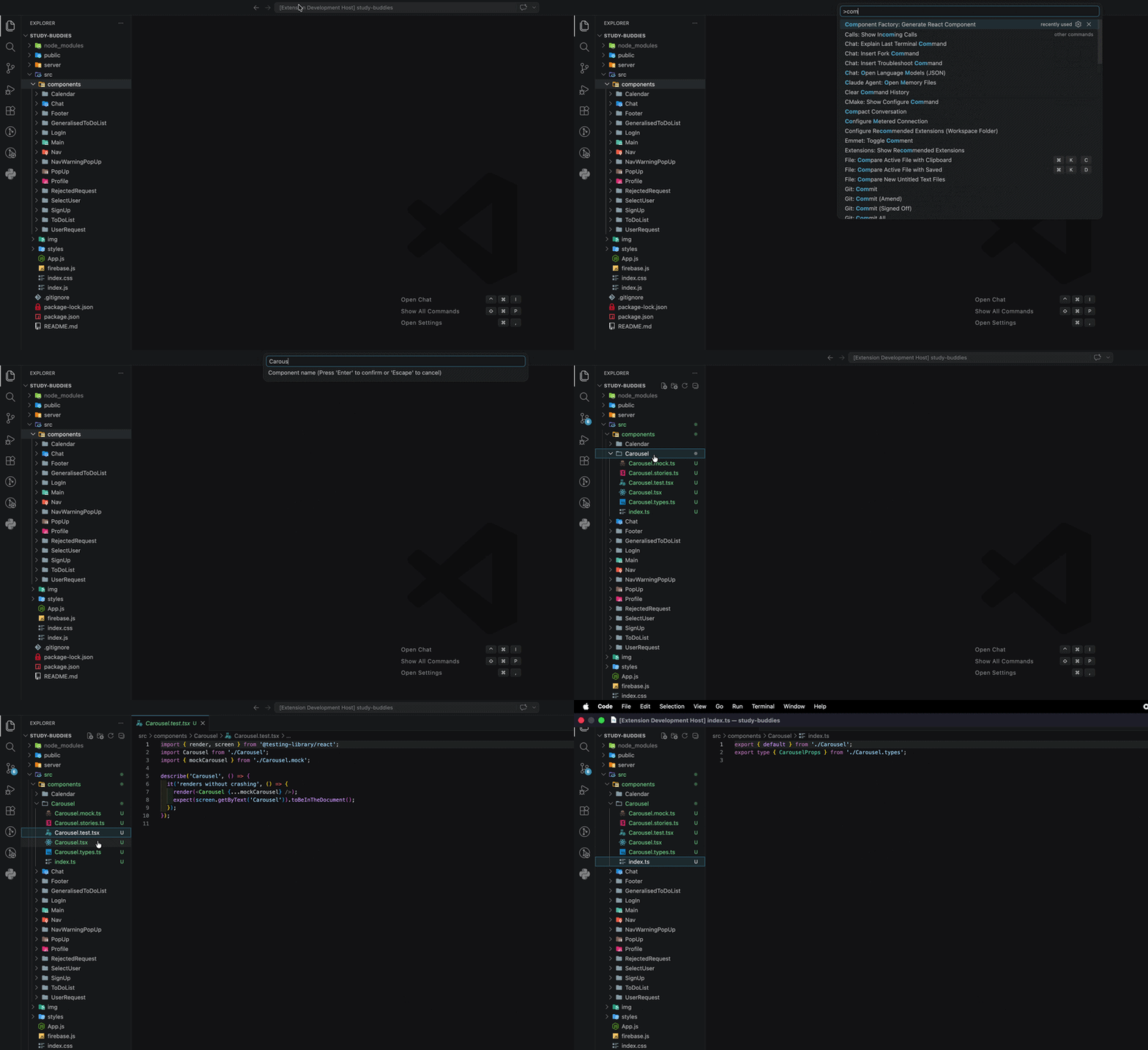
Component Factory is a VS Code extension that scaffolds all the files you need for a React component in one go. Just name it, pick a folder, and it generates everything — the component, types, mock data, tests, Storybook docs, and a clean index export.


Features

Run a single command and get a fully structured component folder:

Button/
├── Button.tsx          # Component file (arrow function)
├── Button.types.ts     # Interface and prop types
├── Button.mock.ts      # Mock / test data
├── Button.test.tsx     # Jest unit tests
├── Button.stories.ts   # Storybook docs
└── index.ts            # Clean export

Smart folder detection — Component Factory checks your project structure automatically:

  • If src/components exists, it drops the component straight in there
  • If you're using atomic design (atoms, molecules, organisms), it asks where you'd like to add it
  • If neither exist, it opens a folder picker scoped to your workspace

Usage

  1. Open the command palette (Cmd+Shift+P / Ctrl+Shift+P)
  2. Search for Component Factory: Generate React Component
  3. Enter a component name (must start with a capital letter)
  4. Select a folder if prompted
  5. Done

Component Factory demo


Requirements

  • VS Code 1.60+
  • A React project (TypeScript)

The generated files assume the following are installed in your project:

  • @testing-library/react and jest for tests
  • @storybook/react for Storybook stories

Installation

Search for Component Factory in the VS Code Extensions panel, or install it directly from the VS Code Marketplace.


Contributing

Contributions are welcome. See CONTRIBUTING.md for how to get started.


License

MIT — see LICENSE for details.

  • Contact us
  • Jobs
  • Privacy
  • Manage cookies
  • Terms of use
  • Trademarks
© 2026 Microsoft