ADO Deep Ops
Deep operations for Azure DevOps Work Items. Edit, copy, or delete hundreds of work items at once -- including their full hierarchy.
What's New
Version 1.3 — Backlog Order in Source Panel
Work items in the source panel (Copy, Edit, Delete) are now displayed in the exact same order as in the backlog. Children are sorted by StackRank (or BacklogPriority as fallback), matching the priority order you see in the Azure DevOps backlog view.
Version 1.2 — Area Path Source & Target
This update extends Bulk Edit and Bulk Copy with area path support and requests one additional permission:
New permission: vso.project (Read project metadata)
This scope is required to list all projects in your organization, which powers the new "area path as copy target" feature. No project data is written or modified — the scope is read-only.
New features:
- Area path as source (Bulk Edit & Bulk Copy): Instead of a single root work item, you can now load all work items under an area path as the source. Type part of the area path name in the search box and select it from the Area Paths section of the dropdown.
- Area path as copy target (Bulk Copy): You can now copy a hierarchy directly into an area path — across any project in your organization — without needing a parent work item. The copied items are created as top-level work items with the target area path set.
Features
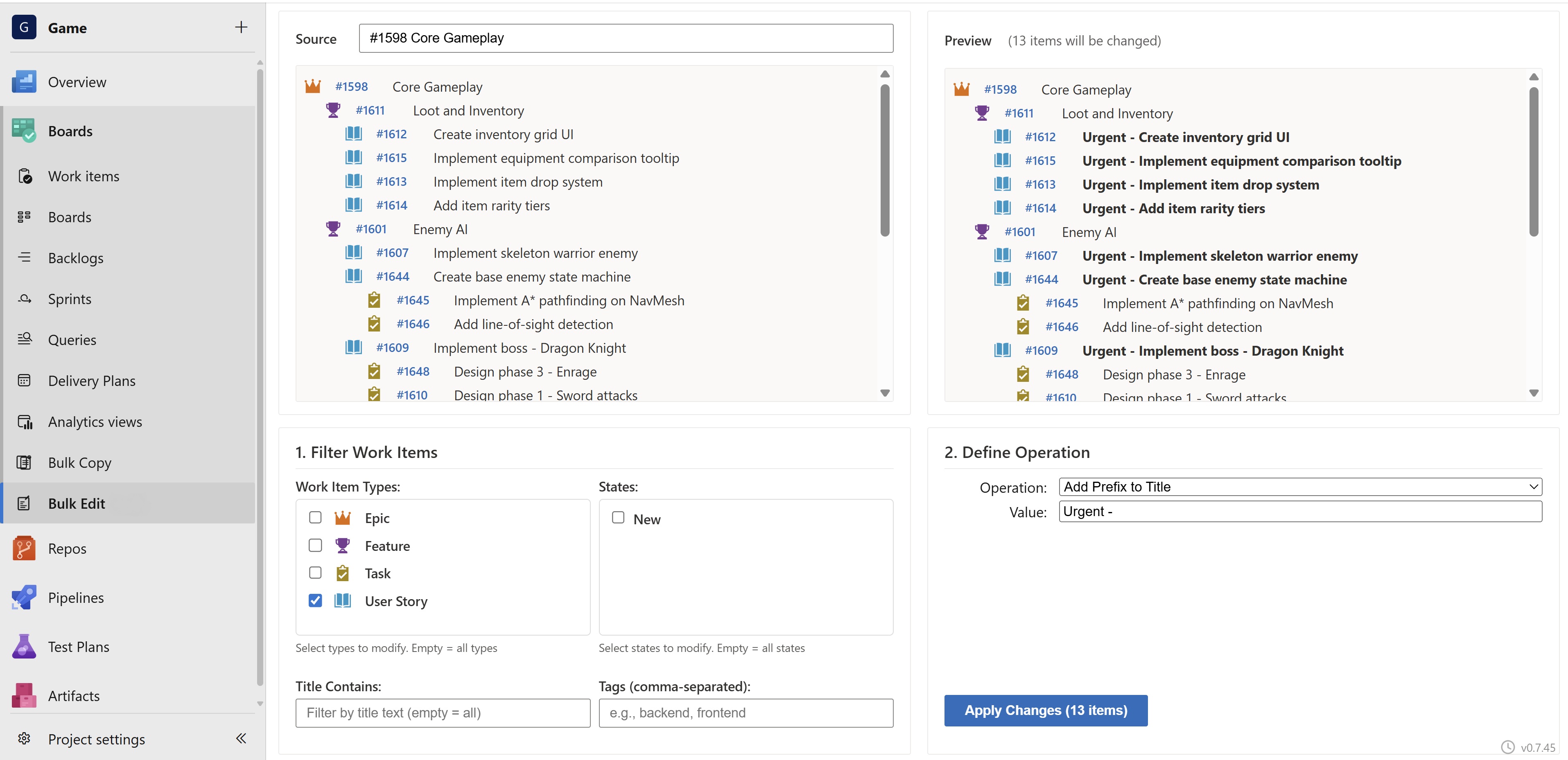
Bulk Edit
Mass-edit work items across entire hierarchies with live preview.
- Work item source: Search by title or
#ID to load a single work item with its full hierarchy
- Area path source: Type part of an area path name and select it from the dropdown — all work items under that area load as a forest (no single root required)
- Filter by Work Item Type, State, Title, Tags, or Assigned To
- Operations: Add title prefix/suffix, search & replace, add/remove tags, change state, set priority
- Preview mode: Review every change side-by-side before applying
- Undo: Revert any bulk edit by operation ID
- Real-time progress with per-item status tracking
Bulk Copy
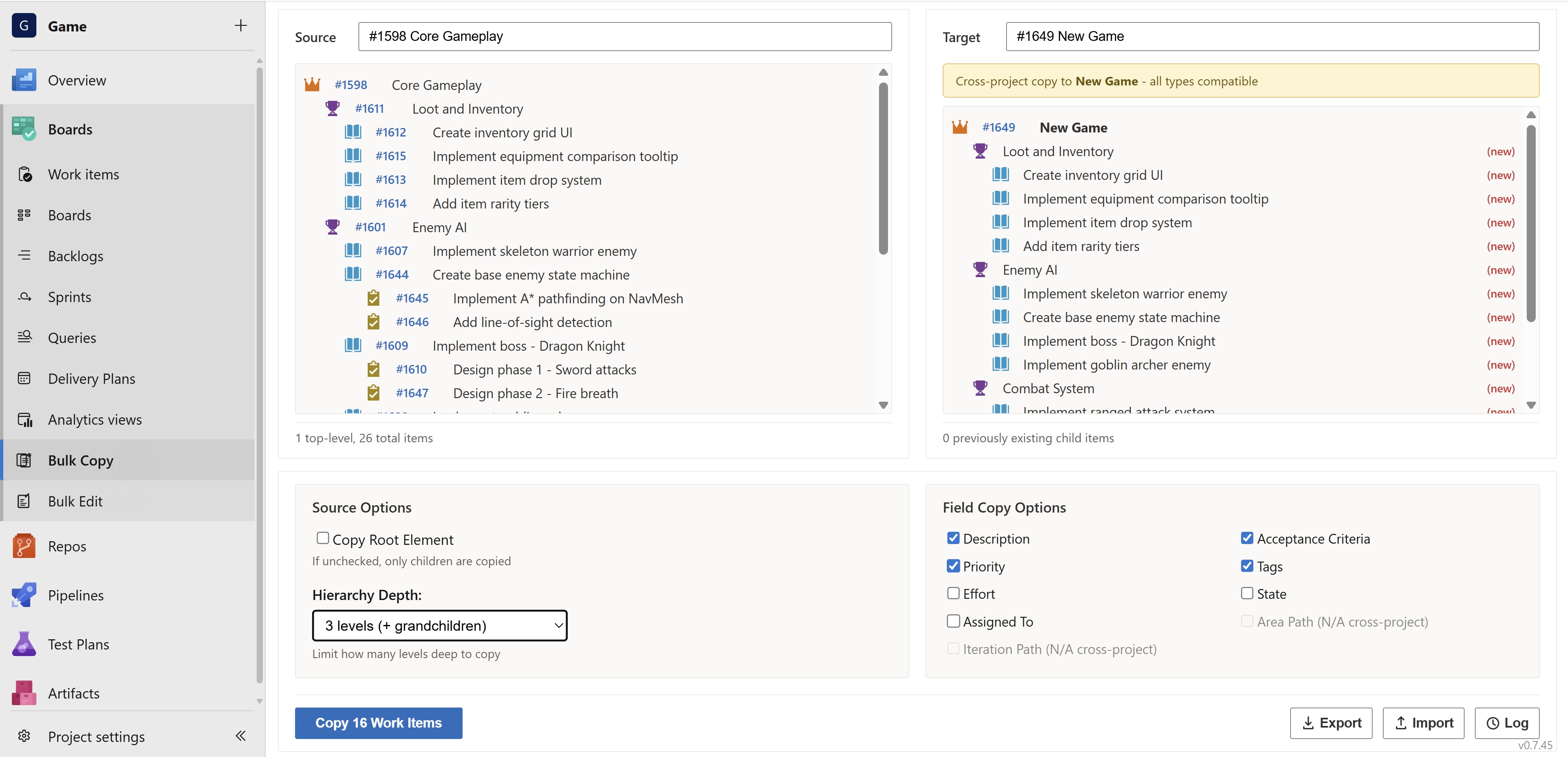
Clone complete work item hierarchies while preserving parent-child relationships.
- Work item source: Search by title or
#ID to load a single work item with its full hierarchy
- Area path source: Type part of an area path name and select it from the Source dropdown — all work items under that area load as a forest (no single root required)
- Work item target: Copy the hierarchy as children under any work item (across all projects in the organization)
- Area path target: Select an area path from any project as the destination — items are created as top-level work items with the target area path set; no parent WI required
- Cross-project copy: Copy hierarchies to any project in your organization
- Type mapping: Automatic detection and mapping of incompatible work item types across process templates (e.g., User Story → Product Backlog Item)
- Selective field copying: Choose which fields to include (Description, Priority, Tags, Effort, State, Area Path, Iteration Path, and more)
- Flexible depth: Copy the root item or only its children, limit hierarchy depth
- Import/Export: Export hierarchies as JSON for offline planning or cross-organization transfers
- Automatic rollback on errors -- no orphaned work items
- Undo: Delete all copied items with a single click
Bulk Delete
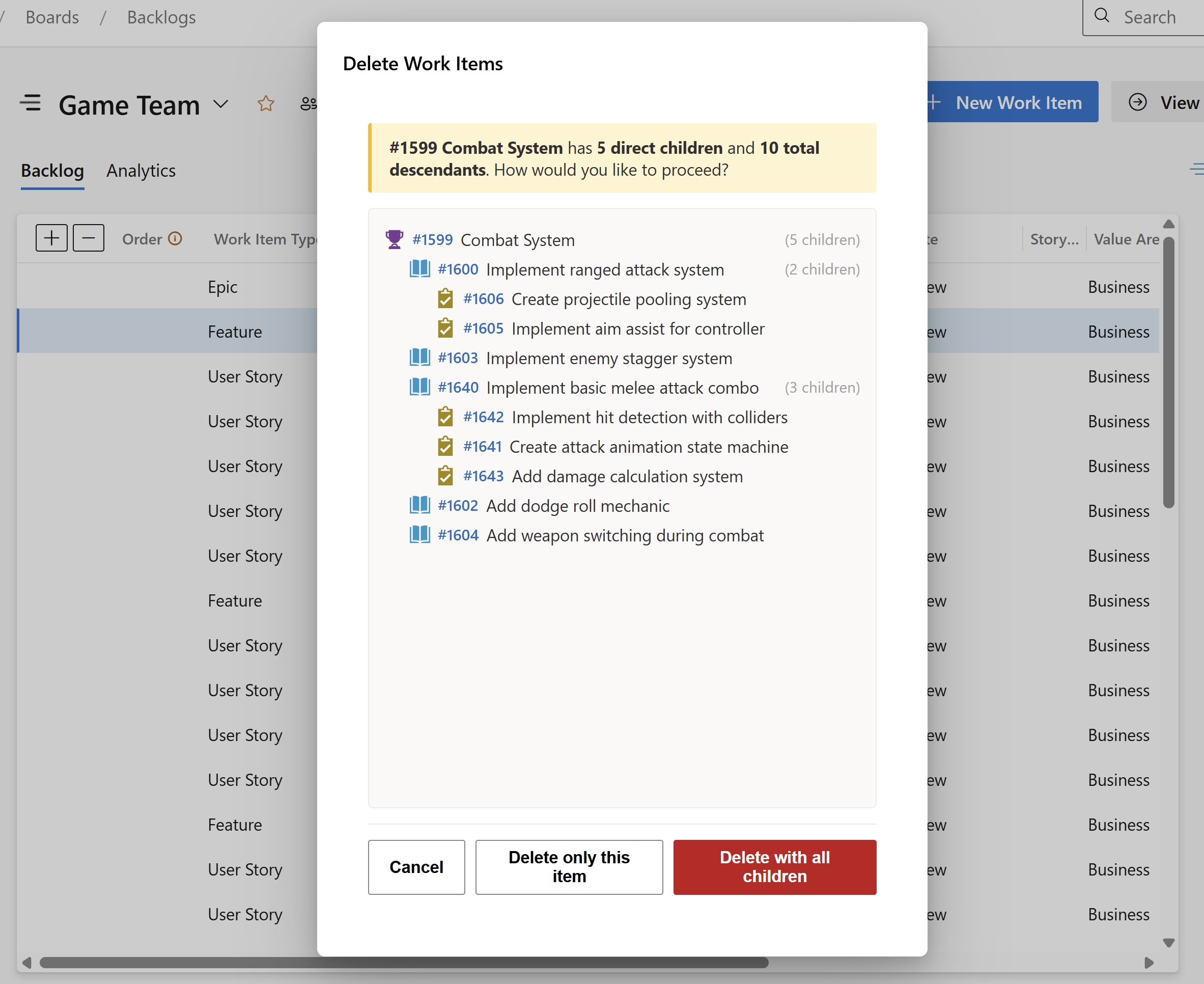
Delete work items with full hierarchy awareness from the context menu.
- Hierarchy visualization: See the full tree of descendants before deleting
- Delete strategies: Delete the entire hierarchy or keep children
- Batch processing: Delete multiple selected items at once
- Progress tracking: Real-time feedback during deletion
- Work item type icons: Visual identification of item types in the hierarchy tree
Access Control
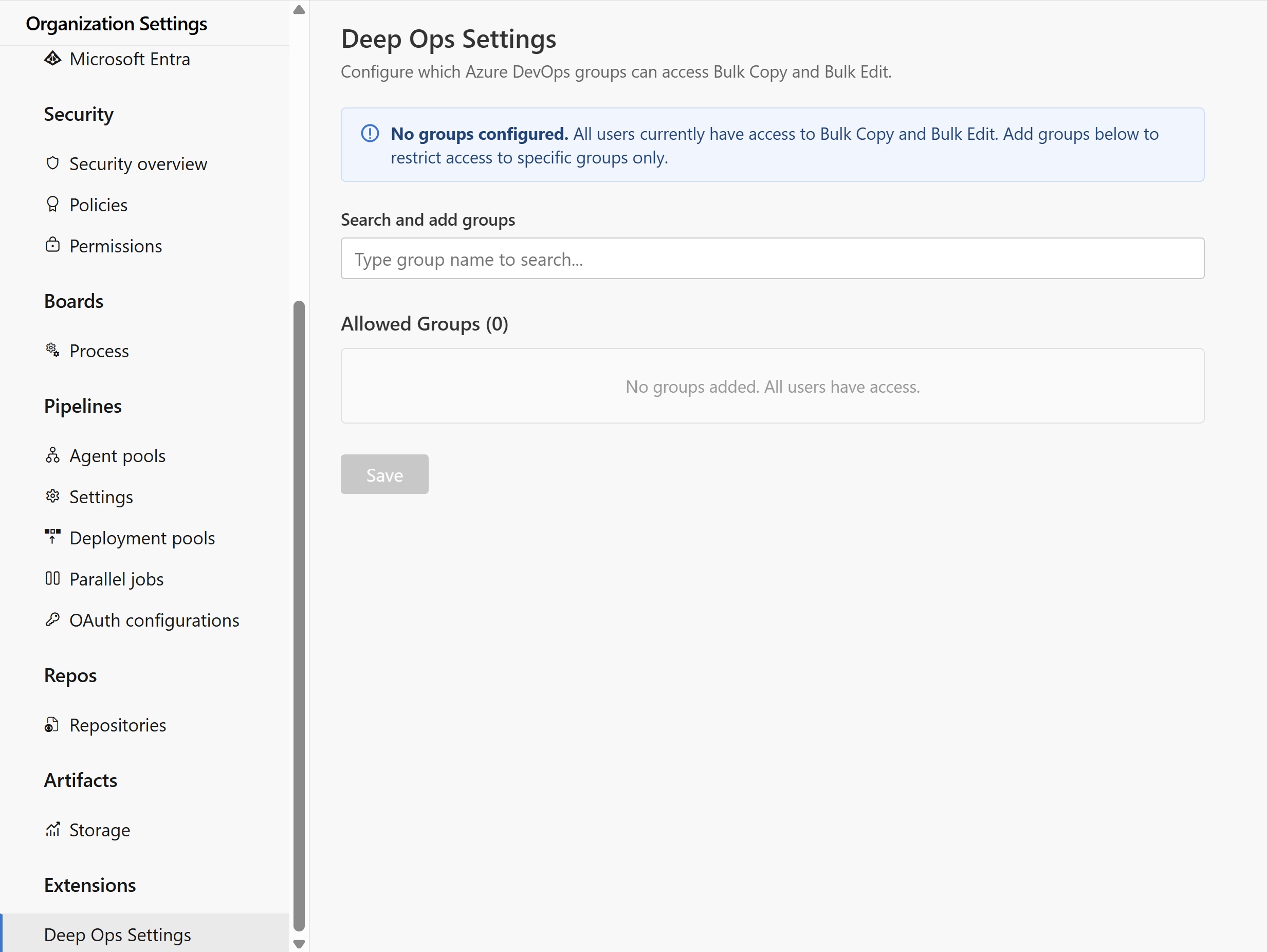
Restrict who can use ADO Deep Ops by Azure DevOps group membership.
- Group-based access: Assign access to specific Azure DevOps groups
- Organization Administrators always have access
- Default: All users have access until groups are configured
- Configure via Organization Settings > Deep Ops Settings (admin only)
Audit Log
Every bulk operation is logged for compliance and traceability.
- Tracks who performed what operation, when, and on which work items
- Filter by operation type
- Download as JSON for external analysis
Getting Started
Installation
- Install the extension from the Visual Studio Marketplace
- The extension will request the required permissions automatically
- Navigate to Boards in any project to find Bulk Edit and Bulk Copy
Using Bulk Edit
- Go to Boards > Bulk Edit
- Type a title,
#ID, or area path in the search box to load your source
- Work item: type a title or
#ID — the full hierarchy loads automatically
- Area path: type part of an area path name and select it from the Area Paths section of the dropdown — all work items under that area load as a forest
- Set your filters (Work Item Type, State, Title, Tags, etc.)
- Choose an operation (e.g., "Add Tag")
- Click Preview to see what will change
- Click Execute to apply the changes
Using Bulk Copy
- Go to Boards > Bulk Copy
- Type a title,
#ID, or area path in the Source search box
- Work item: type a title or
#ID — the full hierarchy loads automatically
- Area path: type part of an area path name and select it from the Area Paths section — all work items under that area load as a forest
- Type a title,
#ID, or area path in the Target search box
- Work item target: select a work item — the copied hierarchy is placed as its children
- Area path target: select an area path from the Area Paths section — items are created as top-level work items with the target area path; the Area Path field copy option is automatically disabled
- If the target project uses a different process template, map the types in the dialog that appears
- Choose which fields to copy
- Click Copy to create the hierarchy
Import/Export:
- Click Export to download the loaded source hierarchy as a JSON file
- Click Import to load a previously exported hierarchy
- Imported hierarchies support all the same operations as live data
Using Bulk Delete
- Right-click a work item on any backlog, board, or query result
- Select Delete with hierarchy
- Review the hierarchy tree in the confirmation dialog
- Choose to delete the entire hierarchy or only the selected item
- The page refreshes automatically after deletion
Configuring Access Control
- Go to Organization Settings > Deep Ops Settings (requires Organization Admin)
- Search for Azure DevOps groups by name
- Add groups that should have access
- Click Save
When no groups are configured, all users have access. Once groups are added, only members of those groups (and Organization Administrators) can use the extension.
Permissions
The extension requires the following scopes:
| Scope |
Purpose |
vso.work |
Read work items and queries |
vso.work_write |
Create, update, and delete work items |
vso.graph |
Read group memberships for access control |
FAQ
Q: Can I load work items from an entire area path instead of a single root?
A: Yes. In both Bulk Edit and Bulk Copy, type part of the area path name in the source search box and select it from the Area Paths section of the dropdown. All work items under that area load with their full hierarchy preserved as a forest (multiple roots if there is no common ancestor in the result).
Q: Can I copy a hierarchy to an area path without a parent work item?
A: Yes. In Bulk Copy, type part of an area path name in the Target search box and select it from the Area Paths section. The copied items are then created as top-level work items with the target area path set. The Area Path field copy option is automatically disabled in this mode since the target area path is used instead.
Q: Can I undo a bulk edit?
A: Yes. Each bulk edit operation can be reverted using the Undo button. The Audit Log records all operations for reference.
Q: What happens if copying fails midway?
A: If "Rollback on Error" is enabled (default), all created work items are automatically deleted in reverse order. No orphaned items are left behind.
Q: Can I copy work items to a different project?
A: Yes. When the target project uses a different process template, the extension detects incompatible work item types and lets you map them. Area Path and Iteration Path are automatically set to the target parent's values.
Q: What happens with custom fields during cross-project copy?
A: If a custom field from the source doesn't exist in the target project, the extension automatically strips it and retries. A warning is shown for each stripped field.
Q: Can I export and import hierarchies?
A: Yes. Use Export to download the source hierarchy as JSON. Use Import to load it back. This is useful for offline planning, backups, or transferring structures between organizations.
Q: Who can configure access control?
A: Only Organization Administrators (Project Collection Administrators) can access the settings page.
Q: Does the extension work with Azure DevOps Server (on-premises)?
A: The extension is designed for Azure DevOps Services (cloud). On-premises compatibility has not been tested.
Data & Privacy
- ADO Deep Ops is free to use with no license required.
- The extension operates entirely within your Azure DevOps organization. Work item data is read and written using the standard Azure DevOps REST API with the permissions granted during installation.
- Access control settings and audit logs are stored in the extension's own data storage within your organization.
- No external calls: The extension does not contact any backend services. No data leaves your Azure DevOps organization.
Third-Party Notices
ADO Deep Ops is built with the following open-source libraries:
All icons used in this extension are original works.
Disclaimer
THIS EXTENSION IS PROVIDED "AS IS", WITHOUT WARRANTY OF ANY KIND, EXPRESS OR IMPLIED, INCLUDING BUT NOT LIMITED TO THE WARRANTIES OF MERCHANTABILITY, FITNESS FOR A PARTICULAR PURPOSE, AND NONINFRINGEMENT. IN NO EVENT SHALL THE AUTHORS OR COPYRIGHT HOLDERS BE LIABLE FOR ANY CLAIM, DAMAGES, OR OTHER LIABILITY ARISING FROM, OUT OF, OR IN CONNECTION WITH THE EXTENSION OR ITS USE.
Bulk operations modify work items in your Azure DevOps organization. While the extension includes safeguards such as preview mode, rollback on error, and audit logging, you are responsible for verifying changes before applying them. Always use the Preview feature for bulk edits and review the hierarchy tree before bulk deletions. Deleted work items are moved to the recycle bin and can be restored within 30 days (Azure DevOps default retention policy).
This extension has been tested with the default Azure DevOps process templates (Agile, Scrum, Basic, CMMI). Customized process templates (custom work item types, fields, or rules) may lead to unexpected results. We recommend testing with a small number of work items first if you use a customized process.
ADO Deep Ops is not affiliated with, endorsed by, or sponsored by Microsoft Corporation. Azure DevOps is a trademark of Microsoft Corporation.
© 2025 Vyve. All rights reserved.

