Claude Control Center
Your Claude Code history, usage, and agents in one place, right inside VS Code.
Claude Control Center turns the sessions Claude Code saves on your machine into a workspace you can browse, search, and pick back up. Find any past conversation in seconds, see which files it changed, follow subagents as they run, keep track of how much of your quota you have used, and continue any session with one click.
Everything stays on your computer. Your conversations are never uploaded anywhere.
Active development: Claude Control Center is changing quickly, so what you see in the extension may differ from what this README describes.
Independent project: Claude Control Center is not affiliated with, endorsed by, or sponsored by Anthropic.
What's new in 0.2
- Agents tab: see every subagent a session started, which ones are still running, and what each one reported back.
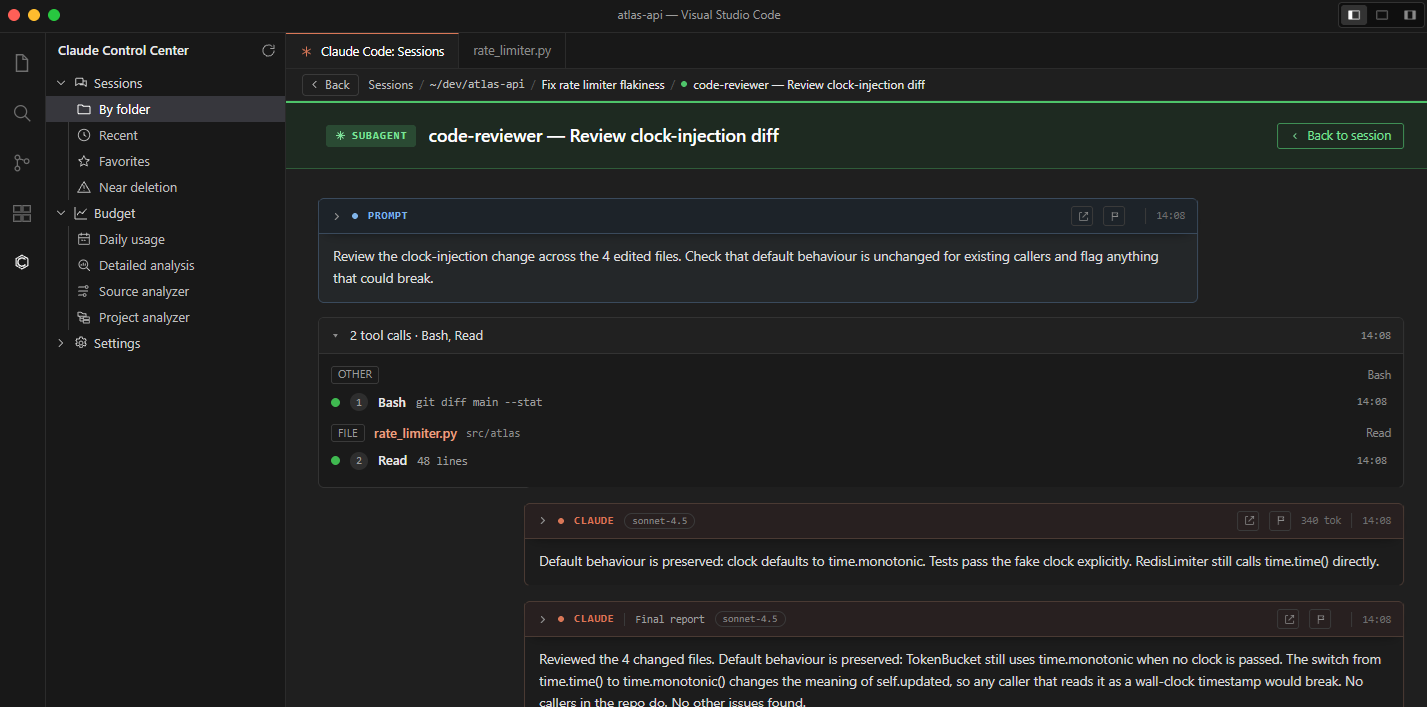
- Agent flow view: open any subagent and read its whole run, from the task it was given to its final report.
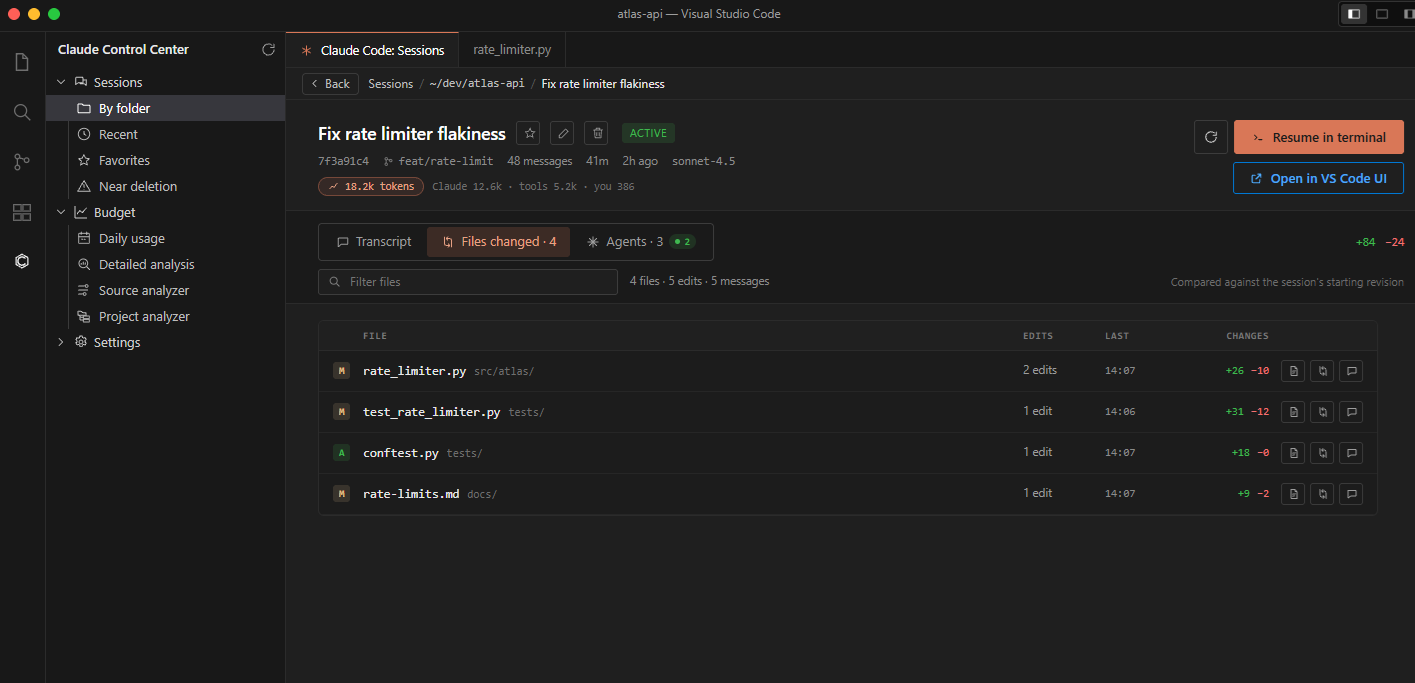
- Files changed: every file a session touched, with a one-click diff.
- Budget pages: daily usage, detailed analysis, a breakdown by tool and agent, and a per-project analyzer.
- Grouped tool calls: a run of tool calls shows up as one tidy card instead of a long wall of output.
- Full screen reading mode for long transcripts.
- Notifications when Claude finishes a turn, a background agent completes, or a limit is running low.
- Delete with Undo: clear out sessions you no longer need, with a few seconds to change your mind.
Everything at a glance
|
|
| 🗂️ Browse |
All your Claude Code sessions, grouped by project folder |
| 🔎 Search |
Search full transcripts, then filter to plans, skills, subagents, or flagged messages |
| 🤖 Agents |
Track subagents live and read each one's full run |
| 📄 Files changed |
See what a session edited and open a diff |
| 📊 Budget |
Your 5-hour and weekly quota, daily usage, and cost breakdowns |
| 🔔 Notifications |
Get told when Claude is waiting for you |
| ▶️ Resume |
Pick any session back up in the terminal or the Claude Code panel |
| 🔒 Private |
Reads local files only, and never changes Claude Code's own logs |
Browse all your sessions
Click the Claude Control Center icon in the Activity Bar and open Sessions. Your history is organized by project folder automatically, with no setup or import needed.
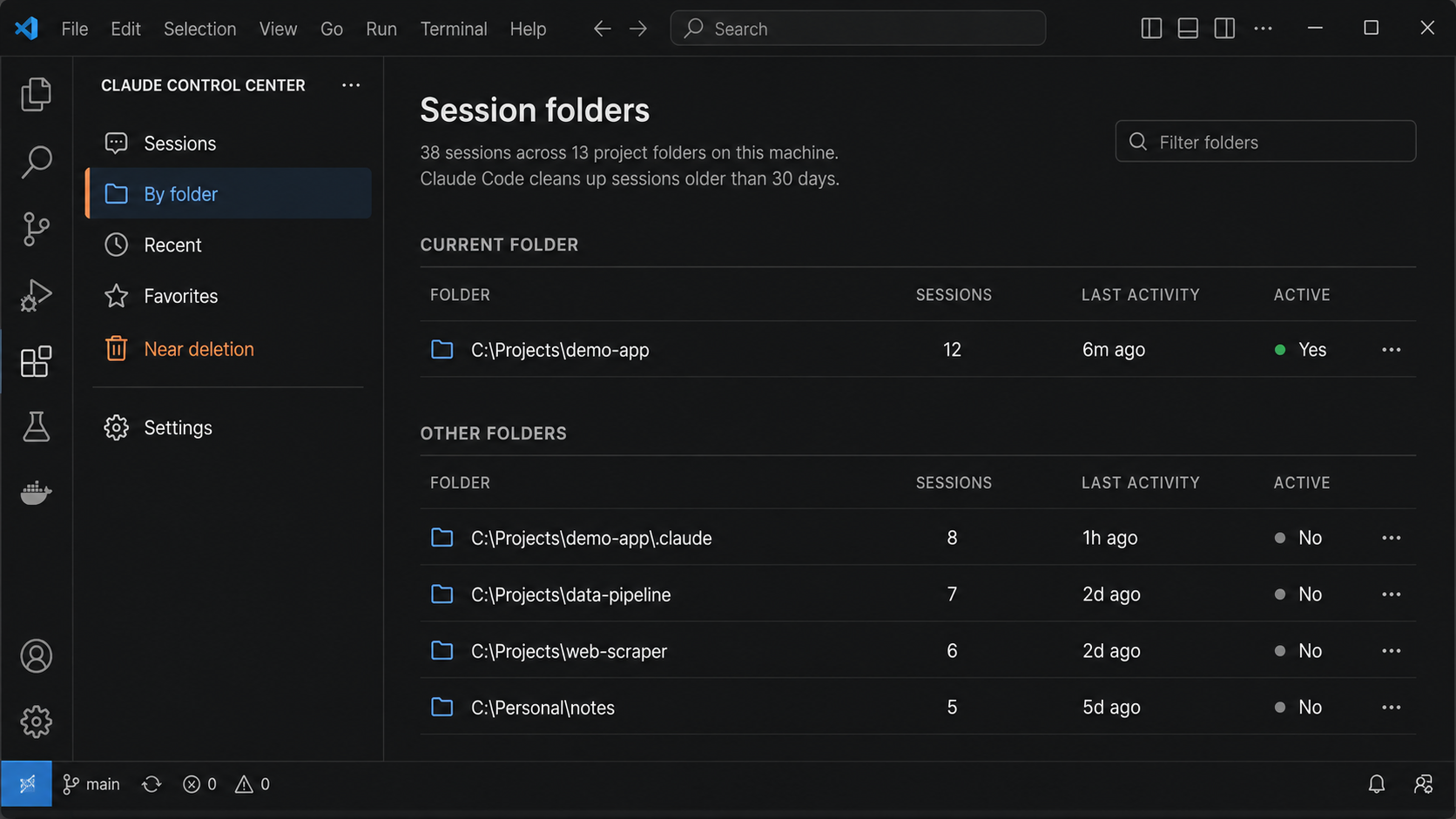
- Current folder: the folders open in this VS Code window, including nested ones.
- Other folders: every other folder on your machine with Claude Code history.
Folders are sorted by latest activity and show their session count, so the work you were just doing is always at the top. Type in the filter box to narrow down a long list.
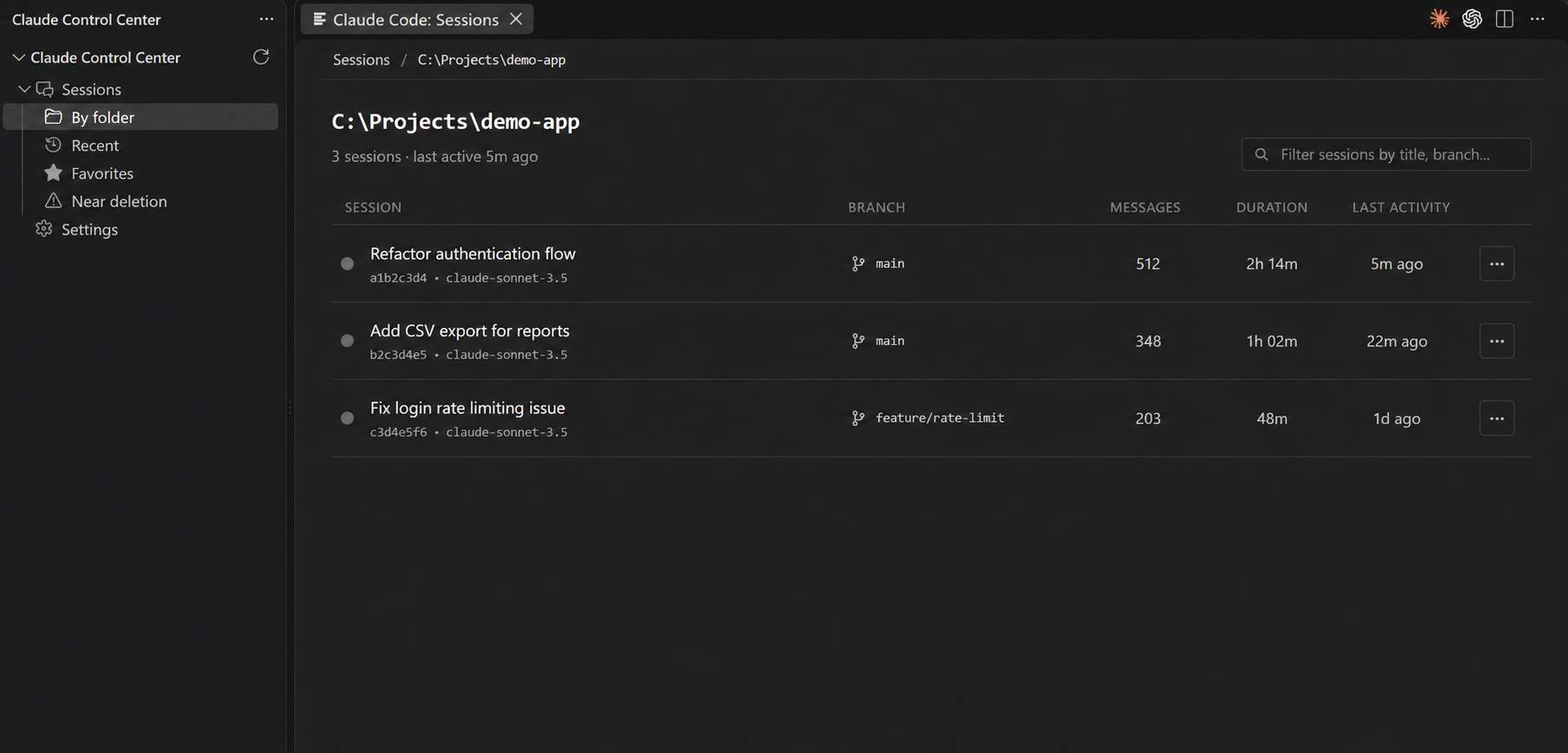
Shortcuts to the sessions you need
- Recent: the latest sessions from every project in one list. Sessions you used recently are marked Active.
- Favorites: star the conversations you keep coming back to.
- Near deletion: sessions that Claude Code is about to clean up, so you can save or resume them before they're gone. The timing follows your own Claude Code cleanup setting.
Read any conversation
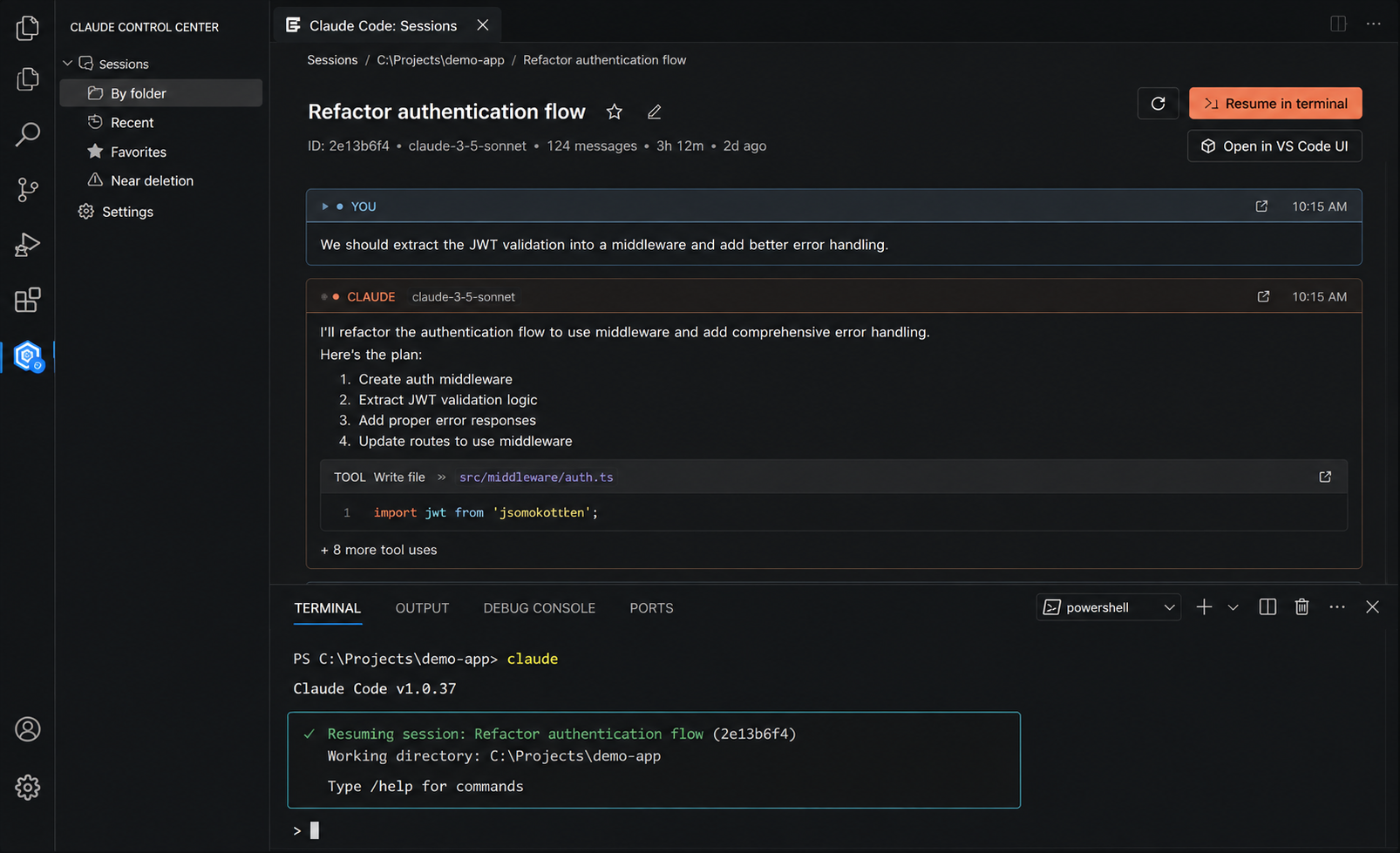
Open a session to read the whole conversation in its own editor tab, laid out like a chat. Your messages are on one side and Claude's are on the other. Each message shows when it was sent, the model, and how many tokens it used.
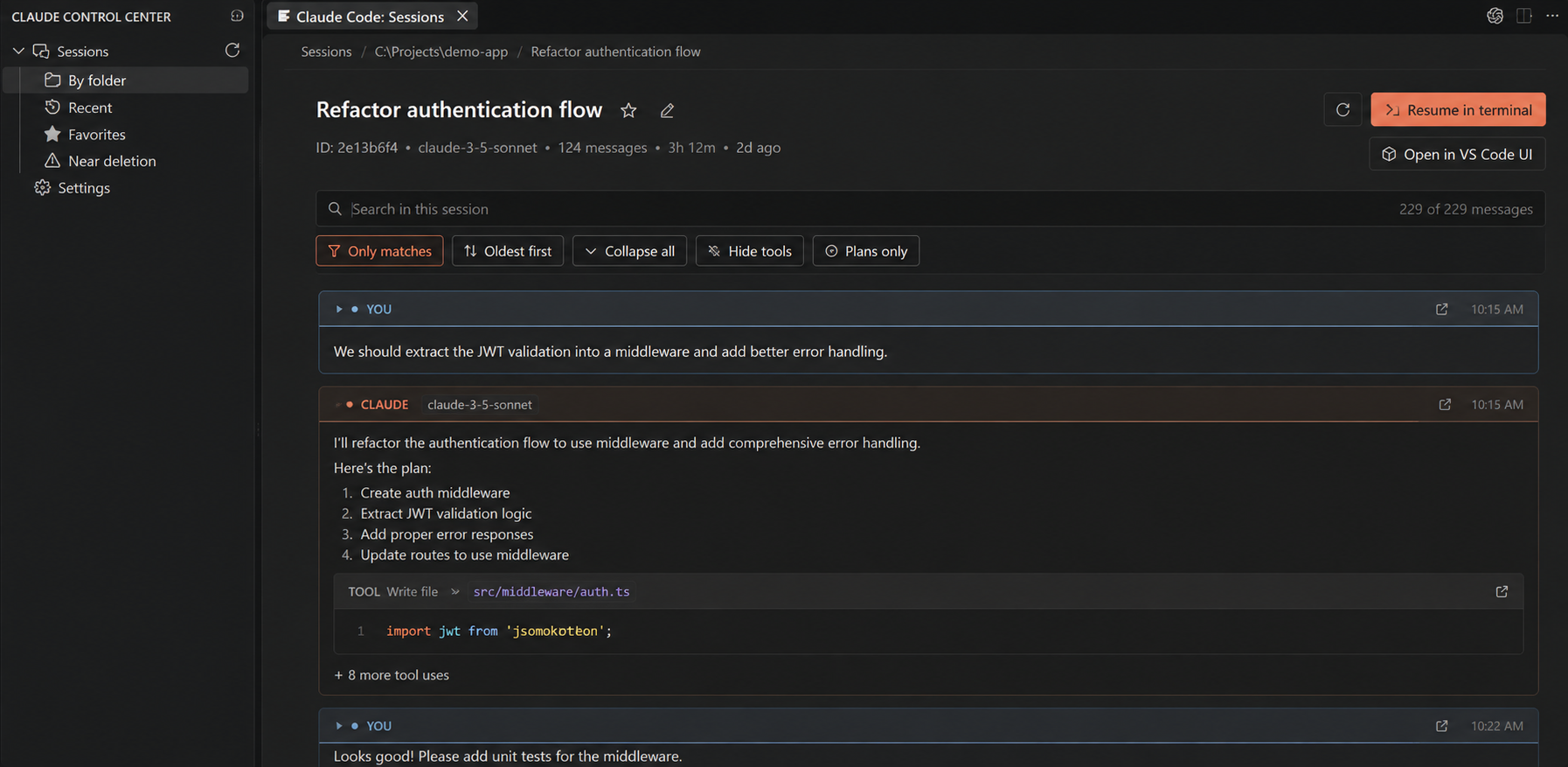
- Tool calls are grouped. A run of commands and file edits becomes one compact card, organized by file. Click any row to see exactly what was run and what came back.
- Plans, skills, and subagents stand out as their own colored cards, so the important moments are easy to spot.
- Clean and readable. Claude Code's internal markup is hidden so you only see the real conversation.
- Live. If the session is still running, new messages appear as Claude writes them, and your scroll position and filters stay where they were.
- Fast, even when long. Sessions with thousands of messages open right away and load more as you scroll.
- Full screen. Hide everything except the messages when you just want to read.
- Open a message on its own. Pop any single message out into its own tab as Markdown, ready to read side by side with your code or copy from.
Search and filter
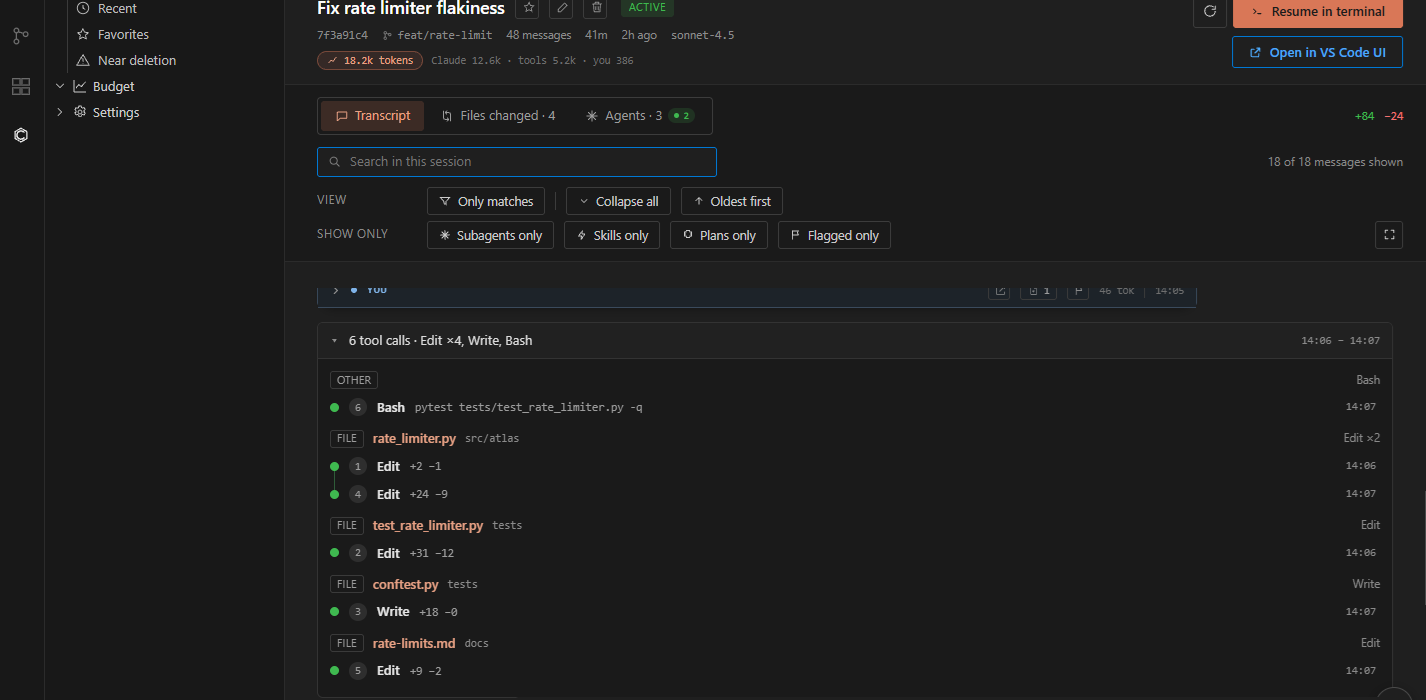
Find the one thing you're looking for in a long session:
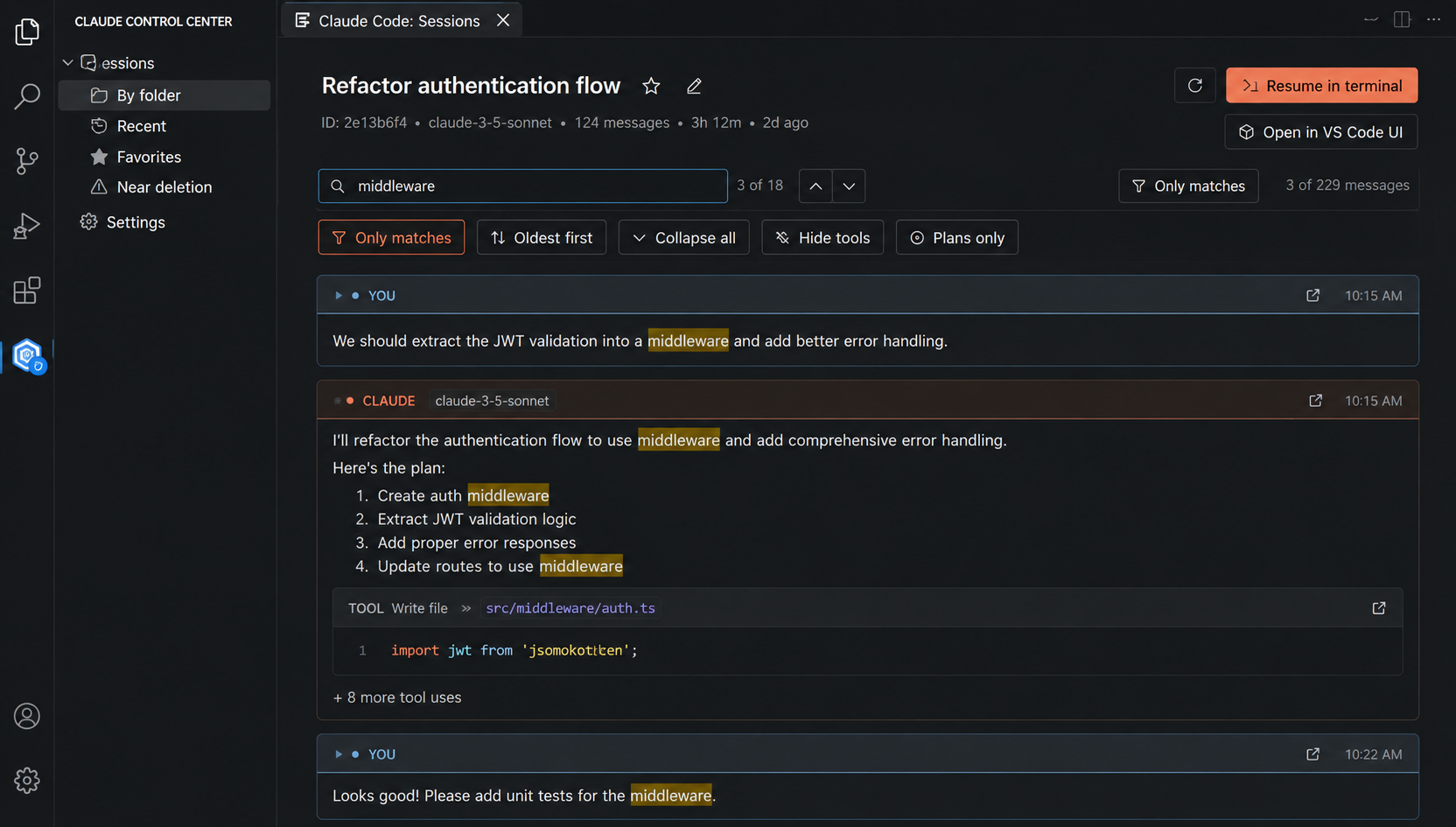
- Search with match count, next/previous navigation, and an Only matches mode.
- Show only subagents, skills, plans, or the messages you've flagged.
- Flag any message to build your own shortlist of key decisions and snippets.
- Switch between Oldest first and Newest first, collapse or expand everything, and jump Back to top in one click.
Follow your agents
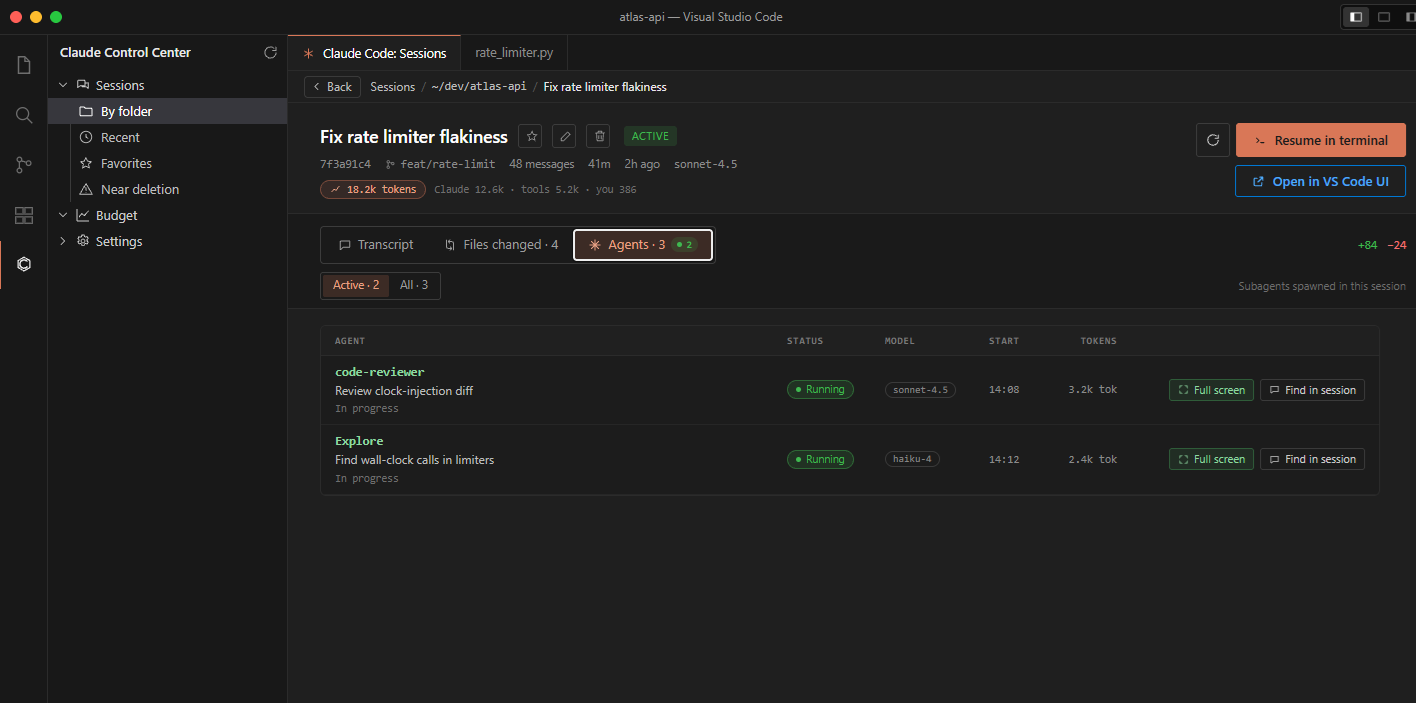
When Claude hands work to subagents, the Agents tab shows each of them: the task it was given, whether it's still Running or Done, which model it used, how many tokens it spent, and a summary of what it reported.
- Show Active agents only, or All of them.
- Find in session jumps to the point in the conversation where the agent was started.
- Open flow shows the agent's own run from start to finish: the prompt it was given, every step it took, and its final report.
See what a session changed
Any session that edited files gets a Files changed tab with its total lines added and removed. It lists every file the session touched, and for each one you can:
- Open diff to compare the file before and after the session in VS Code's diff editor.
- Go to message to jump to the moment in the conversation where the change was made.
Messages that edited files also show a small file chip, so you can review just that one edit right from the transcript.
You don't need a git repository for this. The changes are rebuilt from the session itself.
Track your usage and budget
A Usage indicator in the status bar keeps your numbers in view while you work. Click it to open Budget.
You choose how to track usage:
- Tokens (default): your real 5-hour and weekly quota, the same figures Claude Code's
/usage command shows, with reset times.
- Money: this month's spend in dollars, optionally against a monthly limit you set. Costs then also appear in the session list and on each transcript.

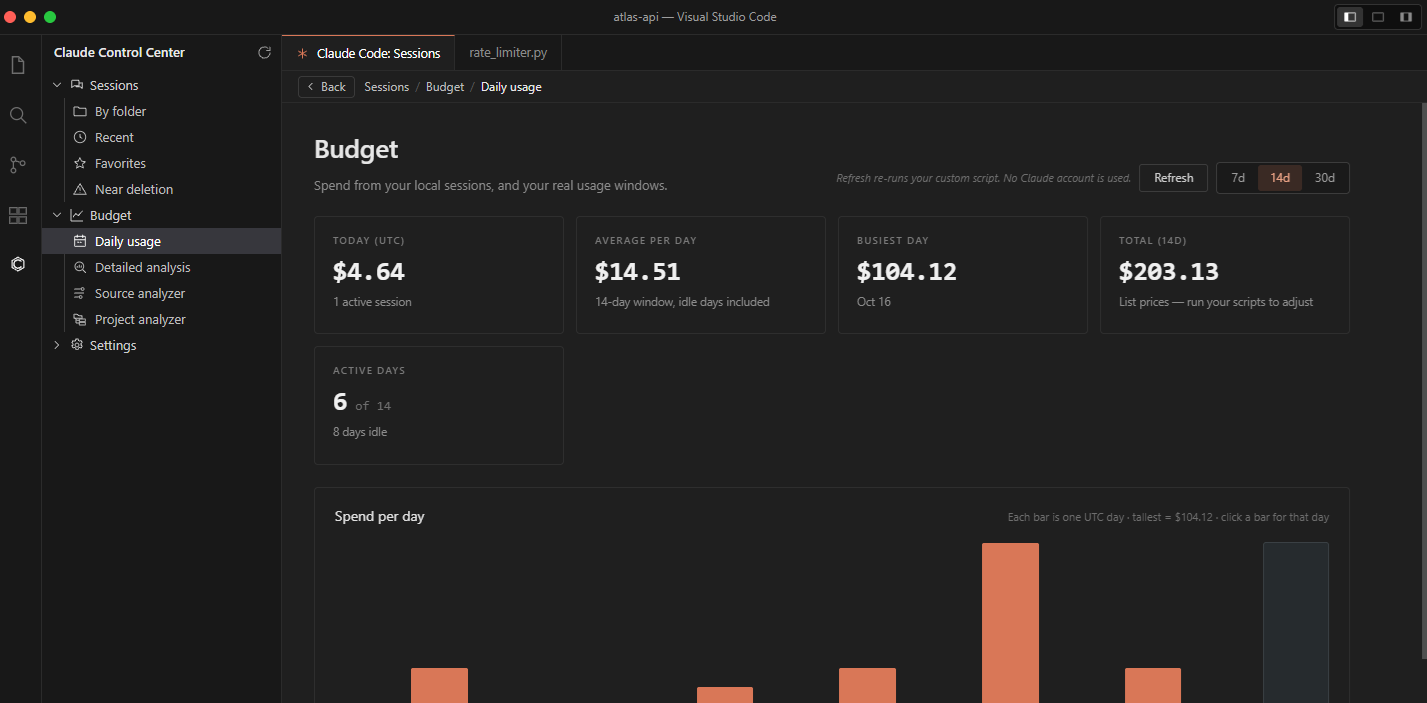
Daily usage
Today's consumption, a 7/14/30-day chart, your average and busiest day, and a split by model. Click any bar to look at that day.
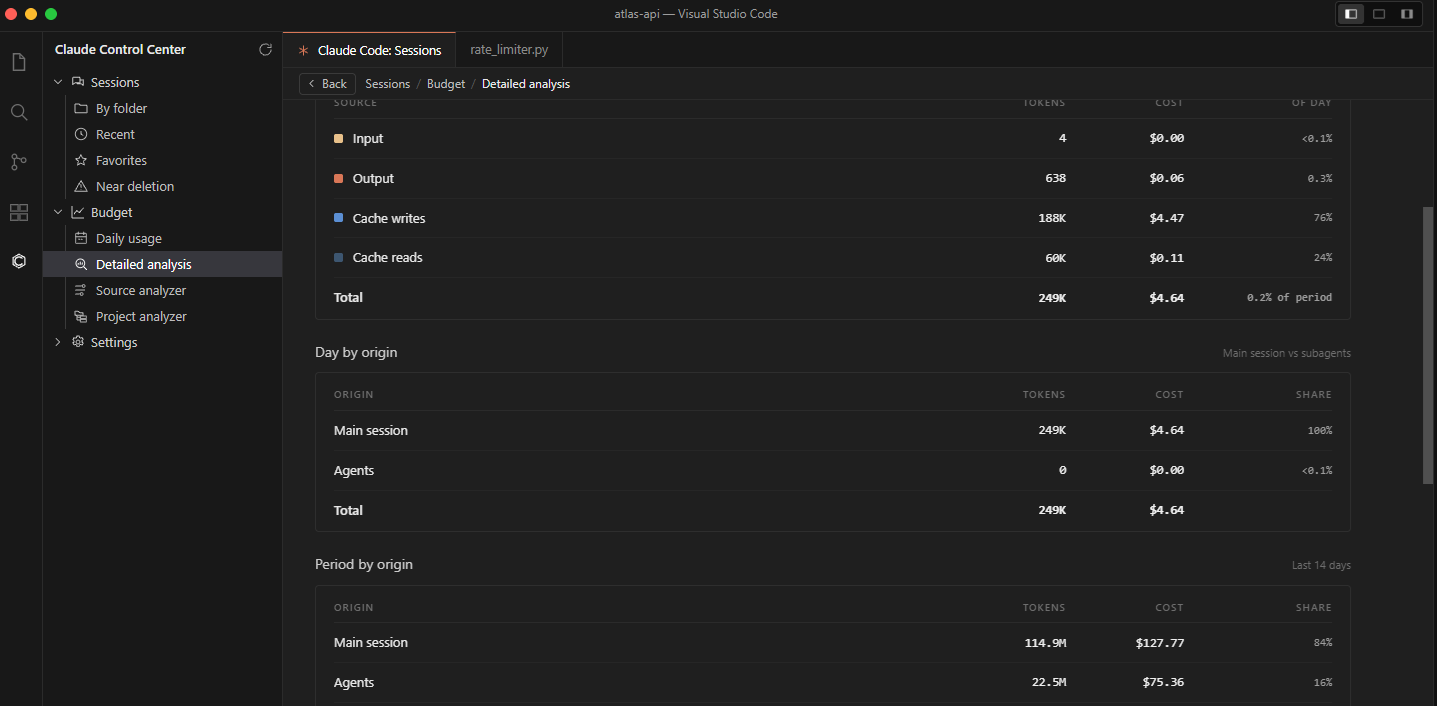
Detailed analysis
Tokens and cost side by side for any period, broken down by day, model, and session. It also shows your cache hit rate, and how much went to your main conversation versus agents.
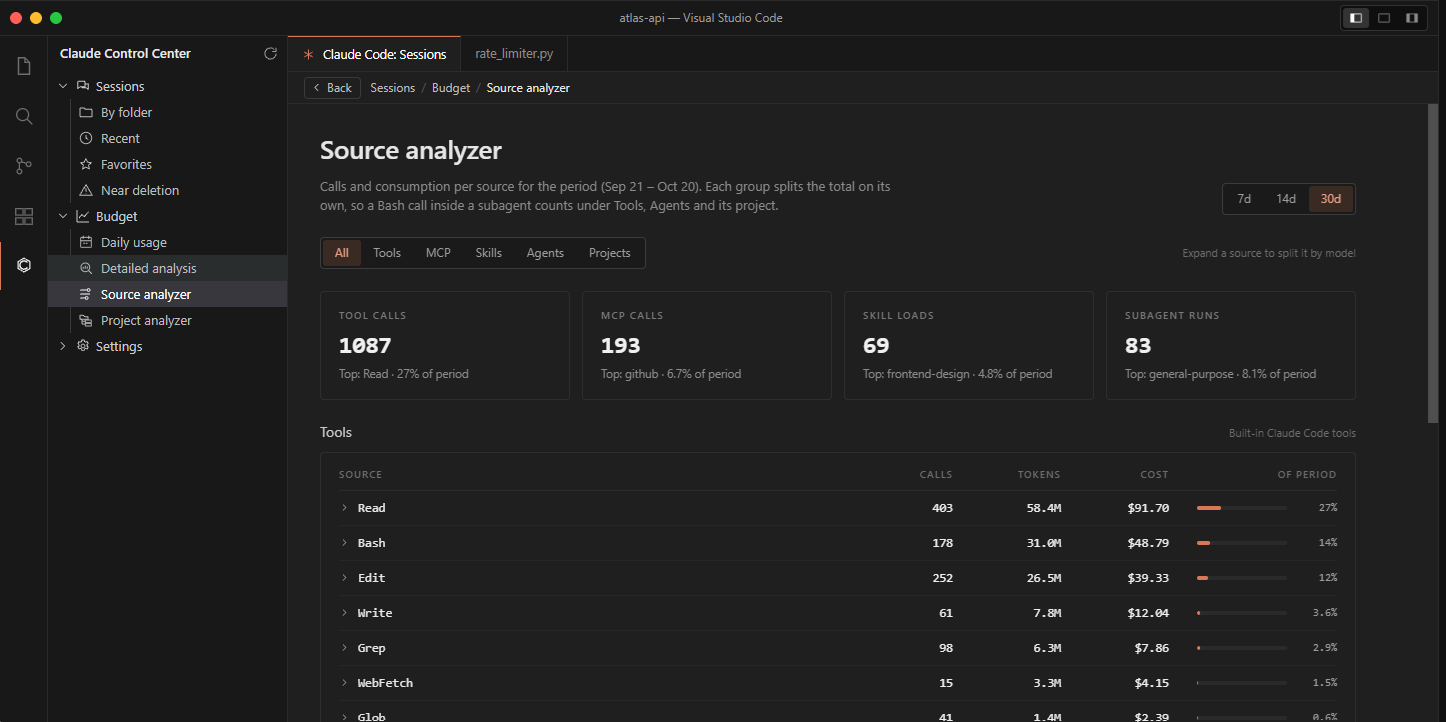
Source analyzer
Find out where your usage actually goes: which built-in tools, MCP servers, skills, and agents used the most. Expand any row to split it by model.
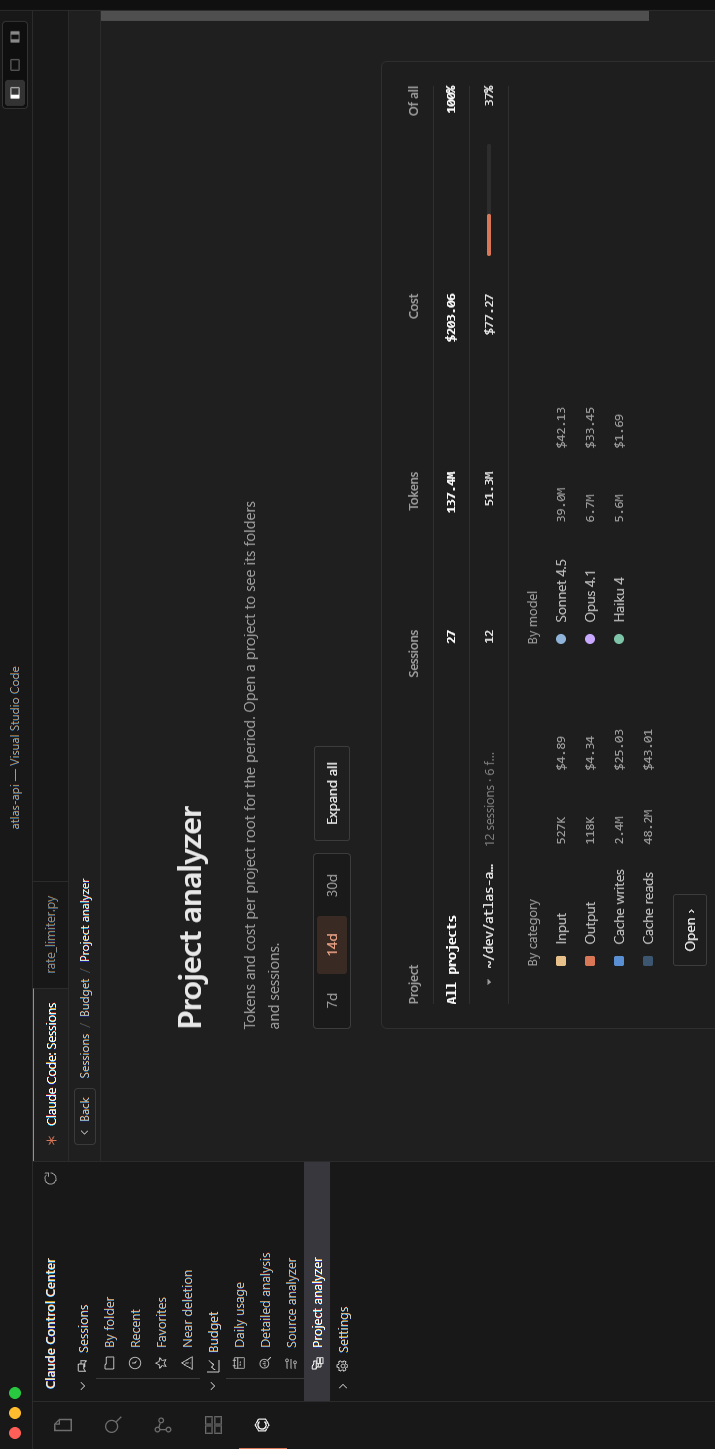
Project analyzer
Usage and cost for each project, then each subfolder inside it, down to individual sessions. See which repository is costing you the most at a glance.
Pay less than list price?
If you're on a discounted plan, you can add your own small scripts that report what you actually spent. Claude Control Center then scales every cost it shows to match. Scripts run only when you click Run, and only from your own user settings, never from a workspace. They run with your permissions, so only add scripts you wrote or have read.
Your live quota is checked only when you click Refresh, unless you turn on automatic refresh in Settings.
Get notified
Turn on notifications in Settings so you don't have to keep checking the terminal:
- Claude is waiting for you: a turn has finished and Claude needs your input.
- A background agent finished: for agents that ran longer than a minute or so.
- A limit is running low: 15% or less left on your 5-hour window, your week, or your monthly spend.
- A favorite is about to be cleaned up: before Claude Code removes a session you starred.
Notifications are rate-limited, so a busy session won't flood you.
Pick up where you left off
- Resume in terminal reopens the session with Claude Code in VS Code's terminal, in the original folder. If that session already has a terminal open, it reuses it instead of opening another.
- Open in VS Code UI continues the conversation in the official Claude Code extension, for sessions that belong to the folder you have open.
Keep things organized
- Rename a session to give it a title you'll recognize.
- Favorite the ones that matter.
- Flag individual messages.
- Open in new tab (or middle-click) to keep several sessions open at once.
- Delete sessions you no longer need. You get a few seconds to Undo, and after that the session goes to your system trash rather than being erased.
Privacy first
Claude Control Center works entirely with the files Claude Code already keeps on your machine.
- Your conversations are never uploaded.
- Claude Code's session logs are never modified. Titles, favorites, and flags are stored separately by the extension.
- The only network call is the optional quota check, which asks Anthropic for your usage figures, the same as
/usage does.
Getting started
- Install Claude Control Center.
- Make sure Claude Code is installed and the
claude command works in your terminal.
- Click the Claude Control Center icon in the Activity Bar.
- Open a session and start exploring.
That's it. Your existing history shows up straight away.
Settings, without editing JSON
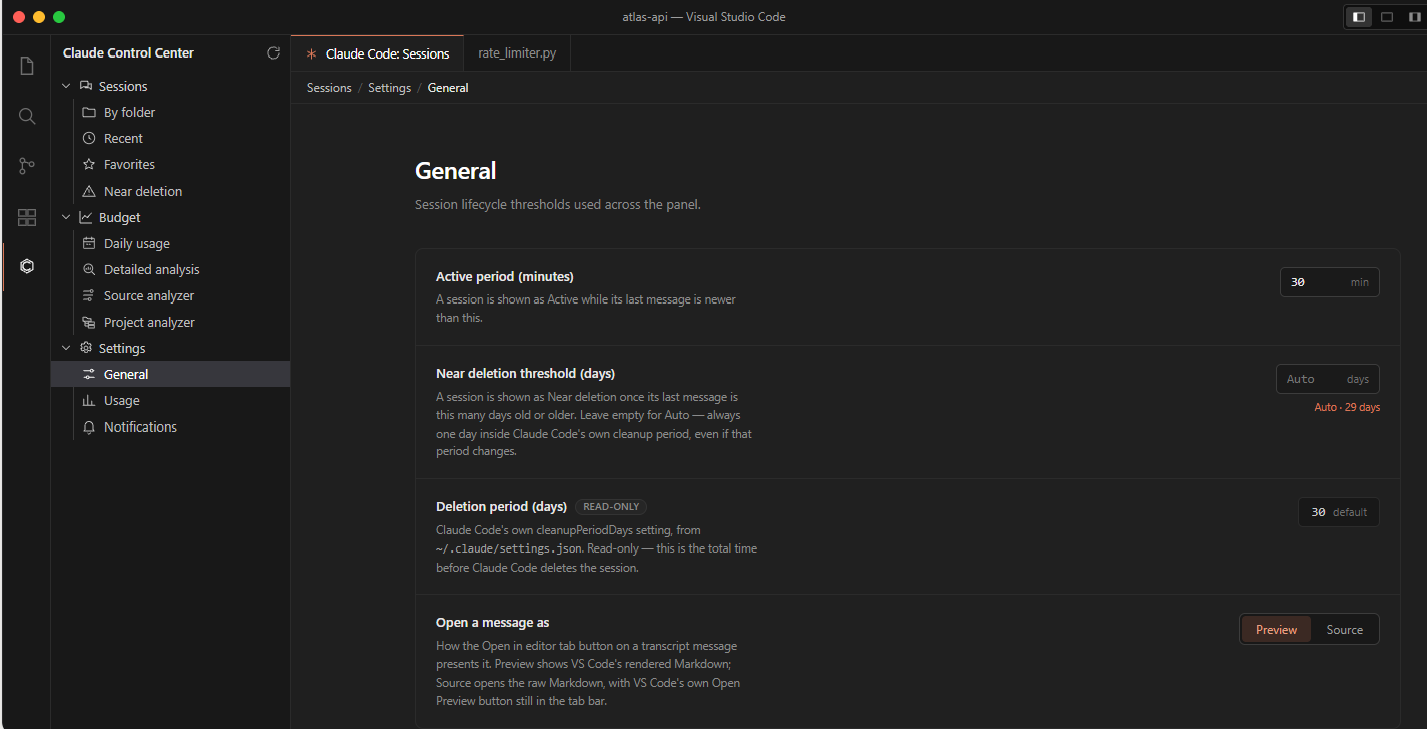
Everything works out of the box. When you do want to change something, open Settings in the Claude Control Center sidebar. It has three pages:
- General: when a session counts as active, the Near deletion window, and how a single message opens in its own tab.
- Usage: tokens or money, a monthly limit, your live quota with a Refresh button, and your cost scripts.
- Notifications: switch each notification on or off.
All settings
The same options are also available in VS Code's own settings:
| Setting |
Default |
What it does |
claudeCodeManager.projectsDirectory |
Empty |
Where Claude Code's sessions live. Leave empty to use ~/.claude/projects. |
claudeCodeManager.activeThresholdMinutes |
30 |
How recently a session must have been used to count as Active. |
claudeCodeManager.nearDeletionThresholdDays |
Auto |
When sessions appear under Near deletion. Matches Claude Code's own cleanup setting by default. |
claudeCodeManager.usageMode |
tokens |
Track usage as tokens (your real quota) or money (monthly spend). |
claudeCodeManager.costSource |
standard |
Money mode: list prices (standard) or your own scripts (custom). |
claudeCodeManager.customCostScripts |
[] |
Your cost scripts. Easiest to manage from the Settings page. |
claudeCodeManager.hasMonthlyLimit |
false |
Money mode: show spend against a monthly limit. |
claudeCodeManager.monthlyLimitUsd |
0 |
Your monthly limit in dollars. |
claudeCodeManager.autoRefreshLiveQuota |
false |
Check your live quota automatically instead of only on Refresh. |
claudeCodeManager.liveQuotaRefreshMinutes |
5 |
How often the automatic quota check runs. |
claudeCodeManager.notifyTurnEnd |
false |
Notify when Claude is waiting for your input. |
claudeCodeManager.notifyAgentFinish |
false |
Notify when a background agent finishes. |
claudeCodeManager.notifyAgentMinSeconds |
60 |
Only announce agents that ran at least this long. |
claudeCodeManager.notifyBudgetExhaustion |
false |
Notify when 15% or less of a limit is left. |
claudeCodeManager.notifyFavoriteDeletion |
false |
Notify when a favorite is about to be cleaned up. |
claudeCodeManager.notifyMaxPerWindow |
5 |
Most turn and agent notifications shown in a short period. 0 means no limit. |
claudeCodeManager.notifyLimitWindowMinutes |
10 |
The length of that period, in minutes. |
claudeCodeManager.sessionDeleteUndoSeconds |
6 |
How long you have to undo a delete (3–60 seconds). |
claudeCodeManager.messageOpenMode |
source |
How a message opens in its own tab: as Markdown (source) or as a rendered preview (preview). |
claudeCodeManager.maxToolOutputChars |
20000 |
Very long tool output is shortened past this length. 0 shows everything. |
Feedback & issues
Found a bug or have an idea? Please open an issue in the project repository. Feature requests and feedback are always welcome.
Disclaimer
Claude Control Center is an independent project and is not affiliated with, endorsed by, or sponsored by Anthropic.
Claude, Claude Code, and related names are trademarks of Anthropic.

