Stop AI bloat. VibeScout is a Post-Generation Intelligence tool that refactors and cleans up duplicate CSS, redundant functions, and logic clones created by LLMs.
Unlock the full power of your workstation with a Professional License.
🤖 Click here for the AI Integration Guide
StyleScout: AI Integration Guide
What is StyleScout?
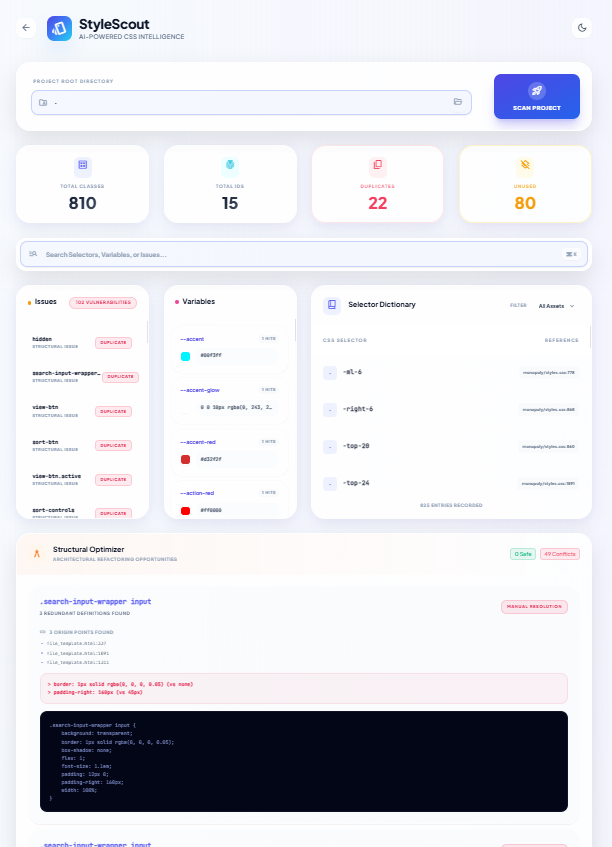
StyleScout is a local analysis server that scans a project directory to identify CSS technical debt. It detects:
- Duplicates: Identical CSS rules defined multiple times.
- Conflicts: Same selector defined with different properties (requires manual resolution).
- Safe Merges: Duplicates within the same file that have NO conflicts and can be safely combined.
- Unused Selectors: Classes or IDs defined in CSS but never referenced in your code.
AI Agents can use the API to programmatically "clean up" a codebase by scanning for issues and applying safe batch fixes.
Base URL: http://localhost:8001 (Note: Port may vary if 8001 is busy. Check active port in VS Code Status Bar).
Authentication: None required for the current free version. (Header X-License-Key is optional).
1. Scan Directory (/api/scan)
Analyzes a directory for CSS files and embedded styles, returning a report on duplicates and unused selectors.
Endpoint: POST /api/scan
Input Payload:
{
  "root": "relative/path/to/scan" // e.g., ".", "client/src"
}
Output Schema:
{
  "success": true,
  "scanned_files": 12,
  "merges": [
    {
      "selector": ".btn-primary",
      "media": null,
      "file": "src/components/Button.vue", // File containing the duplicate
      "count": 3,
      "conflicts": [], // Empty list = SAFE to merge
      "merged_css": ".btn-primary { ... }"
    }
  ],
  "duplicates": ["btn-primary"],
  "unused": [".old-class"]
}
2. Batch Merge (/api/css/batch_merge)
Applies multiple merge operations in sequence. Use this to fix "Safe Merges" identified in step 1.
Endpoint: POST /api/css/batch_merge
Input Payload:
{
  "root": "relative/path/to/scan",
  "merges": [
    {
      "file": "src/components/Button.vue",
      "selector": ".btn-primary",
      "media": null
    }
  ]
}
Output Schema:
{
  "status": "success",
  "processed": 1,
  "success_count": 1,
  "details": [
    { "file": "src/components/Button.vue", "status": "success", "message": "Merged successfully." }
  ]
}
3. Recommended AI Workflow (Python)
AI Agents should follow this "Safe Fix" loop:
- Scan the target directory.
- Filter for Safe Merges (where
conflicts is empty and file is present).
- Apply these merges in a batch.
import requests

BASE_URL = "http://localhost:8001"
TARGET_DIR = "."
LICENSE_KEY = "YOUR_LICENSE_KEY_HERE"

def optimize_css():
    headers = {"X-License-Key": LICENSE_KEY}

    # 1. SCAN
    print(f"Scanning {TARGET_DIR}...")
    res = requests.post(f"{BASE_URL}/api/scan", json={"root": TARGET_DIR}, headers=headers)
    if res.status_code != 200:
        print(f"Error: {res.text}")
        return

    data = res.json()
    merges = data.get('merges', [])

    # 2. FILTER SAFE MERGES
    # Rule: Must have 0 conflicts and be scoped to a specific file
    safe_merges = [
        m for m in merges
        if len(m['conflicts']) == 0 and m.get('file')
    ]

    if not safe_merges:
        print("No safe optimizations found.")
        return

    # 3. APPLY BATCH FIX
    print(f"Applying {len(safe_merges)} safe fixes...")
    payload = {
        "root": TARGET_DIR,
        "merges": [
            { "file": m["file"], "selector": m["selector"], "media": m["media"] }
            for m in safe_merges
        ]
    }

    res = requests.post(f"{BASE_URL}/api/css/batch_merge", json=payload, headers=headers)
    print("Optimization Complete:", res.json())

if __name__ == "__main__":
    optimize_css()
FunctionScout: AI Integration Guide
What is FunctionScout?
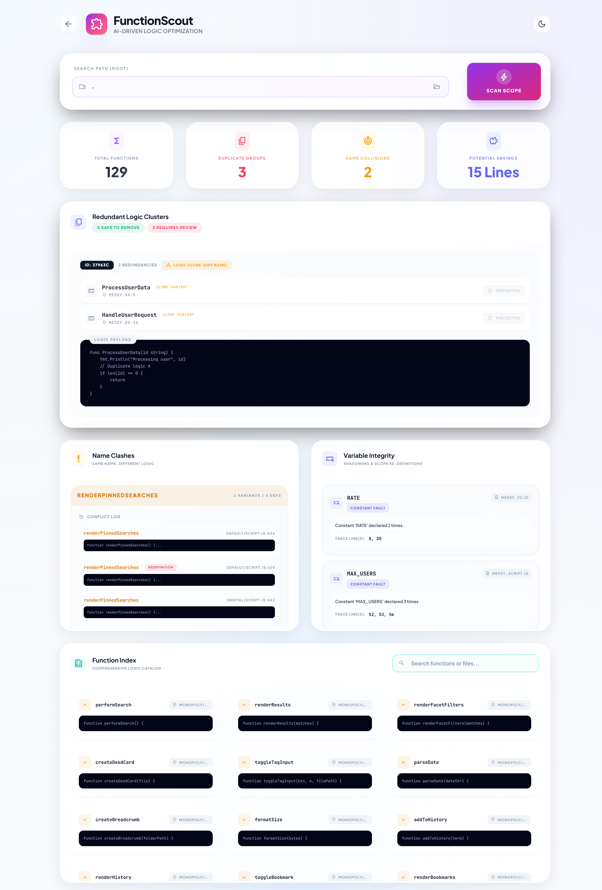
FunctionScout is a logic deduplication engine. It parses Python and JavaScript files to find:
- Safe Duplicates: Functions with identical code + identical names in the same file. (Safe to delete).
- Logic Clones: Functions with identical code but different names. (Requires manual review, effectively "Unsafe").
- Redefinitions: Multiple definitions of the same function name in the same file (Technical Error).
1. Scan Codebase (/api/scan_functions)
Analyzes a directory structure for duplicate logic.
Endpoint: POST /api/scan_functions
Input Payload:
{
  "root": "relative/path/to/scan"
}
Output Schema:
{
  "functions": [...],
  "duplicates": [
    {
      "hash": "a1b2c3",
      "count": 3,
      "has_safe": 1, // 1 = Contains at least one "Safe Duplicate"
      "instances": [
        { "file": "utils.py", "line": 10, "name": "helper", "tags": ["SAFE"] },
        { "file": "utils.py", "line": 50, "name": "helper", "tags": ["SAFE"] }
      ]
    }
  ],
  "collisions": [...]
}
2. Batch Delete (/api/batch_delete_functions)
Deletes specific redundant function definitions. This API is designed to be "Line-Order Safe" (deletes from bottom to top).
Endpoint: POST /api/batch_delete_functions
Input Payload:
{
  "root": "relative/path/to/scan",
  "deletes": [
    {
        "file": "utils.py",
        "line": 50,
        "hash": "abc1234",          // Recommended: ensures data consistency
        "name": "redundant_helper"  // Recommended: disambiguates same-line clones
    }
  ]
}
3. Recommended AI Workflow (Python)
AI Agents should strictly follow the "Safe Fix" protocol to avoid breaking code references.
Protocol:
- Scan the codebase.
- Filter for instances tagged as
SAFE.
SAFE = Same Name + Same Code.- Ignore
CLONE (Different Name) unless explicitly instructed to refactor.
- Preserve One: For every group of N safe duplicates, delete N-1, preserving the first occurrence.
import requests

LICENSE_KEY = "YOUR_LICENSE_KEY_HERE"

def clean_logic_duplicates():
    headers = {"X-License-Key": LICENSE_KEY}

    # 1. SCAN
    res = requests.post("http://localhost:8001/api/scan_functions", json={"root": "."}, headers=headers)
    data = res.json()

    to_delete = []

    # 2. IDENTIFY SAFE DELETIONS
    if 'duplicates' in data:
        for group in data['duplicates']:
            # Filter for Safe instances only
            # 'DUPLICATE' tag = Same Name + Same Logic (Safe to remove)
            safe_instances = [i for i in group['instances'] if 'DUPLICATE' in i.get('tags', [])]

            # 3. PRESERVE ONE POLICY
            if len(safe_instances) > 1:
                # Sort by file/line to be deterministic
                safe_instances.sort(key=lambda x: (x['file'], x['line']))

                # Queue all except the first one for deletion
                for inst in safe_instances[1:]:
                    to_delete.append({
                        "file": inst['file'],
                        "line": inst['line'],
                        "hash": group['hash'],  # Pass Hash
                        "name": inst['name']    # Pass Name
                    })

    if not to_delete:
        print("Codebase is clean.")
        return

    # 4. EXECUTE BATCH DELETE
    print(f"Deleting {len(to_delete)} redundant functions...")
    res = requests.post("http://localhost:8001/api/batch_delete_functions", json={
        "root": ".",
        "deletes": to_delete
    }, headers=headers)
    print("Cleanup Complete:", res.json())